Solved Raid 5 became unallocated.

dloydc

New member
Local time
10:17 PM
Messages
17
Turned on computer and found that drive D: was missing again. As before, it was unallocated. Setting it as a simple drive with letter D: has Windows 7/ 64 Professional asking to format the drive. This time nothing was plugged into the USB ports.
 

My Computer

Computer type
PC/Desktop
Computer Manufacturer/Model Number
custom build
OS
Windows 7 64 Professional
CPU
amd FX-8320 3.5 GHz
Motherboard
Asus M5A99X EVO
Memory
16 GB
Graphics Card(s)
Radeon HD 6800
Hard Drives
Samsung SSD 830 128 GB
AMD 2+1 Raid 5 with Samsung 2 TB drives
Antivirus
Norton's 360
Browser
Internet Explorer 11

My Computer

Computer type
PC/Desktop
Computer Manufacturer/Model Number
Golden Mk. I.4
OS
Windows 10 Pro x64 ; Xubuntu x64
CPU
Intel i7 860 @ 2.80 GHz O/C'ed to 4.0GHz
Motherboard
Gigabyte P55A-UD3R Rev.1. Award BIOS F13
Memory
16GB Corsair Vengance DDR3 @ 661 MHz Dual Channel (9-9-9-24)
Graphics Card(s)
EVGA NVidia GTX 560 1024MB
Sound Card
Realtek Integrated
Monitor(s) Displays
Dual Samsung SyncMaster 2494HS
Screen Resolution
1920*1080 and 1920*1080
Hard Drives
1*Samsung 840 EVO 120GB SSD;
1*OCZ Vertex 2 60GB SSD;
2*Samsung F3 SpinPoint 1TB in RAID0;
1*Samsung F1 SpinPoint 1TB;
2*Western Digital 1TB External USB 3.0
1*Western Digital 500GB External USB 3.0
1*Seagate 500GB External USB 2.0
PSU
Thermaltake ToughPower QFan 750W
Case
Thermaltake Element S VK60001W2Z
Cooling
Corsair H60 Water Cooling, 2*230mm and 2*80mm case fans
Keyboard
Logitech G110
Mouse
Logitech MX518
screen capture

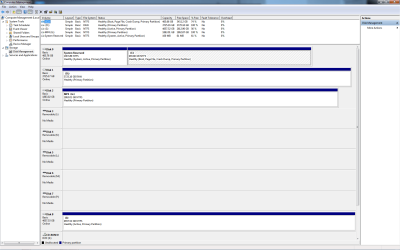
here is the disk managment
 

Attachments

  • Disk Management 04122015.png
    Disk Management 04122015.png
    46.6 KB · Views: 14

My Computer

Computer type
PC/Desktop
Computer Manufacturer/Model Number
custom build
OS
Windows 7 64 Professional
CPU
amd FX-8320 3.5 GHz
Motherboard
Asus M5A99X EVO
Memory
16 GB
Graphics Card(s)
Radeon HD 6800
Hard Drives
Samsung SSD 830 128 GB
AMD 2+1 Raid 5 with Samsung 2 TB drives
Antivirus
Norton's 360
Browser
Internet Explorer 11
The other blank disks is from the simm card reader.
 

My Computer

Computer type
PC/Desktop
Computer Manufacturer/Model Number
custom build
OS
Windows 7 64 Professional
CPU
amd FX-8320 3.5 GHz
Motherboard
Asus M5A99X EVO
Memory
16 GB
Graphics Card(s)
Radeon HD 6800
Hard Drives
Samsung SSD 830 128 GB
AMD 2+1 Raid 5 with Samsung 2 TB drives
Antivirus
Norton's 360
Browser
Internet Explorer 11
d: is a three 2 tb hard drive Raid 5
 

My Computer

Computer type
PC/Desktop
Computer Manufacturer/Model Number
custom build
OS
Windows 7 64 Professional
CPU
amd FX-8320 3.5 GHz
Motherboard
Asus M5A99X EVO
Memory
16 GB
Graphics Card(s)
Radeon HD 6800
Hard Drives
Samsung SSD 830 128 GB
AMD 2+1 Raid 5 with Samsung 2 TB drives
Antivirus
Norton's 360
Browser
Internet Explorer 11
D: is a single physical disk....there is no way it could have been a RAID5. How did you originally build the RAID?
 

My Computer

Computer type
PC/Desktop
Computer Manufacturer/Model Number
Golden Mk. I.4
OS
Windows 10 Pro x64 ; Xubuntu x64
CPU
Intel i7 860 @ 2.80 GHz O/C'ed to 4.0GHz
Motherboard
Gigabyte P55A-UD3R Rev.1. Award BIOS F13
Memory
16GB Corsair Vengance DDR3 @ 661 MHz Dual Channel (9-9-9-24)
Graphics Card(s)
EVGA NVidia GTX 560 1024MB
Sound Card
Realtek Integrated
Monitor(s) Displays
Dual Samsung SyncMaster 2494HS
Screen Resolution
1920*1080 and 1920*1080
Hard Drives
1*Samsung 840 EVO 120GB SSD;
1*OCZ Vertex 2 60GB SSD;
2*Samsung F3 SpinPoint 1TB in RAID0;
1*Samsung F1 SpinPoint 1TB;
2*Western Digital 1TB External USB 3.0
1*Western Digital 500GB External USB 3.0
1*Seagate 500GB External USB 2.0
PSU
Thermaltake ToughPower QFan 750W
Case
Thermaltake Element S VK60001W2Z
Cooling
Corsair H60 Water Cooling, 2*230mm and 2*80mm case fans
Keyboard
Logitech G110
Mouse
Logitech MX518
If it matters I noticed the (D) is also RAW not NTSF.
 

My Computer

Computer type
PC/Desktop
Computer Manufacturer/Model Number
Home made Desktop
OS
Windows 10 Pro. 64/ version 1709 Windows 7 Pro/64
CPU
Intel i7-6800K @ 4.3
Motherboard
ASUS X-99 Deluxe II
Memory
Corsair Platinum 16 gig @2400
Graphics Card(s)
EVGA GTX 1070 OC
Monitor(s) Displays
Asus 27" LED LCD/VE278Q
Screen Resolution
1920-1080 or 1280-720 HDMI
Hard Drives
INTEL SSD 730-240 Gb Sata 3.0/
PSU
EVGA Platium 1200W
Case
Phanteks Luxe Tempered Glass 8 fans/ one radiator
Cooling
XSPC/ Water Cooled CPU
Keyboard
Das 4 Professional
Mouse
Logitech M705/MX Anywhere 2-S
Internet Speed
100 mbits
Antivirus
Microsoft Security Essentials/ Malwarebytes Premium 3.0/ SAS
Browser
I.E. 11 default/Firefox/ ISP Time Warner Cable/Spectrum
Other Info
LG BluRay Burner/
Sound system-KLipsch-THX/
Icy Dock ssd Hot Swap bays.
hmmm.....whether RAID or LAID (just for rhyme), I am of the opinion that either Partition Recovery Wizard or TestDisk should be able to write the lost/corrupted Partition Table if that is what has turned it RAW. I would however like to take other experts' opinion - like Golden and Laybackbear as we proceed and come to that stage.

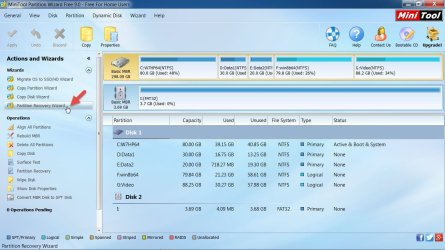
And so let us get started. Download install and run MiniTools Partition Wizard Free Edition 9.0 30.49 MB Free download Magic Partition Manager Software, partition magic alternative, free partition magic, partition magic Windows 7 and server partition software - Partition Wizard Online

Post a screenshot showing ypur RAID drive. ( Please remove all other USB storage devices, We don't want to be confused.:))

Sample:

2015-04-13_18-52-23.jpg

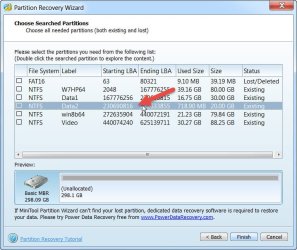
Next click on Partition Recovery Wizard on the left Pane > Next > Select your RAID disk > Next > Full Disk > Next > Quick Scan > Next. Allow Quick Scan to complete and post the resulting screen showing the partitions at the end. Hilight the main partition/volume and double click on the highlighted partition. Does it show all your files? Yes/No

2015-04-13_19-03-46.jpg

Once you have snapped it, click on Cancel and close the Partition Wizard. This is the stage where I will require a second opinion whether we should proceed further since it is a RAID drive. ( We can rerun Partition Recovery Wizard again if necessary. Please do not jump the instructions and do things on your own.) Please do not do anything in haste and wait for further instructions after consultation.
 

My Computer

OS
Windows 7 Home Premium 32 bit
Jumanji, I think we should proceed with recovery of the RAW volume - it is not possible that this disk was ever in a RAID5.
 

My Computer

Computer type
PC/Desktop
Computer Manufacturer/Model Number
Golden Mk. I.4
OS
Windows 10 Pro x64 ; Xubuntu x64
CPU
Intel i7 860 @ 2.80 GHz O/C'ed to 4.0GHz
Motherboard
Gigabyte P55A-UD3R Rev.1. Award BIOS F13
Memory
16GB Corsair Vengance DDR3 @ 661 MHz Dual Channel (9-9-9-24)
Graphics Card(s)
EVGA NVidia GTX 560 1024MB
Sound Card
Realtek Integrated
Monitor(s) Displays
Dual Samsung SyncMaster 2494HS
Screen Resolution
1920*1080 and 1920*1080
Hard Drives
1*Samsung 840 EVO 120GB SSD;
1*OCZ Vertex 2 60GB SSD;
2*Samsung F3 SpinPoint 1TB in RAID0;
1*Samsung F1 SpinPoint 1TB;
2*Western Digital 1TB External USB 3.0
1*Western Digital 500GB External USB 3.0
1*Seagate 500GB External USB 2.0
PSU
Thermaltake ToughPower QFan 750W
Case
Thermaltake Element S VK60001W2Z
Cooling
Corsair H60 Water Cooling, 2*230mm and 2*80mm case fans
Keyboard
Logitech G110
Mouse
Logitech MX518
It has been a Raid 5 for four years.
 

My Computer

Computer type
PC/Desktop
Computer Manufacturer/Model Number
custom build
OS
Windows 7 64 Professional
CPU
amd FX-8320 3.5 GHz
Motherboard
Asus M5A99X EVO
Memory
16 GB
Graphics Card(s)
Radeon HD 6800
Hard Drives
Samsung SSD 830 128 GB
AMD 2+1 Raid 5 with Samsung 2 TB drives
Antivirus
Norton's 360
Browser
Internet Explorer 11
A RAID5 is comprised of a minimum of 3 hard disks....your D: is a single hard disk. How could it have been a RAID5?
 

My Computer

Computer type
PC/Desktop
Computer Manufacturer/Model Number
Golden Mk. I.4
OS
Windows 10 Pro x64 ; Xubuntu x64
CPU
Intel i7 860 @ 2.80 GHz O/C'ed to 4.0GHz
Motherboard
Gigabyte P55A-UD3R Rev.1. Award BIOS F13
Memory
16GB Corsair Vengance DDR3 @ 661 MHz Dual Channel (9-9-9-24)
Graphics Card(s)
EVGA NVidia GTX 560 1024MB
Sound Card
Realtek Integrated
Monitor(s) Displays
Dual Samsung SyncMaster 2494HS
Screen Resolution
1920*1080 and 1920*1080
Hard Drives
1*Samsung 840 EVO 120GB SSD;
1*OCZ Vertex 2 60GB SSD;
2*Samsung F3 SpinPoint 1TB in RAID0;
1*Samsung F1 SpinPoint 1TB;
2*Western Digital 1TB External USB 3.0
1*Western Digital 500GB External USB 3.0
1*Seagate 500GB External USB 2.0
PSU
Thermaltake ToughPower QFan 750W
Case
Thermaltake Element S VK60001W2Z
Cooling
Corsair H60 Water Cooling, 2*230mm and 2*80mm case fans
Keyboard
Logitech G110
Mouse
Logitech MX518
Asus motherboard Raid 5 with three 2 TB drives. Why it shows as one drive is a good question. When it is looked at with other software it shows as a 2+1 Raid 5.
 

My Computer

Computer type
PC/Desktop
Computer Manufacturer/Model Number
custom build
OS
Windows 7 64 Professional
CPU
amd FX-8320 3.5 GHz
Motherboard
Asus M5A99X EVO
Memory
16 GB
Graphics Card(s)
Radeon HD 6800
Hard Drives
Samsung SSD 830 128 GB
AMD 2+1 Raid 5 with Samsung 2 TB drives
Antivirus
Norton's 360
Browser
Internet Explorer 11
What software? Please provide a screen capture image showing this Asus setup.
 

My Computer

Computer type
PC/Desktop
Computer Manufacturer/Model Number
Golden Mk. I.4
OS
Windows 10 Pro x64 ; Xubuntu x64
CPU
Intel i7 860 @ 2.80 GHz O/C'ed to 4.0GHz
Motherboard
Gigabyte P55A-UD3R Rev.1. Award BIOS F13
Memory
16GB Corsair Vengance DDR3 @ 661 MHz Dual Channel (9-9-9-24)
Graphics Card(s)
EVGA NVidia GTX 560 1024MB
Sound Card
Realtek Integrated
Monitor(s) Displays
Dual Samsung SyncMaster 2494HS
Screen Resolution
1920*1080 and 1920*1080
Hard Drives
1*Samsung 840 EVO 120GB SSD;
1*OCZ Vertex 2 60GB SSD;
2*Samsung F3 SpinPoint 1TB in RAID0;
1*Samsung F1 SpinPoint 1TB;
2*Western Digital 1TB External USB 3.0
1*Western Digital 500GB External USB 3.0
1*Seagate 500GB External USB 2.0
PSU
Thermaltake ToughPower QFan 750W
Case
Thermaltake Element S VK60001W2Z
Cooling
Corsair H60 Water Cooling, 2*230mm and 2*80mm case fans
Keyboard
Logitech G110
Mouse
Logitech MX518
Actually, prompted by Steve, I've had a look at my system, and my 2 x disk RAID0 shows as a single physical disk in Disk Management....so I think I am incorrect about your RAID5 setup.

I thought that since the volume shows as RAW, we should see the 3 disks shows as separate entities in Disk Management, but apparently not.

Please follow jumanji's advise to see whether its possible to recover the data.
 

My Computer

Computer type
PC/Desktop
Computer Manufacturer/Model Number
Golden Mk. I.4
OS
Windows 10 Pro x64 ; Xubuntu x64
CPU
Intel i7 860 @ 2.80 GHz O/C'ed to 4.0GHz
Motherboard
Gigabyte P55A-UD3R Rev.1. Award BIOS F13
Memory
16GB Corsair Vengance DDR3 @ 661 MHz Dual Channel (9-9-9-24)
Graphics Card(s)
EVGA NVidia GTX 560 1024MB
Sound Card
Realtek Integrated
Monitor(s) Displays
Dual Samsung SyncMaster 2494HS
Screen Resolution
1920*1080 and 1920*1080
Hard Drives
1*Samsung 840 EVO 120GB SSD;
1*OCZ Vertex 2 60GB SSD;
2*Samsung F3 SpinPoint 1TB in RAID0;
1*Samsung F1 SpinPoint 1TB;
2*Western Digital 1TB External USB 3.0
1*Western Digital 500GB External USB 3.0
1*Seagate 500GB External USB 2.0
PSU
Thermaltake ToughPower QFan 750W
Case
Thermaltake Element S VK60001W2Z
Cooling
Corsair H60 Water Cooling, 2*230mm and 2*80mm case fans
Keyboard
Logitech G110
Mouse
Logitech MX518
After seeing post #13 yesterday night (ET) I composed this post but put it in the backburner and decided to wait for OP's response to that post.

"@Golden, I don't know much about RAID 3 but from what little I read about RAID 3 when I entered this thread, it does require minimum three drives out of which one is for parity and the other two only are for data and I have been presuming that these two data drives would show up as one drive just like in RAID 0. So I was not surprised when the OP's RAID drive - two 2TB drives - showing as a single 3725.16 GB drive ( 2X2TB). The Parity drive may not show up in Windows Disk management or so I have assumed. Should the two data drives show up as individual drives?

(On my Desktop in India which uses Gigabyte motherboard software RAID which I had configured as RAID 0 the two 250GB drives show up as one single drive of 500GB.Of course I had to inject Gigabyte Raid driver during the Windows installation process to recognize it as a single drive. In the early days when I was using Paragon Recovery Disk to image that system drive I had to, during the booting process, inject the Gigabyte raid drivers for it to show the raid drive as one single drive. If I do not, then those two will show up as individual drives and I cannot image the drive. Some other partitioning software when run from a bootable disk also will show the RAID drive as two single drives and there was no provision to inject the raid driver and obviously I could not use those for manipulating the five partitions in my raid drive, one of which is the system partition.) "

Now that the issue is resolved , and clarity has been achieved thanks to Steve's ( I presume essenbe) prompt to Golden I would add this.

I normally do not use my system raid drive for my experiments on HDD but on the one occasion I did, something went wrong and my system became unbootable. I panicked because it was a raid drive and I was unsure whether the normal restoration process we use for single non-raid disks would work to restore the lost MBR. Anyway I had to restore it to get my system back and so I ran TestDisk for DOS which I had ready on a pendrive and wrote the MBR using it and my system came back alive.

From this episode I did learn, that on a raid configuration whether 2,3 or 10 drives showing as a single drive - which it should unless the raid is broken - we can use the same restore techniques that we use on single drives. And that is why I started off my intrusion in this thread with the statement " hmmm.....whether RAID or LAID (just for rhyme), I am of the opinion that either Partition Recovery Wizard or TestDisk should be able to write the lost/corrupted Partition Table if that is what has turned it RAW." :)

And yes, the OP should go ahead with Partition Recovery using Partititon Wizard as ordained in that post #8 but stop with posting the screenshot of the partitions shown. Only after examination by all other experts involved in this thread - including essenbe ,who I am sure is watching this thread - agree to go ahead to write the partition table - if found. I am keeping my fingers crossed at the moment. Nothing is certain till we get those screenshots asked for in post#8.
 

My Computer

OS
Windows 7 Home Premium 32 bit
Me as a person that knows less than nothing about Raid. I'm learning by following this thread.
----------------------------

I do have a question tho.

@dloydc

Because as we are finding out; Raid can be very tricky thing to do and keep working as it should, why are you using Raid and do you really need to use Raid?
---------------------------

Is their possibly a better method that can be used to suite dloydc needs and desires without using Raid??
 

My Computer

Computer type
PC/Desktop
Computer Manufacturer/Model Number
Home made Desktop
OS
Windows 10 Pro. 64/ version 1709 Windows 7 Pro/64
CPU
Intel i7-6800K @ 4.3
Motherboard
ASUS X-99 Deluxe II
Memory
Corsair Platinum 16 gig @2400
Graphics Card(s)
EVGA GTX 1070 OC
Monitor(s) Displays
Asus 27" LED LCD/VE278Q
Screen Resolution
1920-1080 or 1280-720 HDMI
Hard Drives
INTEL SSD 730-240 Gb Sata 3.0/
PSU
EVGA Platium 1200W
Case
Phanteks Luxe Tempered Glass 8 fans/ one radiator
Cooling
XSPC/ Water Cooled CPU
Keyboard
Das 4 Professional
Mouse
Logitech M705/MX Anywhere 2-S
Internet Speed
100 mbits
Antivirus
Microsoft Security Essentials/ Malwarebytes Premium 3.0/ SAS
Browser
I.E. 11 default/Firefox/ ISP Time Warner Cable/Spectrum
Other Info
LG BluRay Burner/
Sound system-KLipsch-THX/
Icy Dock ssd Hot Swap bays.
RAID isn't tricky to keep going....that's just a myth, in part propagated on these forums.

The most important thing now is for the OP to follow jumanji's advice in an attempt to get data recovered.
 

My Computer

Computer type
PC/Desktop
Computer Manufacturer/Model Number
Golden Mk. I.4
OS
Windows 10 Pro x64 ; Xubuntu x64
CPU
Intel i7 860 @ 2.80 GHz O/C'ed to 4.0GHz
Motherboard
Gigabyte P55A-UD3R Rev.1. Award BIOS F13
Memory
16GB Corsair Vengance DDR3 @ 661 MHz Dual Channel (9-9-9-24)
Graphics Card(s)
EVGA NVidia GTX 560 1024MB
Sound Card
Realtek Integrated
Monitor(s) Displays
Dual Samsung SyncMaster 2494HS
Screen Resolution
1920*1080 and 1920*1080
Hard Drives
1*Samsung 840 EVO 120GB SSD;
1*OCZ Vertex 2 60GB SSD;
2*Samsung F3 SpinPoint 1TB in RAID0;
1*Samsung F1 SpinPoint 1TB;
2*Western Digital 1TB External USB 3.0
1*Western Digital 500GB External USB 3.0
1*Seagate 500GB External USB 2.0
PSU
Thermaltake ToughPower QFan 750W
Case
Thermaltake Element S VK60001W2Z
Cooling
Corsair H60 Water Cooling, 2*230mm and 2*80mm case fans
Keyboard
Logitech G110
Mouse
Logitech MX518
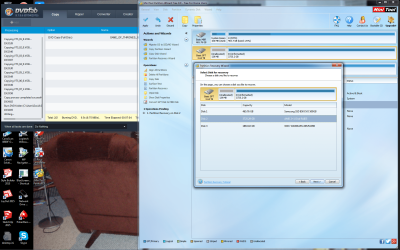
No it doesn't show anything.
 

Attachments

  • Partition 04152015.png
    Partition 04152015.png
    553.5 KB · Views: 2

My Computer

Computer type
PC/Desktop
Computer Manufacturer/Model Number
custom build
OS
Windows 7 64 Professional
CPU
amd FX-8320 3.5 GHz
Motherboard
Asus M5A99X EVO
Memory
16 GB
Graphics Card(s)
Radeon HD 6800
Hard Drives
Samsung SSD 830 128 GB
AMD 2+1 Raid 5 with Samsung 2 TB drives
Antivirus
Norton's 360
Browser
Internet Explorer 11
In answer to post #13. That is done in bios not windows. As any other raid set up is done using the motherboard hardware. As for why I was using a raid, so that this would not happen. Well, losing a hard drive in a raid 5 should be recoverable by replacing the bad hard drive without losing data. All three of the drives checked out fine using different hard drive tests. I have recovered the files. But, they are just files in folders of like files. Not the folders that they were in. At 2.6 tb, that is a lot of files to sort into the folders that they should be in. And, forget about the programs that were on the drives. Recovery software is only good for data.
 

My Computer

Computer type
PC/Desktop
Computer Manufacturer/Model Number
custom build
OS
Windows 7 64 Professional
CPU
amd FX-8320 3.5 GHz
Motherboard
Asus M5A99X EVO
Memory
16 GB
Graphics Card(s)
Radeon HD 6800
Hard Drives
Samsung SSD 830 128 GB
AMD 2+1 Raid 5 with Samsung 2 TB drives
Antivirus
Norton's 360
Browser
Internet Explorer 11
Here is a software showing D: as a Raid 5
 

Attachments

  • Raid.png
    Raid.png
    461.7 KB · Views: 3

My Computer

Computer type
PC/Desktop
Computer Manufacturer/Model Number
custom build
OS
Windows 7 64 Professional
CPU
amd FX-8320 3.5 GHz
Motherboard
Asus M5A99X EVO
Memory
16 GB
Graphics Card(s)
Radeon HD 6800
Hard Drives
Samsung SSD 830 128 GB
AMD 2+1 Raid 5 with Samsung 2 TB drives
Antivirus
Norton's 360
Browser
Internet Explorer 11
Back
Top