HDD became RAW from NTFS

Rovastar

New member
Local time
4:54 PM
Messages
6
Story:

I did buy a 10TB HDD recently, because i had to move files from 3 different (4TB, 2TB and 500GB) HDDs to one, to manage them easier.

The first time i have cloned the 4TB drive and because it split the 10TB drive into to partitions (due to cloning) i have extended the volume to be one. And copied another HDD to it.
Next day i swapped the HDDs, because i am using an HDD docking station (lc power) with two slot, so i swapped the 4TB to the third one, and after turning on the pc, the 10TB HDD was corrupted or damaged and was unreadable by windows.

I was like no problem, i still have the original files, so i have formatted the target HDD (10TB) again and started copying again.

I swapped the source HDDs again and after a reboot both HDDs ( one of the source and the target) turned into RAW again.

So i have no idea how it happened again, twice...

I was thinking that drive letters could mess up the HDDs because i definitely added the same drive letter for two of them, but the system adresses the next available drive letter for the connected devices, unless the previously added letter is not in use in the current configuration, because in this case it will keep the original letter. I have tried it on a different pc and they were unreadable there too.

As i know the HDDs are not fragmented and have no bad sectors. As i mentioned i am using lc power docking station, there was no power loss or improper shutdown.

I don't like to mess with data recovery or saving any data, i just like to know what can cause this issue.

Thanks in advance,
Peter
 
Last edited:

My Computers

System One System Two

  • OS
    Windows 10
  • Computer type
    PC/Desktop
Hi @Rovastar,

Your dock is responsible for it. Check the specifications of your dock - the maximum capacity it can handle in a bay.

Suppose it is only 5TB/bay and you put in a 10TB drive in it and start writing data into it. When the 5TB limit is reached it will wrap around and start writing from the beginning. destroying the partition table in it . That will turn the disk to RAW. This is what is happening in your case.
 

My Computer

OS
Windows 7 Home Premium 32 bit
First of all, thank you for your answer, i am amazed by your knowledge and for helping others.

I have just checked the specification for my docking station (LC Power LC-DOCK-U3-III) and it supports 3,5" drives up to 16TB, as it is described on their website.

But this issue happened to one of my 2TB source HDD as well
I just tested the 2TB HDD yesterday with chkdisk and it identified the drive's file system as NTFS and found no problem at all.
I have checked the files with Recuva and GetDataBack and both have listed all the files on the drive and i was able to recover some of the most important data from it.

So i'm clueless right now :)
 

My Computers

System One System Two

  • OS
    Windows 10
  • Computer type
    PC/Desktop
When it says 16TB overall I will take it as 8TB/bay. Having said that, your source disk should not become RAW. Only your target Disk will become raw when the data exceeds the specified capacity

Let me have a look at Windows Disk Management. Put your 10TB disk in Bay 1 and 2TB disk in bay 2. Post a screenshot of Windows Disk Management,

Disk Management - Post a Screen Capture Image

How to Post a Screenshot of Disk Management | Tutorials

Note: There is also an LC-DOCK-U3-III Docking station 2x 2.5"/3.5" SATA, 2.5" up to 1 TB, 3.5" up to 10 TB

Click on this link to go to reichelt Security Check

You have to check.
 
Last edited:

My Computer

OS
Windows 7 Home Premium 32 bit
No problem. Do it on your own time.

Regarding your dock, I have serious reservations. By the way it turned your 2TB HDD also RAW (???), I do not rule out the dock being defective.Let me see how these disks look on your dock in the Windows Disk Management.

amazon.de shows one with 16TB capacity whereas reichelt elektronik shows one with 10TB capacity priced euro 26.90. Confusion.

You said Getdataback showed all your files on the 2TB disk. It will retain the folder structure and names but to copy those you may have to buy a license. Recuva also can show all fiolders and files but without the original structure and names. I shall check on it and see whether the disk itself can be restored,.
 

My Computer

OS
Windows 7 Home Premium 32 bit
I have found the supported hdd capacity difference confusing too, i was checked it on the manufacturer's website, and it was 16TB.

Recuva and GetDataBack both retained the folder structure and file names, and after the successful recovery still retained the folder structure.
 

My Computers

System One System Two

  • OS
    Windows 10
  • Computer type
    PC/Desktop
You can't trust a device like that.
Jumanji is the drive expert. Follow his instructions to find out what is the problem.
 

My Computers

System One System Two

  • Computer type
    PC/Desktop
    Computer Manufacturer/Model Number
    custom build
    OS
    Windows 7 HP 64
    CPU
    i5 6600K - 800MHz to 4200MHz
    Motherboard
    GA-Z170-HD3P
    Memory
    4+4G GSkill DDR4 3000
    Graphics Card(s)
    IG - Intel 530
    Monitor(s) Displays
    Samsung 226BW
    Screen Resolution
    1680x1050
    Hard Drives
    (1) -1 SM951 – 128GB M.2 AHCI PCIe SSD drive for Windows 7 and Lubuntu
    (2) -1 WD SATA 3 - 1T for Data
    (3) -1 WD SATA 3 - 1T for backup
    PSU
    Thermaltake 450W TR2 gold
    Keyboard
    Old and good Chicony mechanical keyboard
    Mouse
    Logitech mX performance - 9 buttons (had to disable some)
    Internet Speed
    500Mb/s
    Browser
    Firefox 64
    Other Info
    TinyWall firewall
  • Computer type
    Laptop
    System Manufacturer/Model Number
    Asus Q550LF
    OS
    Windows 7 Pro
    CPU
    i7-4500U 800MHz to 3.0GHz
    Motherboard
    Asus Q550LF
    Memory
    (4+4)G DDR3 1600
    Graphics Card(s)
    IG intel 4400 + NVIDIA GeForce GT 745M
    Sound Card
    Realtek
    Monitor(s) Displays
    LG Display LP156WF4-SPH1
    Screen Resolution
    1920 x 1080
    Hard Drives
    BX500 120G SSD for Windows and programs +
    1T HDD for data
    Internet Speed
    500 Mb/s
    Browser
    Firefox
    Other Info
    TinyWall firewall
What do you mean by that Megahertz07? Where did i question his knowledge and skills?
I was just telling what i was experiencing.
 

My Computers

System One System Two

  • OS
    Windows 10
  • Computer type
    PC/Desktop
Hi Rovastar,

Megahertz07 was not questioning you or meant any offence. He is only recommending that you should go with me in trying to resolve the problem in good faith..

Ok, As suggested by me. post the screenshot, Add four and a half hour to your local time and that is my time.If it is late night here, you may not get an immediate respnose. I shall respond only my tomorrow morning..

We shall concentrate on checking your dock rather than data recovery of your 2TB disk if you have already recovered all data in it,
 

My Computer

OS
Windows 7 Home Premium 32 bit
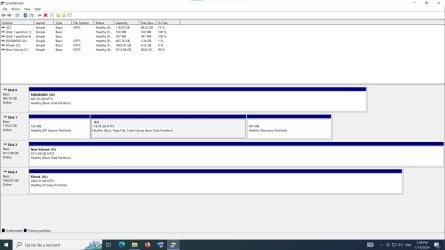
First of all,I have checked the the orginal box of the docking station (i still have it, after a couple years lol) and on the box it does say up to 4TB in case of 3,5" drives, on the physical installation guide it does say the same.So i'm pretty sure, the issue is caused by the docking station.diskmgmt.jpg
Here's the screenshot from disk management. It is interesting again, because it seems to be NTFS
not RAW, but i still cannot open the drive, it's telling me "[driveletter] :\ is not accessible. Access denied."

So according to any known information, chances are big that the docking station is not suitable for this.
Do you have any suggestions on what kind of device should i buy, with at least 4 slots(bay).
I was about to buy something like Raidsonic icy box thing with 4 bays, but i'm not sure a "RAID" device can be used
as a docking station.

Thank you for your help and for your kind replies.
 

My Computers

System One System Two

  • OS
    Windows 10
  • Computer type
    PC/Desktop
There you are. You have an old dock that is not suitable for handling a 10TB disk.

I believe that Disk 0 and Disk 1 are internal disks and Disk 2 10TB and Disk 3 2TB are on the dock but Disk 3 is not accesible.

Switch off the dock. Remove the 10TB disk and put the 2TB disk in the first bay. Reboot the PC and switch on the dock and check whether the 2TB disk is accessible.

If not accessible still, please start a new thread in Ten Forums giving complete history including where and how the disk was connected before. I shall leave it to .other knowledgeable experts there. You can register with the same user name and password and do not forget to fill in the complete specifications of your machine in "My Computer". You can also ask for suitable docks there ( I have only one dock = a Two bay Orico dock and that is also old but can handle upto 8TB - serves me good on my Windows 10 PC.)

Have a good night.
 

My Computer

OS
Windows 7 Home Premium 32 bit
Back
Top