External HDD - K:/ is not accessible

Hi.
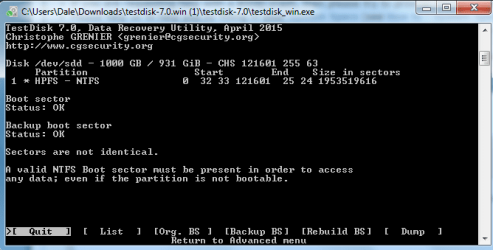
I followed from post 17 as you said and everything was the same with mine up to post 33
mine showed as follows:
 

Attachments

  • TD6.png
    TD6.png
    14.7 KB · Views: 20

My Computer My Computer

Computer type
PC/Desktop
Computer Manufacturer/Model Number
Medion Akoya E7214 laptop
OS
Windows 7 Home Premium 32-bit
CPU
Intel Core i3 M350 @ 2.27GHz
Memory
3GB DDR3
Graphics Card(s)
intel HD Graphics (built in)
Hard Drives
256Gb SSD
500GB 2nd drive
Antivirus
Avast
Browser
Chrome
OK, we are landing into an uncharted territory.

For the time being, move to
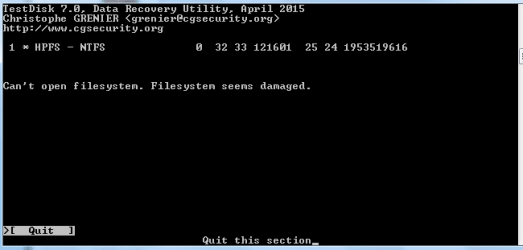
  • with the right arrow, press enter and check whether it lists the files.

    Post the ensuing screenshot.
 

My Computer My Computer

OS
Windows 7 Home Premium 32 bit
Not so good I guess
 

Attachments

  • TD7.png
    TD7.png
    3.9 KB · Views: 21

My Computer My Computer

Computer type
PC/Desktop
Computer Manufacturer/Model Number
Medion Akoya E7214 laptop
OS
Windows 7 Home Premium 32-bit
CPU
Intel Core i3 M350 @ 2.27GHz
Memory
3GB DDR3
Graphics Card(s)
intel HD Graphics (built in)
Hard Drives
256Gb SSD
500GB 2nd drive
Antivirus
Avast
Browser
Chrome
Quit Test Disk.

Now download and run Getdataback simple and check whether you can see the files. This program does not write anything to the drive. So you need not worry about making any mistakes.
 

My Computer My Computer

OS
Windows 7 Home Premium 32 bit
Quit Test Disk.

Now download and run Getdataback simple and check whether you can see the files. This program does not write anything to the drive. So you need not worry about making any mistakes.
Thanks a lot for your help so far.
It seems that most of the files are still obtainable through getdataback

During all this sorting out I have retrieved most of the important data from other drives and had to redesign some posters and leaflets I made
Unfortunately I can't really afford $79 to retrieve what is left. Not because I don't think that the program is worth it but for just one folder there that is still really important but not important enough for that kind of spend. Not for a one time use
If there is another way to retrieve it that would be great otherwise I'll have to let it go
 

My Computer My Computer

Computer type
PC/Desktop
Computer Manufacturer/Model Number
Medion Akoya E7214 laptop
OS
Windows 7 Home Premium 32-bit
CPU
Intel Core i3 M350 @ 2.27GHz
Memory
3GB DDR3
Graphics Card(s)
intel HD Graphics (built in)
Hard Drives
256Gb SSD
500GB 2nd drive
Antivirus
Avast
Browser
Chrome
I understand.

What is the file format you want to recover?

Check whether that file format can be retrieved by PhotoRec. File Formats Recovered By PhotoRec - CGSecurity ( For some reason I am unable to open any TestDisk site)

If it is listed then you can use PhotoRec to recover it.

And we haven't finished with TestDisk yet :). I just diverted you to Getdataback simple just to confirm that the files(data) are still available.

According to cgrenier, the author of TestDisk in a situation where BootSector and Backup boot sector are OK, but Sectors are not identical "Run TestDisk, Advanced, select the NTFS partition, Boot, RebuildBS, List. If you can see your files, choose Write, confirm, Quit and reboot"

I just took time to find out which option we should choose. So go back to the screen at post#21 above and then "RebuildBS(enter), List(enter). If you can see your files, choose Write(enter), confirm(say Yes), Quit and reboot"

If the files are not listed, do not Write. ( As a matter of fact even if you rebuild the BS and write confirm, it will not affect the data.It only writes the rebuilt NTFS file system to the first sector of that partition.)

You lose nothing but may regain your drive in toto if it works.

If it does not, go to PhotoRec. http://www.sevenforums.com/software/193467-guide-using-photorec-recovery-software.html PhotoRec does not write anything to the drive and hence absolutely safe to make any mistakes.:)
 
Last edited:

My Computer My Computer

OS
Windows 7 Home Premium 32 bit
Just because I'm curious I see this in the pictures in post 19. Will this cause problems?

[MAC 1 Apple partition map.
 

My Computer My Computer

Computer type
PC/Desktop
Computer Manufacturer/Model Number
Home made Desktop
OS
Windows 10 Pro. 64/ version 1709 Windows 7 Pro/64
CPU
Intel i7-6800K @ 4.3
Motherboard
ASUS X-99 Deluxe II
Memory
Corsair Platinum 16 gig @2400
Graphics Card(s)
EVGA GTX 1070 OC
Monitor(s) Displays
Asus 27" LED LCD/VE278Q
Screen Resolution
1920-1080 or 1280-720 HDMI
Hard Drives
INTEL SSD 730-240 Gb Sata 3.0/
PSU
EVGA Platium 1200W
Case
Phanteks Luxe Tempered Glass 8 fans/ one radiator
Cooling
XSPC/ Water Cooled CPU
Keyboard
Das 4 Professional
Mouse
Logitech M705/MX Anywhere 2-S
Internet Speed
100 mbits
Antivirus
Microsoft Security Essentials/ Malwarebytes Premium 3.0/ SAS
Browser
I.E. 11 default/Firefox/ ISP Time Warner Cable/Spectrum
Other Info
LG BluRay Burner/
Sound system-KLipsch-THX/
Icy Dock ssd Hot Swap bays.
Thanks again to jumanji
I did what you said and went out to work leaving it to run
I forgot to adjust power settings so my laptop went to sleep
Now I'm having to start over leaving it to run over night
It looks like it will take that long
I'll let you know the outcome
 

My Computer My Computer

Computer type
PC/Desktop
Computer Manufacturer/Model Number
Medion Akoya E7214 laptop
OS
Windows 7 Home Premium 32-bit
CPU
Intel Core i3 M350 @ 2.27GHz
Memory
3GB DDR3
Graphics Card(s)
intel HD Graphics (built in)
Hard Drives
256Gb SSD
500GB 2nd drive
Antivirus
Avast
Browser
Chrome
Just because I'm curious I see this in the pictures in post 19. Will this cause problems?

[MAC 1 Apple partition map.

TestDisk can auto detect the Partition Scheme employed which will automatically be highlighted. In cases where it cannot detect the Partition Scheme in the HDD, the user has to select the Partition Scheme employed, for TestDisk to do its job. Inputting a wrong Partition Scheme will result in TestDisk giving any number of Warning messages and it is not going to do its job.:)

Apple computers use three types of Partition Schemes while formatting. Apple Partition Types on the Hard Drive

Intel based Macs use GUID. Older Power-PC based macs use Apple Partition Map. Macs also facilitate MBR formatting for HDDs to be used on Windows PCs. The user should know what partitioning scheme is employed in the HDD being recovered and input(highlight) the correct scheme. Inputting a wrong scheme, will only result in warning messages.

According to the Partition Scheme used the user has to select EFI GPT ( Intel based Mac i386 -GUID) Or Mac ( Power PC Mac - Apple Partition Map) or Intel ( MBR formatted on Macs)
 
Last edited:

My Computer My Computer

OS
Windows 7 Home Premium 32 bit
Thanks for the info. One more question for now.

Will Windows 7 be able to read and handle [MAC 1 Apple partition map.
 

My Computer My Computer

Computer type
PC/Desktop
Computer Manufacturer/Model Number
Home made Desktop
OS
Windows 10 Pro. 64/ version 1709 Windows 7 Pro/64
CPU
Intel i7-6800K @ 4.3
Motherboard
ASUS X-99 Deluxe II
Memory
Corsair Platinum 16 gig @2400
Graphics Card(s)
EVGA GTX 1070 OC
Monitor(s) Displays
Asus 27" LED LCD/VE278Q
Screen Resolution
1920-1080 or 1280-720 HDMI
Hard Drives
INTEL SSD 730-240 Gb Sata 3.0/
PSU
EVGA Platium 1200W
Case
Phanteks Luxe Tempered Glass 8 fans/ one radiator
Cooling
XSPC/ Water Cooled CPU
Keyboard
Das 4 Professional
Mouse
Logitech M705/MX Anywhere 2-S
Internet Speed
100 mbits
Antivirus
Microsoft Security Essentials/ Malwarebytes Premium 3.0/ SAS
Browser
I.E. 11 default/Firefox/ ISP Time Warner Cable/Spectrum
Other Info
LG BluRay Burner/
Sound system-KLipsch-THX/
Icy Dock ssd Hot Swap bays.
Windows cannot handle legacy Apple Partition Map. But can, with appropriate software like Paragon HFS+ for Windows. HFS+ for Windows® 10 - Overview There may be some freeware also which I remember to have recommended to an OP, but do not remember now :D. Basically I do not know much about Apples except that there are many varieties available in the market, like Fuji apple, Simla apple,, Washington etc., - the fruits. :)
 

My Computer My Computer

OS
Windows 7 Home Premium 32 bit
Back
Top