How to turn on webcam on laptop?

paulyjames

New member
Member
VIP
Local time
5:37 PM
Messages
657
Windows 7. Have sager np2740. I then tried to use my webcam to take picture. However it says webcam not found make sure you webcam is installed.


Does anyone know how to fix this issue?


Last time i used webcam without any issues.
 

My Computer My Computer

Computer type
Laptop
OS
Windows 10 Pro
Does it show up in your device manger, and perhaps it got disabled in the bios.
 

My Computer My Computer

Computer type
PC/Desktop
Computer Manufacturer/Model Number
Custom
OS
10 Pro x64
CPU
Ryzen 9 3900X
Motherboard
Asrock x370 Tachi
Memory
64GB(4x16GB) DDR4
Graphics Card(s)
EVGA 1080ti FTW3
Sound Card
ASUS Xonar Essence STX (V4 Bursons), ODAC rev B, NFB-11, O2
Monitor(s) Displays
3xASUS PB278Q/R, Optoma HD142X
Screen Resolution
3x1440p, 1080p
Hard Drives
512GB 850 EVO(OS, Programs)
4TB (Movies)
3TB (Downloads)
3TB (Programs)
1TB HDD (Games)
2x6TB R1 (videos)
PSU
AX760
Case
Fractal Define R5
Cooling
NH-D15S
Keyboard
Massdrop Ctrl with Box Navy's
Mouse
G903, Alioth XXL Mat
Internet Speed
280/40
Antivirus
MBAM, ESET
Browser
Canary 64 Bit
Other Info
I also own a Thinkpad P50 Xeon 4K, X220T, X1C5
how do i know if it shows up in device manager?
 

My Computer My Computer

Computer type
Laptop
OS
Windows 10 Pro
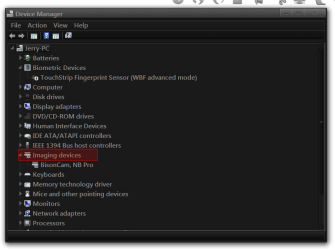
Opened up the Control Panel and go to Device Manager and look under Imaging Device if it's there double-click on the WebCam and look at the properties and see if it is working. If not you may need to go to Sager website and download the latest drivers. Look for Integrated Video Camera Driver for Windows 7 32/64 BIT.
Sager Custom Laptops

Jerry
Device Manager.png
 

My Computer My Computer

Computer type
Laptop
Computer Manufacturer/Model Number
Sager NP9170
OS
Win 7 Pro x64 / Win 10 Pro
CPU
Intel(R) Core(TM) i7-3630QM CPU @ 2.40GHz
Motherboard
CLEVO P170EM
Memory
12 GB
Graphics Card(s)
(1) Intel(R) HD Graphics 4000 (2) NVIDIA GeForce GTX 675M
Sound Card
(1) Realtek High Definition Audio (2) Intel(R) Display Aud
Monitor(s) Displays
17.3
Screen Resolution
1920x1080
Hard Drives
(1) Samsung 860 EVO 500GB(OS) (1) Samsung 860 EVO 500GB(Data)
Keyboard
Backlite
Antivirus
MSE, Malwarebytes Pro
Browser
Firefox
Other Info
DESKTOP: Custom-built.
OS: Win 10 Pro x64.
CASE: Rosewill R5.
CPU: Intel I5 4670K CPU @ 3.40GHz.
CPU COOLER: Cool Master Hyper 212 EVO.
MOTHERBOARD: Asus Z87-A.
MEMORY: Kingston HyperX 2x4 GB.
GPU: Nvidia Geforce 650 TI.
PSU: Corsair TX750.
DRIVES: (1) Samsung 840 120 GB SSD (2) Western Digital blue 500 GB 7200 RPM.
Windows doesn't need the device driver to detect plug and play hardware. It only needs the device driver before Windows can use the device's functionality. That means the cam should be detected and appear in Device Manager either
> Under Imaging device category (device detected and a driver installed) or
> You see something listed under an "Other device" category (device detected but no driver found)

If you can't find it in Device Manager, the cam hardware is not detected which means one of 3 things
> Device turned off
> Device disabled in BIOS or
> Device hardware failed

Do check BIOS and the vendor support site for the user manual if possibly a web cam on/off switch. Unfortunately, i've seen this problem reported in forums often. It's rather common and often it's the laptop web cam hardware has failed :(
 
Last edited:

My Computer My Computer

Computer type
PC/Desktop
Computer Manufacturer/Model Number
Dell Optiplex 360 and Optiplex 755
OS
Desk 1: Win 7 Pro x32; Desk 2: Windows 10 x64
Hard Drives
500GB Crucial SSD in both Desktops
Other Info
Buffalo 6TB NAS, Raid 1
Device manager, i don't know where is the camera. I checked everything under it...
 

My Computer My Computer

Computer type
Laptop
OS
Windows 10 Pro
There is no imaging device.
 

My Computer My Computer

Computer type
Laptop
OS
Windows 10 Pro
I went to sager site and downloaded webcam again. Restarted laptop. Still no laptop at all when searching device manager or using skype...
 

My Computer My Computer

Computer type
Laptop
OS
Windows 10 Pro
If you do not see it in your device manger it most liekly loose inside (unplugged) or damaged. Here is an area with all the manuals for taking it apart ect. W740SU That is the same laptop. It does not look like in the bios you can turn off the camera so it must one of the two issues above.
 

My Computer My Computer

Computer type
PC/Desktop
Computer Manufacturer/Model Number
Custom
OS
10 Pro x64
CPU
Ryzen 9 3900X
Motherboard
Asrock x370 Tachi
Memory
64GB(4x16GB) DDR4
Graphics Card(s)
EVGA 1080ti FTW3
Sound Card
ASUS Xonar Essence STX (V4 Bursons), ODAC rev B, NFB-11, O2
Monitor(s) Displays
3xASUS PB278Q/R, Optoma HD142X
Screen Resolution
3x1440p, 1080p
Hard Drives
512GB 850 EVO(OS, Programs)
4TB (Movies)
3TB (Downloads)
3TB (Programs)
1TB HDD (Games)
2x6TB R1 (videos)
PSU
AX760
Case
Fractal Define R5
Cooling
NH-D15S
Keyboard
Massdrop Ctrl with Box Navy's
Mouse
G903, Alioth XXL Mat
Internet Speed
280/40
Antivirus
MBAM, ESET
Browser
Canary 64 Bit
Other Info
I also own a Thinkpad P50 Xeon 4K, X220T, X1C5
Hi. How would i know it its loose or damaged?


If its damaged, then that mean no way to fix it?
 

My Computer My Computer

Computer type
Laptop
OS
Windows 10 Pro
Hi. How would i know it its loose or damaged?


If its damaged, then that mean no way to fix it?

If it's damaged the yes it would need replaced. If you lightly squeeze the top middle of the frame of your screen does it show up?
 

My Computer My Computer

Computer type
PC/Desktop
Computer Manufacturer/Model Number
Custom
OS
10 Pro x64
CPU
Ryzen 9 3900X
Motherboard
Asrock x370 Tachi
Memory
64GB(4x16GB) DDR4
Graphics Card(s)
EVGA 1080ti FTW3
Sound Card
ASUS Xonar Essence STX (V4 Bursons), ODAC rev B, NFB-11, O2
Monitor(s) Displays
3xASUS PB278Q/R, Optoma HD142X
Screen Resolution
3x1440p, 1080p
Hard Drives
512GB 850 EVO(OS, Programs)
4TB (Movies)
3TB (Downloads)
3TB (Programs)
1TB HDD (Games)
2x6TB R1 (videos)
PSU
AX760
Case
Fractal Define R5
Cooling
NH-D15S
Keyboard
Massdrop Ctrl with Box Navy's
Mouse
G903, Alioth XXL Mat
Internet Speed
280/40
Antivirus
MBAM, ESET
Browser
Canary 64 Bit
Other Info
I also own a Thinkpad P50 Xeon 4K, X220T, X1C5
can you explain what you mean squeeze top of middle of frame?
 

My Computer My Computer

Computer type
Laptop
OS
Windows 10 Pro
Where 1-3 is on the picture, if nothing happens its hard to tell without taking apart the laptop.
clevo-w740su-sager-np2740-service-guide-01.jpg
 

My Computer My Computer

Computer type
PC/Desktop
Computer Manufacturer/Model Number
Custom
OS
10 Pro x64
CPU
Ryzen 9 3900X
Motherboard
Asrock x370 Tachi
Memory
64GB(4x16GB) DDR4
Graphics Card(s)
EVGA 1080ti FTW3
Sound Card
ASUS Xonar Essence STX (V4 Bursons), ODAC rev B, NFB-11, O2
Monitor(s) Displays
3xASUS PB278Q/R, Optoma HD142X
Screen Resolution
3x1440p, 1080p
Hard Drives
512GB 850 EVO(OS, Programs)
4TB (Movies)
3TB (Downloads)
3TB (Programs)
1TB HDD (Games)
2x6TB R1 (videos)
PSU
AX760
Case
Fractal Define R5
Cooling
NH-D15S
Keyboard
Massdrop Ctrl with Box Navy's
Mouse
G903, Alioth XXL Mat
Internet Speed
280/40
Antivirus
MBAM, ESET
Browser
Canary 64 Bit
Other Info
I also own a Thinkpad P50 Xeon 4K, X220T, X1C5
Back
Top