
nabilishes
New member
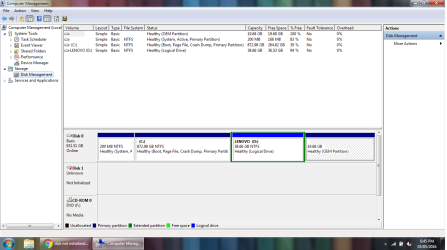
I have a internal 3.5" HDD WD Black 2 TB and try to hook it up in the PC but it doesnt not appear anymore in My Computer. It was working few weeks ago. When opening Disk Management it says the disk is not initialized and it didnt state how many GB available on the hard disk (unallocated). Disk Management tried to initialized the hard disk and it pops out the following errors:
1. Virtual Disk Manager: Incorrect Function
and
2. Virtual Disk Manager: The device is not ready.
I have also tried using a powered USB cable and also connected in directly to the MoBo via SATA but the problem still persist.
I also ran disk part and it shows Disk 3 and Disk 4 as both online but both having size of 0 B
Below is the screen shot of Disk Management. When i right click on the HDD, there are four functions: Initialize Disk, Offline, Properties and Help however the the Initialize Disk function is greyed out.

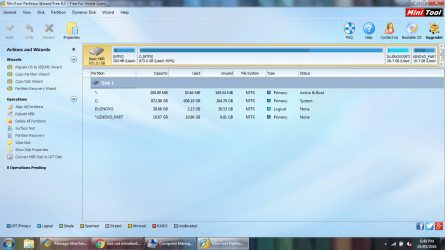
I have Partition Wizard 9.1 and the attached picture below is the screenshot of the main GUI. It shows bad disk on the particular hard disk
Click image for larger version.

I tried running Partition Recovery Wizard on the mentioned HDD and it shows a partition of only 512 Bytes but none of my files are visible (no preview)

I just need to retrieve the files in the Hard disk as it contains important files and pictures that havent been backed up. Any help and suggestions are welcomed! Thanks
1. Virtual Disk Manager: Incorrect Function
and
2. Virtual Disk Manager: The device is not ready.
I have also tried using a powered USB cable and also connected in directly to the MoBo via SATA but the problem still persist.
I also ran disk part and it shows Disk 3 and Disk 4 as both online but both having size of 0 B
Below is the screen shot of Disk Management. When i right click on the HDD, there are four functions: Initialize Disk, Offline, Properties and Help however the the Initialize Disk function is greyed out.
I have Partition Wizard 9.1 and the attached picture below is the screenshot of the main GUI. It shows bad disk on the particular hard disk
Click image for larger version.
I tried running Partition Recovery Wizard on the mentioned HDD and it shows a partition of only 512 Bytes but none of my files are visible (no preview)
I just need to retrieve the files in the Hard disk as it contains important files and pictures that havent been backed up. Any help and suggestions are welcomed! Thanks
My Computer
- OS
- Windows 7 Ultimate x64 SP1
- CPU
- Q6600
- Motherboard
- P5N-D
- Memory
- 8GB
- Graphics Card(s)
- NVidia GTX 285
- Monitor(s) Displays
- 2x DELL 22'' + Samsung 46" UE46D6500
- Keyboard
- Logitech G15
- Mouse
- Razer Mamba 4G

 .
.