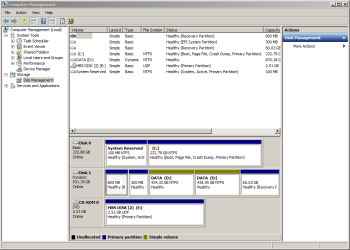
Disk Management shows two "D" partitions: how to make into just one?
Windows 7 Pro, ASUS B85M-E motherboard, 16GB RAM, one 256GB SSD program drive and one 1-TB HDD data drive.
Windows explorer shows a single D drive of about 900GB total.
Disk Management shows Disk-1 with total 931.39GB and the following:
one 800MB partition
one smaller 300MB partition
two "D" partitions: first is 434.33GB and followed by 435.95GB
lastly a 60.03GB partition
1. Do I really need all three, small, partitions?
If not, how to have just a single partition on the HDD "D" drive?
2. How to merge these two D partitions into a single partition?
I have already backed up the entire drive to a flash.
Thanks!
Windows 7 Pro, ASUS B85M-E motherboard, 16GB RAM, one 256GB SSD program drive and one 1-TB HDD data drive.
Windows explorer shows a single D drive of about 900GB total.
Disk Management shows Disk-1 with total 931.39GB and the following:
one 800MB partition
one smaller 300MB partition
two "D" partitions: first is 434.33GB and followed by 435.95GB
lastly a 60.03GB partition
1. Do I really need all three, small, partitions?
If not, how to have just a single partition on the HDD "D" drive?
2. How to merge these two D partitions into a single partition?
I have already backed up the entire drive to a flash.
Thanks!
My Computer
At a glance
Windows 7 Pro 64 bit
- Computer type
- PC/Desktop
- Computer Manufacturer/Model Number
- Acer
- OS
- Windows 7 Pro 64 bit