
diskpart and Disk Management show inconsistent partition types
As a preamble, everything is working fine, and the volume/partition in question is unimportant so it's ok if I lose the data (I'm gonna format it anyway). No external drives are connected, so only the HDD and the internal DVD drive (no disk in it) are in play.
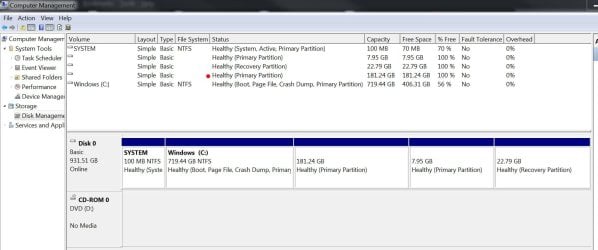
On my 1TB internal HDD, Disk Management and diskpart disagree about a volume and/or partition (I'm not sure if it is "actually" both a volume and a partition or just a partition). DM identifies (in the list of volumes) a 181GB Healthy Primary Partition. diskpart does not see this "volume" at all, but it does see it at as a partition. Twice. One is 181GB logical, one is 189GB extended, neither is primary. :shock:
Here is a screenshot of DM showing 5 volumes. In the order shown they are: Windows reserved, MS Office Click to Run (I think?), OEM recovery, the "mystery volume or partition" (red dot), and Windows C:\.
Here is what diskpart has to say about it:
I looked up the partition types identified by diskpart (type 05 for the 189GB extended partition 0 and type 83 for the 181GB logical partition 5) and they are:
Type 05: DOS 3.3+ Extended Partition: Supports at most 8.4 GB disks: with type 05 DOS/Windows will not use the extended BIOS call, even if it is available. See type 0f below. Using type 05 for extended partitions beyond 8 GB may lead to data corruption with MSDOS.
Type 83: Linux native partition
At this point I remembered that 2 years ago I attempted to install a couple of Linux distros (sequentially - not trying for a triple boot machine) but could never get them to stick. They would boot the first time (maybe more, I forget), but once I booted into Windows again, the GRUB bootloader selector would never come up again, and it would only boot Windows. After many hours not getting it to work, I gave up on it and just left it as a Win7-only machine.
So, the "mystery volume/partition" is definitely where I tried to install Linux and it's probably ext3. Those installs were not total failures, in that Linux did boot, from the hard disk (not a live cd/usb), at least once.
What I am hoping to learn is why diskpart sees it twice, in different sizes, and as both extended and logical. Meanwhile DM says it's primary . I think the answer to this problem will shed some light on why I couldn't get dual booting to work reliably. Maybe.
If you already know the answer and are dying to blurt it out, please go ahead!
If you are dying to find out more information in this riveting cliffhanger, read on:
Another thing that might be relevant (or not) is that this machine has always been a little.... flukey with thumb drives. 95% of thumb drives work normally, but every now and then it will say one is unreadable and prompt to format, while my Win7 laptop will see it just fine. Also, this machine will not reliably boot from a live USB. All I can say is that it will do it "sometimes" but 90% of the time it will not. I don't know why. Literally using the exact same physical live USB thumb drive, it might prompt me to boot into the live OS once even though it would go straight to Windows the previous 7 reboots. Yeah.
Here is an example of the bizarre behavior: A couple months ago I tried to boot a linux live USB formatted FAT32. As I expected, it would not boot - the BIOS did not list it as a boot disk and GRUB never showed up to let me choose an OS. In Windows, I stuck in the live USB and it couldn't read it and prompted to format (I did not format it). I happened to have a Mac laptop nearby and checked if the Mac could read it, and it could. I then stuck it back in my Win7 PC and suddenly Windows could read it AND it could boot from it (Good!).
But then, booting back into Win7, it would no longer recognize ANY thumb drive at all (Bad!). Following the first commandment of troubleshooting, I rebooted. Thumb drives could be seen again (Good!). But once again it could not read the FAT32 live USB and would not boot from it (Neutral!). At this point it was decided (again) that this machine shall forever be Win7-only.
So anyway, I am planning to just format the mystery volume/partition NTFS and give it to C:\, or maybe make it a separate volume/drive letter. But this whole issue of flukey behavior with disks has always bugged me, or rather the fact that I have no clue wtf is going on to cause this bugs me. So it would be super awesome if someone knows the answer. Thanks!
As a preamble, everything is working fine, and the volume/partition in question is unimportant so it's ok if I lose the data (I'm gonna format it anyway). No external drives are connected, so only the HDD and the internal DVD drive (no disk in it) are in play.
On my 1TB internal HDD, Disk Management and diskpart disagree about a volume and/or partition (I'm not sure if it is "actually" both a volume and a partition or just a partition). DM identifies (in the list of volumes) a 181GB Healthy Primary Partition. diskpart does not see this "volume" at all, but it does see it at as a partition. Twice. One is 181GB logical, one is 189GB extended, neither is primary. :shock:
Here is a screenshot of DM showing 5 volumes. In the order shown they are: Windows reserved, MS Office Click to Run (I think?), OEM recovery, the "mystery volume or partition" (red dot), and Windows C:\.
Here is what diskpart has to say about it:
Code:
DISKPART> list partition

  Partition ###  Type              Size     Offset
  -------------  ----------------  -------  -------
  Partition 1    Primary            100 MB  1024 KB
  Partition 2    Primary            719 GB   101 MB
  Partition 0    Extended           189 GB   719 GB
  Partition 5    Logical            181 GB   719 GB
  Partition 4    Logical           8137 MB   900 GB
  Partition 3    Recovery            22 GB   908 GB

DISKPART> select partition 0

Partition 0 is now the selected partition.

DISKPART> detail partition

Partition 0
Type  : 05
Hidden: No
Active: No
Offset in Bytes: 772594990080

There is no volume associated with this partition.

DISKPART> select partition 5

Partition 5 is now the selected partition.

DISKPART> detail partition

Partition 5
Type  : 83
Hidden: Yes
Active: No
Offset in Bytes: 772594991104

There is no volume associated with this partition.

DISKPART> list volume

  Volume ###  Ltr  Label        Fs     Type        Size     Status     Info
  ----------  ---  -----------  -----  ----------  -------  ---------  --------
  Volume 0     D                       DVD-ROM         0 B  No Media
  Volume 1         SYSTEM       NTFS   Partition    100 MB  Healthy    System
  Volume 2     C   Windows      NTFS   Partition    719 GB  Healthy    Boot
  Volume 3         SAMSUNG_REC  NTFS   Partition     22 GB  Healthy    Hidden

DISKPART>Type 05: DOS 3.3+ Extended Partition: Supports at most 8.4 GB disks: with type 05 DOS/Windows will not use the extended BIOS call, even if it is available. See type 0f below. Using type 05 for extended partitions beyond 8 GB may lead to data corruption with MSDOS.
Type 83: Linux native partition
At this point I remembered that 2 years ago I attempted to install a couple of Linux distros (sequentially - not trying for a triple boot machine) but could never get them to stick. They would boot the first time (maybe more, I forget), but once I booted into Windows again, the GRUB bootloader selector would never come up again, and it would only boot Windows. After many hours not getting it to work, I gave up on it and just left it as a Win7-only machine.
So, the "mystery volume/partition" is definitely where I tried to install Linux and it's probably ext3. Those installs were not total failures, in that Linux did boot, from the hard disk (not a live cd/usb), at least once.
What I am hoping to learn is why diskpart sees it twice, in different sizes, and as both extended and logical. Meanwhile DM says it's primary
. I think the answer to this problem will shed some light on why I couldn't get dual booting to work reliably. Maybe.If you already know the answer and are dying to blurt it out, please go ahead!
If you are dying to find out more information in this riveting cliffhanger, read on:
Another thing that might be relevant (or not) is that this machine has always been a little.... flukey with thumb drives. 95% of thumb drives work normally, but every now and then it will say one is unreadable and prompt to format, while my Win7 laptop will see it just fine. Also, this machine will not reliably boot from a live USB. All I can say is that it will do it "sometimes" but 90% of the time it will not. I don't know why. Literally using the exact same physical live USB thumb drive, it might prompt me to boot into the live OS once even though it would go straight to Windows the previous 7 reboots. Yeah.
Here is an example of the bizarre behavior: A couple months ago I tried to boot a linux live USB formatted FAT32. As I expected, it would not boot - the BIOS did not list it as a boot disk and GRUB never showed up to let me choose an OS. In Windows, I stuck in the live USB and it couldn't read it and prompted to format (I did not format it). I happened to have a Mac laptop nearby and checked if the Mac could read it, and it could. I then stuck it back in my Win7 PC and suddenly Windows could read it AND it could boot from it (Good!).
But then, booting back into Win7, it would no longer recognize ANY thumb drive at all (Bad!). Following the first commandment of troubleshooting, I rebooted. Thumb drives could be seen again (Good!). But once again it could not read the FAT32 live USB and would not boot from it (Neutral!).
At this point it was decided (again) that this machine shall forever be Win7-only.So anyway, I am planning to just format the mystery volume/partition NTFS and give it to C:\, or maybe make it a separate volume/drive letter. But this whole issue of flukey behavior with disks has always bugged me, or rather the fact that I have no clue wtf is going on to cause this bugs me. So it would be super awesome if someone knows the answer. Thanks!
Last edited:
My Computer
- Computer type
- PC/Desktop
- Computer Manufacturer/Model Number
- Samsung 700A3B
- OS
- Windows 7 Home Premium x64
- CPU
- dual core i5-2390T
- Memory
- 8GB
- Graphics Card(s)
- intel integrated HD graphics
- Antivirus
- nod32
- Browser
- chrome

