Solved Hard drive not recognized by laptop, No bootable device.

There is no SP2. The thing you installed was just a roll up of various updates till July 2016. It 2 years out of date. There have been a lot of updates since then. Plus some of the updates included in that 3172605 have been superseded.

That is why I suggested you use dism++. :rolleyes:

It is not a disaster. You can get the newer stuff by using windows built in mechanism, or dism++ ( which is quicker and will warn you about telemetry junk ). Or you can use this which will get you the updates without the telemetry junk, but it is quite a large download. https://update7.simplix.info/UpdatePatch-18.7.20.exe

Whichever of the above methods you use, run cleanmgr afterwards. That will clean out the superseded stuff you have unwittingly installed.
 

My Computers My Computers

  • At a glance

    7 X64i5 84002x8gb 3200mhz
    Computer type
    PC/Desktop
    OS
    7 X64
    CPU
    i5 8400
    Motherboard
    gigabyte b365m ds3h
    Memory
    2x8gb 3200mhz
    Hard Drives
    various
    PSU
    pure power 11 400w cm
    Case
    Coolermaster
    Cooling
    cryorig m9i
  • At a glance

    7x64g54008gb ddr4 2400
    Computer type
    PC/Desktop
    OS
    7x64
    CPU
    g5400
    Motherboard
    ga b365m ds3h
    Memory
    8gb ddr4 2400
    PSU
    xfx pro 450w
Siw is right. There is no SP2. As I wrote on my post:
"MS don’t call it SP2, but that what it is.
KB3125574 contains all the security and non-security fixes released since the release of Windows 7 SP1 that are suitable for general distribution, up through April 2016."

It's a simple way to do the updates. And then I only install the Security only updates.

Now that you got it running and updated, create a disk image so you can easily reinstall if necessary. (see post #17)
 

My Computers My Computers

  • At a glance

    Windows 7 HP 64i5 6600K - 800MHz to 4200MHz4+4G GSkill DDR4 3000IG - Intel 530
    Computer type
    PC/Desktop
    Computer Manufacturer/Model Number
    custom build
    OS
    Windows 7 HP 64
    CPU
    i5 6600K - 800MHz to 4200MHz
    Motherboard
    GA-Z170-HD3P
    Memory
    4+4G GSkill DDR4 3000
    Graphics Card(s)
    IG - Intel 530
    Monitor(s) Displays
    Samsung 226BW
    Screen Resolution
    1680x1050
    Hard Drives
    (1) -1 SM951 – 128GB M.2 AHCI PCIe SSD drive for Windows 7 and Lubuntu
    (2) -1 WD SATA 3 - 1T for Data
    (3) -1 WD SATA 3 - 1T for backup
    PSU
    Thermaltake 450W TR2 gold
    Keyboard
    Old and good Chicony mechanical keyboard
    Mouse
    Logitech mX performance - 9 buttons (had to disable some)
    Internet Speed
    500Mb/s
    Browser
    Firefox 64
    Other Info
    TinyWall firewall
  • At a glance

    Windows 7 Proi7-4500U 800MHz to 3.0GHz(4+4)G DDR3 1600IG intel 4400 + NVIDIA GeForce GT 745M
    Computer type
    Laptop
    System Manufacturer/Model Number
    Asus Q550LF
    OS
    Windows 7 Pro
    CPU
    i7-4500U 800MHz to 3.0GHz
    Motherboard
    Asus Q550LF
    Memory
    (4+4)G DDR3 1600
    Graphics Card(s)
    IG intel 4400 + NVIDIA GeForce GT 745M
    Sound Card
    Realtek
    Monitor(s) Displays
    LG Display LP156WF4-SPH1
    Screen Resolution
    1920 x 1080
    Hard Drives
    BX500 120G SSD for Windows and programs +
    1T HDD for data
    Internet Speed
    500 Mb/s
    Browser
    Firefox
    Other Info
    TinyWall firewall
Ohhhh, ok. I had run the dism++ tool thing a couple times prior, & I did wonder why there were so many checked & unchecked updates after it scanned. :confused: I guess I was scared to proceed.

So, is it now my understanding that by running the dism++ scan again, leaving the checked ones alone, then updating ONLY those that are checked is what you recommend?
Thank you, :-)
 

My Computer My Computer

At a glance

Windows 7 Home premium 64 bit Microsoft sp1Intel(R) Pentium(R) CPU B950 @ 2.10GHz, 64 bit,4 gbIntel(R) HD Graphics
Computer type
Laptop
Computer Manufacturer/Model Number
Gateway NV56R06U Pentium
OS
Windows 7 Home premium 64 bit Microsoft sp1
CPU
Intel(R) Pentium(R) CPU B950 @ 2.10GHz, 64 bit,
Motherboard
Gateway VG50_HC_HR
Memory
4 gb
Graphics Card(s)
Intel(R) HD Graphics
Sound Card
(1) High Definition Audio Device (2) Intel(R) Display Audi
Hard Drives
HITACHI HTS541612J9SA00 3H ATA Device, 111.79 GB
Browser
Chrome
Other Info
Network Adapters: Atheros AR5B125 Wireless Network Adapter, Broadcom NetLink (TM) Gigabit Ethernet.
The updates it lists are the ones MS says are "applicable" to your system.

Some are security and critical updates. Those are automatically ticked by dism++. The rest are "optional" or as MS calls them "recommended".


I suggest you install those dism++ has already ticked,reboot, then scan again.

You can tick the rest and install them after the second scan. Dism++ will pop up a couple of messages when it comes across an update containing telemetry - click cancel if you don't want to install that. Most people don't seem to care and install the telemetry stuff anyway.

It will also pop up a message if an update requires "exclusive access". That means you need to reboot after installing it before you can install any more, so click cancel to continue installing the rest.

Reboot when you have done that. Scan for the third time and install the "exclusive access" update (s).

Finally, run cleanmgr and remove any superseded updates.

It is quicker and easier than it sounds.
 

My Computers My Computers

  • At a glance

    7 X64i5 84002x8gb 3200mhz
    Computer type
    PC/Desktop
    OS
    7 X64
    CPU
    i5 8400
    Motherboard
    gigabyte b365m ds3h
    Memory
    2x8gb 3200mhz
    Hard Drives
    various
    PSU
    pure power 11 400w cm
    Case
    Coolermaster
    Cooling
    cryorig m9i
  • At a glance

    7x64g54008gb ddr4 2400
    Computer type
    PC/Desktop
    OS
    7x64
    CPU
    g5400
    Motherboard
    ga b365m ds3h
    Memory
    8gb ddr4 2400
    PSU
    xfx pro 450w
Hi SIW2,

Just out of curiosity, is there a portable version of DISM++ as there are sites that say there is but look suspect?
When I clean install I usually amend/update the install.wim using a batch file that includes the updates [Rollup, Security Only Updates etc].
In the near future I want to try a clean install without updating the install.wim but using the DISM++ method.
Is it a case of once the installation is complete using the DVD/ISO, I then download and run DISM++ as per your instructions above?
I would then obviously make an image of the clean install including all the updates using AOMEI.

Thanks in advance.
 

My Computer My Computer

At a glance

Win 7 HP SP1 64-bit Vista HB SP2 32-bit Linux...Intel(R) Pentium(R) CPU P6200 @ 2.13GHz4.00 GBIntel(R) Graphics Media Accelerator HD
Computer type
Laptop
Computer Manufacturer/Model Number
Fujitsu LIFEBOOK
OS
Win 7 HP SP1 64-bit Vista HB SP2 32-bit Linux Mint 18.3
CPU
Intel(R) Pentium(R) CPU P6200 @ 2.13GHz
Motherboard
FUJITSU FJNBB06
Memory
4.00 GB
Graphics Card(s)
Intel(R) Graphics Media Accelerator HD
Sound Card
[1] Realtek High Definition Audio [2] Intel(R) Display Audio
Screen Resolution
1366 x 768 x 32 bits (4294967296 colors) @ 59 Hz
Hard Drives
TOSHIBA MK5076GSX
Antivirus
AVG FREE
Dism++ is portable anyway. There is no installable version. It also runs in winpe or off a flash drive with no other dependencies. You can use dism++ to add updates and/or drivers to your currently running system. Or , dism++ can mount a wim image and will add updates and/or and drivers to the mounted image.

http://cdn.chuyu.me/Dism++10.1.1000.70C.zip


I have done a batch file to update win7 installation media. It has the neat function of updating either one image, or ALL images.
If you select ALL images ( by entering * when prompted ), it saves time by doing the following:

1.It updates the first image ( might take 45-60 mins or more - depends on your system ).
2.It then exports the first image 4 times ( or 5 times for x86). That takes only 3 or 4 minutes.
3.Then it mounts images 2,3,4, ( and 5 for x86) and changes the editions. Takes maybe 3 mins for each.
4.Then the wim is optimized.
5.The date you did the updating will be displayed.

It is very thorough. Usb3 drivers are included in install.wim by default, and the few updates that require exclusive access are also included.

Update your Win 7 installation media

10.jpg

Update your Win 7 installation media
 

My Computers My Computers

  • At a glance

    7 X64i5 84002x8gb 3200mhz
    Computer type
    PC/Desktop
    OS
    7 X64
    CPU
    i5 8400
    Motherboard
    gigabyte b365m ds3h
    Memory
    2x8gb 3200mhz
    Hard Drives
    various
    PSU
    pure power 11 400w cm
    Case
    Coolermaster
    Cooling
    cryorig m9i
  • At a glance

    7x64g54008gb ddr4 2400
    Computer type
    PC/Desktop
    OS
    7x64
    CPU
    g5400
    Motherboard
    ga b365m ds3h
    Memory
    8gb ddr4 2400
    PSU
    xfx pro 450w
Congratulations SIW2. Great tool, (as usual).
 

My Computers My Computers

  • At a glance

    Windows 7 HP 64i5 6600K - 800MHz to 4200MHz4+4G GSkill DDR4 3000IG - Intel 530
    Computer type
    PC/Desktop
    Computer Manufacturer/Model Number
    custom build
    OS
    Windows 7 HP 64
    CPU
    i5 6600K - 800MHz to 4200MHz
    Motherboard
    GA-Z170-HD3P
    Memory
    4+4G GSkill DDR4 3000
    Graphics Card(s)
    IG - Intel 530
    Monitor(s) Displays
    Samsung 226BW
    Screen Resolution
    1680x1050
    Hard Drives
    (1) -1 SM951 – 128GB M.2 AHCI PCIe SSD drive for Windows 7 and Lubuntu
    (2) -1 WD SATA 3 - 1T for Data
    (3) -1 WD SATA 3 - 1T for backup
    PSU
    Thermaltake 450W TR2 gold
    Keyboard
    Old and good Chicony mechanical keyboard
    Mouse
    Logitech mX performance - 9 buttons (had to disable some)
    Internet Speed
    500Mb/s
    Browser
    Firefox 64
    Other Info
    TinyWall firewall
  • At a glance

    Windows 7 Proi7-4500U 800MHz to 3.0GHz(4+4)G DDR3 1600IG intel 4400 + NVIDIA GeForce GT 745M
    Computer type
    Laptop
    System Manufacturer/Model Number
    Asus Q550LF
    OS
    Windows 7 Pro
    CPU
    i7-4500U 800MHz to 3.0GHz
    Motherboard
    Asus Q550LF
    Memory
    (4+4)G DDR3 1600
    Graphics Card(s)
    IG intel 4400 + NVIDIA GeForce GT 745M
    Sound Card
    Realtek
    Monitor(s) Displays
    LG Display LP156WF4-SPH1
    Screen Resolution
    1920 x 1080
    Hard Drives
    BX500 120G SSD for Windows and programs +
    1T HDD for data
    Internet Speed
    500 Mb/s
    Browser
    Firefox
    Other Info
    TinyWall firewall

My Computers My Computers

  • At a glance

    7 X64i5 84002x8gb 3200mhz
    Computer type
    PC/Desktop
    OS
    7 X64
    CPU
    i5 8400
    Motherboard
    gigabyte b365m ds3h
    Memory
    2x8gb 3200mhz
    Hard Drives
    various
    PSU
    pure power 11 400w cm
    Case
    Coolermaster
    Cooling
    cryorig m9i
  • At a glance

    7x64g54008gb ddr4 2400
    Computer type
    PC/Desktop
    OS
    7x64
    CPU
    g5400
    Motherboard
    ga b365m ds3h
    Memory
    8gb ddr4 2400
    PSU
    xfx pro 450w
Hi SIW2,

That's brilliant. What a Batch File that is!

DISM++

I understand that DISM++ can mount the install.wim image and can add the Windows Updates to the mounted image and then create a new up to date install.wim for installation. I think you said that the Windows Updates would have to be run 3 times for it to be able to include the Exclusive Access updates?

Batch File

You say that the USB3 drivers are included in the install.wim by default, and the few updates that require Exclusive Access are also included. Where abouts are these drivers and updates, are they in the BIN folder?

When the Batch File is run, how is the updating automatically done?

In the Update your Win 7 installation media post (No. 2), you say Right click and Run as administrator on the 7update.cmd. Am I right in saying that this has been amended/updated to 7updatev4.cmd [Windows Command Script]?

When the Download Updates, approx 700mb? <Y/N> appears and you click Y it then runs the UpdatePatch-18.7.20. Where do these updates actually come from?

Thanks in advance.
 

My Computer My Computer

At a glance

Win 7 HP SP1 64-bit Vista HB SP2 32-bit Linux...Intel(R) Pentium(R) CPU P6200 @ 2.13GHz4.00 GBIntel(R) Graphics Media Accelerator HD
Computer type
Laptop
Computer Manufacturer/Model Number
Fujitsu LIFEBOOK
OS
Win 7 HP SP1 64-bit Vista HB SP2 32-bit Linux Mint 18.3
CPU
Intel(R) Pentium(R) CPU P6200 @ 2.13GHz
Motherboard
FUJITSU FJNBB06
Memory
4.00 GB
Graphics Card(s)
Intel(R) Graphics Media Accelerator HD
Sound Card
[1] Realtek High Definition Audio [2] Intel(R) Display Audio
Screen Resolution
1366 x 768 x 32 bits (4294967296 colors) @ 59 Hz
Hard Drives
TOSHIBA MK5076GSX
Antivirus
AVG FREE
You say that the USB3 drivers are included in the install.wim by default, and the few updates that require Exclusive Access are also included. Where abouts are these drivers and updates, are they in the BIN folder?

They are downloaded - if you select Y to the question Do you want to d/l updates

What gets installed will depend on what bit version you are updating, and also on whether you are updating win7 client or Server 2008R2. There is a list below. At the end of the updating, it will pop up notepad telling you what has been installed.

Details


In the Update your Win 7 installation media post (No. 2), you say Right click and Run as administrator on the 7update.cmd. Am I right in saying that this has been amended/updated to 7updatev4.cmd [Windows Command Script]?

Yes, the version number will change as I make adjustments.
 

My Computers My Computers

  • At a glance

    7 X64i5 84002x8gb 3200mhz
    Computer type
    PC/Desktop
    OS
    7 X64
    CPU
    i5 8400
    Motherboard
    gigabyte b365m ds3h
    Memory
    2x8gb 3200mhz
    Hard Drives
    various
    PSU
    pure power 11 400w cm
    Case
    Coolermaster
    Cooling
    cryorig m9i
  • At a glance

    7x64g54008gb ddr4 2400
    Computer type
    PC/Desktop
    OS
    7x64
    CPU
    g5400
    Motherboard
    ga b365m ds3h
    Memory
    8gb ddr4 2400
    PSU
    xfx pro 450w
Hi SIW2, thanks for the reply and clarification, it is appreciated.

I forgot that you recommend using simplix!

Using this method will increase the install.wim/install.wims file(s) significantly, and will therefore only work if a USB is used as the installation media!

After the install.wim/install.wims file(s) have been updated, does the Batch File create a new ISO ready to be burnt for installation?

What gets installed will depend on what bit version you are updating, and also on whether you are updating Win7 Client or Server 2008R2.

From your comment above, does this have to be created using a Windows 7 OS or can it be created using an altenative OS? I was just thinking that is someones system is completely unbootable, would they be able to create this on say Vista/8/10? I can't see why not, but I am probably wrong!

Thanks in advance.
 

My Computer My Computer

At a glance

Win 7 HP SP1 64-bit Vista HB SP2 32-bit Linux...Intel(R) Pentium(R) CPU P6200 @ 2.13GHz4.00 GBIntel(R) Graphics Media Accelerator HD
Computer type
Laptop
Computer Manufacturer/Model Number
Fujitsu LIFEBOOK
OS
Win 7 HP SP1 64-bit Vista HB SP2 32-bit Linux Mint 18.3
CPU
Intel(R) Pentium(R) CPU P6200 @ 2.13GHz
Motherboard
FUJITSU FJNBB06
Memory
4.00 GB
Graphics Card(s)
Intel(R) Graphics Media Accelerator HD
Sound Card
[1] Realtek High Definition Audio [2] Intel(R) Display Audio
Screen Resolution
1366 x 768 x 32 bits (4294967296 colors) @ 59 Hz
Hard Drives
TOSHIBA MK5076GSX
Antivirus
AVG FREE
Using this method will increase the install.wim/install.wims file(s) significantly, and will therefore only work if a USB is used as the installation media!

64 bit will be too big to burn to dvd, 32 bit will be ok. Most people use usb stick now anyway.

After the install.wim/install.wims file(s) have been updated, does the Batch File create a new ISO ready to be burnt for installation?

I haven't included that, not difficult to knock up another batch which can sit next to 7update.cmd. It could be called createIso.cmd. That could be run afterwards, by those who want.
 

My Computers My Computers

  • At a glance

    7 X64i5 84002x8gb 3200mhz
    Computer type
    PC/Desktop
    OS
    7 X64
    CPU
    i5 8400
    Motherboard
    gigabyte b365m ds3h
    Memory
    2x8gb 3200mhz
    Hard Drives
    various
    PSU
    pure power 11 400w cm
    Case
    Coolermaster
    Cooling
    cryorig m9i
  • At a glance

    7x64g54008gb ddr4 2400
    Computer type
    PC/Desktop
    OS
    7x64
    CPU
    g5400
    Motherboard
    ga b365m ds3h
    Memory
    8gb ddr4 2400
    PSU
    xfx pro 450w
does this have to be created using a Windows 7 OS or can it be created using an altenative OS? I was just thinking that is someones system is completely unbootable, would they be able to create this on say Vista/8/10? I can't see why not, but I am probably wrong!

You can use any OS that has dism. Dism isn't included in Vista by default ( easy to add in though). 7/8/10 are fine.

I suppose I could include something to d/l dism if it is being run on Vista.
 

My Computers My Computers

  • At a glance

    7 X64i5 84002x8gb 3200mhz
    Computer type
    PC/Desktop
    OS
    7 X64
    CPU
    i5 8400
    Motherboard
    gigabyte b365m ds3h
    Memory
    2x8gb 3200mhz
    Hard Drives
    various
    PSU
    pure power 11 400w cm
    Case
    Coolermaster
    Cooling
    cryorig m9i
  • At a glance

    7x64g54008gb ddr4 2400
    Computer type
    PC/Desktop
    OS
    7x64
    CPU
    g5400
    Motherboard
    ga b365m ds3h
    Memory
    8gb ddr4 2400
    PSU
    xfx pro 450w
Hi SIW2, thanks again for the reply, it is appreciated.

I suppose that you could use something like:

Code:
Oscdimg.exe -bootdata:2#p0,e,bC:\Win7ISO\boot\etfsboot.com#pEF,e,bC:\Win7ISO\efi\microsoft\boot\Efisys.bin -u1 -udfver102 C:\Win7ISO C:\Win7ISOUpdated\Win7ISOUpdated.iso

This is what you gave me and I used in my Batch File when I used DISM to create an updated install.wim file. It is good because it covers both types of systems [Legacy - MBR and UEFI - GPT]. Obviously the folders [Win7ISO and Win7ISOUpdated] would change according to your Batch File Parameters!

I think anyone using your method would find it extremely useful. It just finishes it off!
 
Last edited:

My Computer My Computer

At a glance

Win 7 HP SP1 64-bit Vista HB SP2 32-bit Linux...Intel(R) Pentium(R) CPU P6200 @ 2.13GHz4.00 GBIntel(R) Graphics Media Accelerator HD
Computer type
Laptop
Computer Manufacturer/Model Number
Fujitsu LIFEBOOK
OS
Win 7 HP SP1 64-bit Vista HB SP2 32-bit Linux Mint 18.3
CPU
Intel(R) Pentium(R) CPU P6200 @ 2.13GHz
Motherboard
FUJITSU FJNBB06
Memory
4.00 GB
Graphics Card(s)
Intel(R) Graphics Media Accelerator HD
Sound Card
[1] Realtek High Definition Audio [2] Intel(R) Display Audio
Screen Resolution
1366 x 768 x 32 bits (4294967296 colors) @ 59 Hz
Hard Drives
TOSHIBA MK5076GSX
Antivirus
AVG FREE
You would use the -m switch as well, coz it might be a big .iso


oscdimg.exe -bootdata:2#p0,e,b"%TP%\ISO\BOOT\etfsboot.com"#pEF,e,b"%TP%\ISO\BOOT\Efisys.bin" -m -u1 -udfver102 "%TP%\ISO" "%TP%\somenamex64.iso"


32 bit is different

oscdimg.exe -n -m -o -b"%TP%\ISO\BOOT\etfsboot.com" "%TP%\ISO" "%TP%\somenamex86.iso"

I would probably include a way to browse for the installation media directory, and also for the iso destination. Maybe also give it sensible name, something like

%Build%.%svcbuild%_%wimlang%_wimarch%.iso , which would currently come out as:

7601.24168_en-US_x64.iso

So if you do another one in a few months, the svcbuild number will have increased.
 

My Computers My Computers

  • At a glance

    7 X64i5 84002x8gb 3200mhz
    Computer type
    PC/Desktop
    OS
    7 X64
    CPU
    i5 8400
    Motherboard
    gigabyte b365m ds3h
    Memory
    2x8gb 3200mhz
    Hard Drives
    various
    PSU
    pure power 11 400w cm
    Case
    Coolermaster
    Cooling
    cryorig m9i
  • At a glance

    7x64g54008gb ddr4 2400
    Computer type
    PC/Desktop
    OS
    7x64
    CPU
    g5400
    Motherboard
    ga b365m ds3h
    Memory
    8gb ddr4 2400
    PSU
    xfx pro 450w

My Computers My Computers

  • At a glance

    7 X64i5 84002x8gb 3200mhz
    Computer type
    PC/Desktop
    OS
    7 X64
    CPU
    i5 8400
    Motherboard
    gigabyte b365m ds3h
    Memory
    2x8gb 3200mhz
    Hard Drives
    various
    PSU
    pure power 11 400w cm
    Case
    Coolermaster
    Cooling
    cryorig m9i
  • At a glance

    7x64g54008gb ddr4 2400
    Computer type
    PC/Desktop
    OS
    7x64
    CPU
    g5400
    Motherboard
    ga b365m ds3h
    Memory
    8gb ddr4 2400
    PSU
    xfx pro 450w
Added the ability to create .iso, for those who want.

After updating your installation media, you can rt click and run as admin on CreateIso.cmd

It is part of 7UPDATEv5

Please comment/discuss on that thread:
Update your Win 7 installation media
 

My Computers My Computers

  • At a glance

    7 X64i5 84002x8gb 3200mhz
    Computer type
    PC/Desktop
    OS
    7 X64
    CPU
    i5 8400
    Motherboard
    gigabyte b365m ds3h
    Memory
    2x8gb 3200mhz
    Hard Drives
    various
    PSU
    pure power 11 400w cm
    Case
    Coolermaster
    Cooling
    cryorig m9i
  • At a glance

    7x64g54008gb ddr4 2400
    Computer type
    PC/Desktop
    OS
    7x64
    CPU
    g5400
    Motherboard
    ga b365m ds3h
    Memory
    8gb ddr4 2400
    PSU
    xfx pro 450w
My daughters Windows 7 Laptop issues are done.

Hi all,
I think I have resolved my daughters whole laptop issue. Hopefully for good and I can
hand it back to her.
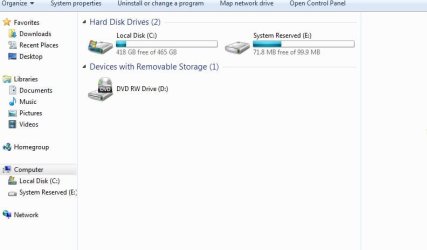
I have attached a screen shot of her system Hard Disks, and was wondering if this looks fine.
C drive and System reserve are the only things showing.

So I hope the partitions or whatever the they are called, were done correctly by macrium.
The laptop is running fine so I guess all is fine.

Thank you all for the help and tips.
I personally have windows 10 and its "ok". but have a liking to the former windows versions.

Thanks again,:-)
 

Attachments

  • Computer Hard drive.JPG
    Computer Hard drive.JPG
    32.3 KB · Views: 0

My Computer My Computer

At a glance

Windows 7 Home premium 64 bit Microsoft sp1Intel(R) Pentium(R) CPU B950 @ 2.10GHz, 64 bit,4 gbIntel(R) HD Graphics
Computer type
Laptop
Computer Manufacturer/Model Number
Gateway NV56R06U Pentium
OS
Windows 7 Home premium 64 bit Microsoft sp1
CPU
Intel(R) Pentium(R) CPU B950 @ 2.10GHz, 64 bit,
Motherboard
Gateway VG50_HC_HR
Memory
4 gb
Graphics Card(s)
Intel(R) HD Graphics
Sound Card
(1) High Definition Audio Device (2) Intel(R) Display Audi
Hard Drives
HITACHI HTS541612J9SA00 3H ATA Device, 111.79 GB
Browser
Chrome
Other Info
Network Adapters: Atheros AR5B125 Wireless Network Adapter, Broadcom NetLink (TM) Gigabit Ethernet.
System Reserved only have boot files and other important system files. My suggestion is hide the partition by taking out the letter assigned to it. Use Disk management.

Please mark this thread as solved.
 

My Computers My Computers

  • At a glance

    Windows 7 HP 64i5 6600K - 800MHz to 4200MHz4+4G GSkill DDR4 3000IG - Intel 530
    Computer type
    PC/Desktop
    Computer Manufacturer/Model Number
    custom build
    OS
    Windows 7 HP 64
    CPU
    i5 6600K - 800MHz to 4200MHz
    Motherboard
    GA-Z170-HD3P
    Memory
    4+4G GSkill DDR4 3000
    Graphics Card(s)
    IG - Intel 530
    Monitor(s) Displays
    Samsung 226BW
    Screen Resolution
    1680x1050
    Hard Drives
    (1) -1 SM951 – 128GB M.2 AHCI PCIe SSD drive for Windows 7 and Lubuntu
    (2) -1 WD SATA 3 - 1T for Data
    (3) -1 WD SATA 3 - 1T for backup
    PSU
    Thermaltake 450W TR2 gold
    Keyboard
    Old and good Chicony mechanical keyboard
    Mouse
    Logitech mX performance - 9 buttons (had to disable some)
    Internet Speed
    500Mb/s
    Browser
    Firefox 64
    Other Info
    TinyWall firewall
  • At a glance

    Windows 7 Proi7-4500U 800MHz to 3.0GHz(4+4)G DDR3 1600IG intel 4400 + NVIDIA GeForce GT 745M
    Computer type
    Laptop
    System Manufacturer/Model Number
    Asus Q550LF
    OS
    Windows 7 Pro
    CPU
    i7-4500U 800MHz to 3.0GHz
    Motherboard
    Asus Q550LF
    Memory
    (4+4)G DDR3 1600
    Graphics Card(s)
    IG intel 4400 + NVIDIA GeForce GT 745M
    Sound Card
    Realtek
    Monitor(s) Displays
    LG Display LP156WF4-SPH1
    Screen Resolution
    1920 x 1080
    Hard Drives
    BX500 120G SSD for Windows and programs +
    1T HDD for data
    Internet Speed
    500 Mb/s
    Browser
    Firefox
    Other Info
    TinyWall firewall
Hi, I removed the assigned letter to hide partition. I will mark this post as solved.
And I again thank you both, Megahertz07 and SIW2, for your time & great help. You're both awesome. :-)
 

My Computer My Computer

At a glance

Windows 7 Home premium 64 bit Microsoft sp1Intel(R) Pentium(R) CPU B950 @ 2.10GHz, 64 bit,4 gbIntel(R) HD Graphics
Computer type
Laptop
Computer Manufacturer/Model Number
Gateway NV56R06U Pentium
OS
Windows 7 Home premium 64 bit Microsoft sp1
CPU
Intel(R) Pentium(R) CPU B950 @ 2.10GHz, 64 bit,
Motherboard
Gateway VG50_HC_HR
Memory
4 gb
Graphics Card(s)
Intel(R) HD Graphics
Sound Card
(1) High Definition Audio Device (2) Intel(R) Display Audi
Hard Drives
HITACHI HTS541612J9SA00 3H ATA Device, 111.79 GB
Browser
Chrome
Other Info
Network Adapters: Atheros AR5B125 Wireless Network Adapter, Broadcom NetLink (TM) Gigabit Ethernet.
Back
Top