Cant change flash drive back to quick removal policy!

fields999

New member
Local time
4:33 PM
Messages
17
Location
england
Hi,

Well today i was looking into how i can increase the performance speed of my phone when i was using it as a mass storage device, just like a usb to transfer files to it.

I went into: Properties > Hardware > [selected the device] > Properties > Policies

And then it showed the removal policies, which were either:

Quick Removal (default) -or- Better Performance

So for now i chose better performance, this was fine and i transfered all my media to my phone etc. I then had to eject the device with safety removal tool because i still had it on the better performance removal policy.

Well later on when i came back i plugged in my phone again as a mass storage device, and then decided i wanted to put it back to quick removal. But when i tried to do this it said:

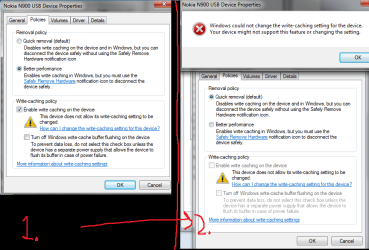
"Windows could not change the write-caching setting for the device. Your device might not support this feature or changing the setting."

Ive no idea why it says this, as it was origionally set to quick removal, although it wont let me change back to it.

If anyone could help me with this problem it would be a great help thanks.

_adam
 

My Computer My Computer

At a glance

Windows 7 Ultimate 64bitAMD Phenom x3 8650 2.3ghz8GB DDR2ATI Radeon 4650 1GB
OS
Windows 7 Ultimate 64bit
CPU
AMD Phenom x3 8650 2.3ghz
Motherboard
Nvidia Chipset
Memory
8GB DDR2
Graphics Card(s)
ATI Radeon 4650 1GB
Sound Card
Internal
Monitor(s) Displays
22 inch hp w2216v
Screen Resolution
1680x1050
Hard Drives
1TB WD
500GB Hitachi
500GB Seagate
PSU
600w Cooler Master
Case
HP a6605uk
Cooling
2x 10mm 1x 8mm
Keyboard
HP Multimedia Keyboard
Mouse
HP Standard 2009
Internet Speed
24/mbps
Hi,

Well today i was looking into how i can increase the performance speed of my phone when i was using it as a mass storage device, just like a usb to transfer files to it.

I went into: Properties > Hardware > [selected the device] > Properties > Policies

And then it showed the removal policies, which were either:

Quick Removal (default) -or- Better Performance

So for now i chose better performance, this was fine and i transfered all my media to my phone etc. I then had to eject the device with safety removal tool because i still had it on the better performance removal policy.

Well later on when i came back i plugged in my phone again as a mass storage device, and then decided i wanted to put it back to quick removal. But when i tried to do this it said:

"Windows could not change the write-caching setting for the device. Your device might not support this feature or changing the setting."

Ive no idea why it says this, as it was origionally set to quick removal, although it wont let me change back to it.

If anyone could help me with this problem it would be a great help thanks.

_adam

With these annoying little problems that are not that common, the best way is system restore, from a point prior to the problem
 

My Computer My Computer

At a glance

Windows 10, Home Clean InstallIntel Core2 processsor Q8200(2.33Ghz 1333FSB)...6 gbATI Radeon 256MB HD3650
Computer type
PC/Desktop
Computer Manufacturer/Model Number
Dell XPS 420
OS
Windows 10, Home Clean Install
CPU
Intel Core2 processsor Q8200(2.33Ghz 1333FSB) Quad Core Tech
Motherboard
Dell
Memory
6 gb
Graphics Card(s)
ATI Radeon 256MB HD3650
Sound Card
Intergrated 7.1 Channel Audio
Monitor(s) Displays
Dell SP2009W 20"
Hard Drives
640 GB Serial ATA Hard drive
Cooling
Fan
Keyboard
Dell USB Keyboard
Mouse
Dell Premium Optical USB
Internet Speed
DSL 2.85
Its the device that is not correct though, not my pc, (atleast i dont think so)

I want to change my device back to quick removal although its on better performance at the moment. And as i cant restore my device im not sure what to do, there must be some work around for this, or maybe a reason why its happening.
 

My Computer My Computer

At a glance

Windows 7 Ultimate 64bitAMD Phenom x3 8650 2.3ghz8GB DDR2ATI Radeon 4650 1GB
OS
Windows 7 Ultimate 64bit
CPU
AMD Phenom x3 8650 2.3ghz
Motherboard
Nvidia Chipset
Memory
8GB DDR2
Graphics Card(s)
ATI Radeon 4650 1GB
Sound Card
Internal
Monitor(s) Displays
22 inch hp w2216v
Screen Resolution
1680x1050
Hard Drives
1TB WD
500GB Hitachi
500GB Seagate
PSU
600w Cooler Master
Case
HP a6605uk
Cooling
2x 10mm 1x 8mm
Keyboard
HP Multimedia Keyboard
Mouse
HP Standard 2009
Internet Speed
24/mbps
Its the device that is not correct though, not my pc, (atleast i dont think so)

I want to change my device back to quick removal although its on better performance at the moment. And as i cant restore my device im not sure what to do, there must be some work around for this, or maybe a reason why its happening.

A double apology, I did not understand your question and I do notknow how to make the necessary change. Sorry, but I wish you the best holiday season and hope that you can work this out.
 

My Computer My Computer

At a glance

Windows 10, Home Clean InstallIntel Core2 processsor Q8200(2.33Ghz 1333FSB)...6 gbATI Radeon 256MB HD3650
Computer type
PC/Desktop
Computer Manufacturer/Model Number
Dell XPS 420
OS
Windows 10, Home Clean Install
CPU
Intel Core2 processsor Q8200(2.33Ghz 1333FSB) Quad Core Tech
Motherboard
Dell
Memory
6 gb
Graphics Card(s)
ATI Radeon 256MB HD3650
Sound Card
Intergrated 7.1 Channel Audio
Monitor(s) Displays
Dell SP2009W 20"
Hard Drives
640 GB Serial ATA Hard drive
Cooling
Fan
Keyboard
Dell USB Keyboard
Mouse
Dell Premium Optical USB
Internet Speed
DSL 2.85
I don't know if the setting made some kind of change in the device itself, or just in the OS. If the latter, perhaps plugging in the device, then going to the Device Manager and uninstalling it might remove the change that you made. After doing this, either remove the device physically and then replugging it, or selecting "Scan for hardware changes" from the Action might restore it to it's original state. It would be better to do this from Safe Mode.
 

My Computer My Computer

At a glance

W7x64 Pro, SuSe 12.1/** W7 x64 Pro, XP MCEPhenom II 1090T w/Noctua NH-D14 /**4400+ X2 w...2 x 2GB Patriot PGS34g1600LLKA/**4x1GB Corsai...EVGA GTX460 SC/**EVGA 8800GTS
Computer Manufacturer/Model Number
DIY
OS
W7x64 Pro, SuSe 12.1/** W7 x64 Pro, XP MCE
CPU
Phenom II 1090T w/Noctua NH-D14 /**4400+ X2 w/CM Hyper TX 3
Motherboard
ASRock 890FX Deluxe 4/**A8N-SLI
Memory
2 x 2GB Patriot PGS34g1600LLKA/**4x1GB Corsair VS
Graphics Card(s)
EVGA GTX460 SC/**EVGA 8800GTS
Sound Card
Asus Xonar D2X/**Xonar D1
Monitor(s) Displays
Acer X233H, Dell E152FPc /**LG M237-WD
Screen Resolution
1920x1080 & 1024x768/**1980x1080
Hard Drives
WDC 2TB, 1.5TB, 1TB, 500GB,Seagate 500GB , Maxtor 80GB /**500GB Seagate & WDC 1TB Black
PSU
CM RS600 w/ APC BX1000G/**Antec 500 TP w/ APC BX1000
Case
HAF922/**Antec 1040IIB
Cooling
3x200mm, 1x140 and 1x120mm/**5x80mm fans
Keyboard
Logitech Media USB/**Saitek Eclipse
Mouse
Cordless Trackman Wheel/**Ditto
Internet Speed
3.3Mbps
Other Info
SB 560 5.1 w/ Sennheiser RS140/**Creative T20 speakers, Dvico FusionHDTV7 Gold RT, Cisco E3000, HP 5510V AIO, Linksys E3000, Belkin F5U237 hub and **F5D8055 adapter
(** = 2nd rig)
After a couple of cups of coffee and rethinking this, I think that a better sequence to follow would be to boot into Safe Mode with the drive unplugged, select Show hidden devices from the Device Manager's View menu and see if a ghost of the drive appears. If so, delete it, then plug the drive in and see if it's original setting has returned.
 

My Computer My Computer

At a glance

W7x64 Pro, SuSe 12.1/** W7 x64 Pro, XP MCEPhenom II 1090T w/Noctua NH-D14 /**4400+ X2 w...2 x 2GB Patriot PGS34g1600LLKA/**4x1GB Corsai...EVGA GTX460 SC/**EVGA 8800GTS
Computer Manufacturer/Model Number
DIY
OS
W7x64 Pro, SuSe 12.1/** W7 x64 Pro, XP MCE
CPU
Phenom II 1090T w/Noctua NH-D14 /**4400+ X2 w/CM Hyper TX 3
Motherboard
ASRock 890FX Deluxe 4/**A8N-SLI
Memory
2 x 2GB Patriot PGS34g1600LLKA/**4x1GB Corsair VS
Graphics Card(s)
EVGA GTX460 SC/**EVGA 8800GTS
Sound Card
Asus Xonar D2X/**Xonar D1
Monitor(s) Displays
Acer X233H, Dell E152FPc /**LG M237-WD
Screen Resolution
1920x1080 & 1024x768/**1980x1080
Hard Drives
WDC 2TB, 1.5TB, 1TB, 500GB,Seagate 500GB , Maxtor 80GB /**500GB Seagate & WDC 1TB Black
PSU
CM RS600 w/ APC BX1000G/**Antec 500 TP w/ APC BX1000
Case
HAF922/**Antec 1040IIB
Cooling
3x200mm, 1x140 and 1x120mm/**5x80mm fans
Keyboard
Logitech Media USB/**Saitek Eclipse
Mouse
Cordless Trackman Wheel/**Ditto
Internet Speed
3.3Mbps
Other Info
SB 560 5.1 w/ Sennheiser RS140/**Creative T20 speakers, Dvico FusionHDTV7 Gold RT, Cisco E3000, HP 5510V AIO, Linksys E3000, Belkin F5U237 hub and **F5D8055 adapter
(** = 2nd rig)
i tried your first method but still when i re-install it, i still cant get back to quick removal.

and when i tried the second method as far as i could see there wasnt a ghost drive on there.
 

My Computer My Computer

At a glance

Windows 7 Ultimate 64bitAMD Phenom x3 8650 2.3ghz8GB DDR2ATI Radeon 4650 1GB
OS
Windows 7 Ultimate 64bit
CPU
AMD Phenom x3 8650 2.3ghz
Motherboard
Nvidia Chipset
Memory
8GB DDR2
Graphics Card(s)
ATI Radeon 4650 1GB
Sound Card
Internal
Monitor(s) Displays
22 inch hp w2216v
Screen Resolution
1680x1050
Hard Drives
1TB WD
500GB Hitachi
500GB Seagate
PSU
600w Cooler Master
Case
HP a6605uk
Cooling
2x 10mm 1x 8mm
Keyboard
HP Multimedia Keyboard
Mouse
HP Standard 2009
Internet Speed
24/mbps
Heres a screen shot of the problem when i try to change back to Quick removal.

Click to enlarge.
 

Attachments

  • removalp.png
    removalp.png
    37.1 KB · Views: 508

My Computer My Computer

At a glance

Windows 7 Ultimate 64bitAMD Phenom x3 8650 2.3ghz8GB DDR2ATI Radeon 4650 1GB
OS
Windows 7 Ultimate 64bit
CPU
AMD Phenom x3 8650 2.3ghz
Motherboard
Nvidia Chipset
Memory
8GB DDR2
Graphics Card(s)
ATI Radeon 4650 1GB
Sound Card
Internal
Monitor(s) Displays
22 inch hp w2216v
Screen Resolution
1680x1050
Hard Drives
1TB WD
500GB Hitachi
500GB Seagate
PSU
600w Cooler Master
Case
HP a6605uk
Cooling
2x 10mm 1x 8mm
Keyboard
HP Multimedia Keyboard
Mouse
HP Standard 2009
Internet Speed
24/mbps
Back
Top