please help with my iphone

swest

New member
Local time
3:28 PM
Messages
1
My old computer crashed several months ago and so I haven't updated my iphone 3g. I just got a new laptop with windows 7 64 bit. I plug my phone in and it charges but the laptop says USB device not recognized. Ive googled just about everything I could think of with no luck. Gone to the device manager and updated drivers but it still says "unknown device", uninstalled, reinstalled, etc. I have the latest iTunes for 64 bit.

Im getting the iphone 4 next week and I don't want this to affect that new phone. Any help would be greatly appreciated.
 

My Computer

OS
windows 7 home premium
Have you reinstalled iTunes?

~Lordbob
 

My Computer

Computer Manufacturer/Model Number
Hera
OS
Windows 7 Ultimate x64, Mint 9
CPU
Intel i5-2500k
Motherboard
ASUS P8P67 Pro
Memory
2x 4Gb Corsair VENGEANCE DDR3-1600
Graphics Card(s)
NVidia GeForce N260GTX Twin Frozr
Sound Card
Realtek HD OnBoard Audio
Monitor(s) Displays
ASUS 24" Monitor
Screen Resolution
1920x1080
Hard Drives
G.SKILL Phoenix Series 60GB SATA II MLC Internal Solid State Drive (SSD)
SAMSUNG Spinpoint F3R 1TB 7200 RPM 32MB Cache SATA II
PSU
Cooler Master Real Power Pro 750W
Case
Cooler Master Haf 932
Cooling
Fans
Keyboard
Razer Tarantula
Mouse
Razer Lachesis
Internet Speed
not fast enough
You are missing driver

Welcome to Windows 7 Support forums,
As I understand your issue your Iphone charges but your device manager does not recognise your Iphone.
To resolve this issue please conduct the following procedure:
  • Remove your Iphone from your system
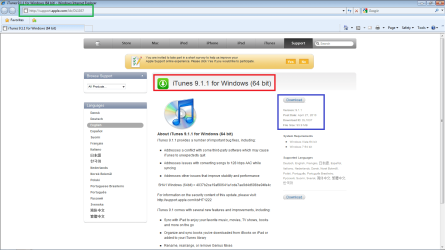
  • If you have internet access go to Apple's Itune support page
  • Based on your selection, you can either D/L Itunes installer in 32/64 bit installer,
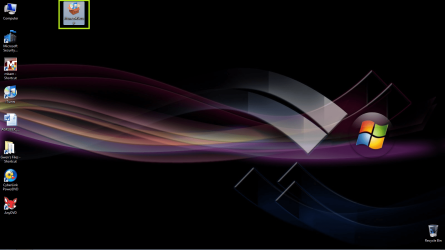
  • Download the installer to where ever you desire, desktop is usually the easiest
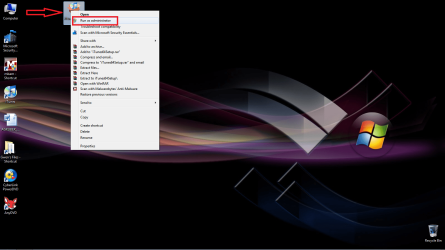
  • Once you have D/L the installer place your mouse over the Itunes program, right click your mouse, you will see a drop down menu, you will observe the caption: "Run as Administrator" Left click that selection and Itunes will install onto your system
Your Iphone is not recognised currently due to the lack of the Apple Mobile Device drivers.

Let us know if you need any further assistance.
For your ease of installation attached are some screenshots for you to review.
 

Attachments

  • admin.png
    admin.png
    168.5 KB · Views: 15
  • apple.png
    apple.png
    55.1 KB · Views: 22
  • desk.png
    desk.png
    185.7 KB · Views: 12

My Computer

Computer Manufacturer/Model Number
Custom Build
OS
Windows 7 7600 1 X64
CPU
AMD PHENOM II X 550 PROCESSOR 3.1 ghz
Motherboard
ASUS M4A78-TE
Memory
Corsair 4 gig ddr 3
Graphics Card(s)
ati radeon 3300
Sound Card
ati hd
Monitor(s) Displays
syncmaster 2033sw
Screen Resolution
1600X900 60 hz refresh
Hard Drives
twin_seagates SATA's 1 TB & 500 Gig, hitachi_slimline 160 gig
PSU
antec_550 watt
Case
cooler master GLite
Cooling
stock_heat sink
Internet Speed
20mbs up/ 1.5mbs down
Other Info
favorite child "stewie"
favorite dog "brian"
Welcome to Windows 7 Support forums,
As I understand your issue your Iphone charges but your device manager does not recognise your Iphone.
To resolve this issue please conduct the following procedure:
  • Remove your Iphone from your system
  • If you have internet access go to Apple's Itune support page
  • Based on your selection, you can either D/L Itunes installer in 32/64 bit installer,
  • Download the installer to where ever you desire, desktop is usually the easiest
  • Once you have D/L the installer place your mouse over the Itunes program, right click your mouse, you will see a drop down menu, you will observe the caption: "Run as Administrator" Left click that selection and Itunes will install onto your system
Your Iphone is not recognised currently due to the lack of the Apple Mobile Device drivers.

Let us know if you need any further assistance.
For your ease of installation attached are some screenshots for you to review.
I suspected that, which is why I recommended reinstalling iTunes.

~Lordbob
 

My Computer

Computer Manufacturer/Model Number
Hera
OS
Windows 7 Ultimate x64, Mint 9
CPU
Intel i5-2500k
Motherboard
ASUS P8P67 Pro
Memory
2x 4Gb Corsair VENGEANCE DDR3-1600
Graphics Card(s)
NVidia GeForce N260GTX Twin Frozr
Sound Card
Realtek HD OnBoard Audio
Monitor(s) Displays
ASUS 24" Monitor
Screen Resolution
1920x1080
Hard Drives
G.SKILL Phoenix Series 60GB SATA II MLC Internal Solid State Drive (SSD)
SAMSUNG Spinpoint F3R 1TB 7200 RPM 32MB Cache SATA II
PSU
Cooler Master Real Power Pro 750W
Case
Cooler Master Haf 932
Cooling
Fans
Keyboard
Razer Tarantula
Mouse
Razer Lachesis
Internet Speed
not fast enough
Back
Top