Solved Cannot get 'MS Office Student 2007' to auto update?

Brummie

New member
Local time
1:52 PM
Messages
8
Hello All,

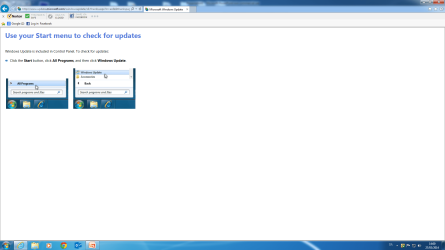
Here's hoping someone can help. I updraded my PC two weeks ago, motherboard and processor, everything is running good with no issues. My W7 has received all current auto updates. I have the above Office suite installed which is a three license key pack. I decided to go the usual route yesterday and click on the 'Get updates for other Microsoft products' on the 'Windows Update' page. All this does is send me to a page with information telling me to 'Use your start menu to check for updates' which only sends me around in circles and back to the 'Windows Update' page.
Does anyone out there know how I am supposed to set it to allow auto updates? My son's desktop next door has the same suite and his auto updates function fine. The other key is used on my laptop.
I did uninstall the suite and installed again yesterday from my disc, ran the product key and got the green tick to say it activated correctly.

My specs are, Windows 7 Home Premium, IE 11, 3.40GHz proc. 8 Gb Ram, Office Home and Student 2007,
Norton Int. Security 2014.
 

My Computer My Computer

Computer Manufacturer/Model Number
Asus Pro 2000
OS
Windows 7 Home Premium 64 bit
CPU
2.13 Ghz Dual Core
Memory
3Gb
Graphics Card(s)
Ati Radeon 6770 HD 1Gb
Sound Card
On board
Monitor(s) Displays
Philips 190 WV
Hard Drives
320 Gig
PSU
400w
Keyboard
Microsoft Multimedia Keyboard 1.1 (Wireless)
Mouse
Microsoft Optical Wireless 2000
Internet Speed
1Gbt ADSL

My Computer My Computer

Computer type
PC/Desktop
Computer Manufacturer/Model Number
Self built using existing case
OS
Windows 7 Home Premium 64 bit sp1
CPU
Intel i5 3570 3.4Ghz Ivy Bridge SKT 1155 quad core
Motherboard
Gigabyte Z77-HD3 SKT 1155 2xSata 3, 4x USB 3.0
Memory
G-Skill Rip Jaws 16Gb (8x2) DDR3 -1600 PC3 12800 CL 10 red
Graphics Card(s)
Gigabyte NVIDIA GT610 1Gb DDR3 810/1200 PCI-E 2.0 Silent
Sound Card
NVIDIA High Definition & Realtech High Definition Audio
Monitor(s) Displays
2 x Philips 226V4L 16:9 aspect ratio
Screen Resolution
1920 x 1080 HD
Hard Drives
Samsung 840 Pro 256gb SSD, SATA 3.
Hitachi Touro Portable 1tb, USB 3.0 HDD used for image b/ups.
PSU
Corsair VS450
Case
Codeng
Cooling
PSU fan & CPU fan
Keyboard
Logitech
Mouse
Logitech Wireless trackball M570
Internet Speed
Wireless 3G. 3mg down & 550kb up.
Antivirus
Bitdefender Internet Security 2020
Browser
Opera (Current Version) & Firefox
Other Info
MS Office 2013 Pro. Davis weather station software. MGE Nova 600 avr UPS.
Hi,
Thanks for your reply.
Clicked the link and checked it out and mine has the correct setting as explained in the article. My problem is I just cannot enable the auto updates to start off. When my son reformatted his PC last August, we did the same thing for his office suite and there were no issues like the one I have described, very strange.
You don't think it is because of this new 'Office Online' cloud feature that is now available in 'Outlook' email that auto updates are not available any more for newly installed older Office suites?

Regards
 

My Computer My Computer

Computer Manufacturer/Model Number
Asus Pro 2000
OS
Windows 7 Home Premium 64 bit
CPU
2.13 Ghz Dual Core
Memory
3Gb
Graphics Card(s)
Ati Radeon 6770 HD 1Gb
Sound Card
On board
Monitor(s) Displays
Philips 190 WV
Hard Drives
320 Gig
PSU
400w
Keyboard
Microsoft Multimedia Keyboard 1.1 (Wireless)
Mouse
Microsoft Optical Wireless 2000
Internet Speed
1Gbt ADSL
No I don't think it would have anything to with the Cloud feature. i am using Office 2013 pro & I received the same email about the Cloud. Office 2007 is still a current version so updates should install.

You could try disabling Norton Internet Security to see if that is causing the problem & then try to get the updates to install.
 

My Computer My Computer

Computer type
PC/Desktop
Computer Manufacturer/Model Number
Self built using existing case
OS
Windows 7 Home Premium 64 bit sp1
CPU
Intel i5 3570 3.4Ghz Ivy Bridge SKT 1155 quad core
Motherboard
Gigabyte Z77-HD3 SKT 1155 2xSata 3, 4x USB 3.0
Memory
G-Skill Rip Jaws 16Gb (8x2) DDR3 -1600 PC3 12800 CL 10 red
Graphics Card(s)
Gigabyte NVIDIA GT610 1Gb DDR3 810/1200 PCI-E 2.0 Silent
Sound Card
NVIDIA High Definition & Realtech High Definition Audio
Monitor(s) Displays
2 x Philips 226V4L 16:9 aspect ratio
Screen Resolution
1920 x 1080 HD
Hard Drives
Samsung 840 Pro 256gb SSD, SATA 3.
Hitachi Touro Portable 1tb, USB 3.0 HDD used for image b/ups.
PSU
Corsair VS450
Case
Codeng
Cooling
PSU fan & CPU fan
Keyboard
Logitech
Mouse
Logitech Wireless trackball M570
Internet Speed
Wireless 3G. 3mg down & 550kb up.
Antivirus
Bitdefender Internet Security 2020
Browser
Opera (Current Version) & Firefox
Other Info
MS Office 2013 Pro. Davis weather station software. MGE Nova 600 avr UPS.
It's nothing to do with Norton, the problem is the link from the Windows update page, it goes in a loop and takes you back to the Windows page? If I could enable Office updates in the first place and they weren't happening, then I would look at firewall.
I think I will uninstall one more time and see if anything changes.
 

My Computer My Computer

Computer Manufacturer/Model Number
Asus Pro 2000
OS
Windows 7 Home Premium 64 bit
CPU
2.13 Ghz Dual Core
Memory
3Gb
Graphics Card(s)
Ati Radeon 6770 HD 1Gb
Sound Card
On board
Monitor(s) Displays
Philips 190 WV
Hard Drives
320 Gig
PSU
400w
Keyboard
Microsoft Multimedia Keyboard 1.1 (Wireless)
Mouse
Microsoft Optical Wireless 2000
Internet Speed
1Gbt ADSL
Just reinstalled again and still no joy. I even re activated my product key for Windows 7, that was successful and still I run into a brick wall. I will attemp to attach a screen shot of what I get directed to when I click on 'Get updates for other Microsoft products' from the 'Windows Update' page. This is supposed to allow you to set your computer to receive office updates with your Windows ones?
 

Attachments

  • Office update.png
    Office update.png
    71 KB · Views: 3

My Computer My Computer

Computer Manufacturer/Model Number
Asus Pro 2000
OS
Windows 7 Home Premium 64 bit
CPU
2.13 Ghz Dual Core
Memory
3Gb
Graphics Card(s)
Ati Radeon 6770 HD 1Gb
Sound Card
On board
Monitor(s) Displays
Philips 190 WV
Hard Drives
320 Gig
PSU
400w
Keyboard
Microsoft Multimedia Keyboard 1.1 (Wireless)
Mouse
Microsoft Optical Wireless 2000
Internet Speed
1Gbt ADSL

My Computer My Computer

Computer type
PC/Desktop
Computer Manufacturer/Model Number
Self built using existing case
OS
Windows 7 Home Premium 64 bit sp1
CPU
Intel i5 3570 3.4Ghz Ivy Bridge SKT 1155 quad core
Motherboard
Gigabyte Z77-HD3 SKT 1155 2xSata 3, 4x USB 3.0
Memory
G-Skill Rip Jaws 16Gb (8x2) DDR3 -1600 PC3 12800 CL 10 red
Graphics Card(s)
Gigabyte NVIDIA GT610 1Gb DDR3 810/1200 PCI-E 2.0 Silent
Sound Card
NVIDIA High Definition & Realtech High Definition Audio
Monitor(s) Displays
2 x Philips 226V4L 16:9 aspect ratio
Screen Resolution
1920 x 1080 HD
Hard Drives
Samsung 840 Pro 256gb SSD, SATA 3.
Hitachi Touro Portable 1tb, USB 3.0 HDD used for image b/ups.
PSU
Corsair VS450
Case
Codeng
Cooling
PSU fan & CPU fan
Keyboard
Logitech
Mouse
Logitech Wireless trackball M570
Internet Speed
Wireless 3G. 3mg down & 550kb up.
Antivirus
Bitdefender Internet Security 2020
Browser
Opera (Current Version) & Firefox
Other Info
MS Office 2013 Pro. Davis weather station software. MGE Nova 600 avr UPS.
Hi,
Thanks again for taking time out in trying to solve this. Unfortunately, having read that link you posted it wasn't any help! I still cannot get it to go start getting updates still, keep getting the same page that I showed in my attachment. I may pop back to the place where I had the work done on my PC to see what they say. I'm starting to think that they may have put a blocker/cracked file on so you don't 'accidentally' click for updates? Strange how my Windows updates are all working (Here unfortunately, piracy is rife) and up to date but just the office is refusing to play. Will let you know how I get on.
 

My Computer My Computer

Computer Manufacturer/Model Number
Asus Pro 2000
OS
Windows 7 Home Premium 64 bit
CPU
2.13 Ghz Dual Core
Memory
3Gb
Graphics Card(s)
Ati Radeon 6770 HD 1Gb
Sound Card
On board
Monitor(s) Displays
Philips 190 WV
Hard Drives
320 Gig
PSU
400w
Keyboard
Microsoft Multimedia Keyboard 1.1 (Wireless)
Mouse
Microsoft Optical Wireless 2000
Internet Speed
1Gbt ADSL
Thanks for the update. I will await your reply.
 

My Computer My Computer

Computer type
PC/Desktop
Computer Manufacturer/Model Number
Self built using existing case
OS
Windows 7 Home Premium 64 bit sp1
CPU
Intel i5 3570 3.4Ghz Ivy Bridge SKT 1155 quad core
Motherboard
Gigabyte Z77-HD3 SKT 1155 2xSata 3, 4x USB 3.0
Memory
G-Skill Rip Jaws 16Gb (8x2) DDR3 -1600 PC3 12800 CL 10 red
Graphics Card(s)
Gigabyte NVIDIA GT610 1Gb DDR3 810/1200 PCI-E 2.0 Silent
Sound Card
NVIDIA High Definition & Realtech High Definition Audio
Monitor(s) Displays
2 x Philips 226V4L 16:9 aspect ratio
Screen Resolution
1920 x 1080 HD
Hard Drives
Samsung 840 Pro 256gb SSD, SATA 3.
Hitachi Touro Portable 1tb, USB 3.0 HDD used for image b/ups.
PSU
Corsair VS450
Case
Codeng
Cooling
PSU fan & CPU fan
Keyboard
Logitech
Mouse
Logitech Wireless trackball M570
Internet Speed
Wireless 3G. 3mg down & 550kb up.
Antivirus
Bitdefender Internet Security 2020
Browser
Opera (Current Version) & Firefox
Other Info
MS Office 2013 Pro. Davis weather station software. MGE Nova 600 avr UPS.
Hello again,
Success at last! Took it back to shop, explained to 'Techy' the problem and was able to replicate the issue there. He later told me they had to download a fix it file from Microsoft as something was blocking the auto update setup function? Now I am happily downloading all the necessary files and service packs as I speak. I have already installed quite a few and the next batch is downloading as I type. This was certainly a strange issue.
I woud like to thank you once again for your help, have a good weekend ;)
 

My Computer My Computer

Computer Manufacturer/Model Number
Asus Pro 2000
OS
Windows 7 Home Premium 64 bit
CPU
2.13 Ghz Dual Core
Memory
3Gb
Graphics Card(s)
Ati Radeon 6770 HD 1Gb
Sound Card
On board
Monitor(s) Displays
Philips 190 WV
Hard Drives
320 Gig
PSU
400w
Keyboard
Microsoft Multimedia Keyboard 1.1 (Wireless)
Mouse
Microsoft Optical Wireless 2000
Internet Speed
1Gbt ADSL
Thanks for your reply. I am glad you have it fixed & also have a good weekend.
 

My Computer My Computer

Computer type
PC/Desktop
Computer Manufacturer/Model Number
Self built using existing case
OS
Windows 7 Home Premium 64 bit sp1
CPU
Intel i5 3570 3.4Ghz Ivy Bridge SKT 1155 quad core
Motherboard
Gigabyte Z77-HD3 SKT 1155 2xSata 3, 4x USB 3.0
Memory
G-Skill Rip Jaws 16Gb (8x2) DDR3 -1600 PC3 12800 CL 10 red
Graphics Card(s)
Gigabyte NVIDIA GT610 1Gb DDR3 810/1200 PCI-E 2.0 Silent
Sound Card
NVIDIA High Definition & Realtech High Definition Audio
Monitor(s) Displays
2 x Philips 226V4L 16:9 aspect ratio
Screen Resolution
1920 x 1080 HD
Hard Drives
Samsung 840 Pro 256gb SSD, SATA 3.
Hitachi Touro Portable 1tb, USB 3.0 HDD used for image b/ups.
PSU
Corsair VS450
Case
Codeng
Cooling
PSU fan & CPU fan
Keyboard
Logitech
Mouse
Logitech Wireless trackball M570
Internet Speed
Wireless 3G. 3mg down & 550kb up.
Antivirus
Bitdefender Internet Security 2020
Browser
Opera (Current Version) & Firefox
Other Info
MS Office 2013 Pro. Davis weather station software. MGE Nova 600 avr UPS.
Back
Top