
Cannot get MS Office 2007 autoupdates after setting up new system, #2

wpcoe

New member
Local time
11:48 PM
Messages
8
Location
Thailand
I'm stealing the title of an existing thread because the opening post is identical to my situation, except I'm working with 32-bit Windows 7 Pro on an Acer Travelmate 3004 notebook. Unfortunately, I'm still stuck, whereas that poster got lucky. Per the Windows Update Posting Instructions I'm starting a new thread.

I get stuck on Step #1, running SURT. After the initial "Preparing the installation..." screen, I'm prompted:

SURT03.gif


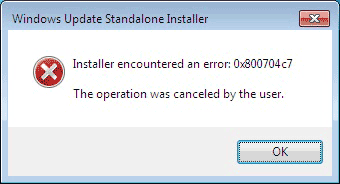
If I click "Yes" it goes through the motions (for twenty or more minutes) of installing that KB Hotfix. When it finishes it is necessary to relaunch SURT, and again I get the same prompt. (Even after a reboot.)

If I click "No":
SURT04.gif


It's an endless Groundhog Day loop. I can't get beyond updating that same Hotfix.

Step #2:

Microsoft Windows [Version 6.1.7601]
Copyright (c) 2009 Microsoft Corporation. All rights reserved.

C:\Windows\system32>sfc /scannow

Beginning system scan. This process will take some time.

Beginning verification phase of system scan.
Verification 100% complete.

Windows Resource Protection did not find any integrity violations.

Step #3 not relevant, as there are no error messages. I'm simply not able to get updates for MS Office.

Step #4: CBS.zip file attached
___________________________________________

Where do I go from here?

FYI, this is an old laptop for my 96-year old mother, and I want Windows Update to work seamlessly in the background, including updating the MSOffice suite.
 

My Computer My Computer

At a glance

Windows 7 Pro 32-bitIntel Pentium M7602GBIGP
Computer type
Laptop
Computer Manufacturer/Model Number
Acer Travelmate 3004WTMi
OS
Windows 7 Pro 32-bit
CPU
Intel Pentium M760
Motherboard
Acer "Hummingbird" with i915GMS/901GML Chipset
Memory
2GB
Graphics Card(s)
IGP
Screen Resolution
1280 x 800
Hard Drives
WD 150GB 2.5" HDD
Antivirus
Avast (free)
Browser
Opera 12, IE11, Chrome
There don't appear to be any problems in any of the posted logs.

Please post the following files...
C:\Windows\windowsupdate.log
 

My Computer My Computer

At a glance

Win 7 x64 Home Premium (and x86 VirtualBox VM...i3 370M/i7 6500U8GB - finally :)/8GBit's an i3, dude!/dual Intel&nVidia
Computer type
Laptop
Computer Manufacturer/Model Number
Asus K52F or Lenovo B51-80
OS
Win 7 x64 Home Premium (and x86 VirtualBox VM)/Win10
CPU
i3 370M/i7 6500U
Motherboard
Asus/Lenovo
Memory
8GB - finally :)/8GB
Graphics Card(s)
it's an i3, dude!/dual Intel&nVidia
Sound Card
onboard
Monitor(s) Displays
15.6" built-in
Screen Resolution
1366x768/1920x1080
Hard Drives
750GB Seagate internal
Sundry external drives attached to other computers on the local network
1TB SSD on the Lenovo
PSU
n/a
Internet Speed
as much as I can get - usually on a dongle/phone, so <1MB/s
Antivirus
MSE/Defender
Browser
IE11/12/Edge/Chrome/FF(if I must)
Thanks for checking the previous logs, attached is the windowsupdate.log
 

My Computer My Computer

At a glance

Windows 7 Pro 32-bitIntel Pentium M7602GBIGP
Computer type
Laptop
Computer Manufacturer/Model Number
Acer Travelmate 3004WTMi
OS
Windows 7 Pro 32-bit
CPU
Intel Pentium M760
Motherboard
Acer "Hummingbird" with i915GMS/901GML Chipset
Memory
2GB
Graphics Card(s)
IGP
Screen Resolution
1280 x 800
Hard Drives
WD 150GB 2.5" HDD
Antivirus
Avast (free)
Browser
Opera 12, IE11, Chrome
Try this...

Open an Elevated Command Prompt, and run the following Commands..

dism /online /remove-package /packagename:Package_for_KB2834140~31bf3856ad364e35~x86~~6.1.2.0
Once complete, reboot twice, then do a Check for Updates, and see what happens.
 

My Computer My Computer

At a glance

Win 7 x64 Home Premium (and x86 VirtualBox VM...i3 370M/i7 6500U8GB - finally :)/8GBit's an i3, dude!/dual Intel&nVidia
Computer type
Laptop
Computer Manufacturer/Model Number
Asus K52F or Lenovo B51-80
OS
Win 7 x64 Home Premium (and x86 VirtualBox VM)/Win10
CPU
i3 370M/i7 6500U
Motherboard
Asus/Lenovo
Memory
8GB - finally :)/8GB
Graphics Card(s)
it's an i3, dude!/dual Intel&nVidia
Sound Card
onboard
Monitor(s) Displays
15.6" built-in
Screen Resolution
1366x768/1920x1080
Hard Drives
750GB Seagate internal
Sundry external drives attached to other computers on the local network
1TB SSD on the Lenovo
PSU
n/a
Internet Speed
as much as I can get - usually on a dongle/phone, so <1MB/s
Antivirus
MSE/Defender
Browser
IE11/12/Edge/Chrome/FF(if I must)
Microsoft Windows [Version 6.1.7601]
Copyright (c) 2009 Microsoft Corporation. All rights reserved.

C:\Windows\system32>dism /online /remove-package /packagename:Package_for_KB2834140~31bf3856ad36
4e35~x86~~6.1.2.0

Deployment Image Servicing and Management tool
Version: 6.1.7600.16385

Image Version: 6.1.7601.18489

Processing 1 of 1 - Removing package Package_for_KB2834140~31bf3856ad364e35~x86~~6.1.2.0
[==========================100.0%==========================]
The operation completed successfully.
Restart Windows to complete this operation.
Do you want to restart the computer now (Y/N)?

During reboot process, "Configuring Windows updates" messages appeared but later, nothing has changed. Cannot add MS Office to Windows Updates, and when running SURT it's still the Groundhog Day loop with installing (or not) KB947821.
 

My Computer My Computer

At a glance

Windows 7 Pro 32-bitIntel Pentium M7602GBIGP
Computer type
Laptop
Computer Manufacturer/Model Number
Acer Travelmate 3004WTMi
OS
Windows 7 Pro 32-bit
CPU
Intel Pentium M760
Motherboard
Acer "Hummingbird" with i915GMS/901GML Chipset
Memory
2GB
Graphics Card(s)
IGP
Screen Resolution
1280 x 800
Hard Drives
WD 150GB 2.5" HDD
Antivirus
Avast (free)
Browser
Opera 12, IE11, Chrome

My Computer My Computer

At a glance

Microsoft Windows 7 Home Premium 64-bits 7601...Intel(R) Core(TM) i3 CPU M 370 @ 2.40GHz4,00 GBATI Mobility Radeon HD 5400 Series
Computer type
Laptop
Computer Manufacturer/Model Number
ACER ASPIRE 5742G
OS
Microsoft Windows 7 Home Premium 64-bits 7601 Multiprocessor Free Service Pack 1
CPU
Intel(R) Core(TM) i3 CPU M 370 @ 2.40GHz
Motherboard
Acer Aspire 5742G
Memory
4,00 GB
Graphics Card(s)
ATI Mobility Radeon HD 5400 Series
Sound Card
(1) AMD High Definition Audio Device (2) Realtek High Defi
Screen Resolution
1366 x 768 x 32 bits (4294967296 colors) @ 60 Hz
Hard Drives
WDC WD5000BEVT-22ZAT0
Well, that was an interesting ride. After I saw how long it took to get only about 20% finished, I decided to let it run overnight. Woke up and it was frozen at 21 minutes, showing "Regular Jobs: 2/11". Closed it and tried again. Again, froze at 21 minutes with 2/11.

After a third try I finally unchecked 1-2-3 and it ran fine. Then #1, fine. #2 was the culprit. Cannot reset file permissions on any of the three partitions. #3 ran fine.

Several reboots during and after that, but still Windows Update is stuck on "You receive updates: For Windows only."

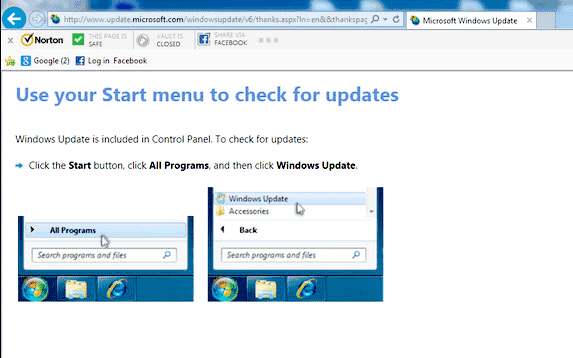
Clicking on the "Find out more" link after "Get updates for other Microsoft products" still links to this web page:

windows-update-loop.gif
 

My Computer My Computer

At a glance

Windows 7 Pro 32-bitIntel Pentium M7602GBIGP
Computer type
Laptop
Computer Manufacturer/Model Number
Acer Travelmate 3004WTMi
OS
Windows 7 Pro 32-bit
CPU
Intel Pentium M760
Motherboard
Acer "Hummingbird" with i915GMS/901GML Chipset
Memory
2GB
Graphics Card(s)
IGP
Screen Resolution
1280 x 800
Hard Drives
WD 150GB 2.5" HDD
Antivirus
Avast (free)
Browser
Opera 12, IE11, Chrome
Let's have a look at the existing permissions on the partitions...

Open an Elevated Command Prompt, and run the following commands...

ICACLS C:
ICACLS C:\
ICACLS D:
ICACLS D:\
ICACLS E:
ICACLS E:\

Post the results.

Here are some instructions to make life easier :)
1) To open an Elevated Command Prompt Window (the ECP window), click on Start, All Programs, Accessories – then right-click on Command Prompt, and select Run as Administrator. Accept the UAC prompt.
2) To run the commands easier, highlight the block of commands, and right-click on the highlight – select Copy. In the CP Window, click on the black/white icon at top left – select Paste. The commands will run but may not complete the last command, so hit the Enter Key once.
3) To copy the results... click on the Black/White icon in the top left, and select Edit... 'Select All', and hit the Enter key - then use Ctrl+V or r-click+Paste to paste it into your response.
 

My Computer My Computer

At a glance

Win 7 x64 Home Premium (and x86 VirtualBox VM...i3 370M/i7 6500U8GB - finally :)/8GBit's an i3, dude!/dual Intel&nVidia
Computer type
Laptop
Computer Manufacturer/Model Number
Asus K52F or Lenovo B51-80
OS
Win 7 x64 Home Premium (and x86 VirtualBox VM)/Win10
CPU
i3 370M/i7 6500U
Motherboard
Asus/Lenovo
Memory
8GB - finally :)/8GB
Graphics Card(s)
it's an i3, dude!/dual Intel&nVidia
Sound Card
onboard
Monitor(s) Displays
15.6" built-in
Screen Resolution
1366x768/1920x1080
Hard Drives
750GB Seagate internal
Sundry external drives attached to other computers on the local network
1TB SSD on the Lenovo
PSU
n/a
Internet Speed
as much as I can get - usually on a dongle/phone, so <1MB/s
Antivirus
MSE/Defender
Browser
IE11/12/Edge/Chrome/FF(if I must)
My partitions are C:, F, and H:, so:
Microsoft Windows [Version 6.1.7601]
Copyright (c) 2009 Microsoft Corporation. All rights reserved.

C:\Windows\system32>ICACLS C:
C: NT SERVICE\TrustedInstaller:(OI)(CI)(F)
BUILTIN\Administrators:(OI)(CI)(F)
NT AUTHORITY\SYSTEM:(OI)(CI)(F)
Everyone:(OI)(CI)(F)
BUILTIN\Users:(OI)(CI)(F)
CREATOR OWNER:(OI)(CI)(IO)(F)

Successfully processed 1 files; Failed processing 0 files

C:\Windows\system32>ICACLS C:\
C:\ NT SERVICE\TrustedInstaller:(OI)(CI)(F)
BUILTIN\Administrators:(OI)(CI)(F)
NT AUTHORITY\SYSTEM:(OI)(CI)(F)
Everyone:(OI)(CI)(F)
BUILTIN\Users:(OI)(CI)(F)
NT AUTHORITY\Authenticated Users:(OI)(CI)(IO)(M)
NT AUTHORITY\Authenticated Users:(AD)
Mandatory Label\High Mandatory Level:(OI)(NP)(IO)(NW)

Successfully processed 1 files; Failed processing 0 files

C:\Windows\system32>ICACLS F:
F: NT AUTHORITY\Authenticated Users:(OI)(CI)(M)
NT AUTHORITY\SYSTEM:(OI)(CI)(F)
BUILTIN\Administrators:(OI)(CI)(F)
BUILTIN\Users:(OI)(CI)(RX)
No mapping between account names and security IDs was done.
(OI)(CI)(F)

Successfully processed 1 files; Failed processing 0 files

C:\Windows\system32>ICACLS F:\
F:\ NT AUTHORITY\Authenticated Users:(OI)(CI)(M)
NT AUTHORITY\SYSTEM:(OI)(CI)(F)
BUILTIN\Administrators:(OI)(CI)(F)
BUILTIN\Users:(OI)(CI)(RX)
No mapping between account names and security IDs was done.
(OI)(CI)(F)

Successfully processed 1 files; Failed processing 0 files

C:\Windows\system32>ICACLS H:
H: No permissions are set. All users have full control.
Successfully processed 1 files; Failed processing 0 files

C:\Windows\system32>ICACLS H:\
H:\ No permissions are set. All users have full control.
Successfully processed 1 files; Failed processing 0 files

C:\Windows\system32>
 

My Computer My Computer

At a glance

Windows 7 Pro 32-bitIntel Pentium M7602GBIGP
Computer type
Laptop
Computer Manufacturer/Model Number
Acer Travelmate 3004WTMi
OS
Windows 7 Pro 32-bit
CPU
Intel Pentium M760
Motherboard
Acer "Hummingbird" with i915GMS/901GML Chipset
Memory
2GB
Graphics Card(s)
IGP
Screen Resolution
1280 x 800
Hard Drives
WD 150GB 2.5" HDD
Antivirus
Avast (free)
Browser
Opera 12, IE11, Chrome
That all looks normal enough - a little unusual to see a drive without permissions (unless it's formatted FAT32 or similar?)
I'll have to have a think what to do next....
 

My Computer My Computer

At a glance

Win 7 x64 Home Premium (and x86 VirtualBox VM...i3 370M/i7 6500U8GB - finally :)/8GBit's an i3, dude!/dual Intel&nVidia
Computer type
Laptop
Computer Manufacturer/Model Number
Asus K52F or Lenovo B51-80
OS
Win 7 x64 Home Premium (and x86 VirtualBox VM)/Win10
CPU
i3 370M/i7 6500U
Motherboard
Asus/Lenovo
Memory
8GB - finally :)/8GB
Graphics Card(s)
it's an i3, dude!/dual Intel&nVidia
Sound Card
onboard
Monitor(s) Displays
15.6" built-in
Screen Resolution
1366x768/1920x1080
Hard Drives
750GB Seagate internal
Sundry external drives attached to other computers on the local network
1TB SSD on the Lenovo
PSU
n/a
Internet Speed
as much as I can get - usually on a dongle/phone, so <1MB/s
Antivirus
MSE/Defender
Browser
IE11/12/Edge/Chrome/FF(if I must)
Yeah, the H: drive is formatted either as FAT or FAT32 (can't remember off the top of my head).

Awaiting further instructions. :D
 

My Computer My Computer

At a glance

Windows 7 Pro 32-bitIntel Pentium M7602GBIGP
Computer type
Laptop
Computer Manufacturer/Model Number
Acer Travelmate 3004WTMi
OS
Windows 7 Pro 32-bit
CPU
Intel Pentium M760
Motherboard
Acer "Hummingbird" with i915GMS/901GML Chipset
Memory
2GB
Graphics Card(s)
IGP
Screen Resolution
1280 x 800
Hard Drives
WD 150GB 2.5" HDD
Antivirus
Avast (free)
Browser
Opera 12, IE11, Chrome
FAT32 - unless the partition is less than 2GB ;)
It's not possible to set permissions on a FAT partition - such things didn't exist in those days.
Did you try resetting each partition individually?

Please post the new windowsupdate.log file - you should be able to hide the KB947821 update if it appears in WU, which would stop it installing at every shutdown, at least.

I think the root of the problem lies with the WU Agent installation - it looks to me as if it's that which is stuck partly-installed. We need to either roll it back or finish it.

Now (I think) I know what I'm looking for, I may be able to work out a fix.

Please open an Elevated Command Prompt and run the following command

DIR C:\Windows\pending*.xml*

find the files listed, and upload them
They may give me some clues (if I can work out what they mean!)
 

My Computer My Computer

At a glance

Win 7 x64 Home Premium (and x86 VirtualBox VM...i3 370M/i7 6500U8GB - finally :)/8GBit's an i3, dude!/dual Intel&nVidia
Computer type
Laptop
Computer Manufacturer/Model Number
Asus K52F or Lenovo B51-80
OS
Win 7 x64 Home Premium (and x86 VirtualBox VM)/Win10
CPU
i3 370M/i7 6500U
Motherboard
Asus/Lenovo
Memory
8GB - finally :)/8GB
Graphics Card(s)
it's an i3, dude!/dual Intel&nVidia
Sound Card
onboard
Monitor(s) Displays
15.6" built-in
Screen Resolution
1366x768/1920x1080
Hard Drives
750GB Seagate internal
Sundry external drives attached to other computers on the local network
1TB SSD on the Lenovo
PSU
n/a
Internet Speed
as much as I can get - usually on a dongle/phone, so <1MB/s
Antivirus
MSE/Defender
Browser
IE11/12/Edge/Chrome/FF(if I must)
Yes, using the utility, I tried setting permissions on the NTFS partitions individually, but it failed.

The KB947821 only got stuck in a loop within the Tweaking.com Windows Repair Tool. Whenever I would launch the Windows Repair Tool, it kept insisting on installing KB947821.

Here are the results of my DIR attempts:

Microsoft Windows [Version 6.1.7601]
Copyright (c) 2009 Microsoft Corporation. All rights reserved.

C:\Windows\system32>dir c:\windows\pending*.xml*
Volume in drive C is Win7
Volume Serial Number is 589B-3A01

Directory of c:\windows

File Not Found

C:\Windows\system32>dir c:\windows\pending*.xml
Volume in drive C is Win7
Volume Serial Number is 589B-3A01

Directory of c:\windows

File Not Found

C:\Windows\system32>dir c:\windows\pending*.*
Volume in drive C is Win7
Volume Serial Number is 589B-3A01

Directory of c:\windows

File Not Found

C:\Windows\system32>

Attached is a ZIP'd version of the windowsupdate.log file.
 
Last edited:

My Computer My Computer

At a glance

Windows 7 Pro 32-bitIntel Pentium M7602GBIGP
Computer type
Laptop
Computer Manufacturer/Model Number
Acer Travelmate 3004WTMi
OS
Windows 7 Pro 32-bit
CPU
Intel Pentium M760
Motherboard
Acer "Hummingbird" with i915GMS/901GML Chipset
Memory
2GB
Graphics Card(s)
IGP
Screen Resolution
1280 x 800
Hard Drives
WD 150GB 2.5" HDD
Antivirus
Avast (free)
Browser
Opera 12, IE11, Chrome
Good it's now reading things right but it looks like you've disabled AU?
Check the settings and make sure you have it set right.
 

My Computer My Computer

At a glance

Win 7 x64 Home Premium (and x86 VirtualBox VM...i3 370M/i7 6500U8GB - finally :)/8GBit's an i3, dude!/dual Intel&nVidia
Computer type
Laptop
Computer Manufacturer/Model Number
Asus K52F or Lenovo B51-80
OS
Win 7 x64 Home Premium (and x86 VirtualBox VM)/Win10
CPU
i3 370M/i7 6500U
Motherboard
Asus/Lenovo
Memory
8GB - finally :)/8GB
Graphics Card(s)
it's an i3, dude!/dual Intel&nVidia
Sound Card
onboard
Monitor(s) Displays
15.6" built-in
Screen Resolution
1366x768/1920x1080
Hard Drives
750GB Seagate internal
Sundry external drives attached to other computers on the local network
1TB SSD on the Lenovo
PSU
n/a
Internet Speed
as much as I can get - usually on a dongle/phone, so <1MB/s
Antivirus
MSE/Defender
Browser
IE11/12/Edge/Chrome/FF(if I must)
My usual M.O. while setting up a computer is to leave Windows Update to not automatically check for udpates, since I do it manually very frequently during the set-up process. I've never had that interfere with being able to use Windows Update to get updates for MS Office.

But, just to see if it affects the behavior of the notebook in question, I just configured WU to "check for updates but let me choose whether to download and install them."

No change. Still can't configure WU to get updates for MS Office.
 

My Computer My Computer

At a glance

Windows 7 Pro 32-bitIntel Pentium M7602GBIGP
Computer type
Laptop
Computer Manufacturer/Model Number
Acer Travelmate 3004WTMi
OS
Windows 7 Pro 32-bit
CPU
Intel Pentium M760
Motherboard
Acer "Hummingbird" with i915GMS/901GML Chipset
Memory
2GB
Graphics Card(s)
IGP
Screen Resolution
1280 x 800
Hard Drives
WD 150GB 2.5" HDD
Antivirus
Avast (free)
Browser
Opera 12, IE11, Chrome
Back
Top