

- Local time
- 5:29 PM
- Messages
- 40
I just helped a friend set up his new HP Pavilion 500T computer that is running Windows 7 Pro SP1 64 bit. After initial setup and before installing any software, I ran Windows Update and it downloaded and installed about 70 updates with no problems.
I then installed Outlook 2007 (first) and MS Office 2007 Home and Student (second) which he had been using on his previous system. When I installed Outlook 2007 I received the query whether I would like to have Microsoft Update download and install updates for Microsoft software, which I confirmed.
After the installation and setup of the Office products I then opened Windows Update and on the left side clicked on Check for updates. No important new updates, including any Office or Outlook ones, were available. Having followed a similar process when I set up my custom build with Windows 7 I knew there was an issue here.
Looking at his Windows Update window it showed For Windows only by the You receive updates line. It should have read For Windows and other products from Microsoft Update. Below that it had "Get updates for other Microsoft products. Click for details" but when clicking on that it lead to a browser page that showed this:
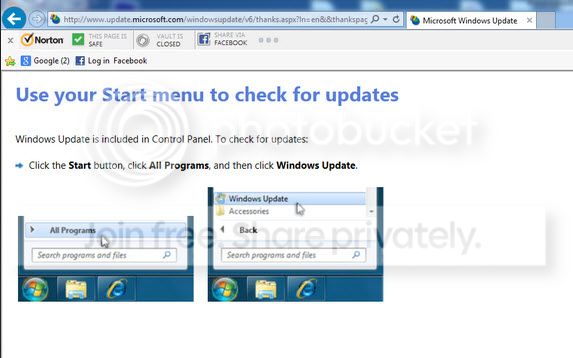
No interaction on the page. Only thing to do was close it. This exact same scenario (Windows 7, Office 2007 and Windows Update) was described in an older post (Mar 2014) in the Microsoft Office category of this forum. The person there said he got it fixed by a computer repair shop that had to download a Microsoft fix in order to correct it.
If anyone reading is familiar with this issue or has any suggestions on how to resolve it I would appreciate any advice. Just as an aside both the Outlook 2007 and the MS Office 2007 H & S are not Service Pack 3 versions. I have downloaded SP3 from MS and will be installing that. Any chance that might correct the problem?
I then installed Outlook 2007 (first) and MS Office 2007 Home and Student (second) which he had been using on his previous system. When I installed Outlook 2007 I received the query whether I would like to have Microsoft Update download and install updates for Microsoft software, which I confirmed.
After the installation and setup of the Office products I then opened Windows Update and on the left side clicked on Check for updates. No important new updates, including any Office or Outlook ones, were available. Having followed a similar process when I set up my custom build with Windows 7 I knew there was an issue here.
Looking at his Windows Update window it showed For Windows only by the You receive updates line. It should have read For Windows and other products from Microsoft Update. Below that it had "Get updates for other Microsoft products. Click for details" but when clicking on that it lead to a browser page that showed this:

No interaction on the page. Only thing to do was close it. This exact same scenario (Windows 7, Office 2007 and Windows Update) was described in an older post (Mar 2014) in the Microsoft Office category of this forum. The person there said he got it fixed by a computer repair shop that had to download a Microsoft fix in order to correct it.
If anyone reading is familiar with this issue or has any suggestions on how to resolve it I would appreciate any advice. Just as an aside both the Outlook 2007 and the MS Office 2007 H & S are not Service Pack 3 versions. I have downloaded SP3 from MS and will be installing that. Any chance that might correct the problem?
My Computer
At a glance
Window 7 Home Premium 64bitIntel i5 3570K16 GB Corsair PC3-1280 DDR3EVGA e-GeForce GTX 650
- Computer type
- PC/Desktop
- Computer Manufacturer/Model Number
- custom build
- OS
- Window 7 Home Premium 64bit
- CPU
- Intel i5 3570K
- Motherboard
- ASRock Z77 Pro4-M
- Memory
- 16 GB Corsair PC3-1280 DDR3
- Graphics Card(s)
- EVGA e-GeForce GTX 650
- Sound Card
- N/A
- Monitor(s) Displays
- Acer K242HL
- Screen Resolution
- 1280 x 1024
- Hard Drives
- Samsung 830 256GB SSD SATA 6 Gb/s
WD Black 500GB SATA 6 Gb/s
- PSU
- Corsair vx 550
- Case
- Silverstone Temjin J108b
- Cooling
- Cooler Master Hyper 212 EVO
- Keyboard
- Logitech K350 wireless
- Mouse
- Logitech K510 wireless
- Internet Speed
- 50 Mbps down, 5 Mbps up
- Antivirus
- Bitdefender Total Security 2018
- Browser
- Firefox, Chrome

