Ethernet Port Not Working

r00ploi

New member
Hi,

I have one of these motherboards GA-890FXA-UD5 in my main PC. And one of the Ethernet ports will no longer connect to the router. It was working fine the other day so I'm not sure what’s happened. The port that will not connect to the router is still flashing orange and green once a cable is connected to it, so does this mean that it’s still functioning okay? If I swap the cable over to the other Ethernet port on the board it connects straight away.


Any ideas?


Thanks
 

My Computer

Computer type
Laptop
Computer Manufacturer/Model Number
HP
OS
Windows 7
does sound a little strange. do u have diag in bios for ethernet, that can tell u simple things like cable length and other details.

very easy try a live CD (easiest is ubuntu) see if u get a IP and all the reset. its gd that u have a light on the port (or on ur switch/router on other end when plugged in)
 

My Computer

Computer Manufacturer/Model Number
Windows 7 Ultimate 64-bit
OS
Windows 7 Ultimate N 64-bit
CPU
AMD Black Edition - AMD Phenom X4 2.5 GHz Processor
Motherboard
Bio Star
Memory
8GB DDR2 800MHZ BRANDED
Graphics Card(s)
Palti NVIDIA GeForce GTX 460
Monitor(s) Displays
3D 23.6" & 22"
Screen Resolution
1920x1080@120Hz
Hard Drives
313GB SAMSUNG SAMSUNG HD321KJ
PSU
OCZ 600W StealthXStream PSU, PowerWhisper, Active PFC
Internet Speed
22793
Wiz,

when you say it can't connect, do you mean it's not connecting to your network or that you simply can't access the internet ? the orange and green means it's "latching" generally, unless it's still lighting up when you completely unplug the ethernet....if it's still lit up after no connection then it's FUBAR.

there could be several things wrong;
cable speed not set correctly, ie automatic or higher than the maximum that your router will allow,
you may have a problem with the IP configuration on that network card.
there maybe a corruption with configuration, etc

from a command prompt can you run ipconfig /all when you plug the cable into the port that doesn't work and also in the one that works. let us know what your findings are..
 

My Computer

OS
windows 7 enterprise 32bit
Have you tried ininstalling your drivers for the Ethernet port in question? Worth a shot!
 

My Computer

Computer Manufacturer/Model Number
Packard Bell MH36-U300
OS
Windows 7 Ultimate 64-Bit
CPU
Intel(R) Pentium(R) Dual CPU T3400 @ 2.16GHz
Memory
2GB DDR2
Graphics Card(s)
Mobile Intel(R) 4 Series Express Chipset
Sound Card
Realtek High Definition Audio
Monitor(s) Displays
15" LCD
Screen Resolution
1280 x 800
Hard Drives
320GB Western Digital
Case
Notebook
Internet Speed
10Mbps
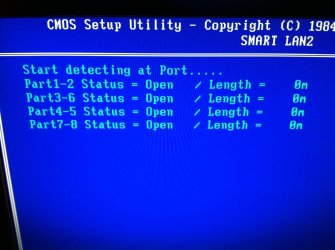
Your motherboard supports "SMART LAN1/LAN2 (LAN Cable Diagnostic Function)" in the BIOS ga-890fxa_ud5 manual (goto page 51) maybe you could use this as a diagnostic tool for testing ;)
 

My Computer

Computer type
PC/Desktop
Computer Manufacturer/Model Number
Self Built
OS
Windows 7 Ultimate 64bit
CPU
AMD Phenom Quad core 9950 black edition
Motherboard
Gigabyte
Memory
16Gb
Graphics Card(s)
2x XFX Radeon 5850
Sound Card
PCI Express X-Fi Titanium / Logitech G35
Monitor(s) Displays
2x HP 2410i
Screen Resolution
1920x1080
Hard Drives
2x 500Gb Seagate
1x 300Gb Seagate
1x 1Tb Seagate
2x 1Tb Hitatchi
PSU
Jean Tech Storm 700W
Case
Cooler Master COSMOS S
Cooling
Akasa Evo Blue Pro
Keyboard
Logitech G15
Mouse
Mad Catz M.M.O. 7
Internet Speed
12mb
Hello All,

Thanks for your responses.

I've tried a live version of ubuntu and it still wont connect through that either I have gone into the BIOS and disabled both connections then re enabled it again but it has not made any difference. So I assume that the port must be faulty? I have been in contact with Gigabyte and they have informed me that they offer a 3 year warranty on the board so at least I don't have to rush about sending it back. I just hope the other port continues to function okay.


Edit- I tried the SMART LAN1/LAN2 (LAN Cable Diagnostic Function) this is the result I get attached picture.
 

Attachments

  • IMG_0320.jpg
    IMG_0320.jpg
    450 KB · Views: 21
Last edited:

My Computer

Computer type
Laptop
Computer Manufacturer/Model Number
HP
OS
Windows 7
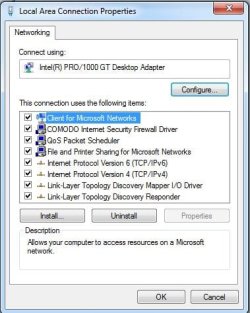
When you open up the Properties on the two connections (side by side), are they the same?

Example
Capture.JPG
 

My Computer

Computer type
PC/Desktop
Computer Manufacturer/Model Number
Custom Build
OS
Windows 7 Home Premium 64 bit
CPU
Intel Core i7-4790
Motherboard
GA-Z87X-D3H
Memory
G.SKILL 8GB (2 x 4GB) DDR3 F3-10666CL9D-8GBNT
Graphics Card(s)
AMD Radeon R7 250
Sound Card
Realtek ALC892
Monitor(s) Displays
Samsung UN32EH5000, Dell 1703FPT
Screen Resolution
1920 x 1080, 1280 x 1024
Hard Drives
WD5003AZEX
WD10EZEX
Samsung HD103SJ
Samsung 128 GB 840 PRO
PSU
SeaSonic M12II SS-500GM
Case
Fractal Design Define R4
Cooling
Zalman CNPS9900ALED
Keyboard
Logitech K800
Mouse
Logitech M705
Internet Speed
16 Mbps
Antivirus
Avast
Browser
Firefox
Other Info
Bose Companion 2 Multimedia Speakers
Hi,

Yup both are the same as your picture. When I plug the ethernet cable into the port that is not working it constantly says that a cable has been plugged in then disconnected.
 

My Computer

Computer type
Laptop
Computer Manufacturer/Model Number
HP
OS
Windows 7
ok

So what i have read your have tried the Linux with no Joy the Bois is saying the same old stuff.

Conclusion, Your Port has become damaged. Use the other port or do a RMA and get a new board sent to you.

Regs

Me.

PS, Have a look at the pins are any bent.
 
Last edited:

My Computer

Computer Manufacturer/Model Number
Home Build.
OS
Windows 7 Home Pre
CPU
Q8200 Intell 2.333
Motherboard
Asus P5Q3 Delux
Memory
DDR3 1333 4gig
Graphics Card(s)
Ati HD4870
Sound Card
Onboard Soundmax. 7.1
Monitor(s) Displays
1, 20" Samsung
Screen Resolution
1600/900
PSU
Good enough
Case
Le Shark
Cooling
FAN FAN FAN FAN, Thermaltake Minitype 90 with speed fan 4.
Keyboard
Standard, Gaming Wolfking
Mouse
Cm-storm-inferno-wired-gaming-mouse
Internet Speed
Sky Crappy upto 20meg I get a whapping 5.8mbs.
ok

So what i have read your have tried the Linux with no Joy the Bois is saying the same old stuff.

Conclusion, Your Port has become damaged. Use the other port or do a RMA and get a new board sent to you.

Regs

Me.

PS, Have a look at the pins are any bent.


Hi,

Thanks for your response,

The port in question is not damaged and does not have any bent pins. It was working fine a few days ago and then I turned on the computer and went to use the internet and said it couldn't connect. The port does flash green and orange but does not connect at all.


Last time I RMA'd a board to Gigabyte they repaired it, has this changed or do they still attempt to repair the board if they cannot repair then send out a new one?
 

My Computer

Computer type
Laptop
Computer Manufacturer/Model Number
HP
OS
Windows 7
Have you tried ininstalling your drivers for the Ethernet port in question? Worth a shot!

Did you ever try this?
Uninstall, reinstall.
 

My Computer

Computer type
PC/Desktop
Computer Manufacturer/Model Number
Custom Build
OS
Windows 7 Home Premium 64 bit
CPU
Intel Core i7-4790
Motherboard
GA-Z87X-D3H
Memory
G.SKILL 8GB (2 x 4GB) DDR3 F3-10666CL9D-8GBNT
Graphics Card(s)
AMD Radeon R7 250
Sound Card
Realtek ALC892
Monitor(s) Displays
Samsung UN32EH5000, Dell 1703FPT
Screen Resolution
1920 x 1080, 1280 x 1024
Hard Drives
WD5003AZEX
WD10EZEX
Samsung HD103SJ
Samsung 128 GB 840 PRO
PSU
SeaSonic M12II SS-500GM
Case
Fractal Design Define R4
Cooling
Zalman CNPS9900ALED
Keyboard
Logitech K800
Mouse
Logitech M705
Internet Speed
16 Mbps
Antivirus
Avast
Browser
Firefox
Other Info
Bose Companion 2 Multimedia Speakers
Hi,

I have had further contact with Gigabyte regarding this issue and they have said that they want it back for testing. They have advised that I should update to the latest BIOS but I cannot see this fixing the issue?

Having done some further research on the issue it seems that other people also experience this issue one port goes then the next one soon follows.

What do others think
 

My Computer

Computer type
Laptop
Computer Manufacturer/Model Number
HP
OS
Windows 7
u will have to as they have asked you to do that really, shouldnt be a problem IF the situation goes from bad to worse they are still going to repair/replace during a BIOS upgrade only for e.g.
 

My Computer

Computer Manufacturer/Model Number
Windows 7 Ultimate 64-bit
OS
Windows 7 Ultimate N 64-bit
CPU
AMD Black Edition - AMD Phenom X4 2.5 GHz Processor
Motherboard
Bio Star
Memory
8GB DDR2 800MHZ BRANDED
Graphics Card(s)
Palti NVIDIA GeForce GTX 460
Monitor(s) Displays
3D 23.6" & 22"
Screen Resolution
1920x1080@120Hz
Hard Drives
313GB SAMSUNG SAMSUNG HD321KJ
PSU
OCZ 600W StealthXStream PSU, PowerWhisper, Active PFC
Internet Speed
22793
Back
Top