Solved Can't connect to 192.168.2.3 in browser(s)

sensory

New member
Local time
12:56 AM
Messages
13
Hi all,

I've had this problem for a week now that I can't connect to, for instance, 192.168.2.3:8888 (which is my phone, Android) when I know that there is something running on that port. In most cases that something is AirDroid which allows me to connect to my phone and type out SMS messages from within my browser.

I can connect fine under Ubuntu, so this is an issue with Windows 7 and not my router. I've tried resetting my router numerous times all the same but nothing has fixed it.

ipconfig /all is as follows:

Code:
C:\Users\Rob>ipconfig/all

Windows IP Configuration

   Host Name . . . . . . . . . . . . : Frak
   Primary Dns Suffix  . . . . . . . :
   Node Type . . . . . . . . . . . . : Hybrid
   IP Routing Enabled. . . . . . . . : No
   WINS Proxy Enabled. . . . . . . . : No
   DNS Suffix Search List. . . . . . : Belkin

Ethernet adapter Local Area Connection:

   Media State . . . . . . . . . . . : Media disconnected
   Connection-specific DNS Suffix  . : Belkin
   Description . . . . . . . . . . . : Realtek PCIe FE Family Controller
   Physical Address. . . . . . . . . : 10-1F-74-CA-78-B8
   DHCP Enabled. . . . . . . . . . . : Yes
   Autoconfiguration Enabled . . . . : Yes

Wireless LAN adapter Wireless Network Connection:

   Connection-specific DNS Suffix  . : Belkin
   Description . . . . . . . . . . . : Atheros AR9285 802.11b/g/n WiFi Adapter
   Physical Address. . . . . . . . . : C0-F8-DA-88-93-2D
   DHCP Enabled. . . . . . . . . . . : Yes
   Autoconfiguration Enabled . . . . : Yes
   Link-local IPv6 Address . . . . . : fe80::b8d2:2e1a:814f:2fe2%11(Preferred)
   IPv4 Address. . . . . . . . . . . : 192.168.2.2(Preferred)
   Subnet Mask . . . . . . . . . . . : 255.255.255.0
   Lease Obtained. . . . . . . . . . : 31 December 2011 21:31:04
   Lease Expires . . . . . . . . . . : 07 February 2148 04:04:56
   Default Gateway . . . . . . . . . : 192.168.2.1
   DHCP Server . . . . . . . . . . . : 192.168.2.1
   DHCPv6 IAID . . . . . . . . . . . : 247527642
   DHCPv6 Client DUID. . . . . . . . : 00-01-00-01-17-00-90-9F-C0-F8-DA-88-93-2D

   DNS Servers . . . . . . . . . . . : 192.168.2.1
                                       194.168.4.100
                                       194.168.8.100
   NetBIOS over Tcpip. . . . . . . . : Enabled

Tunnel adapter isatap.Belkin:

   Media State . . . . . . . . . . . : Media disconnected
   Connection-specific DNS Suffix  . : Belkin
   Description . . . . . . . . . . . : Microsoft ISATAP Adapter
   Physical Address. . . . . . . . . : 00-00-00-00-00-00-00-E0
   DHCP Enabled. . . . . . . . . . . : No
   Autoconfiguration Enabled . . . . : Yes

Tunnel adapter Local Area Connection* 12:

   Media State . . . . . . . . . . . : Media disconnected
   Connection-specific DNS Suffix  . :
   Description . . . . . . . . . . . : Microsoft 6to4 Adapter
   Physical Address. . . . . . . . . : 00-00-00-00-00-00-00-E0
   DHCP Enabled. . . . . . . . . . . : No
   Autoconfiguration Enabled . . . . : Yes

Tunnel adapter Teredo Tunneling Pseudo-Interface:

   Connection-specific DNS Suffix  . :
   Description . . . . . . . . . . . : Teredo Tunneling Pseudo-Interface
   Physical Address. . . . . . . . . : 00-00-00-00-00-00-00-E0
   DHCP Enabled. . . . . . . . . . . : No
   Autoconfiguration Enabled . . . . : Yes
   IPv6 Address. . . . . . . . . . . : 2001:0:5ef5:79fd:8ac:165f:adfb:a6ec(Prefe
rred)
   Link-local IPv6 Address . . . . . : fe80::8ac:165f:adfb:a6ec%14(Preferred)
   Default Gateway . . . . . . . . . : ::
   NetBIOS over Tcpip. . . . . . . . : Disabled
I've also tried disabling Homegroup entirely but that didn't fix it.

Any help is greatly appreciated!

P.S. I should add that I can access my router's configuration page without any problem, which is located at 192.168.2.1
 

My Computer My Computer

OS
Windows 7 64bit
CPU
Core i5 2.4ghz
Memory
6Gb SDRAM
Hard Drives
750Gb
Have you set your router to forward port 8888 to 192.168.2.3? On my Belkin router this is called Virtual Servers.
 

My Computer My Computer

Computer type
PC/Desktop
Computer Manufacturer/Model Number
Lenovo IdeaCenter 450
OS
Windows 10 Pro X64
CPU
Intel Quad Core i7-4770 @ 3.4Ghz
Memory
16.0GB PC3-12800 DDR3 SDRAM 1600 MHz
Graphics Card(s)
Intel Integrated HD Graphics
Sound Card
Realtek HD Audio
Monitor(s) Displays
HP 22" LCD
Screen Resolution
1680 x 1050
Hard Drives
250GB Samsung EVO SATA-3 SSD
2TB Seagate ST2000DM001 SATA-2
1.5TB Seagate ST3150041AS SATA
Keyboard
Dell USB
Mouse
Lenovo USB
Internet Speed
Cable via Road Runner 3MB Upload, 30MB Download
Antivirus
Windows Defender, MBAM Pro, MBAE
Browser
Seamonkey
Other Info
UEFI/GPT
PLDS DVD-RW DH16AERSH
Just tried that now but it doesn't help I'm afraid. The issue lies entirely with Windows 7.
 

My Computer My Computer

OS
Windows 7 64bit
CPU
Core i5 2.4ghz
Memory
6Gb SDRAM
Hard Drives
750Gb
Hi sensory, welcome to 7F, and happy new year! :)

Go to Services, and make sure the WLAN, and WWAN Services are at least set to manual, and not disabled. They will be at/near the bottom of the window.
wwlan.JPG
You could even try them started. Restart your machine if you make any changes.


You have had this "problem for a week". Can you recall any changes that might have affected performance?

Have you changed your routine in connecting to your 'Droid?

Can you set the AirDroid service to manual instead of having it run continuously?

Your password may be changing while in Windows, try to set a predefined password.

Are you using IE* while in Windows to connect?
(For best performance IE is not recommended)
Source: AirDroid-Requirements
To verify:
In your P.S., when you access your router's configuration page your doing this in Windows?
 

My Computer My Computer

Computer type
PC/Desktop
Computer Manufacturer/Model Number
Gateway DX4831-01e (Mid-Tower Desktop)
OS
Originally Win 7 Hm Prem x64 Ver 6.1.7600 Build 7601-SP1 | Upgraded to Windows 10 December 14, 2019
CPU
Intel i3 530 2.93GHz, 2933MHz 2 Cores 4 Logical Processors
Motherboard
Gateway H57M01 133 megahertz
Memory
6GB of 1,333MHz DDR3 SDRAM
Graphics Card(s)
32MB Intel Graphics Media Accelerator HD IGChip
Sound Card
Realtek High Definition Audio
Monitor(s) Displays
Gateway HX2000 20inch TFT active matrix TN
Screen Resolution
1600 x 900 x 59 hertz
Hard Drives
WDC WD10EADS-00M2B0 [HDD] (1000.20 GB) -- drive 0,
HL-DT-ST DVDRAM GH41N [CD-ROM dr]
Four card readers, and Four USB 2.0
PSU
300watts.
Case
Mid-Tower Desktop
Cooling
Stock from Gateway
Keyboard
Natural Ergonomic Keyboard 4000, see Other Info
Mouse
Orig. Gateway wore out now using Insignia USB wired optical
Internet Speed
Vz FIOS 10ms png 57.64Mbps down 65.53Mbps up Speedtest.org
Antivirus
Zamana Anti-logger with Anti-malware, MSE, Windows Firewall,
Browser
IE11.0.9600.19399-Upd ver11.0.135, Firefox 68.0.1 x64
Other Info
System Specs by Belarc.

BIOS: American Megatrends Inc. P01-A0 11/17/2009

Replaced the MS 'Natural' Standard PS/2 Enhanced 101-102 Keyboard with a new Natural Ergonomic Keyboard 4000 on August 1st 2014.

Canon Pixma MG3222 Printer.

Updated to IE11 on 12102015 | Fios Quantum Router g1100

Additional AV: SpywareBlaster, manual Mbam, SAS
Hi there Anak, thanks for the reply and a Happy New Year to you also. :)

I've gone ahead and set WLAN Autoconfig and WWAN Autoconfig to Automatic (WWAN was on manual) but no luck so far. I've only had this laptop for just over a week but I do remember being able to connect to Airdroid (and others which I can't connect to anymore either) while being away from my home network with family over Christmas. When I got back I tinkered around with Windows 7 a bit but nothing that I can remember which would have affect being able to connect to Airdroid or similar.

I'm using Firefox to connect, but I've tried it on Chrome and IE with no luck as well.

What happens is, the page will sit there trying to load until it times out. I can ping the other device fine from within Windows and it returns with four healthy replies.

Oh and yes, connecting to the router's configuration page is being done under Windows and works just fine.
 

My Computer My Computer

OS
Windows 7 64bit
CPU
Core i5 2.4ghz
Memory
6Gb SDRAM
Hard Drives
750Gb
Is this a dual-boot machine with Ubuntu?

If not, this could be as simple as doing a System Restore. Make sure to run Option One, Step 9, "Show Affected Programs and Drivers".
That will tell you if you need to re-install any programs.

warnsmall.png
Warning

A System Restore will also uninstall programs and drivers (step 8 in Option One below) that were installed after the date on the selected restore point.

If you use System Restore when the computer is in safe mode, you cannot undo the restore operation. However, you can run System Restore again and choose a different restore point if one exists.
 

My Computer My Computer

Computer type
PC/Desktop
Computer Manufacturer/Model Number
Gateway DX4831-01e (Mid-Tower Desktop)
OS
Originally Win 7 Hm Prem x64 Ver 6.1.7600 Build 7601-SP1 | Upgraded to Windows 10 December 14, 2019
CPU
Intel i3 530 2.93GHz, 2933MHz 2 Cores 4 Logical Processors
Motherboard
Gateway H57M01 133 megahertz
Memory
6GB of 1,333MHz DDR3 SDRAM
Graphics Card(s)
32MB Intel Graphics Media Accelerator HD IGChip
Sound Card
Realtek High Definition Audio
Monitor(s) Displays
Gateway HX2000 20inch TFT active matrix TN
Screen Resolution
1600 x 900 x 59 hertz
Hard Drives
WDC WD10EADS-00M2B0 [HDD] (1000.20 GB) -- drive 0,
HL-DT-ST DVDRAM GH41N [CD-ROM dr]
Four card readers, and Four USB 2.0
PSU
300watts.
Case
Mid-Tower Desktop
Cooling
Stock from Gateway
Keyboard
Natural Ergonomic Keyboard 4000, see Other Info
Mouse
Orig. Gateway wore out now using Insignia USB wired optical
Internet Speed
Vz FIOS 10ms png 57.64Mbps down 65.53Mbps up Speedtest.org
Antivirus
Zamana Anti-logger with Anti-malware, MSE, Windows Firewall,
Browser
IE11.0.9600.19399-Upd ver11.0.135, Firefox 68.0.1 x64
Other Info
System Specs by Belarc.

BIOS: American Megatrends Inc. P01-A0 11/17/2009

Replaced the MS 'Natural' Standard PS/2 Enhanced 101-102 Keyboard with a new Natural Ergonomic Keyboard 4000 on August 1st 2014.

Canon Pixma MG3222 Printer.

Updated to IE11 on 12102015 | Fios Quantum Router g1100

Additional AV: SpywareBlaster, manual Mbam, SAS
I'll give that a shot and report back. :)
 

My Computer My Computer

OS
Windows 7 64bit
CPU
Core i5 2.4ghz
Memory
6Gb SDRAM
Hard Drives
750Gb
No luck I'm afraid. I restored to the earliest available point and had the same problems still.
 

My Computer My Computer

OS
Windows 7 64bit
CPU
Core i5 2.4ghz
Memory
6Gb SDRAM
Hard Drives
750Gb
For some reason I can connect fine if I'm connected up to my router via an ethernet cable. Well, if that's what it takes then so be it.

If anyone has an idea about how to fix it so that I could connect while I'm wirelessly connected to the router, that would be of great help!

If not, I'll set this thread as Solved in a day or two. :)
 

My Computer My Computer

OS
Windows 7 64bit
CPU
Core i5 2.4ghz
Memory
6Gb SDRAM
Hard Drives
750Gb
That is really strange. One thought was interference, but when you try under Ubuntu its okay.

Is Win 7, and Ubuntu on different machines? As in, win7 is the only OS on one machine.

If so, check the WNIC in the win7 box maybe its loose, dirty connections, bad antenna, interference between it, and your wireless router.
 

My Computer My Computer

Computer type
PC/Desktop
Computer Manufacturer/Model Number
Gateway DX4831-01e (Mid-Tower Desktop)
OS
Originally Win 7 Hm Prem x64 Ver 6.1.7600 Build 7601-SP1 | Upgraded to Windows 10 December 14, 2019
CPU
Intel i3 530 2.93GHz, 2933MHz 2 Cores 4 Logical Processors
Motherboard
Gateway H57M01 133 megahertz
Memory
6GB of 1,333MHz DDR3 SDRAM
Graphics Card(s)
32MB Intel Graphics Media Accelerator HD IGChip
Sound Card
Realtek High Definition Audio
Monitor(s) Displays
Gateway HX2000 20inch TFT active matrix TN
Screen Resolution
1600 x 900 x 59 hertz
Hard Drives
WDC WD10EADS-00M2B0 [HDD] (1000.20 GB) -- drive 0,
HL-DT-ST DVDRAM GH41N [CD-ROM dr]
Four card readers, and Four USB 2.0
PSU
300watts.
Case
Mid-Tower Desktop
Cooling
Stock from Gateway
Keyboard
Natural Ergonomic Keyboard 4000, see Other Info
Mouse
Orig. Gateway wore out now using Insignia USB wired optical
Internet Speed
Vz FIOS 10ms png 57.64Mbps down 65.53Mbps up Speedtest.org
Antivirus
Zamana Anti-logger with Anti-malware, MSE, Windows Firewall,
Browser
IE11.0.9600.19399-Upd ver11.0.135, Firefox 68.0.1 x64
Other Info
System Specs by Belarc.

BIOS: American Megatrends Inc. P01-A0 11/17/2009

Replaced the MS 'Natural' Standard PS/2 Enhanced 101-102 Keyboard with a new Natural Ergonomic Keyboard 4000 on August 1st 2014.

Canon Pixma MG3222 Printer.

Updated to IE11 on 12102015 | Fios Quantum Router g1100

Additional AV: SpywareBlaster, manual Mbam, SAS
Both on the same computer. :) Ubuntu is currently installed only through Wubi, not on a separate partition.
 

My Computer My Computer

OS
Windows 7 64bit
CPU
Core i5 2.4ghz
Memory
6Gb SDRAM
Hard Drives
750Gb
For some reason I can connect fine if I'm connected up to my router via an ethernet cable ............ If anyone has an idea about how to fix it so that I could connect while I'm wirelessly connected to the router

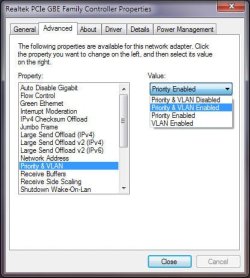
It's some setting in your WiFi adapter properties, either the advanced or power management tabs, which is similar to the screenshot shown - except that it shows a hardwired ethernet contoller...

The only other possibility is that your router may have independent settings for security on WiFi and hard-wired connections. Some do, others do not.
 

Attachments

  • Ethernet Adapter.jpg
    Ethernet Adapter.jpg
    40.2 KB · Views: 23

My Computer My Computer

Computer Manufacturer/Model Number
Custom built machine
OS
W7 x64
CPU
Intel Q9300 2.5Ghz Quad LGA775 (Would like Q9650)
Motherboard
Gigabyte GA-EP45T-UD3R (F6 Bios)
Memory
4Gb OCZ Gold 1,333Mhz
Graphics Card(s)
Palit HD4850 O/C Sonic 512Mb DDR3, Dual DViD's
Sound Card
Azalia to twin Samson 50w Studio Monitors
Monitor(s) Displays
Twin Dell (E-IPS) U2311H 23.6" Screens
Screen Resolution
1920 x 1080 @ 60Hz
Hard Drives
Crucial M4 SSD, archives on twin Western Digital Caviar Black WD2002FAEX, 2TB, 7200rpm HDD's, Samsung Ritemaster CD/DVD Burner...
PSU
OCZ 600w
Case
Lian-Li PC8 acoustifoamed' aluminium tower
Cooling
Scythe 140mm Zipang
Keyboard
Cherry PS/2 custom model
Mouse
Lenovo USB laser "Thinkpad" Mouse
Internet Speed
ADSL2+ @14Mbps downstream & Cat6 Gigabit Ethernet
Antivirus
NOD32
Browser
Opera
Other Info
Silicon Dust HD Homerun Dual FTA (Ethernet) TV Tuners, Dray Tek Vigor 2850Vn router and 8x HP Gigabit Switch. Lian-Li CR26 Card Reader, Canon MF4430 iSensys laser printer/scanner.
Maybe something in Windows Firewall, Advanced Settings, Outbound rules?
 

My Computer My Computer

Computer type
PC/Desktop
Computer Manufacturer/Model Number
Lenovo IdeaCenter 450
OS
Windows 10 Pro X64
CPU
Intel Quad Core i7-4770 @ 3.4Ghz
Memory
16.0GB PC3-12800 DDR3 SDRAM 1600 MHz
Graphics Card(s)
Intel Integrated HD Graphics
Sound Card
Realtek HD Audio
Monitor(s) Displays
HP 22" LCD
Screen Resolution
1680 x 1050
Hard Drives
250GB Samsung EVO SATA-3 SSD
2TB Seagate ST2000DM001 SATA-2
1.5TB Seagate ST3150041AS SATA
Keyboard
Dell USB
Mouse
Lenovo USB
Internet Speed
Cable via Road Runner 3MB Upload, 30MB Download
Antivirus
Windows Defender, MBAM Pro, MBAE
Browser
Seamonkey
Other Info
UEFI/GPT
PLDS DVD-RW DH16AERSH
Hmm, no luck so far, guys. Thanks very much for all the help, though.
 

My Computer My Computer

OS
Windows 7 64bit
CPU
Core i5 2.4ghz
Memory
6Gb SDRAM
Hard Drives
750Gb
All I can offer are links that may seem promising:

Desktop won't connect to the link provided by phone - AirDroid
Check the forum.


Here's one where its somewhat similar, but it gives me a skull pain trying to figure it out without the components in front of me:
[SOLVED] Linksys Wireless router connected but no access to the internet - Tech Support Forum To me this sounded promising. Your bypassing this, crossing over that.


Port forwarding - problem resolved


Might be a couple of weeks before I post back with anything that might help.
 

My Computer My Computer

Computer type
PC/Desktop
Computer Manufacturer/Model Number
Gateway DX4831-01e (Mid-Tower Desktop)
OS
Originally Win 7 Hm Prem x64 Ver 6.1.7600 Build 7601-SP1 | Upgraded to Windows 10 December 14, 2019
CPU
Intel i3 530 2.93GHz, 2933MHz 2 Cores 4 Logical Processors
Motherboard
Gateway H57M01 133 megahertz
Memory
6GB of 1,333MHz DDR3 SDRAM
Graphics Card(s)
32MB Intel Graphics Media Accelerator HD IGChip
Sound Card
Realtek High Definition Audio
Monitor(s) Displays
Gateway HX2000 20inch TFT active matrix TN
Screen Resolution
1600 x 900 x 59 hertz
Hard Drives
WDC WD10EADS-00M2B0 [HDD] (1000.20 GB) -- drive 0,
HL-DT-ST DVDRAM GH41N [CD-ROM dr]
Four card readers, and Four USB 2.0
PSU
300watts.
Case
Mid-Tower Desktop
Cooling
Stock from Gateway
Keyboard
Natural Ergonomic Keyboard 4000, see Other Info
Mouse
Orig. Gateway wore out now using Insignia USB wired optical
Internet Speed
Vz FIOS 10ms png 57.64Mbps down 65.53Mbps up Speedtest.org
Antivirus
Zamana Anti-logger with Anti-malware, MSE, Windows Firewall,
Browser
IE11.0.9600.19399-Upd ver11.0.135, Firefox 68.0.1 x64
Other Info
System Specs by Belarc.

BIOS: American Megatrends Inc. P01-A0 11/17/2009

Replaced the MS 'Natural' Standard PS/2 Enhanced 101-102 Keyboard with a new Natural Ergonomic Keyboard 4000 on August 1st 2014.

Canon Pixma MG3222 Printer.

Updated to IE11 on 12102015 | Fios Quantum Router g1100

Additional AV: SpywareBlaster, manual Mbam, SAS
To add to this thread, I've found that if I change the encryption for my WiFi from AES to TKIP it will allow me to connect to 192.169.2.3 (etc.) without any issues under Windows 7. This isn't ideal but at least it works.
 

My Computer My Computer

OS
Windows 7 64bit
CPU
Core i5 2.4ghz
Memory
6Gb SDRAM
Hard Drives
750Gb

My Computer My Computer

Computer type
PC/Desktop
Computer Manufacturer/Model Number
Gateway DX4831-01e (Mid-Tower Desktop)
OS
Originally Win 7 Hm Prem x64 Ver 6.1.7600 Build 7601-SP1 | Upgraded to Windows 10 December 14, 2019
CPU
Intel i3 530 2.93GHz, 2933MHz 2 Cores 4 Logical Processors
Motherboard
Gateway H57M01 133 megahertz
Memory
6GB of 1,333MHz DDR3 SDRAM
Graphics Card(s)
32MB Intel Graphics Media Accelerator HD IGChip
Sound Card
Realtek High Definition Audio
Monitor(s) Displays
Gateway HX2000 20inch TFT active matrix TN
Screen Resolution
1600 x 900 x 59 hertz
Hard Drives
WDC WD10EADS-00M2B0 [HDD] (1000.20 GB) -- drive 0,
HL-DT-ST DVDRAM GH41N [CD-ROM dr]
Four card readers, and Four USB 2.0
PSU
300watts.
Case
Mid-Tower Desktop
Cooling
Stock from Gateway
Keyboard
Natural Ergonomic Keyboard 4000, see Other Info
Mouse
Orig. Gateway wore out now using Insignia USB wired optical
Internet Speed
Vz FIOS 10ms png 57.64Mbps down 65.53Mbps up Speedtest.org
Antivirus
Zamana Anti-logger with Anti-malware, MSE, Windows Firewall,
Browser
IE11.0.9600.19399-Upd ver11.0.135, Firefox 68.0.1 x64
Other Info
System Specs by Belarc.

BIOS: American Megatrends Inc. P01-A0 11/17/2009

Replaced the MS 'Natural' Standard PS/2 Enhanced 101-102 Keyboard with a new Natural Ergonomic Keyboard 4000 on August 1st 2014.

Canon Pixma MG3222 Printer.

Updated to IE11 on 12102015 | Fios Quantum Router g1100

Additional AV: SpywareBlaster, manual Mbam, SAS
Back
Top