Red X On Network Icon But Working Perfectly

y0himba

Desktop Freak
Power User
Local time
5:56 AM
Messages
105
Location
In a house.
Hello. If this has already been covered in another post, please post a link to it? Thanks.

Let me start by saying that both my LAN and WAN (Internet) connections are working perfectly. I get full speed on the Internet, and the 4 machines in my house, 2 XP, 1 Vista, and this one which is Win 7, are networked and seeing each other without any issues. I even have my Canon MX860 connected to all machines wireless, although Win7 cannot use it because Canon has not released a network driver for Windows 7 yet and the Vista driver doesn't work. I use it connected via USB on the Win7 machine.

I have cable Internet and I am using a DLINK DIR-655 Wireless router. The main PC with the issue is wired, the others are wireless.

For some weird reason, there is a red X on my network icon. I have been unable to figure it out and as I said there are no problems with the network at all.

I am using Windows 7 RC 7100.

Has anyone else seen this issue? If so, did you find a fix?
 

My Computer My Computer

Computer type
PC/Desktop
Computer Manufacturer/Model Number
Alienware Aurora-R4
OS
Windows 7 Professional x64
CPU
Intel(R) Core(TM) i7-3820 CPU, 4 Cores, 8 Logical Cores
Motherboard
Alienware
Memory
32 GB DDR3 1600
Graphics Card(s)
ATI Radeon HD 8950 3GB vDDR5 & ATI Radeon HD 7950 3GB vDDR5
Sound Card
Realtek 7.1 Audio
Monitor(s) Displays
Dell SP2309W 23 inch
Screen Resolution
2048x1152
Hard Drives
7.3 TB in 4 drives (Raid 0), 2TB NAS backup drive.
PSU
875w
Case
ALX Chasis with active venting
Cooling
Liquid cooled with active venting and fans.
Keyboard
Alienware TactX
Mouse
Alienware TactX
Internet Speed
15mb Cable
Antivirus
Malwarebytes
Browser
Pale Moon (Optimized Mozilla Based)
Other Info
http://www.y0himba.net
Mine is the same too
I was thinking maybe the red X is for IPv6 as mine isn't working ??

You may find that XP drives work ok
I had XP x64 drivers installed for my NIC they worked better than Win 7 ones
 

My Computer My Computer

Computer Manufacturer/Model Number
Gigabyte Asus
OS
,Windows 7-64.7600.16385 Ultimate
CPU
AMD Athlon(tm) 64 X2 Dual Core Processor 4800+, 2500
Motherboard
GA-MA78G-DS3H
Memory
Geil 4 Gig DDR2 800 PC2-6400 (400 MHz)
Graphics Card(s)
ATI Onboard 3200
Sound Card
ATI High Definition Audio Device
Monitor(s) Displays
Acer 22"
Screen Resolution
1680x1050
Hard Drives
1 x120 Gig
1 X 80 Gig
PSU
550 watt
Case
Cooler Master
Keyboard
Wireless Microsoft
Mouse
Wireless Microsoft
Internet Speed
3 Meg down .5 up
Other Info
BIOS Version/Date Award Software International, Inc. F8, 12/08/2009
I disabled IPv6. It has never worked, Still a red X. Maybe because IPv6 is unchecked?
 

My Computer My Computer

Computer type
PC/Desktop
Computer Manufacturer/Model Number
Alienware Aurora-R4
OS
Windows 7 Professional x64
CPU
Intel(R) Core(TM) i7-3820 CPU, 4 Cores, 8 Logical Cores
Motherboard
Alienware
Memory
32 GB DDR3 1600
Graphics Card(s)
ATI Radeon HD 8950 3GB vDDR5 & ATI Radeon HD 7950 3GB vDDR5
Sound Card
Realtek 7.1 Audio
Monitor(s) Displays
Dell SP2309W 23 inch
Screen Resolution
2048x1152
Hard Drives
7.3 TB in 4 drives (Raid 0), 2TB NAS backup drive.
PSU
875w
Case
ALX Chasis with active venting
Cooling
Liquid cooled with active venting and fans.
Keyboard
Alienware TactX
Mouse
Alienware TactX
Internet Speed
15mb Cable
Antivirus
Malwarebytes
Browser
Pale Moon (Optimized Mozilla Based)
Other Info
http://www.y0himba.net
Is this a tray icon with a red X?

Is it possible you have two NICs in the machine? If you are using one but have no cable plugged into the second one then the second one shows up with the red X unless youdisable the adapter in the hardware manager.

If you hover over the icon, what does it say?
 

My Computer My Computer

Computer Manufacturer/Model Number
Scratch built
OS
Windows 7 x64 Ultimate
CPU
i7 960
Motherboard
Asus P6X58D
Memory
12 Gig Corsair Dominator
Graphics Card(s)
Nvidia 480
Sound Card
Maudio Delta 44 + breakout box
Monitor(s) Displays
Dell UltraSharp U2410 24in and Samsung 21 dual monitors
Screen Resolution
1920x1200 and 1280x1024
Hard Drives
Primary: Intel X-25M G2 160G SSD
Secondary: Segate baracuda 1.0 TB
HDs in AHCI mode.
PSU
Corasair TX850
Case
Cooler Master HAF
Cooling
Corsair H50
Keyboard
Logitech G15 + N52 game pad
Mouse
Logitech MX518
Internet Speed
15kbs down 4.5kbps up
Other Info
WEI 7.6
CPU & RAM 7.6
Graphics 7.9
Hard disk 7.7
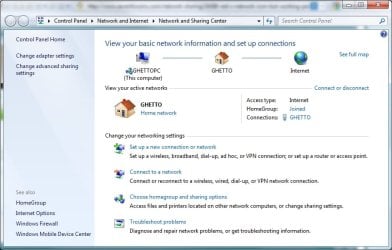
There is one NIC in the machine, wired. The on-board Ethernet controller. It only says "GHETTO" which is the name of my network. I have even run the troubleshooter, no issues found.
 

Attachments

  • inet.jpg
    inet.jpg
    5.2 KB · Views: 8,680
  • ghetto.jpg
    ghetto.jpg
    57 KB · Views: 315

My Computer My Computer

Computer type
PC/Desktop
Computer Manufacturer/Model Number
Alienware Aurora-R4
OS
Windows 7 Professional x64
CPU
Intel(R) Core(TM) i7-3820 CPU, 4 Cores, 8 Logical Cores
Motherboard
Alienware
Memory
32 GB DDR3 1600
Graphics Card(s)
ATI Radeon HD 8950 3GB vDDR5 & ATI Radeon HD 7950 3GB vDDR5
Sound Card
Realtek 7.1 Audio
Monitor(s) Displays
Dell SP2309W 23 inch
Screen Resolution
2048x1152
Hard Drives
7.3 TB in 4 drives (Raid 0), 2TB NAS backup drive.
PSU
875w
Case
ALX Chasis with active venting
Cooling
Liquid cooled with active venting and fans.
Keyboard
Alienware TactX
Mouse
Alienware TactX
Internet Speed
15mb Cable
Antivirus
Malwarebytes
Browser
Pale Moon (Optimized Mozilla Based)
Other Info
http://www.y0himba.net
Yesterday, I re-enabled UAC. When I booted, my systray volume icon had a red X, even thoigh all sounds worked properly.

I disabled again, booted, and the red X disappeared.

A proposed solution for this "problem" was to re-enable UAC, uninstall sound drivers, boot, re-install sound drivers and disable UAC.
 
Wow, that really looks like it's some kind of icon update/icon set problem :D

If there really was an issue id should say what it is in the popup I believe and it would show a red X on the etwork map. So it seems like the icon itself is the only thing that dissagrees with reality.

Could try disabling the adapter and reenabling it and see if that kicks an icon update or something. Other than that, I got nuthin' :D
 

My Computer My Computer

Computer Manufacturer/Model Number
Scratch built
OS
Windows 7 x64 Ultimate
CPU
i7 960
Motherboard
Asus P6X58D
Memory
12 Gig Corsair Dominator
Graphics Card(s)
Nvidia 480
Sound Card
Maudio Delta 44 + breakout box
Monitor(s) Displays
Dell UltraSharp U2410 24in and Samsung 21 dual monitors
Screen Resolution
1920x1200 and 1280x1024
Hard Drives
Primary: Intel X-25M G2 160G SSD
Secondary: Segate baracuda 1.0 TB
HDs in AHCI mode.
PSU
Corasair TX850
Case
Cooler Master HAF
Cooling
Corsair H50
Keyboard
Logitech G15 + N52 game pad
Mouse
Logitech MX518
Internet Speed
15kbs down 4.5kbps up
Other Info
WEI 7.6
CPU & RAM 7.6
Graphics 7.9
Hard disk 7.7
I have tried everything...hopefully when I get the RTM on the 30th it will fix itself. I seriously have no idea. I even removed and reinstalled TCP...Google search shows I am not the only one though. Maybe a hidden network or something? Maybe somethign to do with my PDA? It still shows even when the PDA is connected...
 

My Computer My Computer

Computer type
PC/Desktop
Computer Manufacturer/Model Number
Alienware Aurora-R4
OS
Windows 7 Professional x64
CPU
Intel(R) Core(TM) i7-3820 CPU, 4 Cores, 8 Logical Cores
Motherboard
Alienware
Memory
32 GB DDR3 1600
Graphics Card(s)
ATI Radeon HD 8950 3GB vDDR5 & ATI Radeon HD 7950 3GB vDDR5
Sound Card
Realtek 7.1 Audio
Monitor(s) Displays
Dell SP2309W 23 inch
Screen Resolution
2048x1152
Hard Drives
7.3 TB in 4 drives (Raid 0), 2TB NAS backup drive.
PSU
875w
Case
ALX Chasis with active venting
Cooling
Liquid cooled with active venting and fans.
Keyboard
Alienware TactX
Mouse
Alienware TactX
Internet Speed
15mb Cable
Antivirus
Malwarebytes
Browser
Pale Moon (Optimized Mozilla Based)
Other Info
http://www.y0himba.net
Do you have something like VMWare installed?
 

My Computer My Computer

Computer Manufacturer/Model Number
Compal JFT02 (Custom Build Laptop)
OS
Windows 7 Home Premium x64 - Mac OS X 10.6.4 x64
CPU
Intel Core 2 Duo T9300 2.5 GHz
Motherboard
JFT02
Memory
4GB Kingston DDR2-800
Graphics Card(s)
NVIDIA Geforce 8600M GT (512MB Model)
Sound Card
Realtek HD Audio
Monitor(s) Displays
WUXGA Standard Laptop Display
Screen Resolution
1680*1050
Hard Drives
Toshiba 320GB 5400RPM Laptop HD
PSU
Standard Laptop Power Supply
Case
Standard Laptop Case
Cooling
Standard Laptop Cooling
Keyboard
Standard Laptop 105 Key-Keyboard
Mouse
Synaptics Touchpad
Internet Speed
Verizion Online DSL 3360/864 kbs (dl/up)
Nope...
 

My Computer My Computer

Computer type
PC/Desktop
Computer Manufacturer/Model Number
Alienware Aurora-R4
OS
Windows 7 Professional x64
CPU
Intel(R) Core(TM) i7-3820 CPU, 4 Cores, 8 Logical Cores
Motherboard
Alienware
Memory
32 GB DDR3 1600
Graphics Card(s)
ATI Radeon HD 8950 3GB vDDR5 & ATI Radeon HD 7950 3GB vDDR5
Sound Card
Realtek 7.1 Audio
Monitor(s) Displays
Dell SP2309W 23 inch
Screen Resolution
2048x1152
Hard Drives
7.3 TB in 4 drives (Raid 0), 2TB NAS backup drive.
PSU
875w
Case
ALX Chasis with active venting
Cooling
Liquid cooled with active venting and fans.
Keyboard
Alienware TactX
Mouse
Alienware TactX
Internet Speed
15mb Cable
Antivirus
Malwarebytes
Browser
Pale Moon (Optimized Mozilla Based)
Other Info
http://www.y0himba.net
in my PCs, the red cross disappeared when i let the DHCP work, instead of giving fix IP to the machines.
Don't know why ...
 

My Computer My Computer

OS
7

My Computer My Computer

Computer Manufacturer/Model Number
Gigabyte Asus
OS
,Windows 7-64.7600.16385 Ultimate
CPU
AMD Athlon(tm) 64 X2 Dual Core Processor 4800+, 2500
Motherboard
GA-MA78G-DS3H
Memory
Geil 4 Gig DDR2 800 PC2-6400 (400 MHz)
Graphics Card(s)
ATI Onboard 3200
Sound Card
ATI High Definition Audio Device
Monitor(s) Displays
Acer 22"
Screen Resolution
1680x1050
Hard Drives
1 x120 Gig
1 X 80 Gig
PSU
550 watt
Case
Cooler Master
Keyboard
Wireless Microsoft
Mouse
Wireless Microsoft
Internet Speed
3 Meg down .5 up
Other Info
BIOS Version/Date Award Software International, Inc. F8, 12/08/2009
my problem would be fixed if the disconnection of my LAN cord would disable my bridge and LAN connections, instead of doing it manually every time by opening net. con. and right clicking on... and etc., or if the network system tray icon only monitored the wireless would be great as well. Any ideas?
 

My Computer My Computer

Computer Manufacturer/Model Number
HP Pavillion dv6646
OS
Windows 7 Ultimate 64-bit
Memory
4gb
Graphics Card(s)
Nvidia
okay....i had the same problem and or noticed the same thing on my windows 7. i have the final version. and i have a network bridge set up that i use for my xbox 360 but the cable wasnt plugged in (the ethernet cable) and so the red x is there but internet is working fine...as soon as i plugged that cable in it went away instantly and it went to a regular icon without that "x". so im guessing you have a network bridge on your computer and thats why you are seeing this red x....

hope this helped. :sarc:
 

My Computer My Computer

OS
Windows 7
Hi,

This was a common issue with vista and the solution that worked for me was to restart the Network List service [netprofm].

It may be worth giving this a try.

The problem was so persistent on one machine that I ended up writing a start-up script using the net command to restart every boot.
 

My Computers My Computers

System One System Two

  • Computer type
    PC/Desktop
    Computer Manufacturer/Model Number
    ChillBlast - Custom to my design
    OS
    Windows 11 Pro x64 [Latest Release and Release Preview]
    CPU
    Ryzen 9 5950X, 3.8 - 5.2 MHz
    Motherboard
    Asus Prime X570-Pro
    Memory
    64GB [2 x 32GB] DDR4 3200MHz
    Graphics Card(s)
    4GB NVIDIA GEFORCE GTX 1650 Ti
    Sound Card
    On-board SPDIF to 5.1 System + HDMI [5.1 system]
    Monitor(s) Displays
    32" UHD 32 Bit HDR Monitor + 43" UHD 4K 32Bit HDR TV
    Screen Resolution
    2 x 3840 x 2160 @60Hz
    Hard Drives
    1TB M2 SSD OS, 500GB Fast Access SSD, 2 x 8TB Data + Various Externals from 1TB to 4TB, 10TB NAS
    PSU
    NZXT C750 80 PLUS Gold 750W Modular PSU
    Case
    Workstation Case [Matt Black]
    Cooling
    NZXT Kraken X63 280mm CPU Cooler +2x Quiet Case fans
    Keyboard
    Logitech Wireless MX Keys & K400 + others
    Mouse
    Logitech Wireless MX Master 3S
    Internet Speed
    920 MB Down 50 MB Up
    Antivirus
    BitDefender Total Security Pro
    Browser
    Chrome (always run latest Non-Beta)
    Other Info
    Also run ...
    Laptop - Quad 8GB - Windows 10 Pro x64
    Nexus 7 Android tablet x2
    Samsung 10.2" tablet
    Blackview TAB 8 4G Android Tablet c/w Keyboard
    Wacom Intuos Pro Medium Pen Pad
    Wacom Intuos Pro Small Pen Pad
    Wacom Expresskeys Remote
    Loopdeck+ Graphics Controller
    Shuttle Pro v2 Control
  • Computer type
    Laptop
    System Manufacturer/Model Number
    Dell XPS 17 10750H
    OS
    Windows 11 Pro x64 Latest RP
    CPU
    Intel I7 10750H 5.0GHz
    Motherboard
    Dell XPS
    Memory
    32GB [2x16GB] DDR4 2933 MHz
    Graphics Card(s)
    nVidia GTX1650Ti 4 GB GDDR6
    Sound Card
    Stock [Realtek] 4 Speaker
    Monitor(s) Displays
    17" IPS UHD+ Infinity Edge Touchscreen
    Screen Resolution
    3840 x 2400
    Hard Drives
    2TB M2 NVMe, 4TB External + various 500GB & 1TB External NVMe (also have access to spinner HDD from
    PSU
    Stock
    Case
    Stock XPS Aluminium & Carbon Fibre
    Cooling
    Stock - Active Fan Control
    Keyboard
    Backlit + Various Logitech
    Mouse
    Stock Track Pad + Logitech MX Trackball
    Internet Speed
    72 MB Down 18MB Up
    Browser
    Chrome
    Other Info
    Also run ...
    Laptop - Quad 8GB - Windows 10 Pro x64
    Nexus 7 Android tablet x2
    10.2" tablet
    Sony Z3 Android Smartphone
    Wacom Intuos Pro Medium Pen Pad
    Wacom Intuos Pro Small Pen Pad
    Wacom Expresskeys Remote
    Loopdeck+ Graphics Controller
    Shuttle Pro v2 Control Pad
    10TB NAS
Fixed mine by deleteing Incoming Connections in Network and Sharing Centre > Change Adapter Settings.

Windows Vista to Windows 7 Upgrade.
 

My Computer My Computer

OS
Windows 7 32-bit
Back
Top