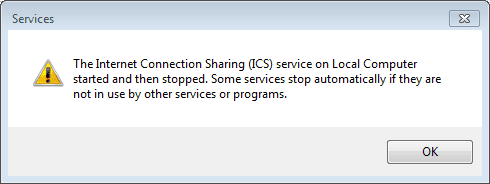
I have instaled Windows 7 Ultimate 32bit on my new computer. (Dual boot with XP). On my old computer there was installed XP... so the problem is:
When i tryed to share Internet connection Windows 7 gave me an error:
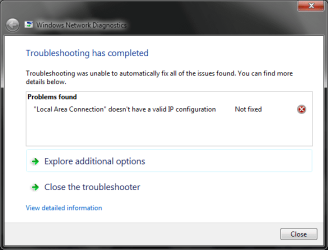
"Local Area Connection" doesn't have a valid IP configuration
but files were shared and i could transfer files from one computer to the other... (only Internet didnt work)...
So i got back to win XP and tried to share connection ( XP vs XP ) and it worked great...
Then i thought: maybe windows 7 and windows XP cant share internet connection... and i installed windows 7 on the old computer (win7 vs win7)...
But then both computers came up with the same error ("Local Area Connection" doesn't have a valid IP configuration).
When i tryed to share Internet connection Windows 7 gave me an error:
"Local Area Connection" doesn't have a valid IP configuration
but files were shared and i could transfer files from one computer to the other... (only Internet didnt work)...
So i got back to win XP and tried to share connection ( XP vs XP ) and it worked great...
Then i thought: maybe windows 7 and windows XP cant share internet connection... and i installed windows 7 on the old computer (win7 vs win7)...
But then both computers came up with the same error ("Local Area Connection" doesn't have a valid IP configuration).
I tried winXP on the new comp and windows 7 on the old... and it worked great!!!
I figured out thet something is wrong with windows 7 on my new computer and i did a clean installation 3 times and the same error came up...
I tried all this things and nothing worked:
1)Disable/enable NIC
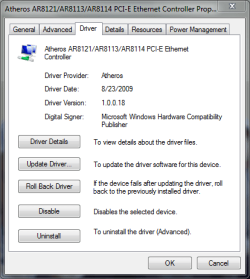
2)Install latest drivers for my NIC
3)Roll back the drivers
4)cmd -> ipconfig /refresh /release
5)Disabled ip v6
6) netsh winsock reset catalog
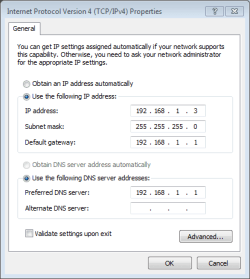
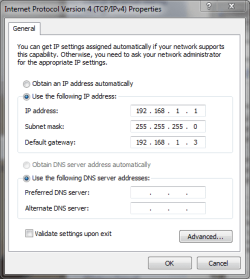
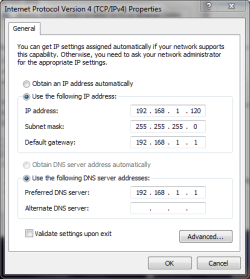
7)tried to manually enter IP
8)tried automatic IP
9)disabled Firewall
10)Bonjour is not instaled on my windows
I really dont know what else to do so somebody PLZ HELP!!!!
CPU: Intel Core2Duo E8400 (3.00 GHz) Motherboard: Asus P5Q SE Memory: 2GB Kingston DDR2 Graphics Card: GeForce 9800 GTNIC: Atheros AR8121/AR8113/AR8114 PCI-E Ethernet Controller
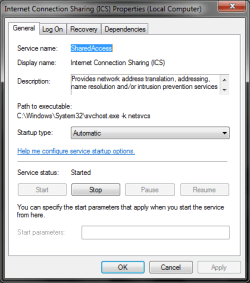
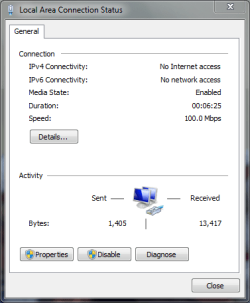
(i downloaded drivers for NIC at ASUSTeK Computer Inc.)I attached some screenshots and my IPCONFIG
I figured out thet something is wrong with windows 7 on my new computer and i did a clean installation 3 times and the same error came up...
I tried all this things and nothing worked:
1)Disable/enable NIC
2)Install latest drivers for my NIC
3)Roll back the drivers
4)cmd -> ipconfig /refresh /release
5)Disabled ip v6
6) netsh winsock reset catalog
7)tried to manually enter IP
8)tried automatic IP
9)disabled Firewall
10)Bonjour is not instaled on my windows
I really dont know what else to do so somebody PLZ HELP!!!!
CPU: Intel Core2Duo E8400 (3.00 GHz) Motherboard: Asus P5Q SE Memory: 2GB Kingston DDR2 Graphics Card: GeForce 9800 GTNIC: Atheros AR8121/AR8113/AR8114 PCI-E Ethernet Controller
(i downloaded drivers for NIC at ASUSTeK Computer Inc.)I attached some screenshots and my IPCONFIG
Attachments
Last edited:
My Computer
- OS
- Windows 7 Ultimate (64 bit)
- CPU
- Intel Core2Duo E8400 (3.00 GHz)
- Motherboard
- Asus P5Q SE
- Memory
- 2GB Kingston DDR2
- Graphics Card(s)
- GeForce 9800 GT
- Sound Card
- Realtek High Definition Audio
- Monitor(s) Displays
- SyncMaster 940BF
- Hard Drives
- Western Digital 300GB
- Case
- CoolerMaster Centurion 590 Mid tower
- Cooling
- Cooler Master
- Keyboard
- Logitech Classic Keyboard
- Mouse
- Logitech MX518
- Internet Speed
- 3 Mbps