|
|
|
|||||||||||||||||||||||||||||||||||||||||||||||||||||||||||||||||||||||||||||||||||||||||||||||||||
| 09 Feb 2009 | #1 |
|
|
Samba network share issue with Windows 7
Hi all,
Was having an issue here and was hoping someone could offer some assistance. I have a Linux Box (debian) running with Samba installed and hosting a network share. I can access the share on a 2 Windows XP machines, a windows Vista machine, AND a modded Xbox with Xbox media center with SMB support. However, for some reason, windows 7 comes up with an error box when I try to connect and says Quote:
\\10.0.0.1
More Data is available. I went into gpedit.msc and then to "Computer Configuration / Windows Settings / Security Settings / Local Policies / Security Options" and selected a variety of the choices here but none seem to do the trick |
| My System Specs |
| . |
|
|
| 12 Feb 2009 | #2 |
|
|
I do have probleme to with a file server under Debian R4 avec Samba.
All work pretty fine with Vista (dual-boot) and from a Xbox with XBMC But from Seven Beta it's really slow and totally unusable. File explorer freeze each time I navigate intoo file folder that are on the network Drive. And the copy of video file is pretty impossible. After few try the connexion is lost but I can still access the serveur via webmin or putty but it can be laggy. I really don't understand what's goning wrong. I had some similar problem at the beginning with Vista but not at this level !! |
| My System Specs |
| 21 Sep 2009 | #3 |
|
|
Similar problem here (but slightly different). Trying to access a Win7 share from Ubuntu 9.04, I just get a constant log-in dialog box. Works fine to XP...
|
| My System Specs |
| . |
|
|
| 21 Sep 2009 | #4 |
|
|
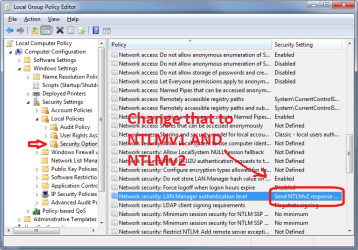
If you change the policy setting highlighted in the attached screenshot to include NTLMv1 (and not just NTLMv2), that may do the trick. |
| My System Specs |
| 23 Sep 2009 | #5 |
|
|
Tried that - and disabling SMB2 and still no joy.
|
| My System Specs |
| 23 Sep 2009 | #6 |
|
|
Disabling SMB2 should be unnecessary because Win7/Vista/Win2K8 will always fall back on SMB1 if the newer variant is not negotiated. In other words, they're just as happy with SMB1 and the choice is automatic depending on the capabilities of the other party.
At this stage, I'd personally be looking at a packet trace to try to understand what's failing and why. If you like, please upload a (zipped) packet trace of the connection attempt and I or somebody else here may be able to help. (To generate a trace: www.wireshark.com, download, install, start trace, repro connection failure, stop trace, save trace, zip up, upload.) |
| My System Specs |
| 23 Sep 2009 | #7 |
|
|
H2SO4:
First off, thank you for the tip - this solves the issue completely on my end. What I did notice, however, is that prior to changing the authentication method options, I could access the share via \\server_hostname\\share_name\, but not through the server's LAN IP address (both boxes are on the same subnet). When I added the server's ip to /etc/hosts, the share became accessible. Again, this is before modifying auth method preferences. That would indicate that attempting to access the share through the server's IP address in this case somehow triggers a legacy auth method, as opposed to ntlmv2, correct? If so, do you have any idea as to why this could be occurring? The server in question is running Samba 3.0.28a. Thanks again for your help. |
| My System Specs |
| 23 Sep 2009 | #8 |
|
|
H2SO4:
First off, thank you for the tip - this solves the issue completely on my end. What I did notice, however, is that prior to changing the authentication method options, I could access the share via \\server_hostname\\share_name\, but not through the server's LAN IP address (both boxes are on the same subnet). When I added the server's ip to /etc/hosts, the share became accessible. Again, this is before modifying auth method preferences. That would indicate that attempting to access the share through the server's IP address in this case somehow triggers a legacy auth method, as opposed to ntlmv2, correct? If so, do you have any idea as to why this could be occurring? The server in question is running Samba 3.0.28a. Thanks again for your help. The choice of authentication mechanism invoked by the client depends on two main factors: 1) whether the "target" name is IP/FQDN or a single-label hostname, 2) whether the client is a member of an AD domain. As you've found, the use of an IP address or a FQDN (host.domain.com) as the target causes a different security path to be taken compared to a single-label host. Adding domain membership introduces another layer of complexity because IP/FQDN access will then rely on Kerberos while single-label still falls back on NTLM. These settings can mostly be controlled through policy, so joining a "real" domain with multiple layers of group policy settings may produce varying results, depending on what the domain admins have specified. Hope this helps. |
| My System Specs |
| 05 Oct 2009 | #9 |
|
|
Hi Trespasser, I have run into the very same thing where Windows 7 shares and printers are unavailable from my Linux boxes. I get the very same dialog box that regardless of entering my user name and password from windows, it never lets me get to the share or print to the windows shared printer. Please give me details on EXACTLY what you did to solve the problem and indicate all steps for both windows and linux sides.
Thank you |
| My System Specs |
| 06 Oct 2009 | #10 |
|
|
billydv,
I merely followed h2so4's advice above (the post with a screenshot) to change the auth method on my client box. |
| My System Specs |
| Similar help and support threads | ||||
| Thread | Forum | |||
|
SAMBA share windows 7 and HP Unix I am new to windows 7 and need my samba share to work. I have been sharing from HP Unix using samba to windows XP for a while. I loaded windows 7 prof - 64 bit on a machine and I cannot get the samba share to work. I have change the lmcompatabilitylevel from 1 to 2. I changed the policy... |
Network & Sharing | |||
|
Unable to Access SAMBA Share from Windows 7 Hi All , I wanted to access some content which have been shared with the network in a SAMBA server. SAMBA server is working fine. I am able to access SMABA shared folder from my Windows XP box. 1. SAMBA server is in FEDORA 14 box and connected to wired LAN. (Broadband switch) 2. Windows... |
Network & Sharing | |||
|
samba share is not accessible from Windows 7 client... Hello, I'm trying to map a network drive from my windows client running Windows 7 Enterprise. The folder is a Samba share on a linux (Fedora core 13) server. When I attempt to map the drive using the folder \\10.1.1.131\earth, I get the message via a dialog box: Y:\ is not accessible an... |
Network & Sharing | |||
|
Samba Share Networkmounting as X,Y,Z works, \\Share\mount not Dear admins, power users etc. The last 36h hours i spend googling my problem but couldn't get any help to solve this issue. I have multiple Windows 7 machines (32bit and 64 bit) at home. One machine shows my samba share in the network environment and i can access it via double click... |
Network & Sharing | |||
|
Connecting Windows 7 to SLES 10 Sp1 Samba Share Hi, I've got come across a very peculiar issue. We currently have approx 8 servers that are all running SLES 10 SP1 and have samba shares configured on them. On our Windows 7 machines, if I try to browse the shares via UNC (server1\share\directory) each directory comes up saying "this... |
Network & Sharing | |||
| Our Sites |
Site Links |
About Us |
Find Us |
|
Windows 7 Forums is an independent web site and has not been authorized,
sponsored, or otherwise approved by Microsoft Corporation.
"Windows 7" and related materials are trademarks of Microsoft Corp.
© Designer Media Ltd All times are GMT -5. The time now is 16:57. |
|