Solved Samba network share issue with Windows 7

  • Thread starter Thread starter Jibbs
  • Start date Start date
J

Jibbs

Guest
Hi all,

Was having an issue here and was hoping someone could offer some assistance.

I have a Linux Box (debian) running with Samba installed and hosting a network share.

I can access the share on a 2 Windows XP machines, a windows Vista machine, AND a modded Xbox with Xbox media center with SMB support. However, for some reason, windows 7 comes up with an error box when I try to connect and says

\\10.0.0.1

More Data is available.

10.0.0.1 being my sharebox/router.

I went into gpedit.msc and then to "Computer Configuration / Windows Settings / Security Settings / Local Policies / Security Options" and selected a variety of the choices here but none seem to do the trick
 
I do have probleme to with a file server under Debian R4 avec Samba.

All work pretty fine with Vista (dual-boot) and from a Xbox with XBMC But from Seven Beta it's really slow and totally unusable.
File explorer freeze each time I navigate intoo file folder that are on the network Drive.
And the copy of video file is pretty impossible.
After few try the connexion is lost but I can still access the serveur via webmin or putty but it can be laggy.

I really don't understand what's goning wrong. I had some similar problem at the beginning with Vista but not at this level !!
 

My Computer

OS
Vista H.P. SP1 x32 Seven RC x64
CPU
Q6600 @ 3.4Ghz
Motherboard
GA-EP45-DS3L
Memory
4Go PC2-6400
Graphics Card(s)
8500GT @ 700/500
Sound Card
Audigy Platinium
Monitor(s) Displays
Mitsubishi Diamond Pro 920 + Mitsubishi Diamond Pro 720
Screen Resolution
1600x1200 twice
Hard Drives
Hitachi 160Go
Maxtor 160Go (system drive)
Maxtor 200Go in Antec MX-1 EC external box (eSATA-USB2.0)
PSU
Corsair VX550W
Case
Thermaltake Xaser III
Cooling
Watercooling (CPU, GPU, HDD, NB)
Keyboard
MS Wireless Multimedia 6000 V2.0
Mouse
IntellEye Explorer 3.0
Internet Speed
ADSL 18Mbit/s/1Mbit/s
Hi all,

Was having an issue here and was hoping someone could offer some assistance.

I have a Linux Box (debian) running with Samba installed and hosting a network share.

I can access the share on a 2 Windows XP machines, a windows Vista machine,

Similar problem here (but slightly different). Trying to access a Win7 share from Ubuntu 9.04, I just get a constant log-in dialog box. Works fine to XP...
 

My Computer

Computer Manufacturer/Model Number
Toshiba L40 Satellite
OS
Windows 7 RC
CPU
Duo core 1.6GNz Intel
Memory
2GB
Hard Drives
80 GB SATA
Similar problem here (but slightly different). Trying to access a Win7 share from Ubuntu 9.04, I just get a constant log-in dialog box. Works fine to XP...

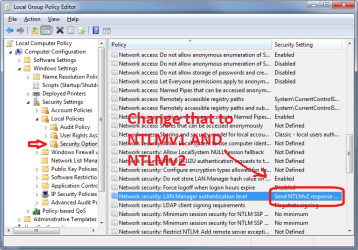
Many authentication incompatibilities between NIXes and Vista/Win7 are caused by the latter's (default settings) reluctance to resort to the older and less secure NTLM version 1 - NTLMv1 - authentication mechanism.

If you change the policy setting highlighted in the attached screenshot to include NTLMv1 (and not just NTLMv2), that may do the trick.
 

Attachments

  • NTLMvX.png
    NTLMvX.png
    34.7 KB · Views: 31,246
Last edited by a moderator:

My Computer

Computer Manufacturer/Model Number
Multiple machines in various stages of decomposition.
OS
Win7x64
Tried that - and disabling SMB2 and still no joy.
 

My Computer

Computer Manufacturer/Model Number
Toshiba L40 Satellite
OS
Windows 7 RC
CPU
Duo core 1.6GNz Intel
Memory
2GB
Hard Drives
80 GB SATA
Tried that - and disabling SMB2 and still no joy.

Disabling SMB2 should be unnecessary because Win7/Vista/Win2K8 will always fall back on SMB1 if the newer variant is not negotiated. In other words, they're just as happy with SMB1 and the choice is automatic depending on the capabilities of the other party.

At this stage, I'd personally be looking at a packet trace to try to understand what's failing and why. If you like, please upload a (zipped) packet trace of the connection attempt and I or somebody else here may be able to help.

(To generate a trace: www.wireshark.com, download, install, start trace, repro connection failure, stop trace, save trace, zip up, upload.)
 

My Computer

Computer Manufacturer/Model Number
Multiple machines in various stages of decomposition.
OS
Win7x64
H2SO4:

First off, thank you for the tip - this solves the issue completely on my end. What I did notice, however, is that prior to changing the authentication method options, I could access the share via \\server_hostname\\share_name\, but not through the server's LAN IP address (both boxes are on the same subnet). When I added the server's ip to /etc/hosts, the share became accessible. Again, this is before modifying auth method preferences.

That would indicate that attempting to access the share through the server's IP address in this case somehow triggers a legacy auth method, as opposed to ntlmv2, correct? If so, do you have any idea as to why this could be occurring?

The server in question is running Samba 3.0.28a.

Thanks again for your help.
 

My Computer

OS
7
H2SO4:

First off, thank you for the tip - this solves the issue completely on my end. What I did notice, however, is that prior to changing the authentication method options, I could access the share via \\server_hostname\\share_name\, but not through the server's LAN IP address (both boxes are on the same subnet). When I added the server's ip to /etc/hosts, the share became accessible. Again, this is before modifying auth method preferences.

That would indicate that attempting to access the share through the server's IP address in this case somehow triggers a legacy auth method, as opposed to ntlmv2, correct? If so, do you have any idea as to why this could be occurring?

The server in question is running Samba 3.0.28a.

Thanks again for your help.

No problem, glad to hear that worked for you.

The choice of authentication mechanism invoked by the client depends on two main factors:

1) whether the "target" name is IP/FQDN or a single-label hostname,
2) whether the client is a member of an AD domain.

As you've found, the use of an IP address or a FQDN (host.domain.com) as the target causes a different security path to be taken compared to a single-label host. Adding domain membership introduces another layer of complexity because IP/FQDN access will then rely on Kerberos while single-label still falls back on NTLM.

These settings can mostly be controlled through policy, so joining a "real" domain with multiple layers of group policy settings may produce varying results, depending on what the domain admins have specified.

Hope this helps.
 

My Computer

Computer Manufacturer/Model Number
Multiple machines in various stages of decomposition.
OS
Win7x64
Hi Trespasser, I have run into the very same thing where Windows 7 shares and printers are unavailable from my Linux boxes. I get the very same dialog box that regardless of entering my user name and password from windows, it never lets me get to the share or print to the windows shared printer. Please give me details on EXACTLY what you did to solve the problem and indicate all steps for both windows and linux sides.
Thank you
 

My Computer

OS
Windows7, Gentoo Linux
billydv,

I merely followed h2so4's advice above (the post with a screenshot) to change the auth method on my client box.
 

My Computer

OS
7
If I need to make a change to the Policy in order to connect to my NAS drive which is apparently based on Samba server, but I have Windows 7 Home Premium, is there a way to try the above mentioned adjustment with my OS?

Cheers Mike H
 

My Computer

Computer Manufacturer/Model Number
Clone
OS
Win xp 64 Pro, trying Win 7
CPU
i5
Motherboard
Asus P7P55D
Memory
4gig 1600
Graphics Card(s)
XFX 4350 1Gig
Monitor(s) Displays
Lg W2453V
Hard Drives
2- 500 gig
PSU
Coolermaster 650
Case
Coolermaster
Apparently it can be done using the method described here:

I've followed this, creating a DWORD entry in the lsa key that looks like this:

32786619.png


Rebooted, but I still cannot authenticate into shared windows7 folders or printers using Samba from ubuntu 9.10. I've tried setting no password on the user account in windows 7, and also setting the password / username to the same combination in both OS'. When I browse the network in Ubuntu, I can see the Windows 7 PC I'm trying to connect to, but authentication always fails.

I'm not sure what the poster from the thread I linked to means by:

"If I bypass the root and go straight to the share, I'm fine."
 

My Computer

OS
Win 7 Home Premium / Ubuntu 9.10
Apparently it can be done using the method described here:

I've followed this, creating a DWORD entry in the lsa key that looks like this:

32786619.png


Rebooted, but I still cannot authenticate into shared windows7 folders or printers using Samba from ubuntu 9.10. I've tried setting no password on the user account in windows 7, and also setting the password / username to the same combination in both OS'. When I browse the network in Ubuntu, I can see the Windows 7 PC I'm trying to connect to, but authentication always fails.

I'm not sure what the poster from the thread I linked to means by:

"If I bypass the root and go straight to the share, I'm fine."

The reg value is called "LmCompatibilityLevel", not "LMCompatibility". The capitalisation doesn't matter, but the absence of those last 5 letters is going to ensure it doesn't work ;)

Little known fact: not that it's a good idea, but most places in the registry you can create bogus new values to your heart's content, and it won't make a lick of difference as long as their names do not correspond to anything the software is actually looking for in that location.
 

My Computer

Computer Manufacturer/Model Number
Multiple machines in various stages of decomposition.
OS
Win7x64
Thanks H2SO4. Sadly, it makes no difference. I've set file / printer sharing to not require a password in Windows 7, and I'm wondering if maybe Samba doesn't like it. I''ll have to keep plugging away at it. I couldn't get this working in the RC either.
 

My Computer

OS
Win 7 Home Premium / Ubuntu 9.10
Thanks H2SO4. Sadly, it makes no difference. I've set file / printer sharing to not require a password in Windows 7, and I'm wondering if maybe Samba doesn't like it. I''ll have to keep plugging away at it. I couldn't get this working in the RC either.

As a suggestion, download Wireshark (www.wireshark.org), install it, start a packet trace, repro the problem, stop and save the trace, zip it up, and upload here.

Analysis of the trace ought to reveal the nature of the problem, or at least point us in the right direction. It's possible that your interoperability woes have nothing to do with NTLM versions, or it's a compound symptom.
 

My Computer

Computer Manufacturer/Model Number
Multiple machines in various stages of decomposition.
OS
Win7x64
What does that mean? "auth"? I looked at tyhe screen shot but I can't figure out where that is or how to get to it? All I need to do is access some files on my Linux PC. It used to work with windows XP but not any more on windows 7.

Thanks.
 

My Computer

OS
windows 7
Thanks H2SO4. Sadly, it makes no difference. I've set file / printer sharing to not require a password in Windows 7, and I'm wondering if maybe Samba doesn't like it. I''ll have to keep plugging away at it. I couldn't get this working in the RC either.

As a suggestion, download Wireshark (www.wireshark.org), install it, start a packet trace, repro the problem, stop and save the trace, zip it up, and upload here.

Analysis of the trace ought to reveal the nature of the problem, or at least point us in the right direction. It's possible that your interoperability woes have nothing to do with NTLM versions, or it's a compound symptom.

Alright, I've got a capture of ubuntu trying to get authorization to use a printer on windows 7. One thing though - how can I be sure that my passwords are not being stored somewhere in the capture?
 

My Computer

OS
Win 7 Home Premium / Ubuntu 9.10
here is a packet trace from my pc.

x.x.x.107 my pc win7 64bit
x.x.x.163 mediagate hd using samba to connect to my pc

need any more info let me know dont know if im dooing it right :D
 

Attachments

My Computer

OS
win 7 64
Hi all,

Was having an issue here and was hoping someone could offer some assistance.

I have a Linux Box (debian) running with Samba installed and hosting a network share.

I can access the share on a 2 Windows XP machines, a windows Vista machine,

Similar problem here (but slightly different). Trying to access a Win7 share from Ubuntu 9.04, I just get a constant log-in dialog box. Works fine to XP...

All fixed by a series of Ubuntu Updates a short while ago, including a Samba update.
Now the access to the Win 7 box goes right ahead as it should do....
 

My Computer

Computer Manufacturer/Model Number
Toshiba L40 Satellite
OS
Windows 7 RC
CPU
Duo core 1.6GNz Intel
Memory
2GB
Hard Drives
80 GB SATA
still no fixes for those who can not upgrade their samba server/client ? for example i got an external hd for TV and theres no update on firmware on that box. There must be some fix on win7, has anyone with experience looked at the dump from wireshark i posted earlier?
 

My Computer

OS
win 7 64
Back
Top