Wifi won't reconnect after resuming suspend

frbas

New member
Local time
9:20 PM
Messages
13
So my computer won't reconnect to any wifi network after it resumes a suspend. This happens with all networks, secured and unsecured. I have to manually reconnect, when this is done, it doesn't always reconnect the first time. Some times I have to attempt to reconnect multiple times before I get it to work. I believe this problem after I installed the Sprint broadband card manager. I removed the software but I am still getting the problem. I also ran an System File Checker on the system and it didn't do anything either.

Anybody know what can cause this and how to fix it? Thanks.
 

My Computer My Computer

At a glance

Windows 7 UltimateT7300 2.0GHz2 GB
Computer Manufacturer/Model Number
Sony VGN-CR123E
OS
Windows 7 Ultimate
CPU
T7300 2.0GHz
Memory
2 GB
Screen Resolution
1280 x 800
Hard Drives
500 GB
Internet Speed
10 Mbps
This is part of your Screen Saver settings. You need to go into your Advanced power settings and stop your computer from putting your devices into sleep.

since i see you are using windows 7

Right Click on your desktop and select Personalization

Bottom right click on Screen Saver

Change Power Settings >>> Change Plan Settings

then Change Advanced Power Settings
 

My Computer My Computer

At a glance

Windows 7 Ultimate x64AMD Phenom x6 1045t8 GBATI Radeon HD 5570
Computer Manufacturer/Model Number
HP Pavilion Elite HPE-410f
OS
Windows 7 Ultimate x64
CPU
AMD Phenom x6 1045t
Motherboard
N/A
Memory
8 GB
Graphics Card(s)
ATI Radeon HD 5570
Sound Card
Realtek Highdefinition Audio / 5.1 Dolby Setup
Monitor(s) Displays
HP w2207h Widescreen
Screen Resolution
1680*1050
Hard Drives
1 TB (fixed), 320 Portable maxtor, Server Hard drives
PSU
350 Watt
Case
HP CASE
Cooling
Bass
Keyboard
Logitech MX 5500
Mouse
Logitech MX 5500
Internet Speed
ROAD RUNNER 16MB D/512 U
Once I get to Change Advanced Power Settings what should I do?
 

My Computer My Computer

At a glance

Windows 7 UltimateT7300 2.0GHz2 GB
Computer Manufacturer/Model Number
Sony VGN-CR123E
OS
Windows 7 Ultimate
CPU
T7300 2.0GHz
Memory
2 GB
Screen Resolution
1280 x 800
Hard Drives
500 GB
Internet Speed
10 Mbps
Me Personally becuase I aways have stuff going... I would keep your Hard drive on. Don't have it shut Down. So, Under hard disk, you should put never. Now that is just me... but also this will shut your wireless down too if you decide to turn your hard drive off... but that really depends on how much poweryou want to save when it comes to having your compuer in sleep mode.

Wireless Adapter: Maximum Performance (Plugged in and Battery)

The only thing that i really do is dont have my computer go into sleep. I just have m display turn off.. keeps everything else runnig. LIke i said. It is your preference.

You culd just turn sleep completelly off along with hibernation and just have your desktop screen turn off after 15 min and start your screen saver after 5 .... something like that.
 

My Computer My Computer

At a glance

Windows 7 Ultimate x64AMD Phenom x6 1045t8 GBATI Radeon HD 5570
Computer Manufacturer/Model Number
HP Pavilion Elite HPE-410f
OS
Windows 7 Ultimate x64
CPU
AMD Phenom x6 1045t
Motherboard
N/A
Memory
8 GB
Graphics Card(s)
ATI Radeon HD 5570
Sound Card
Realtek Highdefinition Audio / 5.1 Dolby Setup
Monitor(s) Displays
HP w2207h Widescreen
Screen Resolution
1680*1050
Hard Drives
1 TB (fixed), 320 Portable maxtor, Server Hard drives
PSU
350 Watt
Case
HP CASE
Cooling
Bass
Keyboard
Logitech MX 5500
Mouse
Logitech MX 5500
Internet Speed
ROAD RUNNER 16MB D/512 U
If you have a laptop... Make sure... just before you go into advance power saving properties, there are links on your left side of the dialog... for laptops... asking what yo would like to do if you close your lid... make sure you have it do nothing. Usuaallly windows will have it defaulted to going to sleep if it is closed.
 

My Computer My Computer

At a glance

Windows 7 Ultimate x64AMD Phenom x6 1045t8 GBATI Radeon HD 5570
Computer Manufacturer/Model Number
HP Pavilion Elite HPE-410f
OS
Windows 7 Ultimate x64
CPU
AMD Phenom x6 1045t
Motherboard
N/A
Memory
8 GB
Graphics Card(s)
ATI Radeon HD 5570
Sound Card
Realtek Highdefinition Audio / 5.1 Dolby Setup
Monitor(s) Displays
HP w2207h Widescreen
Screen Resolution
1680*1050
Hard Drives
1 TB (fixed), 320 Portable maxtor, Server Hard drives
PSU
350 Watt
Case
HP CASE
Cooling
Bass
Keyboard
Logitech MX 5500
Mouse
Logitech MX 5500
Internet Speed
ROAD RUNNER 16MB D/512 U
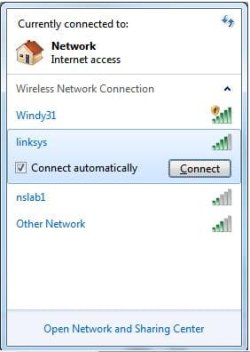
Hi frbas, i assume you already ticked this option like so:

Noname.jpg
 

My Computer My Computer

At a glance

Windows 7 Ultimate 64BitGenuineIntel Intel(R) Core(TM) DuoCore T2400 ...2.00 GBMobile Intel(R) 945 Express Chipset
Computer Manufacturer/Model Number
Lenovo ThinkPad T60
OS
Windows 7 Ultimate 64Bit
CPU
GenuineIntel Intel(R) Core(TM) DuoCore T2400 @ 1.83GHz
Motherboard
Intel(R) 82801G (ICH7 Family)
Memory
2.00 GB
Graphics Card(s)
Mobile Intel(R) 945 Express Chipset
Sound Card
SoundMAX Integrated Digital HD Audio
Monitor(s) Displays
ThinkPad Display
Screen Resolution
1400x1050
Hard Drives
100Gb SATA
Keyboard
Standard Keyboard
Mouse
HID-compliant Mouse
Internet Speed
Cable Broadband - 54Mbps
Other Info
Intel(R) PRO/1000 PL Network Connection
11a/b/g Wireless LAN Mini PCI Express Adapter
This is a laptop. I don't think my issue is related to the HD turning off. I went and looked at all my power power options and the minimum for HD turning off is 3 min. I can close the lid let is go into suspend then immediately open it back up and I still have the problem. When the lid closes the computer does go into sleep, but it has always been that way.
 

My Computer My Computer

At a glance

Windows 7 UltimateT7300 2.0GHz2 GB
Computer Manufacturer/Model Number
Sony VGN-CR123E
OS
Windows 7 Ultimate
CPU
T7300 2.0GHz
Memory
2 GB
Screen Resolution
1280 x 800
Hard Drives
500 GB
Internet Speed
10 Mbps
And about the ticking of the reconnect box?:p
 

My Computer My Computer

At a glance

Windows 7 Ultimate 64BitGenuineIntel Intel(R) Core(TM) DuoCore T2400 ...2.00 GBMobile Intel(R) 945 Express Chipset
Computer Manufacturer/Model Number
Lenovo ThinkPad T60
OS
Windows 7 Ultimate 64Bit
CPU
GenuineIntel Intel(R) Core(TM) DuoCore T2400 @ 1.83GHz
Motherboard
Intel(R) 82801G (ICH7 Family)
Memory
2.00 GB
Graphics Card(s)
Mobile Intel(R) 945 Express Chipset
Sound Card
SoundMAX Integrated Digital HD Audio
Monitor(s) Displays
ThinkPad Display
Screen Resolution
1400x1050
Hard Drives
100Gb SATA
Keyboard
Standard Keyboard
Mouse
HID-compliant Mouse
Internet Speed
Cable Broadband - 54Mbps
Other Info
Intel(R) PRO/1000 PL Network Connection
11a/b/g Wireless LAN Mini PCI Express Adapter
Power Saving

Windows has always had weird issues with sleep/standby/hibernate not just a Windows 7 issue and I suppose knowing MS it will always be this way.

What you should do is in network and sharing on the left panel choose change adapter settings then right click on your adapters go to properties then click on the configure button then go to the power management tab and uncheck allow the computer to turn off this device to save power
 

My Computer My Computer

At a glance

Windows 7 Ultimate 32 bitAMD Athlon 64 X2 4200+ Overclocked to 3.0Ghz2 Gigs of G.Skill DDR2 800HIS ATI Radeon HD 2600 Pro With IceQ cooler
Computer Manufacturer/Model Number
Custom Built
OS
Windows 7 Ultimate 32 bit
CPU
AMD Athlon 64 X2 4200+ Overclocked to 3.0Ghz
Motherboard
Biostar TF560 A2+
Memory
2 Gigs of G.Skill DDR2 800
Graphics Card(s)
HIS ATI Radeon HD 2600 Pro With IceQ cooler
Sound Card
6.1 Channel Sound Blaster Live 24 Bit
Monitor(s) Displays
Dual 20.5 " LG Flatrons W2052TO
Screen Resolution
1152x864
Hard Drives
Dual 36 Gig 10,000 RPM Raptors
PSU
430 watt Seasonic 80%+ Dual 12v Rails 2x80mm fans
Case
CHIEFMAX YA-5X
Cooling
4-80mm case fans 1-140mm case fan freezer 64 Pro CPU cooler
Keyboard
Saitek Eclipse II
Mouse
A4Tech wireless battery free optical scroll mouse
Internet Speed
1.5 meg down 384 up
Other Info
Logisys LED fan/light controller and dual 16" LED sticks mounted inside top of case all fans are LED all lighting is blue
DVD RW and CD RW both and Memory card reader
Power Saving

as acurasd stated the power saving settings within Windows cause more aggravation then they are worth and I always turn them off
 

My Computer My Computer

At a glance

Windows 7 Ultimate 32 bitAMD Athlon 64 X2 4200+ Overclocked to 3.0Ghz2 Gigs of G.Skill DDR2 800HIS ATI Radeon HD 2600 Pro With IceQ cooler
Computer Manufacturer/Model Number
Custom Built
OS
Windows 7 Ultimate 32 bit
CPU
AMD Athlon 64 X2 4200+ Overclocked to 3.0Ghz
Motherboard
Biostar TF560 A2+
Memory
2 Gigs of G.Skill DDR2 800
Graphics Card(s)
HIS ATI Radeon HD 2600 Pro With IceQ cooler
Sound Card
6.1 Channel Sound Blaster Live 24 Bit
Monitor(s) Displays
Dual 20.5 " LG Flatrons W2052TO
Screen Resolution
1152x864
Hard Drives
Dual 36 Gig 10,000 RPM Raptors
PSU
430 watt Seasonic 80%+ Dual 12v Rails 2x80mm fans
Case
CHIEFMAX YA-5X
Cooling
4-80mm case fans 1-140mm case fan freezer 64 Pro CPU cooler
Keyboard
Saitek Eclipse II
Mouse
A4Tech wireless battery free optical scroll mouse
Internet Speed
1.5 meg down 384 up
Other Info
Logisys LED fan/light controller and dual 16" LED sticks mounted inside top of case all fans are LED all lighting is blue
DVD RW and CD RW both and Memory card reader
I went to changed the power management and deleted the network from the remembered list and that fixed the issue.

Thanks both of you.
 

My Computer My Computer

At a glance

Windows 7 UltimateT7300 2.0GHz2 GB
Computer Manufacturer/Model Number
Sony VGN-CR123E
OS
Windows 7 Ultimate
CPU
T7300 2.0GHz
Memory
2 GB
Screen Resolution
1280 x 800
Hard Drives
500 GB
Internet Speed
10 Mbps
Our job is done.... My time on earth is finished...after taco bell i'll step into the whie light
 

My Computer My Computer

At a glance

Windows 7 Ultimate x64AMD Phenom x6 1045t8 GBATI Radeon HD 5570
Computer Manufacturer/Model Number
HP Pavilion Elite HPE-410f
OS
Windows 7 Ultimate x64
CPU
AMD Phenom x6 1045t
Motherboard
N/A
Memory
8 GB
Graphics Card(s)
ATI Radeon HD 5570
Sound Card
Realtek Highdefinition Audio / 5.1 Dolby Setup
Monitor(s) Displays
HP w2207h Widescreen
Screen Resolution
1680*1050
Hard Drives
1 TB (fixed), 320 Portable maxtor, Server Hard drives
PSU
350 Watt
Case
HP CASE
Cooling
Bass
Keyboard
Logitech MX 5500
Mouse
Logitech MX 5500
Internet Speed
ROAD RUNNER 16MB D/512 U
White Light

Our job is done.... My time on earth is finished...after taco bell i'll step into the whie light

step toward the light bask in it's warmth
 

My Computer My Computer

At a glance

Windows 7 Ultimate 32 bitAMD Athlon 64 X2 4200+ Overclocked to 3.0Ghz2 Gigs of G.Skill DDR2 800HIS ATI Radeon HD 2600 Pro With IceQ cooler
Computer Manufacturer/Model Number
Custom Built
OS
Windows 7 Ultimate 32 bit
CPU
AMD Athlon 64 X2 4200+ Overclocked to 3.0Ghz
Motherboard
Biostar TF560 A2+
Memory
2 Gigs of G.Skill DDR2 800
Graphics Card(s)
HIS ATI Radeon HD 2600 Pro With IceQ cooler
Sound Card
6.1 Channel Sound Blaster Live 24 Bit
Monitor(s) Displays
Dual 20.5 " LG Flatrons W2052TO
Screen Resolution
1152x864
Hard Drives
Dual 36 Gig 10,000 RPM Raptors
PSU
430 watt Seasonic 80%+ Dual 12v Rails 2x80mm fans
Case
CHIEFMAX YA-5X
Cooling
4-80mm case fans 1-140mm case fan freezer 64 Pro CPU cooler
Keyboard
Saitek Eclipse II
Mouse
A4Tech wireless battery free optical scroll mouse
Internet Speed
1.5 meg down 384 up
Other Info
Logisys LED fan/light controller and dual 16" LED sticks mounted inside top of case all fans are LED all lighting is blue
DVD RW and CD RW both and Memory card reader

My Computer My Computer

At a glance

Windows 7 Ultimate x64AMD Phenom x6 1045t8 GBATI Radeon HD 5570
Computer Manufacturer/Model Number
HP Pavilion Elite HPE-410f
OS
Windows 7 Ultimate x64
CPU
AMD Phenom x6 1045t
Motherboard
N/A
Memory
8 GB
Graphics Card(s)
ATI Radeon HD 5570
Sound Card
Realtek Highdefinition Audio / 5.1 Dolby Setup
Monitor(s) Displays
HP w2207h Widescreen
Screen Resolution
1680*1050
Hard Drives
1 TB (fixed), 320 Portable maxtor, Server Hard drives
PSU
350 Watt
Case
HP CASE
Cooling
Bass
Keyboard
Logitech MX 5500
Mouse
Logitech MX 5500
Internet Speed
ROAD RUNNER 16MB D/512 U
Another way to fix wifi after hibernation.

If you want to SAVE power, but still use the hibernate feature. If your laptop has a function to turn off the wifi. do so for 12 seconds and turn it back on. Then right click the internet properties icon on your task bar and make it troubleshoot problems. Mine always say, ip are not set to work properly.
 

My Computer My Computer

At a glance

Windows 7 Home Premium 64bit.Pentium(R) Dual-Core CPU T4400 @ 2.20GHz4.00GB
Computer type
Laptop
Computer Manufacturer/Model Number
Gateway
OS
Windows 7 Home Premium 64bit.
CPU
Pentium(R) Dual-Core CPU T4400 @ 2.20GHz
Memory
4.00GB
Antivirus
Norton 360
Browser
Google Crome
Back
Top