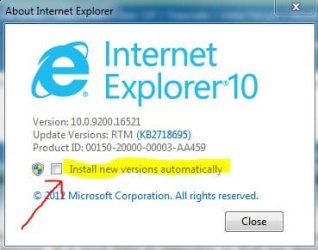
Internet Explorer 10 is available worldwide in 95 languages for download today. We will begin auto updating Windows 7 customers to IE10 in the weeks ahead, starting today with customers running the IE10 Release Preview. With this final release, IE10 brings the same leading standards support, with improved performance, security, privacy, reliability that consumers enjoy on Windows 8, to Windows 7 customers.
20% faster for real world Web sites
With IE10 we continue delivering the best performance for real world Web sites on your Windows device. As with Windows 8, IE10 on Windows 7 improves performance across the board with faster page loading, faster interactivity, and faster JavaScript performance, while reducing CPU usage and improving battery life on mobile PCs. In measurements in our performance lab, IE loads real world pages up to 20% faster in top sites for news, social, search, ecommerce, and more.
You can experience IE10’s leading performance first hand with demos on the IE Test Drive site with examples of hardware accelerated rendering, interactivity, touch, and real world site patterns. Minesweeper is a new test drive demo that is both a full featured HTML5 game and also lets you measure your browser’s performance.
Enjoy a full featured HTML5 Minesweeper experience and test your browser’s performance
Minesweeper is built on a breadth of Web platform capabilities including HTML5, CSS3, WOFF, touch, animations, transitions, audio, video, canvas, transforms, and power efficiency patterns. The game uses standards-based mark-up for interoperability across browsers, and makes the most of fully hardware accelerated browsers like IE10 on both Windows 7 and Windows 8, with consistent performance across a wide range of devices including tablets like the Surface RT. Minesweeper’s performance mode measures how long it takes the browser to solve the minesweeper board, so you can test your browser performance with different minesweeper boards with different complexity.
IE10 also improves hardware accelerated performance of SVG and HTML4 constructs. You can see improvements yourself with the Chalkboard test drive where performance improves over IE9 by 15%. Similarly, improved drawing performance enables faster rendering patterns you can experience yourself with the Speed Reading test drive where performance improves by 30% over IE9 on comparable hardware.
IE10 continues to lead on JavaScript performance with many improvements to the Chakra JavaScript engine including profile-based, type-specialized JIT machine code, faster floating point operations, faster object and property access, and more. All of these improvements come to IE10 on Windows 7 and are consistent across the underlying operating system and hardware. As a result, with IE10 on Windows 7, performance on the WebKit SunSpider JavaScript benchmark improves by 25% over IE9 and leads the industry and other browsers by 17%.
In addition to raw performance improvements of real world sites, IE10 includes improvements to make common browsing activities you do every day faster. IE10’s integrated spell checking and auto-correct for common spelling mistakes, makes typing text for blog posts, social updates, and tweets faster and less error prone. Similarly, we tuned the tabs bar so closing many tabs is faster and more efficient, without having to moving your mouse as each tab closes.
60% increase in supported modern Web standards
For developers, IE10 brings increased support for modern Web standards powered by hardware acceleration to enable a new class of compelling applications and fast and fluid Web browsing. IE10 adds support for over 30 new modern Web standards beyond IE9, for a 60% increase. These new supported standards in IE10 include many of the latest HTML5, CSS3, DOM, Web Performance, and Web Application specifications across important aspects of Web development including:
You can read more at the IE Developer Center and the updated IE10 Guide for Developers about the full set of new Web standards supported in IE10. Listed below with links to the W3C specifications.
- Create rich visual effects with CSS Text Shadow, CSS 3D Transforms, CSS3 Transitions and Animations, CSS3 Gradient, and SVG Filter Effects
- More sophisticated and responsive page layouts with CSS3 for publication quality page layouts and responsive application UI (CSS3 grid, flexbox, multi-column, positioned floats, regions, and hyphenation), HTML5 Forms, input controls, and validation
- Enhanced Web programming model for better offline applications through local storage with IndexedDB and the HTML5 Application Cache; Web Sockets, HTML5 History, Async scripts, HTML5 File APIs, HTML5 Drag-drop, HTML5 Sandboxing, Web workers, ES5 Strict mode support.
- Beautiful and interactive Web applications with support for several new technologies like CSS3 Positioned Floats, HTML5 Drag-drop, File Reader API, Media Query Listeners, Pointer Events, and HTML5 Forms.
- Improved Web application security with the same markup and support for HTML5 Sandbox for iframe isolation.
Furthering our commitment to privacy
In keeping with our commitment on prioritizing the privacy of our customers, the Do Not Track (DNT) signal is turned on in IE10 for Windows 7. In addition to Tracking Protection, IE continues to lead in providing increased choice and control over your privacy online. Customers can choose to turn-off the DNT signal in the options settings in Internet Explorer.
Our commitment to keeping Windows customers in control of their privacy and data sharing continues, especially in the current environment of so much user data being collected online without explicit consent or user awareness.
A better Web today and ahead
The opportunities continue for HTML5 to make both Web sites and applications better. Those opportunities are exciting for everyone on the Web. Like IE10 on Windows 8, this release brings high performance HTML5 development to Windows 7.
For developers building on HTML5, now is time to get ready for IE 10. Developers can use the recently launched modern.IE to test and verify your sites, using a wizard that scans a Web page URL for common interoperability problems and suggests some ideas for how to address those issues to improve the user experience across modern and older browsers.
On behalf of the individuals and companies who have worked with us to deliver this product, and the many people at Microsoft who have built it, thank you for your feedback and for using IE10.
— Rob Mauceri, Group Program Manager, Internet Explorer

More...
See also: http://www.sevenforums.com/tutorial...10-enable-32-bit-64-bit-ie10-windows-7-a.html
Last edited by a moderator:
My Computer
At a glance
Desk1 7 Home Prem / Desk2 10 Pro / Main lap A...Desk1 i5 3750K / Laptop i7 GTX 860M / Desk2 i...Desk1 8GB (1866) / Desk2 16GB (1333) / Laptop...Desk 1& 2NVidia GTX 650 & Laptops on board Intel
- Computer type
- PC/Desktop
- Computer Manufacturer/Model Number
- Own build (new) Desk1 / Asus ROG Win 7 / Desk2 1st build
- OS
- Desk1 7 Home Prem / Desk2 10 Pro / Main lap Asus ROG 10 Pro 2 laptop Toshiba 7 Pro Asus P2520 7 & 10
- CPU
- Desk1 i5 3750K / Laptop i7 GTX 860M / Desk2 i5 2500
- Motherboard
- Desk1 Asus P877-V / Desk2 Gigabyte H67 UD3H / Laptop ?
- Memory
- Desk1 8GB (1866) / Desk2 16GB (1333) / Laptop 8Gb DDR3
- Graphics Card(s)
- Desk 1& 2NVidia GTX 650 & Laptops on board Intel
- Sound Card
- Desk 1 & 2 -XONAR DG Realtek High Def audio Laptop
- Monitor(s) Displays
- Desk 1 Benq HD 2450 / Desk2 Philips 24" / Laptop 17.5"
- Screen Resolution
- 1920x1080 D1 & D2 & Laptop 1
- Hard Drives
- Desk1 Samsung 120GB 830 SSD
Asus ROG 256GB 850 Pro SSD
Desk2 Samsung 840 256 SSD
Toshiba 120GB EVO
- PSU
- Desk 1 Corsair HX 1050/ Laptop ? / Desk 2 Corsair HX 650
- Case
- Desk 1 Cooler HAF XM ? Toshiba laptop / Desk2 Coolermaster
- Cooling
- Fans on all Desk1 -2 Desk2 - all Coolermasters 5 Laptop ?
- Keyboard
- Desk 1 MS Sidewinder X6 Desk 2 MS Sidewinder X 4
- Mouse
- Desk 1&2 - Gigabyte MS 900 gamer - laptop - Logitec wireless
- Internet Speed
- ADSL2+
- Other Info
- One other Desktop (tester) and spare Toshba laptop both with SSD's
Running Kaspersky 2016 ISS on all machines config'd identically
Logitec audio stereo systems on each machine (x3)
Canon MG5250MFC
Router/modem TP-Link running WPA2SK


 Yahoo is losing me more and more........ Just don't think you can get more "updated" than this......