
Windows 10 upgrade: How-to information on scheduling and notifications

Brink

Administrator
Staff member
Local time
6:41 AM
Messages
74,885
Location
Oklahoma
Windows 10 is the best, most secure Windows ever – and it’s easy to get your free upgrade. If you’re a Windows 7 or 8.1 customer, be sure to complete your upgrade before the free upgrade offer expires on July 29, 2016.

To check your status or make a change to your upgrade schedule or notifications, see the instructions below. Additional frequently asked questions about the free upgrade can be found here.

You may have received a notification (like the pop-up screen shown here) about upgrading your PC to Windows 10.

3163284.png


This notification means your Windows 10 upgrade will occur at the time indicated, unless you select either Upgrade now or “Click here to change upgrade schedule or cancel scheduled upgrade”. If you click on OK or on the red “X”, you’re all set for the upgrade and there is nothing further to do.

When you close this pop up, your PC will upgrade at the scheduled time. Based on customer feedback, in the most recent version of the Get Windows 10 (GWX) app, we confirm the time of your scheduled upgrade and provide you an additional opportunity for cancelling or rescheduling the upgrade.

3163285.PNG


Changing your scheduled upgrade

To change your scheduled upgrade, use the Get Windows 10 (GWX) app to follow these steps.

  1. First close all open GWX dialogs, then relaunch the GWX app by clicking the Windows icon at the bottom of your screen:
    3163290.png
  2. Once you’ve relaunched GWX, you’ll see one of the following messages:

    Screen: Windows 10 is a Recommended Update for this PC
    Screen: Microsoft recommends upgrading to Windows 10

    From these screens, you can manage your Windows 10 upgrade schedule.
    • To schedule or start your upgrade, follow the instructions on the screen.
    • If you don’t want to schedule your upgrade, you can select either “Click here to change upgrade schedule or cancel scheduled upgrade” or you can click the red "X" to close the window. (If you receive a pop up that says “You’re set!”, click the link at the bottom to reschedule or cancel the upgrade.)
    Screen: You signed up for Windows 10, and it's ready!

    If you receive this screen:
    • To schedule or start your upgrade, follow the instructions on the screen.
    • If you don’t want to schedule your upgrade, click the link to “change upgrade schedule or cancel scheduled upgrade”. Then select the Cancel scheduled upgrade option on the following screen.
If your upgrade was previously scheduled, you will see the message, Windows 10 is a Recommended Update for this PC. To cancel your scheduled upgrade, click the link to “change upgrade schedule or cancel scheduled upgrade”. Then select the Cancel scheduled upgrade option on the following screens.

3163286.png


3163287.png


When you schedule your upgrade, you will receive a reminder 15 minutes before the upgrade starts. When the reminder appears, you can click I need more time to reschedule or cancel the upgrade.

3163288.png


Turning off notifications

If you no longer want to receive pop-up notifications for the free upgrade offer, you can turn off notifications and hide the GWX app. If you do not wish to upgrade, then prior to taking the following steps to turn off notifications, you should also confirm that you have canceled any scheduled upgrade by following the instructions above. (Note: If your upgrade is already scheduled, the reminder that occurs 15 minutes before the upgrade starts will appear even if notifications have been turned off.)

  1. Right-click (or press and hold) the Taskbar, and then select Properties.
  2. On the Taskbar tab, go down to the Notification area and select Customize…
  3. In the Notification Area Icons window, for the GWX icon, select Hide icon and notifications.
3157350.png


Source: Windows 10 upgrade: How-to information on scheduling and notifications


My Computer My Computer

At a glance

64-bit Windows 11 Pro for WorkstationsIntel i7-8700K OC'd to 5 GHz64 GB (4x16GB) G.SKILL TridentZ RGB DDR4 3600...ASUS ROG-STRIX-GTX1080TI-O11G-GAMING
Computer type
PC/Desktop
Computer Manufacturer/Model Number
Self built custom
OS
64-bit Windows 11 Pro for Workstations
CPU
Intel i7-8700K OC'd to 5 GHz
Motherboard
ASUS ROG Maximus XI Formula Z390
Memory
64 GB (4x16GB) G.SKILL TridentZ RGB DDR4 3600 MHz
Graphics Card(s)
ASUS ROG-STRIX-GTX1080TI-O11G-GAMING
Sound Card
Integrated
Monitor(s) Displays
2 x Samsung Odyssey G7 27"
Screen Resolution
2560x1440
Hard Drives
1TB Samsung 990 PRO M.2,
4TB Samsung 990 PRO PRO M.2,
TerraMaster F8 SSD Plus NAS
PSU
Seasonic Prime Titanium 850W
Case
Thermaltake Core P3
Cooling
Corsair Hydro H115i
Keyboard
Logitech wireless K800
Mouse
Logitech MX Master 4
Internet Speed
2 Gb/s Download and 100 Mb/s Upload
Antivirus
Malwarebyte Anti-Malware Premium
Browser
Google Chrome
Other Info
Logitech Z625 speaker system,
Logitech BRIO 4K Pro webcam,
HP Color LaserJet Pro MFP M477fdn,
APC SMART-UPS RT 1000 XL - SURT1000XLI,
Galaxy S23 Plus phone
No more reservations needed = very interesting.
 

My Computer My Computer

At a glance

Win-7-Pro64bit 7-H-Prem-64biti7-5930K 2nd i9-9940x both water blocked VRM'...Trident-z 3200C14 2nd Trident-z 3600C16EVGA 1080ti ftw3 2nd Titan Xp both water blocked
Computer type
PC/Desktop
Computer Manufacturer/Model Number
Custom assembled by me :}
OS
Win-7-Pro64bit 7-H-Prem-64bit
CPU
i7-5930K 2nd i9-9940x both water blocked VRM's too
Motherboard
ASUS SABERTOOTH X99 2nd ASUS x299 Apex
Memory
Trident-z 3200C14 2nd Trident-z 3600C16
Graphics Card(s)
EVGA 1080ti ftw3 2nd Titan Xp both water blocked
Sound Card
Built-in Realtek
Monitor(s) Displays
1-AOC G2460PG 24"G-Sync 144Hz/ 2nd 1-ASUS VG248QE 24" 144Hz
Screen Resolution
1920 x 1080 144Hz
Hard Drives
2-Samsung M.2 Evo & Evo Plus
2-Samsung 850 EVO 500GB SSD's/ 3-2.5 W.D. Black 1tb-&3-1tb/3-3.5 WD Black 1tb hdd's
PSU
EVGA SuperNOVA 1000-P2 2nd 1200-P2
Case
2-Corsair Obsidian Series 450D Black ATX Mid Tower
Cooling
Custom water loops
Keyboard
Logitech G710+/ 2nd Logitech G910
Mouse
2-RedDragon M901 Perdition 16400 dpi Gaming mouse = wired
Internet Speed
Comcast Ping 19ms 89.31mbps download speed 6.12mbps upload
Antivirus
Malwarebytes Pro/ Superantispyware Pro
Browser
FireFox & Pale moon
Other Info
2nd ASUS X299 Apex/Intel i9-9940x with Custom water loop/7H-Prem-x64/Corsair 450D case/Ram Trident-z 3600C16 4x8gb / Samsung970Evo plus 500gb SSD/Dual ssd EZ swap evo/PSU EVGA SuperNova 1200w-P2 80+Platinum/GPU Titan Xp /8-ML-140 on push-pull on 2-280GTX rads
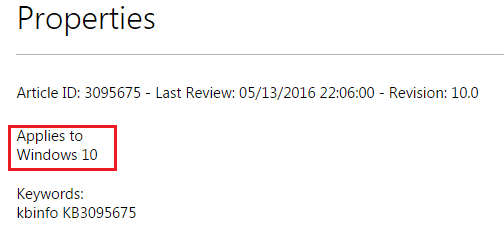
Seems odd that the KB applies to W10?

W10.png

I would have thought that it applied to W7 and W8.1.
 

My Computer My Computer

At a glance

W7 Pro SP1 64biti78GBIntel HD Graphics
Computer type
Laptop
Computer Manufacturer/Model Number
Employer provided Dell Latitude
OS
W7 Pro SP1 64bit
CPU
i7
Memory
8GB
Graphics Card(s)
Intel HD Graphics
Hard Drives
crappy SSD
Antivirus
Employer mandated Symantec Endpoint Protection
Browser
Pale Moon 64bit, IE11 64bit & Chrome 64bit
I try to remember that Microsoft next step is to try and get people to buy W-10.
I'm thinking in the next few months their will be many things changed by Microsoft to complete that goal.
We just have to wait until Shawn post another little goodie from Microsoft.
I also try to remember that their is a Billion or so users of Microsoft operating system that at the present time don't use W-10.

Microsoft wants are money with W-10 and things like the App Store.
Things should get interesting in a short time. For sure Microsoft would love to have us on W-10 and one of their phones synced.

Board members at Microsoft probable have names for us Windows 7 users and I would bet that they couldn't be use in a post here because of the rules.
 

My Computer My Computer

At a glance

Windows 10 Pro. 64/ version 1709 Windows 7 Pr...Intel i7-6800K @ 4.3Corsair Platinum 16 gig @2400EVGA GTX 1070 OC
Computer type
PC/Desktop
Computer Manufacturer/Model Number
Home made Desktop
OS
Windows 10 Pro. 64/ version 1709 Windows 7 Pro/64
CPU
Intel i7-6800K @ 4.3
Motherboard
ASUS X-99 Deluxe II
Memory
Corsair Platinum 16 gig @2400
Graphics Card(s)
EVGA GTX 1070 OC
Monitor(s) Displays
Asus 27" LED LCD/VE278Q
Screen Resolution
1920-1080 or 1280-720 HDMI
Hard Drives
INTEL SSD 730-240 Gb Sata 3.0/
PSU
EVGA Platium 1200W
Case
Phanteks Luxe Tempered Glass 8 fans/ one radiator
Cooling
XSPC/ Water Cooled CPU
Keyboard
Das 4 Professional
Mouse
Logitech M705/MX Anywhere 2-S
Internet Speed
100 mbits
Antivirus
Microsoft Security Essentials/ Malwarebytes Premium 3.0/ SAS
Browser
I.E. 11 default/Firefox/ ISP Time Warner Cable/Spectrum
Other Info
LG BluRay Burner/
Sound system-KLipsch-THX/
Icy Dock ssd Hot Swap bays.
Board members at Microsoft probable have names for us Windows 7 users and I would bet that they couldn't be use in a post here because of the rules.

Board members on SevenForums do have names for Microsoft, Windows 10 and this corporate behavior and we can't post here because of the rules.

We need a new smiley...

Regards,
GEWB
 
Last edited:

My Computer My Computer

At a glance

Linux Mint / XP / Win7 Home, Pro, Ultimate / ...
Computer type
PC/Desktop
Computer Manufacturer/Model Number
(7 different computers booting up to 10 systems)
OS
Linux Mint / XP / Win7 Home, Pro, Ultimate / Win8.1 / Win10
Other Info
Four desktops, two laptops, one notebook and one tablet
My Windows 10 ISO is ready for DVD Burning. (I downloaded it off from official Microsoft site if you're wondering where I got it from ( ͡° ͜ʖ ͡°))
 

My Computer My Computer

At a glance

Windows 7 Home Premium 64-BITAMD A8 7200P8GB 1600mhzRadeon R5 (APU) + Radeon R5 M230 2GB Dual Gra...
Computer type
PC/Desktop
Computer Manufacturer/Model Number
ASUS X550ZE
OS
Windows 7 Home Premium 64-BIT
CPU
AMD A8 7200P
Motherboard
N/A
Memory
8GB 1600mhz
Graphics Card(s)
Radeon R5 (APU) + Radeon R5 M230 2GB Dual Graphics
Sound Card
Realtek ALC269 with SonicMaster
Monitor(s) Displays
Laptop Display
Screen Resolution
1920 x 1080 @60hz
Hard Drives
WDC WD50 00LPVX-80V0TT0 (500GB)
PSU
Laptop Charger
Mouse
ARMAGGEDON TEXTRON SCORPION 7
Internet Speed
100 mbps DOWN / 50 mbps UP
Antivirus
Windows Defender
Browser
Mozzila FireFox, Valve Steam in-game internet browser
Microsoft, Windows 10 and this corporate behavior and we can't post here because of the rules. We need a new smiley...

Yes, realistic descriptions of Virus X are probably not allowed, like this:
barfing.gif


Goodnight MS, may you wake up again.
 

My Computer My Computer

At a glance

W7, W8.1
Computer type
Laptop
Computer Manufacturer/Model Number
Dell \ Lenovo\ HP \ Toshiba
OS
W7, W8.1
Antivirus
MSE, Malwarebytes
Browser
FF
Somehow, this abomination installed itself just now on my primary desktop. I am beyond livid. Doubly so, that it's an unequal trade... retail for OEM. Now I can just eat the loss of being able to upgrade any of my hardware from here on out. It is NOT just tethered to the motherboard. It's everything... every bit of hardware with a distinct name, even down to serial numbers. Like hard drives. Among the several components I WAS going to upgrade later this year.

I do not have, nor do I desire, to spend $200 (pretty much my, until this morning, upgrades budget) on an OS I didn't even want in the frigging first place, JUST to regain control of my system's hardware.

Absolutely disgusted. And no, I won't be reinstalling 7. It'll just keep happening. Evidently.

Brace yourselves. 10 is coming for you whether or not you want it.
 

My Computer My Computer

At a glance

7 Ultimate SP1 x64AMD FX-8350 4.0GHz8GB Corsair Vengeance LP DDR3 1600EVGA GTX760 SC 2GB GDDR5
Computer type
PC/Desktop
Computer Manufacturer/Model Number
Custom [03/21/2014]
OS
7 Ultimate SP1 x64
CPU
AMD FX-8350 4.0GHz
Motherboard
Asus M5A99FX Pro R2.0
Memory
8GB Corsair Vengeance LP DDR3 1600
Graphics Card(s)
EVGA GTX760 SC 2GB GDDR5
Sound Card
Realtek ALC892
Monitor(s) Displays
23" Syncmaster P2370HD
Screen Resolution
1920 x 1080
Hard Drives
Scorpio Black WD1003FZEX 1TB
PSU
Corsair RM 750W
Case
Gigabyte Sumo Omega
Cooling
Noctua NH-D14 | 6 120mm case.
Keyboard
Tt eSPORTS Poesidon Z - Blue Switch
Mouse
Logitech M510
Internet Speed
FiOS 100/100
Antivirus
MBAM
Browser
WaterFox & Chrome
Other Info
NETWORKING:
FiOS G1100 (v1.03)
Netgear WNDR37AV
Actiontec MI424WR (Rev. I)
PRINTER:
Canon MX340
Somehow, this abomination installed itself just now on my primary desktop. I am beyond livid. Doubly so, that it's an unequal trade... retail for OEM. Now I can just eat the loss of being able to upgrade any of my hardware from here on out. It is NOT just tethered to the motherboard. It's everything... every bit of hardware with a distinct name, even down to serial numbers. Like hard drives. Among the several components I WAS going to upgrade later this year.

I do not have, nor do I desire, to spend $200 (pretty much my, until this morning, upgrades budget) on an OS I didn't even want in the frigging first place, JUST to regain control of my system's hardware.

Absolutely disgusted. And no, I won't be reinstalling 7. It'll just keep happening. Evidently.

Brace yourselves. 10 is coming for you whether or not you want it.


Windows 10 - Go Back to Previous Windows - Windows 10 Forums

Afterwards:

Upgrade to Windows 10 Update - Enable or Disable in Windows 7 or 8.1 - Windows 10 Forums

Get Windows 10 Icon - Remove from Taskbar in Windows 7 and 8.1 - Windows 10 Forums
 

My Computer My Computer

At a glance

64-bit Windows 11 Pro for WorkstationsIntel i7-8700K OC'd to 5 GHz64 GB (4x16GB) G.SKILL TridentZ RGB DDR4 3600...ASUS ROG-STRIX-GTX1080TI-O11G-GAMING
Computer type
PC/Desktop
Computer Manufacturer/Model Number
Self built custom
OS
64-bit Windows 11 Pro for Workstations
CPU
Intel i7-8700K OC'd to 5 GHz
Motherboard
ASUS ROG Maximus XI Formula Z390
Memory
64 GB (4x16GB) G.SKILL TridentZ RGB DDR4 3600 MHz
Graphics Card(s)
ASUS ROG-STRIX-GTX1080TI-O11G-GAMING
Sound Card
Integrated
Monitor(s) Displays
2 x Samsung Odyssey G7 27"
Screen Resolution
2560x1440
Hard Drives
1TB Samsung 990 PRO M.2,
4TB Samsung 990 PRO PRO M.2,
TerraMaster F8 SSD Plus NAS
PSU
Seasonic Prime Titanium 850W
Case
Thermaltake Core P3
Cooling
Corsair Hydro H115i
Keyboard
Logitech wireless K800
Mouse
Logitech MX Master 4
Internet Speed
2 Gb/s Download and 100 Mb/s Upload
Antivirus
Malwarebyte Anti-Malware Premium
Browser
Google Chrome
Other Info
Logitech Z625 speaker system,
Logitech BRIO 4K Pro webcam,
HP Color LaserJet Pro MFP M477fdn,
APC SMART-UPS RT 1000 XL - SURT1000XLI,
Galaxy S23 Plus phone
Yeah I just realized that people are just wasting time trying to stop Windows 10 upgrade message from appearing. You can just leave it alone. I have left it ever since it first appeared and haven't bothered me imho.
 

My Computer My Computer

At a glance

Windows 7 Home Premium 64-BITAMD A8 7200P8GB 1600mhzRadeon R5 (APU) + Radeon R5 M230 2GB Dual Gra...
Computer type
PC/Desktop
Computer Manufacturer/Model Number
ASUS X550ZE
OS
Windows 7 Home Premium 64-BIT
CPU
AMD A8 7200P
Motherboard
N/A
Memory
8GB 1600mhz
Graphics Card(s)
Radeon R5 (APU) + Radeon R5 M230 2GB Dual Graphics
Sound Card
Realtek ALC269 with SonicMaster
Monitor(s) Displays
Laptop Display
Screen Resolution
1920 x 1080 @60hz
Hard Drives
WDC WD50 00LPVX-80V0TT0 (500GB)
PSU
Laptop Charger
Mouse
ARMAGGEDON TEXTRON SCORPION 7
Internet Speed
100 mbps DOWN / 50 mbps UP
Antivirus
Windows Defender
Browser
Mozzila FireFox, Valve Steam in-game internet browser
Back
Top