Solved Windows 10 Upgrade won't stop forcing itself to install on my PC.

bbgun21

New member
Local time
11:10 AM
Messages
9
Hello everyone.

I've been always browsing these forums as a guest whenever I had a problem with my OS and I always found the solution to my problems because of the community being extremely helpful and nice, and I've recently stumbled upon a problm where searching for a solution would not bring many useful results so I've came here to ask you kind folk if you could help me.

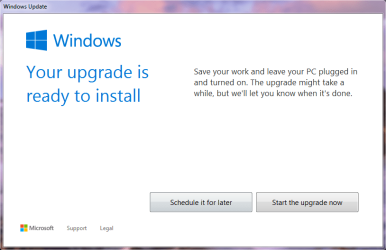
The problem what I am having is the GWX is showing me this popup which I can't get rid of which is trying to make me install Windows 10.

Since I was never a fan of it, I was avoiding this system tray icon for a time but today this popup screen of 'Your upgrade is ready to install' appeared and no matter what I did (tried to close window by right-clicking on the taskbar icon = nothing, tried to kill the process = nothing the window appears again etc...) the problem will not go away.

So I'm wondering does anyone have any suggestions for this problem and how to fix it ?

The picture of the popup screen is in the attachments.

Thanks in forward and I'm glad to have finally joined here, maybe I can return the favor for all the help the community helped me.
 

Attachments
  • GWX.png
    GWX.png
    20.9 KB · Views: 2

My Computer My Computer

At a glance

Windows 7 Ultimate x64Intel Sandy Bridge i5 2500K @ 4.5 GHz (OC-ed)Patriot 2x4GB (1600MHz)MSI GTX 980 Ti Gaming Edition
Computer type
PC/Desktop
Computer Manufacturer/Model Number
Custom build
OS
Windows 7 Ultimate x64
CPU
Intel Sandy Bridge i5 2500K @ 4.5 GHz (OC-ed)
Motherboard
AsRock Z77 Extreme4
Memory
Patriot 2x4GB (1600MHz)
Graphics Card(s)
MSI GTX 980 Ti Gaming Edition
Hard Drives
Samsung EVO 850 (250 GB SSD)
Samsung HD103SJ (1 TB HDD)
Antivirus
Avast Internet Security
Browser
Google Chrome

My Computer My Computer

At a glance

64-bit Windows 11 Pro for WorkstationsIntel i7-8700K OC'd to 5 GHz64 GB (4x16GB) G.SKILL TridentZ RGB DDR4 3600...ASUS ROG-STRIX-GTX1080TI-O11G-GAMING
Computer type
PC/Desktop
Computer Manufacturer/Model Number
Self built custom
OS
64-bit Windows 11 Pro for Workstations
CPU
Intel i7-8700K OC'd to 5 GHz
Motherboard
ASUS ROG Maximus XI Formula Z390
Memory
64 GB (4x16GB) G.SKILL TridentZ RGB DDR4 3600 MHz
Graphics Card(s)
ASUS ROG-STRIX-GTX1080TI-O11G-GAMING
Sound Card
Integrated
Monitor(s) Displays
2 x Samsung Odyssey G7 27"
Screen Resolution
2560x1440
Hard Drives
1TB Samsung 990 PRO M.2,
4TB Samsung 990 PRO PRO M.2,
TerraMaster F8 SSD Plus NAS
PSU
Seasonic Prime Titanium 850W
Case
Thermaltake Core P3
Cooling
Corsair Hydro H115i
Keyboard
Logitech wireless K800
Mouse
Logitech MX Master 4
Internet Speed
2 Gb/s Download and 100 Mb/s Upload
Antivirus
Malwarebyte Anti-Malware Premium
Browser
Google Chrome
Other Info
Logitech Z625 speaker system,
Logitech BRIO 4K Pro webcam,
HP Color LaserJet Pro MFP M477fdn,
APC SMART-UPS RT 1000 XL - SURT1000XLI,
Galaxy S23 Plus phone

Hey there Brink, thank you for the reply.

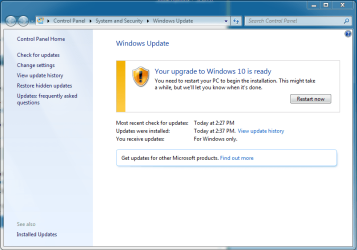
I did everything in the tutorials and the Get Windows 10 icon disappeared and the popup does not bother me anymore, but now I have this problem:

How can I remove these from Windows Updates.

Thanks again for your reply.
 

Attachments

  • GWX.PNG
    GWX.PNG
    34.3 KB · Views: 1

My Computer My Computer

At a glance

Windows 7 Ultimate x64Intel Sandy Bridge i5 2500K @ 4.5 GHz (OC-ed)Patriot 2x4GB (1600MHz)MSI GTX 980 Ti Gaming Edition
Computer type
PC/Desktop
Computer Manufacturer/Model Number
Custom build
OS
Windows 7 Ultimate x64
CPU
Intel Sandy Bridge i5 2500K @ 4.5 GHz (OC-ed)
Motherboard
AsRock Z77 Extreme4
Memory
Patriot 2x4GB (1600MHz)
Graphics Card(s)
MSI GTX 980 Ti Gaming Edition
Hard Drives
Samsung EVO 850 (250 GB SSD)
Samsung HD103SJ (1 TB HDD)
Antivirus
Avast Internet Security
Browser
Google Chrome

My Computer My Computer

At a glance

64-bit Windows 11 Pro for WorkstationsIntel i7-8700K OC'd to 5 GHz64 GB (4x16GB) G.SKILL TridentZ RGB DDR4 3600...ASUS ROG-STRIX-GTX1080TI-O11G-GAMING
Computer type
PC/Desktop
Computer Manufacturer/Model Number
Self built custom
OS
64-bit Windows 11 Pro for Workstations
CPU
Intel i7-8700K OC'd to 5 GHz
Motherboard
ASUS ROG Maximus XI Formula Z390
Memory
64 GB (4x16GB) G.SKILL TridentZ RGB DDR4 3600 MHz
Graphics Card(s)
ASUS ROG-STRIX-GTX1080TI-O11G-GAMING
Sound Card
Integrated
Monitor(s) Displays
2 x Samsung Odyssey G7 27"
Screen Resolution
2560x1440
Hard Drives
1TB Samsung 990 PRO M.2,
4TB Samsung 990 PRO PRO M.2,
TerraMaster F8 SSD Plus NAS
PSU
Seasonic Prime Titanium 850W
Case
Thermaltake Core P3
Cooling
Corsair Hydro H115i
Keyboard
Logitech wireless K800
Mouse
Logitech MX Master 4
Internet Speed
2 Gb/s Download and 100 Mb/s Upload
Antivirus
Malwarebyte Anti-Malware Premium
Browser
Google Chrome
Other Info
Logitech Z625 speaker system,
Logitech BRIO 4K Pro webcam,
HP Color LaserJet Pro MFP M477fdn,
APC SMART-UPS RT 1000 XL - SURT1000XLI,
Galaxy S23 Plus phone

My Computer My Computer

At a glance

Windows 7 Ultimate x64Intel Sandy Bridge i5 2500K @ 4.5 GHz (OC-ed)Patriot 2x4GB (1600MHz)MSI GTX 980 Ti Gaming Edition
Computer type
PC/Desktop
Computer Manufacturer/Model Number
Custom build
OS
Windows 7 Ultimate x64
CPU
Intel Sandy Bridge i5 2500K @ 4.5 GHz (OC-ed)
Motherboard
AsRock Z77 Extreme4
Memory
Patriot 2x4GB (1600MHz)
Graphics Card(s)
MSI GTX 980 Ti Gaming Edition
Hard Drives
Samsung EVO 850 (250 GB SSD)
Samsung HD103SJ (1 TB HDD)
Antivirus
Avast Internet Security
Browser
Google Chrome

My Computer My Computer

At a glance

Windows 10 Pro x64Intel Core i7 6700KGSkill TridentZ RGB 16GB 3600 16-16-16-36EVGA GTX 980 Ti SC x2
Computer type
PC/Desktop
Computer Manufacturer/Model Number
Skylake Special #666
OS
Windows 10 Pro x64
CPU
Intel Core i7 6700K
Motherboard
Asus Sabertooth Z170 Mark 1
Memory
GSkill TridentZ RGB 16GB 3600 16-16-16-36
Graphics Card(s)
EVGA GTX 980 Ti SC x2
Sound Card
Realtek High Definition
Monitor(s) Displays
AOC G2460PG
Screen Resolution
1920 x 1080 144Hz
Hard Drives
Samsung 860 Pro 256GB, Seagate Barracuda 4TB x2
PSU
EVGA 1000 P2, EVGA White Custom Braided Cables
Case
Corsair Vengeance C70 Gunmetal Black
Cooling
Corsair H100i v2, Corsair ML120 x2, Thermal Grizzly Kryonaut
Keyboard
Logitech G910 Orion Spectrum
Mouse
Logitech G700s
Internet Speed
Verizon Fios Quantum Gateway 75/75
Antivirus
Windows Defender, Malwarebytes Free 3.8.3
Browser
Chrome
Other Info
Corsair SP120 x4, LG Blu-ray Drive, Durabrand HT-395 100 Watt Dolby Digital Amp, Corsair H2100 Wireless 7.1 Headset
Ah, it already downloaded. Using OPTION THREE below to completely reset Windows Update should sort it.

http://www.sevenforums.com/tutorials/91738-windows-update-reset.html

Thank you for the guide on windows update reset, the Windows 10 did not install after a restart but the problem is that the same thing appears in Windows Update window as the picture I put in my previous post, any way to get rid of that ?

I'm interested in knowing if any of the suggestions to get rid of the Win 10 Update work.
I was just on someone's PC with Win 8.1 and they have a similar situation, the Win 10 Upgrade is ready to install in Windows Update.
She might want to try Win 10, so i suggested she sleep on it overnight and make the choice.
imho, some people love it, some hate it, and everything in between.
I don't want to be connected remotely during a Win 10 Upgrade, i think that could cause problems, and the upgrade will re-boot and disconnect me anyway.
 

My Computer My Computer

At a glance

Multi-Boot W7_Pro_x64 W8.1_Pro_x64 W10_Pro_x6...AMD Athlon II x4 6206GB GSkill DDR2 800AMD 4670 GPU + AMD 4200 IGP
Computer type
PC/Desktop
Computer Manufacturer/Model Number
home built
OS
Multi-Boot W7_Pro_x64 W8.1_Pro_x64 W10_Pro_x64 +Linux_VMs +Chromium_VM
CPU
AMD Athlon II x4 620
Motherboard
Gigabyte GA-MA785G-UD3H
Memory
6GB GSkill DDR2 800
Graphics Card(s)
AMD 4670 GPU + AMD 4200 IGP
Sound Card
on board Realtek ALC889A
Monitor(s) Displays
RCA 40" LCD TV, Insignia 32" LCD TV, HP 15" LCD monitor
Screen Resolution
1680 x 1050
Hard Drives
OCZ Vertex 3 120GB,
Samsung F3 1TB (3),
Several others - WD, Seagate, Hitachi, ...
PSU
Corsair 500 W
Case
Rosewill mid tower
Cooling
CM 90mm rifle
Keyboard
Gyration wireless, Logitech wireless, Dell USB wired
Mouse
Gyration wireless, Logitech wireless, V7 USB wired
Internet Speed
Spectrum - 100Mbps D / 10Mbps U
Antivirus
Avast, MBAM3, EMET, WinPatrol
Browser
Pale Moon, Firefox, IE
Other Info
2 multi-boot PC's
Mainly HTPC/Office/Gen purpose (no gaming).
Trendnet USB KVM.
LG DVD burner/Blue Ray Player.
Tray system for removable SATA backup drives.

Not currently OCd, under-volted.
I use Hybrid sleep, rarely re-boot or shutdown.

Hauppauge HD-PVR, Avermedia PCIe TV Tuner, Hauppauge PCI TV Tuner.
I just recently did some testing to see what Microsoft is up to in regards to the Push to upgrade people to Windows 10. I posted some screen shots here, How MSFT's tricky new Windows 10 pop-up deceives you into upgrading - Page 7 - Windows 10 Forums I hadn't even logged in to Windows 8.1 for the first time before the upgrade prompts started. If you want to read the whole thread start here, How MSFT's tricky new Windows 10 pop-up deceives you into upgrading - Windows 10 Forums You can opt out if you look close at the screens. Some of the clickable options are in small plain text and you don't know its clickable until you mouse over it.
 

My Computer My Computer

At a glance

Windows 10 Education 64 bitAMD Phenom II X4 980 Black Edition Deneb 3.7GHz8GB 4GBx2 Kingston PC10600 DDR3 1333 MemoryZotac NVIDIA Geforce GT640 2 Gig DDR3 PCIe
Computer type
PC/Desktop
Computer Manufacturer/Model Number
Home Built
OS
Windows 10 Education 64 bit
CPU
AMD Phenom II X4 980 Black Edition Deneb 3.7GHz
Motherboard
Asus M4N68T-M V2 µATX Motherboard
Memory
8GB 4GBx2 Kingston PC10600 DDR3 1333 Memory
Graphics Card(s)
Zotac NVIDIA Geforce GT640 2 Gig DDR3 PCIe
Sound Card
VIA VT1708s High Definition Audio 8-channel Onboard
Monitor(s) Displays
22" LG E2242 1080p and 2 19" I-INC AG191D
Screen Resolution
1280x1024 - 1920x1080 - 1280x1024
Hard Drives
Crucial M100 256 GB SSD and 500 GB WD Blue SATA
PSU
Thermaltake TR 620
Case
Power Up Black ATX Mid-Tower Case
Cooling
Stock heatsink and fan
Keyboard
Logitech Wireless K350 Wave
Mouse
Logitech Wireless M570 Trackman Wheel
Internet Speed
80 Mbps Down 30 Mbps Up
Antivirus
Windows Defender
Browser
Internet Explorer 11
Other Info
HP DVD1040e Lightscribe - External USB2

My Computer My Computer

At a glance

Windows 10 Education 64 bitAMD Phenom II X4 980 Black Edition Deneb 3.7GHz8GB 4GBx2 Kingston PC10600 DDR3 1333 MemoryZotac NVIDIA Geforce GT640 2 Gig DDR3 PCIe
Computer type
PC/Desktop
Computer Manufacturer/Model Number
Home Built
OS
Windows 10 Education 64 bit
CPU
AMD Phenom II X4 980 Black Edition Deneb 3.7GHz
Motherboard
Asus M4N68T-M V2 µATX Motherboard
Memory
8GB 4GBx2 Kingston PC10600 DDR3 1333 Memory
Graphics Card(s)
Zotac NVIDIA Geforce GT640 2 Gig DDR3 PCIe
Sound Card
VIA VT1708s High Definition Audio 8-channel Onboard
Monitor(s) Displays
22" LG E2242 1080p and 2 19" I-INC AG191D
Screen Resolution
1280x1024 - 1920x1080 - 1280x1024
Hard Drives
Crucial M100 256 GB SSD and 500 GB WD Blue SATA
PSU
Thermaltake TR 620
Case
Power Up Black ATX Mid-Tower Case
Cooling
Stock heatsink and fan
Keyboard
Logitech Wireless K350 Wave
Mouse
Logitech Wireless M570 Trackman Wheel
Internet Speed
80 Mbps Down 30 Mbps Up
Antivirus
Windows Defender
Browser
Internet Explorer 11
Other Info
HP DVD1040e Lightscribe - External USB2
I forgot to check the thread yesterday, so forgive me for that guys.

Thanks for the suggestion AddRAM, but the problem in the picture in my previous post is still there.

Anyway, I'm thinking of closing the thread since my original problem got solved and the Windows 10 is not installing itself after a restart so maybe all that I need is not press that button 'Restart Now'.

So if anyone has any other suggestions let me know, and thanks for helping me.
 

My Computer My Computer

At a glance

Windows 7 Ultimate x64Intel Sandy Bridge i5 2500K @ 4.5 GHz (OC-ed)Patriot 2x4GB (1600MHz)MSI GTX 980 Ti Gaming Edition
Computer type
PC/Desktop
Computer Manufacturer/Model Number
Custom build
OS
Windows 7 Ultimate x64
CPU
Intel Sandy Bridge i5 2500K @ 4.5 GHz (OC-ed)
Motherboard
AsRock Z77 Extreme4
Memory
Patriot 2x4GB (1600MHz)
Graphics Card(s)
MSI GTX 980 Ti Gaming Edition
Hard Drives
Samsung EVO 850 (250 GB SSD)
Samsung HD103SJ (1 TB HDD)
Antivirus
Avast Internet Security
Browser
Google Chrome
I would say if you clicked that Restart now in that Window it would update. On my Windows 8.1 PC it said "Get Started". Once I went to "Show all updates" and hid the "Upgrade to Windows 10" that window went back to the normal "You're set to automatically install updates". The "Upgrade to Windows 10" message went away.
 

My Computer My Computer

At a glance

Windows 10 Education 64 bitAMD Phenom II X4 980 Black Edition Deneb 3.7GHz8GB 4GBx2 Kingston PC10600 DDR3 1333 MemoryZotac NVIDIA Geforce GT640 2 Gig DDR3 PCIe
Computer type
PC/Desktop
Computer Manufacturer/Model Number
Home Built
OS
Windows 10 Education 64 bit
CPU
AMD Phenom II X4 980 Black Edition Deneb 3.7GHz
Motherboard
Asus M4N68T-M V2 µATX Motherboard
Memory
8GB 4GBx2 Kingston PC10600 DDR3 1333 Memory
Graphics Card(s)
Zotac NVIDIA Geforce GT640 2 Gig DDR3 PCIe
Sound Card
VIA VT1708s High Definition Audio 8-channel Onboard
Monitor(s) Displays
22" LG E2242 1080p and 2 19" I-INC AG191D
Screen Resolution
1280x1024 - 1920x1080 - 1280x1024
Hard Drives
Crucial M100 256 GB SSD and 500 GB WD Blue SATA
PSU
Thermaltake TR 620
Case
Power Up Black ATX Mid-Tower Case
Cooling
Stock heatsink and fan
Keyboard
Logitech Wireless K350 Wave
Mouse
Logitech Wireless M570 Trackman Wheel
Internet Speed
80 Mbps Down 30 Mbps Up
Antivirus
Windows Defender
Browser
Internet Explorer 11
Other Info
HP DVD1040e Lightscribe - External USB2
Thank you bbgun21 and alphanumeric for the info. +1
If i have any questions about the person I'm trying to help, i'll start my own thread, I don't want to hijack this thread.
I'll keep lurking here for any new suggestions and ideas.
:)
 

My Computer My Computer

At a glance

Multi-Boot W7_Pro_x64 W8.1_Pro_x64 W10_Pro_x6...AMD Athlon II x4 6206GB GSkill DDR2 800AMD 4670 GPU + AMD 4200 IGP
Computer type
PC/Desktop
Computer Manufacturer/Model Number
home built
OS
Multi-Boot W7_Pro_x64 W8.1_Pro_x64 W10_Pro_x64 +Linux_VMs +Chromium_VM
CPU
AMD Athlon II x4 620
Motherboard
Gigabyte GA-MA785G-UD3H
Memory
6GB GSkill DDR2 800
Graphics Card(s)
AMD 4670 GPU + AMD 4200 IGP
Sound Card
on board Realtek ALC889A
Monitor(s) Displays
RCA 40" LCD TV, Insignia 32" LCD TV, HP 15" LCD monitor
Screen Resolution
1680 x 1050
Hard Drives
OCZ Vertex 3 120GB,
Samsung F3 1TB (3),
Several others - WD, Seagate, Hitachi, ...
PSU
Corsair 500 W
Case
Rosewill mid tower
Cooling
CM 90mm rifle
Keyboard
Gyration wireless, Logitech wireless, Dell USB wired
Mouse
Gyration wireless, Logitech wireless, V7 USB wired
Internet Speed
Spectrum - 100Mbps D / 10Mbps U
Antivirus
Avast, MBAM3, EMET, WinPatrol
Browser
Pale Moon, Firefox, IE
Other Info
2 multi-boot PC's
Mainly HTPC/Office/Gen purpose (no gaming).
Trendnet USB KVM.
LG DVD burner/Blue Ray Player.
Tray system for removable SATA backup drives.

Not currently OCd, under-volted.
I use Hybrid sleep, rarely re-boot or shutdown.

Hauppauge HD-PVR, Avermedia PCIe TV Tuner, Hauppauge PCI TV Tuner.
Back
Top