Windows 7 Environment Variables List

rap33042

Senior Moment
Guru
Local time
9:38 PM
Messages
570
Location
Osceola, WI
Environment Variable Path
%ALLUSERSPROFILE% C:\ProgramData
%APPDATA% C:\Users\{username}\AppData\Roaming
%COMMONPROGRAMFILES% C:\Program Files\Common Files
%COMMONPROGRAMFILES(x86)% C:\Program Files (x86)\Common Files
%COMSPEC% C:\Windows\System32\cmd.exe
%HOMEDRIVE% C:
%HOMEPATH% C:\Users\{username}
%LOCALAPPDATA% C:\Users\{username}\AppData\Local
%PROGRAMDATA% C:\ProgramData
%PROGRAMFILES% C:\Program Files
%PROGRAMFILES(X86)% C:\Program Files (x86) (only in 64-bit version)
%PUBLIC% C:\Users\Public
%SystemDrive% C:
%SystemRoot% C:\Windows
%TEMP% and %TMP% C:\Users\{username}\AppData\Local\Temp
%USERPROFILE% C:\Users\{username}
%WINDIR% C:\Windows

NOTE: C:\ is the system drive (ie, where Windows is installed). It will differ if you installed Windows to a different drive.
 

My Computer

Computer Manufacturer/Model Number
OEM - Me
OS
Windows 7 Home Premium x64
CPU
AMD Phenom II X6 1600T
Motherboard
GigaByte GZ-990FXA-UD3
Memory
16GB PC3-10700 (1342MHz)
Graphics Card(s)
ATI Radeon 5770 HD (x2) CrossFire
Sound Card
On-board RealTek chipset
Monitor(s) Displays
3x Hanns-G 1920x1080 Monitors
Screen Resolution
3x Hanns-G 1920x1080 Monitors
Hard Drives
Intel 25-V SSD 40GB: 218 MB/s AT: 0.1ms
Intel X-25M SSD 80GB: 230MB/s AT: 0.1ms
Seagate 750GB: 133 MB/s AT: 13ms (perpendicular storage)
Buffalo HD-PCTU3 1TB External drive
PSU
OCZ Stealth X Stream 750W
Case
Cheap (unknown)
Cooling
Stock
Keyboard
HP USB
Mouse
LogiTech USB
Internet Speed
1.5 Mbps - Slow - At the tail-end of a rural network
Other Info
Printer: Epson Stylus C-84
Scanner: HP 3500C Flatbed
DVD-RW: Plextor
DVD-ROM: Unknown
WEI: 7.4
This list is of course valid only if, as you mentioned, Windows is installed in C: AND you have not moved or relocated any of the folders created by Windows installation. For instance in my case I have Windows installed in C: but I have relocated both Users and ProgramData to D:, so half of those variables in your list are wrong in all my computers.

Variable | Refers to folder or drive
%SYSTEMDRIVE% |The drive / partition where Windows is installed, default = C:
%PROFILESDIRECTORY% | Users, default = %SYSTEMDRIVE%\Users
%WINDIR% |Windows, default = %SYSTEMDRIVE%\Windows
|
%ALLUSERSPROFILE% | ProgramData, default = %SYSTEMDRIVE%\ProgramData
%APPDATA% |%PROFILESDIRECTORY%\{username}\AppData\Roaming
%COMMONPROGRAMFILES% |%SYSTEMDRIVE%\Common Files
%COMMONPROGRAMFILES(x86)% |%SYSTEMDRIVE%\Program Files (x86)\Common Files
%COMSPEC% |%WINDIR%\System32\cmd.exe
%HOMEDRIVE% |The drive where Users is located, default = C:
%HOMEPATH% |%PROFILESDIRECTORY%\{username}
%LOCALAPPDATA% |%PROFILESDIRECTORY%\{username}\AppData\Local
%PROGRAMDATA% |ProgramData, default = %SYSTEMDRIVE%\ProgramData
%PROGRAMFILES% |%SYSTEMDRIVE%\Program Files
%PROGRAMFILES(X86)% |%SYSTEMDRIVE%\Program Files (x86) (only in 64-bit version)
%PUBLIC% |%PROFILESDIRECTORY%\Public
%SYSTEMROOT% |%WINDIR%
%TEMP% and %TMP% |%PROFILESDIRECTORY%\{username}\AppData\Local\Temp
%USERPROFILE% |%PROFILESDIRECTORY%\{username}

Kari
 

My Computer

Computer type
Laptop
Computer Manufacturer/Model Number
HP ENVY 17-1150eg
OS
Windows 10 Pro x64 EN-GB
CPU
1.6 GHz Intel Core i7-720QM Processor
Memory
6 GB
Graphics Card(s)
ATI Mobility Radeon HD 5850 Graphics
Sound Card
Beats sound system with integrated subwoofer
Monitor(s) Displays
17" laptop display, 22" LED and 32" Full HD TV through HDMI
Screen Resolution
1600*900 (1), 1920*1080 (2&3)
Hard Drives
Internal: 2 x 500 GB SATA Hard Disk Drive 7200 rpm
External: 2TB for backups, 3TB USB3 network drive for media
Cooling
As Envy runs a bit warm, I have it on a Cooler Master pad
Keyboard
Logitech diNovo Media Desktop Laser (bluetooth)
Mouse
Logitech Performance Mouse MX
Internet Speed
50/10 Mbps VDSL
Antivirus
Windows Defender 4.3.9431.0
Browser
Maxthon 3.5.2., IE11
All right- let me ask you this:
When you move those folders, doesn't Windows update those associated paths?
 

My Computer

Computer Manufacturer/Model Number
OEM - Me
OS
Windows 7 Home Premium x64
CPU
AMD Phenom II X6 1600T
Motherboard
GigaByte GZ-990FXA-UD3
Memory
16GB PC3-10700 (1342MHz)
Graphics Card(s)
ATI Radeon 5770 HD (x2) CrossFire
Sound Card
On-board RealTek chipset
Monitor(s) Displays
3x Hanns-G 1920x1080 Monitors
Screen Resolution
3x Hanns-G 1920x1080 Monitors
Hard Drives
Intel 25-V SSD 40GB: 218 MB/s AT: 0.1ms
Intel X-25M SSD 80GB: 230MB/s AT: 0.1ms
Seagate 750GB: 133 MB/s AT: 13ms (perpendicular storage)
Buffalo HD-PCTU3 1TB External drive
PSU
OCZ Stealth X Stream 750W
Case
Cheap (unknown)
Cooling
Stock
Keyboard
HP USB
Mouse
LogiTech USB
Internet Speed
1.5 Mbps - Slow - At the tail-end of a rural network
Other Info
Printer: Epson Stylus C-84
Scanner: HP 3500C Flatbed
DVD-RW: Plextor
DVD-ROM: Unknown
WEI: 7.4
Depending on how you do it. Normally yes.

I just wanted to point out that saying that for instance %APPDATA% is C:\Users\{username}\AppData is not necessarily true, even if C: is your system drive. That's why a list of variables is more truthfully presented when we first establish location of %SYSTEMDRIVE%, %PROFILESDIRECTORY% and %WINDIR%, and then present other locations in relation to these.

Kari
 

My Computer

Computer type
Laptop
Computer Manufacturer/Model Number
HP ENVY 17-1150eg
OS
Windows 10 Pro x64 EN-GB
CPU
1.6 GHz Intel Core i7-720QM Processor
Memory
6 GB
Graphics Card(s)
ATI Mobility Radeon HD 5850 Graphics
Sound Card
Beats sound system with integrated subwoofer
Monitor(s) Displays
17" laptop display, 22" LED and 32" Full HD TV through HDMI
Screen Resolution
1600*900 (1), 1920*1080 (2&3)
Hard Drives
Internal: 2 x 500 GB SATA Hard Disk Drive 7200 rpm
External: 2TB for backups, 3TB USB3 network drive for media
Cooling
As Envy runs a bit warm, I have it on a Cooler Master pad
Keyboard
Logitech diNovo Media Desktop Laser (bluetooth)
Mouse
Logitech Performance Mouse MX
Internet Speed
50/10 Mbps VDSL
Antivirus
Windows Defender 4.3.9431.0
Browser
Maxthon 3.5.2., IE11
Point taken...
Thanks for clearing that up for me...
 

My Computer

Computer Manufacturer/Model Number
OEM - Me
OS
Windows 7 Home Premium x64
CPU
AMD Phenom II X6 1600T
Motherboard
GigaByte GZ-990FXA-UD3
Memory
16GB PC3-10700 (1342MHz)
Graphics Card(s)
ATI Radeon 5770 HD (x2) CrossFire
Sound Card
On-board RealTek chipset
Monitor(s) Displays
3x Hanns-G 1920x1080 Monitors
Screen Resolution
3x Hanns-G 1920x1080 Monitors
Hard Drives
Intel 25-V SSD 40GB: 218 MB/s AT: 0.1ms
Intel X-25M SSD 80GB: 230MB/s AT: 0.1ms
Seagate 750GB: 133 MB/s AT: 13ms (perpendicular storage)
Buffalo HD-PCTU3 1TB External drive
PSU
OCZ Stealth X Stream 750W
Case
Cheap (unknown)
Cooling
Stock
Keyboard
HP USB
Mouse
LogiTech USB
Internet Speed
1.5 Mbps - Slow - At the tail-end of a rural network
Other Info
Printer: Epson Stylus C-84
Scanner: HP 3500C Flatbed
DVD-RW: Plextor
DVD-ROM: Unknown
WEI: 7.4
can you provide examples of use of the variables in code, say in c++ for example? and how to edit them in windows? and are there any "hidden" or "secret" variables?
 

My Computer

Computer type
Laptop
Computer Manufacturer/Model Number
HP
OS
Windows 7 Ultimate 32bit
CPU
Intel(R) Core(TM) i5 CPU M 430 @ 2.27GHz
Motherboard
HP 3659
Memory
2GB DDR3 @ 532.1 MHz DRAM
Graphics Card(s)
NVIDIA GeForce G105M GT218 @ 512 MBytes
Antivirus
avast
Browser
Google Chrome
%PROGRAMFILES(X86)%

You legend!!! For some reason my W7FwAS keeps assigning that variable as "%PROGRAMFILES% (x86)"
I use Windows Firewall Control for its Connections Log screen, and have noticed some rules breaking, all of them relating to the x86 Program Files folder... Swapping it to "c:\program files (x86)\" fixes things, now I will try the above mentioned version!!! So happy.

EDIT: omg, 1st post...
 
Last edited:

My Computer

Computer type
Laptop
Computer Manufacturer/Model Number
ASUS N53SV
OS
Windows 7 64bit SP1
CPU
Intel Core i7-2630QM @ 2GHz
Antivirus
None
Browser
Internet Explorer 11
OK I've landed here cause I'm still getting niggling "known folder" 1002 events, ie

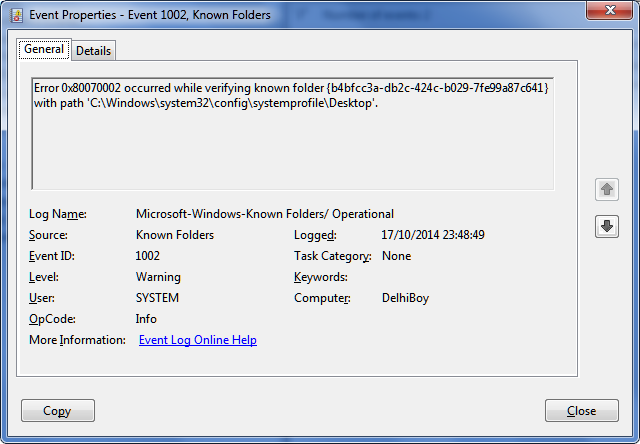
Error 0x80070002 occurred while verifying known folder {b4bfcc3a-db2c-424c-b029-7fe99a87c641} with path 'C:\Windows\system32\config\systemprofile\Desktop'.

I remembered it had to do with environment variables, alas nothing in regedit - til now!

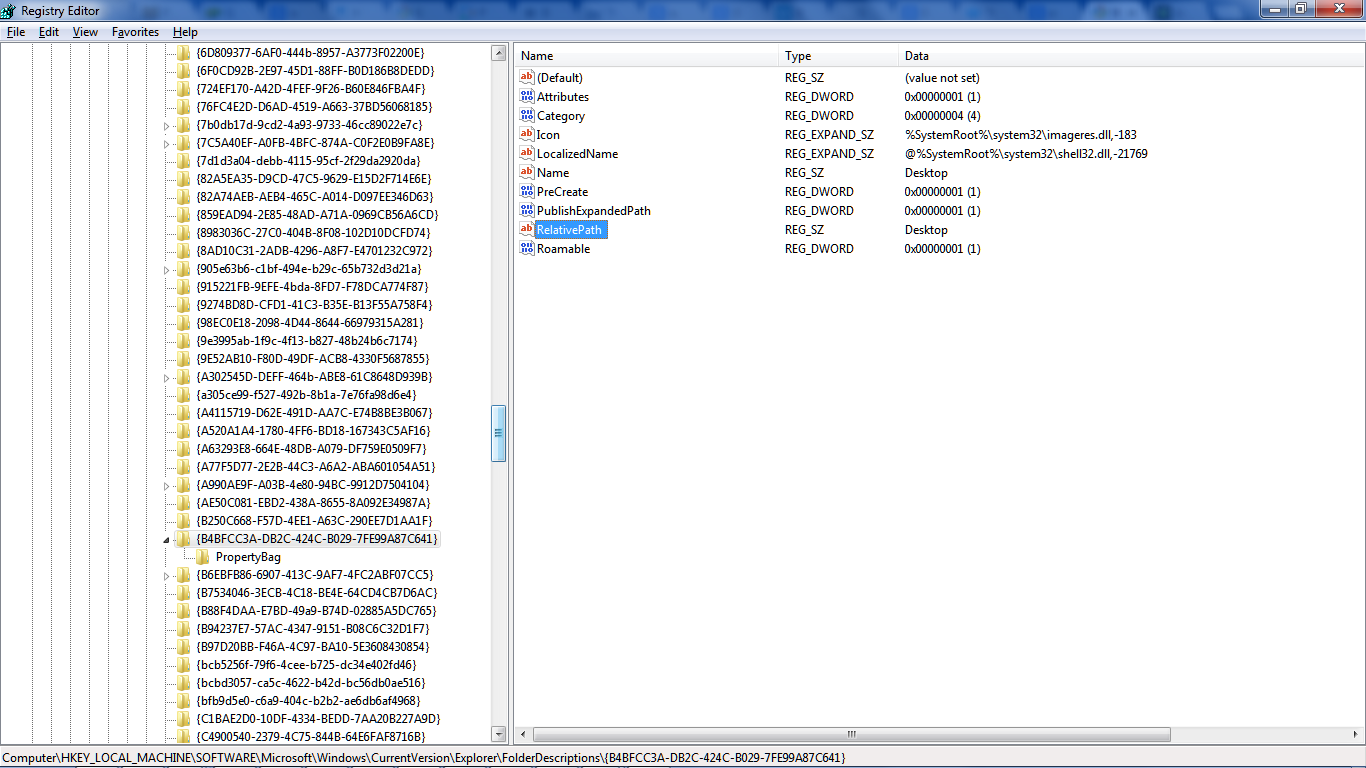
HKEY_LOCAL_MACHINE\SOFTWARE\Microsoft\Windows\CurrentVersion\Explorer\FolderDescriptions\ contains the known folders.

Now, the interesting thing is why is this happening?

"Mikey" rightly identifies that the relative paths are broken, that the system interferes...

So I've deleted my dummy Desktop folder @ C:\Windows\System32\config\systemprofile (it didn't quash the alert I have setup for known folder issues, and was empty)

RE THIS
````````````````````````````````
Then I remembered something: I have Windows 7 x64 ...Many of the things that are in C:\Windows\system32 in 32-bit Windows are in the 64-bit equivalent:C:\Windows\SysWOW64

Sure enough, for example, even though this was NOT there:
C:\Windows\system32\config\systemprofile\AppData\Roaming\Microsoft\Windows\Network Shortcuts

THIS one is there(!!!)
C:\Windows\SysWOW64\config\systemprofile\AppData\Roaming\Microsoft\Windows\Network Shortcuts

So instead of putting blank folders in the incorrect places, we should find-out why Known Folders got it wrong. I will post again when I figure this out...in the meantime, I'm open to suggestions too. ;)
---------------------------------
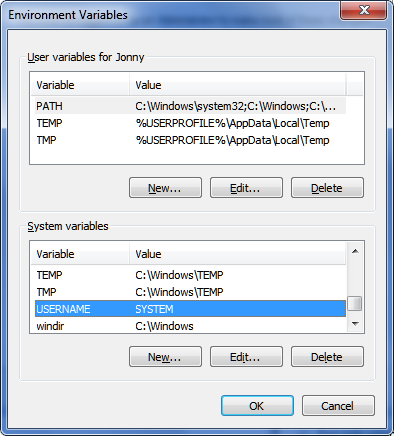
I've just noticed in environment variables this

sSB7q7e.png


I deleted it (UN = SYSTEM), but then chickened out and recreated it...

Everyone else has one of those there, right?

(windows 7 ultimate x64)

back to the test...
 

My Computer

Computer type
Laptop
Computer Manufacturer/Model Number
Dell
OS
Windows 7 Ultimate 64bit
CPU
2.2
Memory
8Gb
Graphics Card(s)
NVIDIA
Screen Resolution
1280/762
Mouse
built in pad || iphone || MS wireless
Internet Speed
100MB
Antivirus
Avast
Browser
Chrome, Chrome portable
Got the alert, re the event

rfpKbgV.png


The suspected culprit

YvSoSju.png


comparing ...
 

My Computer

Computer type
Laptop
Computer Manufacturer/Model Number
Dell
OS
Windows 7 Ultimate 64bit
CPU
2.2
Memory
8Gb
Graphics Card(s)
NVIDIA
Screen Resolution
1280/762
Mouse
built in pad || iphone || MS wireless
Internet Speed
100MB
Antivirus
Avast
Browser
Chrome, Chrome portable
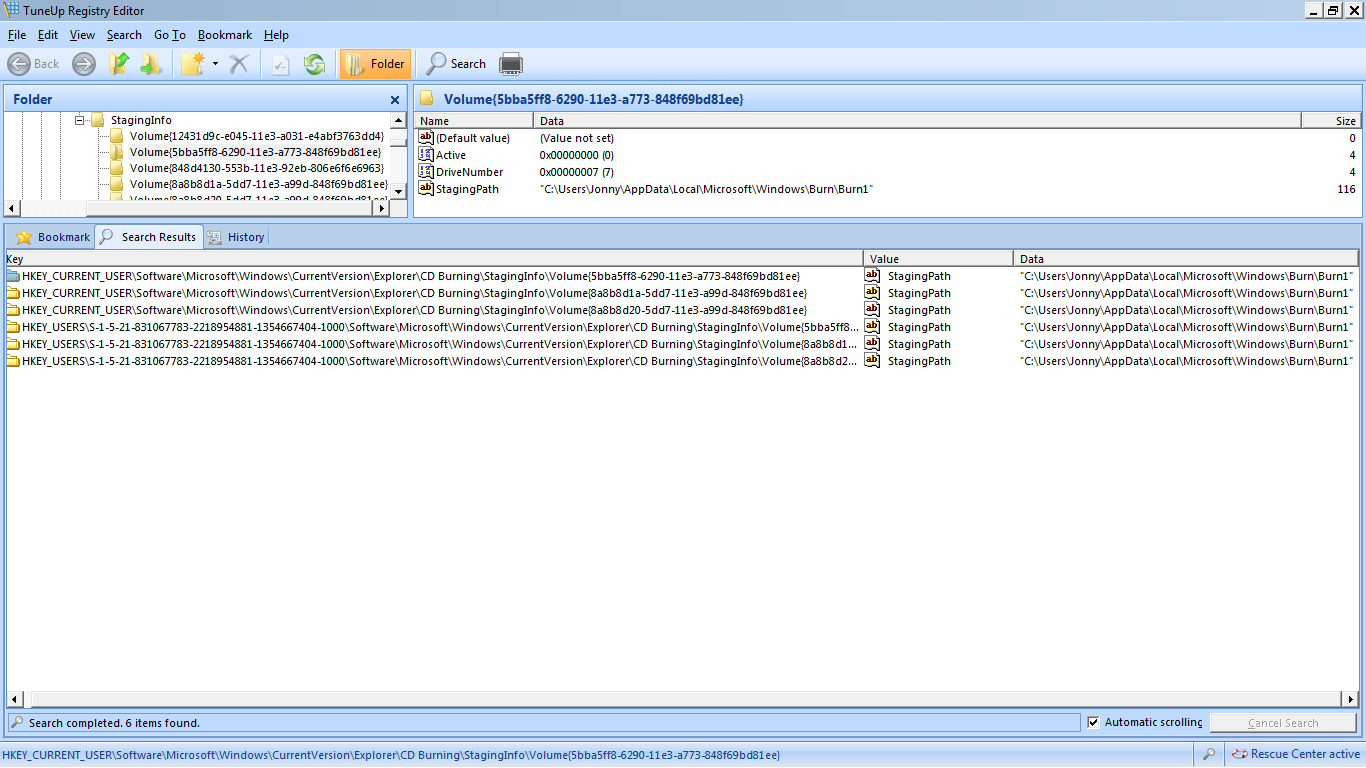
same relative path on folder build, not affected by Desktop, but instead littered with some burn1 nonsense.

LaEKZIG.png


Making a note of my dummy syswow64 for comparison in new builds - the timedatestamps don't help - they make me think I've created them manually as a workaround...

CSg7FnW.png


back to the new builds...
 

My Computer

Computer type
Laptop
Computer Manufacturer/Model Number
Dell
OS
Windows 7 Ultimate 64bit
CPU
2.2
Memory
8Gb
Graphics Card(s)
NVIDIA
Screen Resolution
1280/762
Mouse
built in pad || iphone || MS wireless
Internet Speed
100MB
Antivirus
Avast
Browser
Chrome, Chrome portable
Back
Top