
Hello,
I am having the following problem:
Jumplists - clicking arrow to the right no longer shows the recents list.
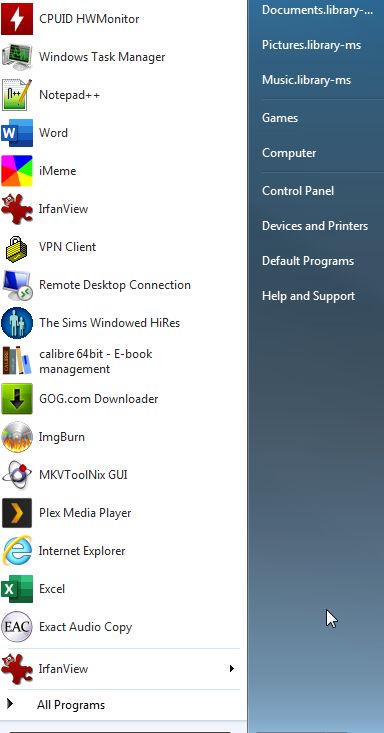
What I tried:
a) Went to C:\Users\*username*\AppData\Roaming\Microsoft\Windows\Recent\AutomaticDestinations and removed all automaticDestinations-ms files
b) Right click on the Taskbar, Properties, Start Menu tab, unchecked the two checkboxes about recent items, clicked apply, rechecked, clicked apply, opened a few files, noticed it still does not work.
Issue started with some malware which I cleaned up, but the effects are still here. Messed up most of my file associations, fixed most of them but I still have these issues.
Also tried "/sfc scannow" in command line, but it said it found no issues.
Thank you!
I am having the following problem:
Jumplists - clicking arrow to the right no longer shows the recents list.
What I tried:
a) Went to C:\Users\*username*\AppData\Roaming\Microsoft\Windows\Recent\AutomaticDestinations and removed all automaticDestinations-ms files
b) Right click on the Taskbar, Properties, Start Menu tab, unchecked the two checkboxes about recent items, clicked apply, rechecked, clicked apply, opened a few files, noticed it still does not work.
Issue started with some malware which I cleaned up, but the effects are still here. Messed up most of my file associations, fixed most of them but I still have these issues.
Also tried "/sfc scannow" in command line, but it said it found no issues.
Thank you!
Last edited:
My Computer
At a glance
Windows 7 Ultimate x64i7 4770k32GB RAM G.SkillASUS Nvidia GTX 780 Poseidon 3GB
- Computer type
- PC/Desktop
- Computer Manufacturer/Model Number
- Custom build
- OS
- Windows 7 Ultimate x64
- CPU
- i7 4770k
- Motherboard
- ASUS Maximus VI Formula
- Memory
- 32GB RAM G.Skill
- Graphics Card(s)
- ASUS Nvidia GTX 780 Poseidon 3GB
- Hard Drives
- SSD + Many HDD
- Internet Speed
- GbE
- Antivirus
- Kaspersky
- Browser
- Edge
