Why is W7 Saying Not Enough Backup Space?

I'm about 99% sure it's the system reserved partition. The error message says for volumes under 500MB, you need at least 50MB free. Well, the System reserved partition is 100MB...and if you got less than 50MB of free space on it, you will get the error message that you see above.

Right click my computer, Manage, go to Disk Management. Right click on the System Reserved partition at the front. Choose change drive letter and path. Assign it a drive, like X. Then open My Computer and check the Free space. I'd bet a dollar to a donut that you have less than 50MB free.

Here is an article explaining this exact problem;
Windows 7 Enterprise Backup Image Error 0x80780119 - Microsoft Answers

In my case, the partition just magically cleaned itself up within a few hours and I was able to run backups. What caused it to drop for a period of time under 50MB is still a mystery to me.

And if one doesn't have a System Reserved Partition and gets this error, what would it be then?
See Post #6

"The system reserved partition needs shadow storage space. You can check this in Disk management (right click Computer>Manage>Disk Management) the system reserved (100MB) should be around 70% free. If you've got 50% free or more then this isn't your problem.

But you should also check the VSS space on the storage volume.
From an elevated command prompt
>vssadmin list shadowstorage

will show you the available shadow storage space on your backup volume."

.

mjf, check the post I made two above the one that I quote you here. I posted screenshots of both in hopes that you or someone could translate it for me.
 

My Computer My Computer

At a glance

Windows 7 Professional 32-bit (6.1, Build 7600)Intel(R) Pentium(R) 4 3.00 GHz HT2.0 GBATI Mobility Radeon 9600 64MB
Computer Manufacturer/Model Number
Averatec 6130HS-20
OS
Windows 7 Professional 32-bit (6.1, Build 7600)
CPU
Intel(R) Pentium(R) 4 3.00 GHz HT
Memory
2.0 GB
Graphics Card(s)
ATI Mobility Radeon 9600 64MB
Sound Card
Realtek AC'97 Audio
Screen Resolution
1280 x 800
Hard Drives
Seagate 96023A 60GB 7200RPM -
Seagate FreeAgentDesktop 250GB
Cooling
20 Inch Box Fan
Mouse
Targus PAWM10 Wireless Optical Laptop Mouse
mjf, check the post I made two above the one that I quote you here. I posted screenshots of both in hopes that you or someone could translate it for me.
Sorry - you've lost me.

Looks like the OP is giving Windows Imaging a miss anyway. On some systems it just seems to be problematic.
 

My Computer My Computer

At a glance

Windows 7x64 Home Premium SP1Intel i7 2600kG.Skill Ripjaws (DDR3-1600) 2x4GBNvidia GeForce GTS 450; Intel HD Graphics 300...
Computer type
PC/Desktop
Computer Manufacturer/Model Number
Own build
OS
Windows 7x64 Home Premium SP1
CPU
Intel i7 2600k
Motherboard
ASUS P8Z68 Deluxe
Memory
G.Skill Ripjaws (DDR3-1600) 2x4GB
Graphics Card(s)
Nvidia GeForce GTS 450; Intel HD Graphics 3000(GT2+)
Monitor(s) Displays
Dell Ultrasharp IPS panel U2311H, Samsung SyncMaster P2350
Screen Resolution
1920x1080
Hard Drives
Samsung 850 Pro SSD 256GB, Samsung SSD 840 120GB, Seagates 1TB Barracuda ST31000528AS x2
PSU
Seasonic M12II 520W
Case
Lian Li Lancool PC-K60
Cooling
Case: 1x120mm, 3x140mm CPU: Hyper 212+
Keyboard
Logitech MK520 (wireless)
Mouse
Logitech MK520
Internet Speed
6-7 Mbps
Antivirus
Norton Security Premium, Malwarebytes on 2 (MSE on 3rd PC)
Browser
FireFox
Other Info
Audio: Logitech Z523 2.1
Looks like the OP is giving Windows Imaging a miss anyway. On some systems it just seems to be problematic.

Yes he's decided to use something else. It appears that Windows Backup was wanting to include another drive in addition to "C" drive for an image backup

Yes, I was experiencing that.

But as I say above, I am no longer relying on Windows for backups. But thanks for your reply.
http://www.sevenforums.com/performa...ng-not-enough-backup-space-2.html#post1276205
 

My Computer My Computer

At a glance

Windows 10 ProIntel Core i7-4770K (3.5Ghz)32 gig Corsair Dominator Platinum (4x8Gig)Sapphire Tri-X R9 Fury
Computer type
PC/Desktop
Computer Manufacturer/Model Number
Custom built by me.
OS
Windows 10 Pro
CPU
Intel Core i7-4770K (3.5Ghz)
Motherboard
Gigabyte G1 Sniper 5 (F10 Bios)
Memory
32 gig Corsair Dominator Platinum (4x8Gig)
Graphics Card(s)
Sapphire Tri-X R9 Fury
Sound Card
Soundblaster ZXR
Monitor(s) Displays
NEC PA242W 24" LCD Monitor
Screen Resolution
1920 x 1200
Hard Drives
Primary - Samsung 850 Pro (512gig), Samsung 840 Pro (256gig), 2TB WD Caviar Black.
PSU
EVGA Supernova 1000 G2
Case
Cooler Master HAF X
Cooling
Corsair H100i with Corsair Air Series SP120 Quiet Fans
Keyboard
Logitech Wireless Wave
Mouse
Logitech Performance MX
Internet Speed
High Speed Cable
Antivirus
Norton Security
Browser
IE11
Other Info
Memory Timings - 1866MHz @ 9-9-9-27-1T @ 1.5 volts
mjf, check the post I made two above the one that I quote you here. I posted screenshots of both in hopes that you or someone could translate it for me.
Sorry - you've lost me.

.

I gave screenshots of Disk management and vssadmin list shadowstorage. I just assumed that you knew how to interpret both and could tell me what my problem was with Windows System Image/Backup.
 

My Computer My Computer

At a glance

Windows 7 Professional 32-bit (6.1, Build 7600)Intel(R) Pentium(R) 4 3.00 GHz HT2.0 GBATI Mobility Radeon 9600 64MB
Computer Manufacturer/Model Number
Averatec 6130HS-20
OS
Windows 7 Professional 32-bit (6.1, Build 7600)
CPU
Intel(R) Pentium(R) 4 3.00 GHz HT
Memory
2.0 GB
Graphics Card(s)
ATI Mobility Radeon 9600 64MB
Sound Card
Realtek AC'97 Audio
Screen Resolution
1280 x 800
Hard Drives
Seagate 96023A 60GB 7200RPM -
Seagate FreeAgentDesktop 250GB
Cooling
20 Inch Box Fan
Mouse
Targus PAWM10 Wireless Optical Laptop Mouse
mjf, check the post I made two above the one that I quote you here. I posted screenshots of both in hopes that you or someone could translate it for me.
Sorry - you've lost me.

.

I gave screenshots of Disk management and vssadmin list shadowstorage. I just assumed that you knew how to interpret both and could tell me what my problem was with Windows System Image/Backup.
Ok - my knowledge is very limited.
Re: Shadow storage on the storage volume -
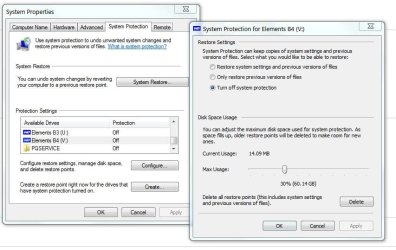
I believe that if the maximum shadow storage is set too low it can cause these errors as this is also used in the imaging process. Your image backup areas appear to have the maximum set at 1%. Mine are set at 30%. See my screen shots. I have a number of images on volumes U and V. You may want to try increasing the maximum shadow storage to something higher and see how you go. (Move the slider in the second screen shot and apply).
shadow storage.JPG

shadow storage2.JPG
 

My Computer My Computer

At a glance

Windows 7x64 Home Premium SP1Intel i7 2600kG.Skill Ripjaws (DDR3-1600) 2x4GBNvidia GeForce GTS 450; Intel HD Graphics 300...
Computer type
PC/Desktop
Computer Manufacturer/Model Number
Own build
OS
Windows 7x64 Home Premium SP1
CPU
Intel i7 2600k
Motherboard
ASUS P8Z68 Deluxe
Memory
G.Skill Ripjaws (DDR3-1600) 2x4GB
Graphics Card(s)
Nvidia GeForce GTS 450; Intel HD Graphics 3000(GT2+)
Monitor(s) Displays
Dell Ultrasharp IPS panel U2311H, Samsung SyncMaster P2350
Screen Resolution
1920x1080
Hard Drives
Samsung 850 Pro SSD 256GB, Samsung SSD 840 120GB, Seagates 1TB Barracuda ST31000528AS x2
PSU
Seasonic M12II 520W
Case
Lian Li Lancool PC-K60
Cooling
Case: 1x120mm, 3x140mm CPU: Hyper 212+
Keyboard
Logitech MK520 (wireless)
Mouse
Logitech MK520
Internet Speed
6-7 Mbps
Antivirus
Norton Security Premium, Malwarebytes on 2 (MSE on 3rd PC)
Browser
FireFox
Other Info
Audio: Logitech Z523 2.1
Dear RealJem,

This is a long shot, but has a bearing on your problem! Kindly read this article : Not enough space for successful backup(0x81000014). Iam posting an excerpt from the link which has the most relevence.

Quote"
My case is: my volume to be backed up is too full. When doing backup in Vista/Win7/Server 2008/R2, VSS backup is the way to go. While VSS will attempt to allocate free space in the drive being backup for creating shadow copy. This is the default VSS behavior but can be altered by vssadmin.exe utility. Please note elevated priviledge is required for running vssadmin.exe.


So, if the drive you are going to backup is too full, you might hit this problem. That means, even if you have free space in other drive, by default VSS don't know how to leverage them"UNquote.

The EXTN. HDDs come pre-formatted, especially the NTFS ones, it's the partitions you have to make! I have two EXTN.HDDs, one is a Seagate Free Agent Pro 750GB and the other is a Western Digital Portable "elements"1TB and both came formatted!
Regards,
Sreedhav

What were the two methods you tried to create a manual backup, as you mentioned in your first post
The two methods were System Image and normal backup, but as I said above I have abandoned the Windows methods as I don't have any trouble understanding SyncbackSE. It just lets you create profiles; From Source folder to Destination folder. Not sure if my Seagate 1TB was formatted, but it works ok with Synback.

Please don't think I'm ungrateful though. I appreciate all the responses from everyone offering help. I plan to use Windows backup when I have more time to test it properly. I also have limited knowledge of doing admin or elevated commands, so I would need to learn how to do it.

OK I did that and yes it's 48%.
It's 48% full, 48% free, or it has 48MB free. If it's got less than 50MB free...that is your issue....as I have been saying all along.
Sorry for the confusion. Yes, you were right; it is less than 50% free.

Thanks
 

My Computer My Computer

At a glance

Windows 7 Home Premium 64 bitIntel® Core™ i5 650 Dual Core 2x 3.2Ghz 4MB C...Samsung 4GB (2x2GB) DDR3 1333MHznvidia GT430 1GB Graphics Card
Computer type
PC/Desktop
Computer Manufacturer/Model Number
iBuild™ custom PC
OS
Windows 7 Home Premium 64 bit
CPU
Intel® Core™ i5 650 Dual Core 2x 3.2Ghz 4MB Cache
Motherboard
ASUS P7H55-M 6x Rear USB 2.0 2x Front
Memory
Samsung 4GB (2x2GB) DDR3 1333MHz
Graphics Card(s)
nvidia GT430 1GB Graphics Card
Sound Card
Built-in audio
Monitor(s) Displays
Videoseven CMC 17" AD
Screen Resolution
1280 x 1024
Hard Drives
250GB 7200RPM SATA II
Hitachi 1TB Serial ATA II 32MB cache
PSU
Corsair 500Watt PSU
Case
Gigabyte GZ-X2 Black ATX MIDI Tower Case
Cooling
Standard CPU Cooling Fan
Keyboard
Packard Bell 9205
Mouse
Microsoft IntelliMouse Optical
Internet Speed
Supposed to be 100mbps (Average: 54mbps!)
Other Info
Also Windows 7 64 Bit on my Acer i3 Laptop
OK I did that and yes it's 48%.
It's 48% full, 48% free, or it has 48MB free. If it's got less than 50MB free...that is your issue....as I have been saying all along.
Sorry for the confusion. Yes, you were right; it is less than 50% free.

Thanks
No problem, well that confirms my initial suspicion. Just like me, you have less than 50MB free on your System Reserved partition and thus the built-in Windows utility doesn't work. I just wish there was a method for cleaning up that partition, but it seems like Windows wouldn't let it under 50MB since this problem can occur.
 

My Computer My Computer

At a glance

Windows 7 Ultimate x64Intel Q9550 2.83Ghz OC'd to 3.40Ghz8GB G.Skill PI DDR2-800, 4-4-4-12 timingsEVGA 1280MB Nvidia GeForce GTX570
Computer Manufacturer/Model Number
Self-Built in July 2009
OS
Windows 7 Ultimate x64
CPU
Intel Q9550 2.83Ghz OC'd to 3.40Ghz
Motherboard
Gigabyte GA-EP45-UD3R rev. 1.1, F12 BIOS
Memory
8GB G.Skill PI DDR2-800, 4-4-4-12 timings
Graphics Card(s)
EVGA 1280MB Nvidia GeForce GTX570
Sound Card
Realtek ALC899A 8 channel onboard audio
Monitor(s) Displays
23" Acer x233H
Screen Resolution
1920x1080
Hard Drives
Intel X25-M 80GB Gen 2 SSD
Western Digital 1TB Caviar Black, 32MB cache. WD1001FALS
PSU
Corsair 620HX modular
Case
Antec P182
Cooling
stock
Keyboard
ABS M1 Mechanical
Mouse
Logitech G9 Laser Mouse
Internet Speed
15/2 cable modem
Other Info
Windows and Linux enthusiast. Logitech G35 Headset.
Response for Greg S

My response in post #26 was directed to Greg S at his request.

As I said before there are 2 shadow storage areas of concern. Greg S had the same problem or symptoms with NO system reserved partition.
I am surprised that the lack of shadow storage space on the system reserved was that rigid that 48% versus 50% would cause failure. I recall reading elsewhere that around the 40% free mark problems would be seen. Unfortunately I cannot remember the source.
 

My Computer My Computer

At a glance

Windows 7x64 Home Premium SP1Intel i7 2600kG.Skill Ripjaws (DDR3-1600) 2x4GBNvidia GeForce GTS 450; Intel HD Graphics 300...
Computer type
PC/Desktop
Computer Manufacturer/Model Number
Own build
OS
Windows 7x64 Home Premium SP1
CPU
Intel i7 2600k
Motherboard
ASUS P8Z68 Deluxe
Memory
G.Skill Ripjaws (DDR3-1600) 2x4GB
Graphics Card(s)
Nvidia GeForce GTS 450; Intel HD Graphics 3000(GT2+)
Monitor(s) Displays
Dell Ultrasharp IPS panel U2311H, Samsung SyncMaster P2350
Screen Resolution
1920x1080
Hard Drives
Samsung 850 Pro SSD 256GB, Samsung SSD 840 120GB, Seagates 1TB Barracuda ST31000528AS x2
PSU
Seasonic M12II 520W
Case
Lian Li Lancool PC-K60
Cooling
Case: 1x120mm, 3x140mm CPU: Hyper 212+
Keyboard
Logitech MK520 (wireless)
Mouse
Logitech MK520
Internet Speed
6-7 Mbps
Antivirus
Norton Security Premium, Malwarebytes on 2 (MSE on 3rd PC)
Browser
FireFox
Other Info
Audio: Logitech Z523 2.1
It's not really about a percentage. The error message clearly states that if you have a volume that is less than 500MB (and the System reserved partition is 100MB), that you have to have at least 50MB free. So, if the person has 48MB free, it's under 50MB and is a problem.
 

My Computer My Computer

At a glance

Windows 7 Ultimate x64Intel Q9550 2.83Ghz OC'd to 3.40Ghz8GB G.Skill PI DDR2-800, 4-4-4-12 timingsEVGA 1280MB Nvidia GeForce GTX570
Computer Manufacturer/Model Number
Self-Built in July 2009
OS
Windows 7 Ultimate x64
CPU
Intel Q9550 2.83Ghz OC'd to 3.40Ghz
Motherboard
Gigabyte GA-EP45-UD3R rev. 1.1, F12 BIOS
Memory
8GB G.Skill PI DDR2-800, 4-4-4-12 timings
Graphics Card(s)
EVGA 1280MB Nvidia GeForce GTX570
Sound Card
Realtek ALC899A 8 channel onboard audio
Monitor(s) Displays
23" Acer x233H
Screen Resolution
1920x1080
Hard Drives
Intel X25-M 80GB Gen 2 SSD
Western Digital 1TB Caviar Black, 32MB cache. WD1001FALS
PSU
Corsair 620HX modular
Case
Antec P182
Cooling
stock
Keyboard
ABS M1 Mechanical
Mouse
Logitech G9 Laser Mouse
Internet Speed
15/2 cable modem
Other Info
Windows and Linux enthusiast. Logitech G35 Headset.
The thread was talking percentages. In the absolute guidance as per
Understanding Disk Partitions
System Partition Requirements Basic system partition requirements are:

  • Must have at least 100 megabytes (MB) of hard drive space.

  • Must have enough free space to create shadow copies of the partition.

    • If the partition is less than 500 MB, it must have at least 50 MB of free space.
    • If the partition is 500 MB or larger, it must have at least 320 MB of free space.
    • If the partition is larger than 1 gigabyte (GB), we recommend that it should have at least 1 GB free.
The stated minimum is 50MB for system reserved partition under 500MB (ie. 100MB). I'm suggesting based on other reading is that this may not be a rigid figure. At around the 40MB free you are definitely likely to strike problems. The example referred to earlier in the thread was for someone who had only 38MB free.
 

My Computer My Computer

At a glance

Windows 7x64 Home Premium SP1Intel i7 2600kG.Skill Ripjaws (DDR3-1600) 2x4GBNvidia GeForce GTS 450; Intel HD Graphics 300...
Computer type
PC/Desktop
Computer Manufacturer/Model Number
Own build
OS
Windows 7x64 Home Premium SP1
CPU
Intel i7 2600k
Motherboard
ASUS P8Z68 Deluxe
Memory
G.Skill Ripjaws (DDR3-1600) 2x4GB
Graphics Card(s)
Nvidia GeForce GTS 450; Intel HD Graphics 3000(GT2+)
Monitor(s) Displays
Dell Ultrasharp IPS panel U2311H, Samsung SyncMaster P2350
Screen Resolution
1920x1080
Hard Drives
Samsung 850 Pro SSD 256GB, Samsung SSD 840 120GB, Seagates 1TB Barracuda ST31000528AS x2
PSU
Seasonic M12II 520W
Case
Lian Li Lancool PC-K60
Cooling
Case: 1x120mm, 3x140mm CPU: Hyper 212+
Keyboard
Logitech MK520 (wireless)
Mouse
Logitech MK520
Internet Speed
6-7 Mbps
Antivirus
Norton Security Premium, Malwarebytes on 2 (MSE on 3rd PC)
Browser
FireFox
Other Info
Audio: Logitech Z523 2.1
Windows 7 backup storage space problem 0x81000033 resolution

I had the same problem and nothing that I did fixed the problem. I followed all of Microsoft's fixes to no avail. Luckily I found a website that had the exact fix, links to the free software you will need and detailed instructions (including screen shots). I followed the instructions and now my backup works flawlessly. The link to the website is below. Good luck!

How to fix Error code 0x81000033 when using Windows 7’s Backup and Restore
 

My Computer My Computer

At a glance

Windows 7 Home Premium 64 bit
OS
Windows 7 Home Premium 64 bit
Yes Lexie164 the system reserved should have always defaulted to a size greater than 100MB in the first place. If you want a system reserved when doing a clean install setting it to around 200MB is a good idea.

Your link to the use of PW to extend should be useful to others. But moving your OS partition like this is not without risk. I'm a bit surprised that a System Repair wasn't required after the move but apparently not.
 

My Computer My Computer

At a glance

Windows 7x64 Home Premium SP1Intel i7 2600kG.Skill Ripjaws (DDR3-1600) 2x4GBNvidia GeForce GTS 450; Intel HD Graphics 300...
Computer type
PC/Desktop
Computer Manufacturer/Model Number
Own build
OS
Windows 7x64 Home Premium SP1
CPU
Intel i7 2600k
Motherboard
ASUS P8Z68 Deluxe
Memory
G.Skill Ripjaws (DDR3-1600) 2x4GB
Graphics Card(s)
Nvidia GeForce GTS 450; Intel HD Graphics 3000(GT2+)
Monitor(s) Displays
Dell Ultrasharp IPS panel U2311H, Samsung SyncMaster P2350
Screen Resolution
1920x1080
Hard Drives
Samsung 850 Pro SSD 256GB, Samsung SSD 840 120GB, Seagates 1TB Barracuda ST31000528AS x2
PSU
Seasonic M12II 520W
Case
Lian Li Lancool PC-K60
Cooling
Case: 1x120mm, 3x140mm CPU: Hyper 212+
Keyboard
Logitech MK520 (wireless)
Mouse
Logitech MK520
Internet Speed
6-7 Mbps
Antivirus
Norton Security Premium, Malwarebytes on 2 (MSE on 3rd PC)
Browser
FireFox
Other Info
Audio: Logitech Z523 2.1
This error is driving me mad when trying to create system images. I purchased Paragon Pro hoping that it would help but now I'm just going to ask them for a refund.
 

My Computer My Computer

At a glance

Win 7 Po x86/x64
Computer type
PC/Desktop
Computer Manufacturer/Model Number
Dell Latitude e6540
OS
Win 7 Po x86/x64
Back
Top