Solved not enough free space in system reserved partition

acernetbook

New member
Local time
7:21 PM
Messages
11
Hello folks,

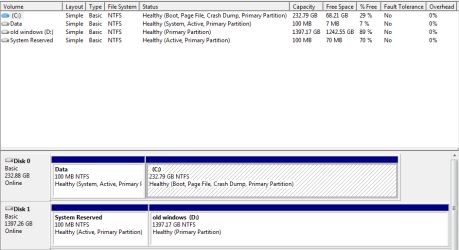
I am having a problem where windows system image backup fails because there is not enough free space in the 100MB system reserved partition.

The story is as follows:
Initially there is a 1.5TB hard drive with 100MB system partition and rest is c:
I installed an SSD and used Samsung's migration assistant to copy the os to the SSD.
The original hard drive still has the system reserved partition with 70% free, and the old windows partition.

The new SSD has a 100 MB partition also, except that it is named "data", and only has 7MB free space. I assigned a drive letter to it to look inside, and I can only see the boot dir of 13.9MB, recycle bin (empty), bootmgr, and "system volume information", which is 48KB.

I also did the thing to delete the USN journal, and it only cleared up 2MB. What is taking up this other space?

PS This is on my Dad's compute with W7 pro
 

My Computer My Computer

At a glance

Windows 7 Home Premium x64
OS
Windows 7 Home Premium x64

My Computer My Computer

At a glance

x64 (6.3.9600) Win8.1 Pro & soon dual boot x6...AMD A6-3420M APU with Radeon(tm) HD Graphics6.00 GBAMD Radeon(TM) HD 6520G
Computer type
Laptop
Computer Manufacturer/Model Number
HP Pavilion dv6-6c10us
OS
x64 (6.3.9600) Win8.1 Pro & soon dual boot x64 (6.1.7601) Win7_SP1 HomePrem
CPU
AMD A6-3420M APU with Radeon(tm) HD Graphics
Motherboard
Hewlett-Packard 1805
Memory
6.00 GB
Graphics Card(s)
AMD Radeon(TM) HD 6520G
Sound Card
(1) AMD High Definition Audio Device (2) IDT High Definiti
Monitor(s) Displays
HP W2072a 20" LCD (1600 x 900) @ 60 Hz
Screen Resolution
1366 x 768 x 32 bits (4294967296 colors) @ 60 Hz
Hard Drives
ST640LM0 00 HM641JI SATA Disk Device
Keyboard
Logitech k520 wireless KB
Mouse
Logitech m320 wireless mouse (bundled with KB)
Internet Speed
15/5 | 54 MB Wireless 'n'
Antivirus
Realtime: Defender or Avast | On-demand: Malwarebytes, ESET
Browser
IE 11 on Win8, IE 10 on win 7
Other Info
Media: [Gimp, Audacity, VLC] || Comm: [WEmail 2012, Skype] || Productivity: [OpenOffice,| Textpad] || Utils: [Sysinternals, cCleaner, Speccy, Defraggler]

My Computer My Computer

At a glance

Vista, Windows7, Mint Mate, Zorin, Windows 8from 1.6GHz Duo to i7
Computer Manufacturer/Model Number
HP, Dell, Gateway, Toshiba - 4 laptops and 2 desktops
OS
Vista, Windows7, Mint Mate, Zorin, Windows 8
CPU
from 1.6GHz Duo to i7
Monitor(s) Displays
2x HP w2207
Hard Drives
5x HDD, 7x SSD, 12x Externals
Keyboard
with trackball - no mices
Mouse
Trackball mice
Internet Speed
DSL 6000
Im thinking im with whs on this one. Its always better i believe to have the bootmgr file(s) in the main c: drive as opposed to a separate partition.
 

My Computer My Computer

At a glance

Windows 7 ultimate 64-bitIntel I7 2600K 3.4ghzCorsair 16gb ddr3 1600mhzNvidia Geforce gt 430
Computer type
PC/Desktop
Computer Manufacturer/Model Number
custom built
OS
Windows 7 ultimate 64-bit
CPU
Intel I7 2600K 3.4ghz
Motherboard
Asus Evo P8P67
Memory
Corsair 16gb ddr3 1600mhz
Graphics Card(s)
Nvidia Geforce gt 430
Sound Card
Sound Blaster Titanium x-fi pci express
Monitor(s) Displays
Dell E198WFP
Hard Drives
1 western digital 2TB drive.
PSU
Antec 1200 watt
Case
Inwin Dragon Rider
Cooling
6 case supplied cooling fans
Keyboard
logitech mk700
Mouse
logitech m705
Internet Speed
25-50mbps download; 10mbps upload(i think)
Antivirus
avg free 2014
Browser
mozilla firefox
Other Info
Also have a pretty bad speaker setup which is a klipsch promedia 5.1 surround speaker setup with huge subwoofer and lg blu ray player/writer. Also a hp officejet pro 8600 plus wireless all in one and a logitech s7500 webcam.
screenshot
 

Attachments

  • Capture.PNG
    Capture.PNG
    11.8 KB · Views: 3

My Computer My Computer

At a glance

Windows 7 Home Premium x64
OS
Windows 7 Home Premium x64
It is not clear, from which 100MB partition the bootmgr is booting. You an only find out if you disconnect the HDD and try to boot from the SSD.

But as I said, transferring the bootmgr to C (on the SSD) is the easiest solution. Then both 100MB partitions are no more needed when booting from the SSD.
 

My Computer My Computer

At a glance

Vista, Windows7, Mint Mate, Zorin, Windows 8from 1.6GHz Duo to i7
Computer Manufacturer/Model Number
HP, Dell, Gateway, Toshiba - 4 laptops and 2 desktops
OS
Vista, Windows7, Mint Mate, Zorin, Windows 8
CPU
from 1.6GHz Duo to i7
Monitor(s) Displays
2x HP w2207
Hard Drives
5x HDD, 7x SSD, 12x Externals
Keyboard
with trackball - no mices
Mouse
Trackball mice
Internet Speed
DSL 6000
Thanks for posting the Disk Mgmnt shot.

I suspect that the SSD will boot after you remove the HD - ie the data partition is the 'correct' active partition. Why it's named data beats me - probably from the Samsung migration assist.

Now about Samsung migration assist - had to read a little but it seems to be Norton Ghost. This might be what's eating up the space.

How to 'correct' this? I'm not sure. I'll leave this up to members already working the issue. Just thought I'd offer some things I 'found'.
 

My Computer My Computer

At a glance

x64 (6.3.9600) Win8.1 Pro & soon dual boot x6...AMD A6-3420M APU with Radeon(tm) HD Graphics6.00 GBAMD Radeon(TM) HD 6520G
Computer type
Laptop
Computer Manufacturer/Model Number
HP Pavilion dv6-6c10us
OS
x64 (6.3.9600) Win8.1 Pro & soon dual boot x64 (6.1.7601) Win7_SP1 HomePrem
CPU
AMD A6-3420M APU with Radeon(tm) HD Graphics
Motherboard
Hewlett-Packard 1805
Memory
6.00 GB
Graphics Card(s)
AMD Radeon(TM) HD 6520G
Sound Card
(1) AMD High Definition Audio Device (2) IDT High Definiti
Monitor(s) Displays
HP W2072a 20" LCD (1600 x 900) @ 60 Hz
Screen Resolution
1366 x 768 x 32 bits (4294967296 colors) @ 60 Hz
Hard Drives
ST640LM0 00 HM641JI SATA Disk Device
Keyboard
Logitech k520 wireless KB
Mouse
Logitech m320 wireless mouse (bundled with KB)
Internet Speed
15/5 | 54 MB Wireless 'n'
Antivirus
Realtime: Defender or Avast | On-demand: Malwarebytes, ESET
Browser
IE 11 on Win8, IE 10 on win 7
Other Info
Media: [Gimp, Audacity, VLC] || Comm: [WEmail 2012, Skype] || Productivity: [OpenOffice,| Textpad] || Utils: [Sysinternals, cCleaner, Speccy, Defraggler]
You can make a small partition on disk 1, make an image of the SR partition and C (using windows built-in imaging program) and store it there, then put that entire image on the ssd.

Personally, I would ask dad if he`s dead set on transferring an image, better to align the ssd, make a partition and clean install windows.
 

My Computer My Computer

At a glance

Windows 10 Pro x64Intel Core i7 6700KGSkill TridentZ RGB 16GB 3600 16-16-16-36EVGA GTX 980 Ti SC x2
Computer type
PC/Desktop
Computer Manufacturer/Model Number
Skylake Special #666
OS
Windows 10 Pro x64
CPU
Intel Core i7 6700K
Motherboard
Asus Sabertooth Z170 Mark 1
Memory
GSkill TridentZ RGB 16GB 3600 16-16-16-36
Graphics Card(s)
EVGA GTX 980 Ti SC x2
Sound Card
Realtek High Definition
Monitor(s) Displays
AOC G2460PG
Screen Resolution
1920 x 1080 144Hz
Hard Drives
Samsung 860 Pro 256GB, Seagate Barracuda 4TB x2
PSU
EVGA 1000 P2, EVGA White Custom Braided Cables
Case
Corsair Vengeance C70 Gunmetal Black
Cooling
Corsair H100i v2, Corsair ML120 x2, Thermal Grizzly Kryonaut
Keyboard
Logitech G910 Orion Spectrum
Mouse
Logitech G700s
Internet Speed
Verizon Fios Quantum Gateway 75/75
Antivirus
Windows Defender, Malwarebytes Free 3.8.3
Browser
Chrome
Other Info
Corsair SP120 x4, LG Blu-ray Drive, Durabrand HT-395 100 Watt Dolby Digital Amp, Corsair H2100 Wireless 7.1 Headset
Thanks for the replies so far. The reason I want to create a system image is to be able to do a "bare metal" restore in case the SSD suddenly dies, or things get really messed up. The easiest is if I can just manage to clear some space on the system reserved so system image can work.

I am also open to options such as:
dd the system reserved from disk 1 onto disk 0
move the boot manager to c: and remove the system partition (but then I lose recovery tools)
use gparted to expand the "data" partition (but that will take a while to scoot the whole c: back)

Clean install windows is out of the question since there are a lot of programs installed that require registration or download.

Yes, this computer can boot from the SSD just fine (set in BIOS) and windows otherwise works fine.

I think the SAmsung migration software is make by clonix.
 

My Computer My Computer

At a glance

Windows 7 Home Premium x64
OS
Windows 7 Home Premium x64
I understand the system tools problem when you move the bootmgr. I myself have never needed or used those tools. I rather make frequent images and recover from those in case of problems. And that is a lot easier if you only have to deal with the C partition - especially for a restore to bare metal.

Just wanted to give you this input how I run 6 systems - all with SSDs. And I also found free Macrium to be the easiest and most reliable imaging program for the job.
 

My Computer My Computer

At a glance

Vista, Windows7, Mint Mate, Zorin, Windows 8from 1.6GHz Duo to i7
Computer Manufacturer/Model Number
HP, Dell, Gateway, Toshiba - 4 laptops and 2 desktops
OS
Vista, Windows7, Mint Mate, Zorin, Windows 8
CPU
from 1.6GHz Duo to i7
Monitor(s) Displays
2x HP w2207
Hard Drives
5x HDD, 7x SSD, 12x Externals
Keyboard
with trackball - no mices
Mouse
Trackball mice
Internet Speed
DSL 6000
We should not advise users of netbooks to use a method to move the System boot files which does not rewrite the F8 Repair My Computer link. Just because you choose to "repair" Win7 by reimaging doesn't mean any other consumer would want to fix their netbook that way when they're in Starbucks without disks or external images.

Let's try to figure out what's clogging the new System Reserved partition. In Control Panel>Folder Options>View unhide System and Hidden files. Post back a screenshot of the contents of both SysRserved partitions.

The method to move the System boot files is to unplug all other HD's, Mark C Partition Active,
boot into System Recovery Options to run Startup Repair - Run 3 Separate Times until Win7 boots with the System Active flags on C. You can then delete System Reserved in Disk Mgmt, recover its space if you want using Partition Wizard to Resize Partition - Video Help.
 
Last edited:
Greg, I think this OP knows what he is doing. I like to give options. As you know I am not a purist like you but I have survived with computers since 1958.
 

My Computer My Computer

At a glance

Vista, Windows7, Mint Mate, Zorin, Windows 8from 1.6GHz Duo to i7
Computer Manufacturer/Model Number
HP, Dell, Gateway, Toshiba - 4 laptops and 2 desktops
OS
Vista, Windows7, Mint Mate, Zorin, Windows 8
CPU
from 1.6GHz Duo to i7
Monitor(s) Displays
2x HP w2207
Hard Drives
5x HDD, 7x SSD, 12x Externals
Keyboard
with trackball - no mices
Mouse
Trackball mice
Internet Speed
DSL 6000
Hi guys,

I did what whs said, which was enough to get windows to stop complaining about the dumb system reserved partition, and make an image backup. My understanding is that the system reserved partition is still there, but just not marked as active, so windows doesn't try to boot from there. As long as it is not active, I don't need care about the 100MB, and am happy not to bother with having to scoot the whole c: over, and having to run windows repair to fix it.

I am pretty sure there is no problem with what hard drive the computer boots from because that is set in the bios. On the old spinning hard drive, I used gparted to shrink the windows partition down to size. Then back in windows, I removed the drive letter from that, and turned the empty space into a d:. So far everything works fine. If the ssd suddenly dies, then we should be able to switch the bios to boot back into the spinning hard drive.

As for that bloated system reserved partition, my description of what is there in the first post is with those boxes unchecked. I also, while using gparted in a linux environment, ran the df and du commands on that partition, and saw the same files and same space consumption issues. e.g. du showed 14 MB of files (if I remember right), and df showed 90% usage. I can post the screenshot if you like, but what are you looking for beyond what I already said? I am still interested in figuring out what is taking up all the space.
 

My Computer My Computer

At a glance

Windows 7 Home Premium x64
OS
Windows 7 Home Premium x64
1. I am glad that EasyBCD did the job for you. And you are right, the bootmger is only copied from the system partition to C. You can always reactivate the system partition and deactivate C to get back to the initial state - once we figured out what is cloggoging your system partition.

2. Can you open the system partition (you have to give it a drive letter for it to show up in Computer). Take a snip of the content and post it here. Maybe we can spot something.
 

My Computer My Computer

At a glance

Vista, Windows7, Mint Mate, Zorin, Windows 8from 1.6GHz Duo to i7
Computer Manufacturer/Model Number
HP, Dell, Gateway, Toshiba - 4 laptops and 2 desktops
OS
Vista, Windows7, Mint Mate, Zorin, Windows 8
CPU
from 1.6GHz Duo to i7
Monitor(s) Displays
2x HP w2207
Hard Drives
5x HDD, 7x SSD, 12x Externals
Keyboard
with trackball - no mices
Mouse
Trackball mice
Internet Speed
DSL 6000
If nothing shows up differently between the two SysReserved partitions by comparison, then if you really want System Reserved you can recreate it by deleting it, creating a new Primary Partition, mark it Active, copy the unhidden Boot Files from C into it, run 3 Startup Repairs to finish the job completely.

If you're happy with the way it is now then you can leave it, or delete SysReserved. I agree it is not worth the trouble to recover its space into C unless you want to play with Partition Wizard. Use the boot disk which will not fail while all others including the Windows version can except DIsk Mgmt.
 
Hello,

I think I found out what the problem was. I viewed the partition with defraggler and saw that there was a big 50MB $logfile, which is one of those hidden ntfs system files. I also saw that there was a command chkdsk (driveletter): /L that is supposed to be able to shrink it. I have not bothered to do that yet in case I screw things up.

I'm also wondering what would happen if I just copied the files off that partition, reformat it, and copy them back?
 

My Computer My Computer

At a glance

Windows 7 Home Premium x64
OS
Windows 7 Home Premium x64
You can try it, or just delete the log file and if it returns to normal size reactivate the partition.

I gave you the best way I've seen to reconstruct the System Reserved partition or to remove it.
 
Hi everyone. I would like to resurrect this thread because I have the exact same symptoms and problem as the OP. I likewise have a Samsung SSD. My system reserved partition likewise became too full after using Samsung's data migration tool. The partition was also renamed "data" (I actually renamed it to "system reserved"). And I can't see what is hogging the drive space either.

I stumbled across this thread after first attempting to deal with this issue by simply resizing the system reserved partition and not worrying about why it got full. However, that keeps failing for some reason. No matter what I do, windows won't boot afterward. If anyone cares, my trials and tribulations are available here.

Doesn't matter. I think I'm on a better track now. Can I get help with clearing up a few things? OP, if you see this, did you ever resolve it? Sounds like you did since you stopped posting.

1.) Unlike the OP, I cannot see this log file. I downloaded defraggler, but I don't see this $logfile. All I see is this:


I think it's only listing the fragmented files. How do I see this mysterious log file?

1.b. If I can use this chkdsk /L command to shrink it, how far can I shrink it? Is there a minimum? What happens when you shrink it?

***

2.) Can somone tell me again the steps for re-creating the system reserved partition? I'm not sure I got it. Do I need to save or copy anything from the partition before I wipe it? Or can it be re-created automatically with the Win rescue disk?

Thanks!
 

My Computer My Computer

At a glance

Windows 7 Pro x64
Computer type
PC/Desktop
OS
Windows 7 Pro x64
You have the system reserved partition named Z, it`s not supposed to have a letter.

That way no information can be written to it.

Please post the shot, as Greg has asked.
 

My Computer My Computer

At a glance

Windows 10 Pro x64Intel Core i7 6700KGSkill TridentZ RGB 16GB 3600 16-16-16-36EVGA GTX 980 Ti SC x2
Computer type
PC/Desktop
Computer Manufacturer/Model Number
Skylake Special #666
OS
Windows 10 Pro x64
CPU
Intel Core i7 6700K
Motherboard
Asus Sabertooth Z170 Mark 1
Memory
GSkill TridentZ RGB 16GB 3600 16-16-16-36
Graphics Card(s)
EVGA GTX 980 Ti SC x2
Sound Card
Realtek High Definition
Monitor(s) Displays
AOC G2460PG
Screen Resolution
1920 x 1080 144Hz
Hard Drives
Samsung 860 Pro 256GB, Seagate Barracuda 4TB x2
PSU
EVGA 1000 P2, EVGA White Custom Braided Cables
Case
Corsair Vengeance C70 Gunmetal Black
Cooling
Corsair H100i v2, Corsair ML120 x2, Thermal Grizzly Kryonaut
Keyboard
Logitech G910 Orion Spectrum
Mouse
Logitech G700s
Internet Speed
Verizon Fios Quantum Gateway 75/75
Antivirus
Windows Defender, Malwarebytes Free 3.8.3
Browser
Chrome
Other Info
Corsair SP120 x4, LG Blu-ray Drive, Durabrand HT-395 100 Watt Dolby Digital Amp, Corsair H2100 Wireless 7.1 Headset
Back
Top