Laptop internal dust removal

PinoyForTheWin

New member
Local time
12:54 PM
Messages
21
Hey I'm a noobie when it come to the internal components of a laptop, lately my laptop has been overheating and a guy I asked at geek squad said an air compressor should be more then suffient to remove dust ( I even specifically said it hasn't been dusted for a year and I believe it is clogged with dust). My first question is, what is a heat sink? Is it connected to the fan?

And also, is removing the fan and cleaning it possible without needing any special items (such as needing thermal paste for a heat sink)

What happens if you don't use thermal paste, what's wrong with just putting everything back together? And is it the heat sink that's a problem in my situation or is it my fan or both?
 
Last edited:

My Computer My Computer

OS
64
You can usually get way with a can of compressed air and with the battery removed and unplugged blast some air through the vents (use a toothpick or something to hold the fan still).

It would also help to post make/model of your laptop, we then might be able to help you remove the access panels to blast air in them as well.

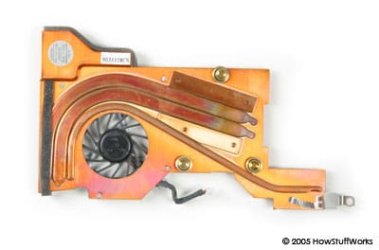
Heatsinks are to disperse the heat away (usually look like small fins) some have fans on them some don't....would help to know make/model.
 

Attachments

  • laptop-2-heatsink.jpg
    laptop-2-heatsink.jpg
    12.7 KB · Views: 7
  • md537.jpg
    md537.jpg
    37.1 KB · Views: 6

My Computer My Computer

Computer type
PC/Desktop
Computer Manufacturer/Model Number
Jeepmann/Custom Built
OS
Windows 7 Ultimate 64bit
CPU
Intel Core i7-2600K Sandy Bridge 3.4GHz (@[email protected])
Motherboard
Asus Maximus IV Extreme LGA 1155 Intel P67
Memory
G.SKILL Ripjaws X Series 16GB 1600Mhz (4 x 4GB) (Stock)
Graphics Card(s)
x2 EVGA GeForce GTX 760's w/ACXCoolers in SLI Surround
Sound Card
On-Board
Monitor(s) Displays
3x Acer 24" HDMI Widescreen LCD Monitor
Screen Resolution
3@ 1920x1080 (5760x1080 In Surround)
Hard Drives
Samsung 830 128gb ssd
Western Digital Caviar Black 640GB 7200 RPM
Western Digital Caviar Black 500GB 7200 RPM
Seagate 2tb 7200 RPM
PSU
COOLER MASTER Silent Pro 1000W
Case
COOLER MASTER HAF X Black
Cooling
CORSAIR Hydro H70
Keyboard
Logitech G510
Mouse
Zalman M300
Internet Speed
100mbps-ish Down & 5mbps-ish Up
Other Info
I installed the stock 140mm case fan outside of case then installed the H70+ 1 of its 120mm fans inside case. Used the 2nd 120mm from the H70 to go in the Gpu tunnel.
230mm Front,200mm side,200mm top,120mm Gpu tunnel,120mm&140mm on H70.
You can usually get way with a can of compressed air and with the battery removed and unplugged blast some air through the vents (use a toothpick or something to hold the fan still).

It would also help to post make/model of your laptop, we then might be able to help you remove the access panels to blast air in them as well.

Heatsinks are to disperse the heat away (usually look like small fins) some have fans on them some don't....would help to know make/model.

It overheats to the point where it shuts down
 

My Computer My Computer

OS
64
Yea, just use a compressed air can and spray it around the fans. You can get them at most stores, Walmart, Target, Wallgreens etc.
 

My Computer My Computer

Computer Manufacturer/Model Number
HP Pavillion P7-1054
OS
Windows 7 Home Premium 64bit
CPU
AMD Athlon 645 II Quad Core 3.2MHz
Motherboard
Foxconn 2AB1
Memory
6GB DDR3 1333MHz
Graphics Card(s)
Radeon HD 4200
Sound Card
Realtek HD Audio
Monitor(s) Displays
HP S2031 20'
Screen Resolution
1600 x 900
Hard Drives
1TB
Internet Speed
18mb/s Down 2mb/s Up
You can usually get way with a can of compressed air and with the battery removed and unplugged blast some air through the vents (use a toothpick or something to hold the fan still).

It would also help to post make/model of your laptop, we then might be able to help you remove the access panels to blast air in them as well.

Heatsinks are to disperse the heat away (usually look like small fins) some have fans on them some don't....would help to know make/model.

It overheats to the point where it shuts down

So you never did give the info requested (make/model of laptop) I also noticed that you have not given the info in the TWO other threads you started about the same issue and now your issue is spread over THREE threads.

Laptop still shuts down - Windows 7 Forums:

Laptop internal dust removal - Windows 7 Forums:

Applied new thermal paste - Windows 7 Forums:

Just a heads up the more info you give us the more we can help with, Also you will get more help if you pick ONE thread and stick with it....
 

My Computer My Computer

Computer type
PC/Desktop
Computer Manufacturer/Model Number
Jeepmann/Custom Built
OS
Windows 7 Ultimate 64bit
CPU
Intel Core i7-2600K Sandy Bridge 3.4GHz (@[email protected])
Motherboard
Asus Maximus IV Extreme LGA 1155 Intel P67
Memory
G.SKILL Ripjaws X Series 16GB 1600Mhz (4 x 4GB) (Stock)
Graphics Card(s)
x2 EVGA GeForce GTX 760's w/ACXCoolers in SLI Surround
Sound Card
On-Board
Monitor(s) Displays
3x Acer 24" HDMI Widescreen LCD Monitor
Screen Resolution
3@ 1920x1080 (5760x1080 In Surround)
Hard Drives
Samsung 830 128gb ssd
Western Digital Caviar Black 640GB 7200 RPM
Western Digital Caviar Black 500GB 7200 RPM
Seagate 2tb 7200 RPM
PSU
COOLER MASTER Silent Pro 1000W
Case
COOLER MASTER HAF X Black
Cooling
CORSAIR Hydro H70
Keyboard
Logitech G510
Mouse
Zalman M300
Internet Speed
100mbps-ish Down & 5mbps-ish Up
Other Info
I installed the stock 140mm case fan outside of case then installed the H70+ 1 of its 120mm fans inside case. Used the 2nd 120mm from the H70 to go in the Gpu tunnel.
230mm Front,200mm side,200mm top,120mm Gpu tunnel,120mm&140mm on H70.
My laptop Model is Sony vaio VPCF116fx

I am 99% sure it isn't shutting down because it overheats, I observed the temperature and it maxed 61c for 3 hours until shutting down. Today I applied new thermal paste and it maxed at 71c and it hasn't shut off yet (it's been another 3 hours)
 

My Computer My Computer

OS
64
To what part(s) of your laptop did you apply the thermal paste? And what kind of thermal paste did you use?
 

My Computer My Computer

Computer type
Laptop
Computer Manufacturer/Model Number
Sony Vaio VPCEB47GM Laptop
OS
Win 7 Pro 64-bit
CPU
Intel i5 2.4 Ghz
Memory
8GB DDR3
Graphics Card(s)
Intel HD 3000
Sound Card
IDT High Definition
Monitor(s) Displays
15.6 WGXA Anti-Glare LED
Screen Resolution
1280x800
Hard Drives
640Gb 7200rpm
Antivirus
MSE
Browser
Opera (primary) with IE9 backup
To what part(s) of your laptop did you apply the thermal paste? And what kind of thermal paste did you use?

I applied it where it previously was, the CPU and gpu. Only paste available in stores Is the generic brand dynex
 

My Computer My Computer

OS
64
Since you didn't bother to mention your make/model you'll need to google how to clean out dust from that model and repaste the processor to see videos which demonstrate.
 
Back
Top