Solved Benefits of GPT vs MBR Primary and MBR Logical Partitions ?

Yes, that was my topic and gave my initial understanding of what led to my problems at that time.

Please note that I was NEVER CARELESS with DISKPART.
In fact I never even used it until AFTER WINDOWS STUPIDITY TRASHED MY DISK.

Windows doesn't use the enumeration to address drives, it uses the disk's signature which is an ID written on the disk and read at boot time.
I agree that Windows writes the Disk ID and also reads it at Boot time.
I have been told this by others.
THAT IS THE ROOT OF WINDOWS CRASS STUPIDITY.

Experience shows that each and every Disk receives the SAME ID that was written to it the last time it was booted up,
EVEN IF the disk is rarely booted
EVEN IF the disk is an external USB connected disk that is swapped between different computers.

OBVIOUSLY Windows does NOT pluck a new random identity out of thin air whenever a Disk starts,
otherwise Macrium Reflect would not know which disk it should be archiving.

OBVIOUSLY Windows needs to know what the identity WAS before it can re-write the same identity.

My BEST GUESS is that when Windows starts up there is some detection of Disk ID's and some "order of enumeration" that allocates numbers 0 through to 2 on the 3 disks that I had at the time,
and as each Disk runs up to speed or whatever is needed to be ready for re-writing the Disk ID,
the existing Disk ID is replaced by what was read some nanoseconds earlier from ONE OR ANOTHER of the available Disks.

I really do not care whether my Best Guess is correct or false,
WHAT IS INESCAPEABLE IS THE WINDOWS 7 ARBITRARILY replaced the complex GPT style GUID identity of my 600 GB W.D.C HDD with the simple 8 digit MBR identity of my 930 GB Samsung HDD,
AND THEN FOUND MY SAMSUNG identity clashed with that which it had just written to the W.D.C. HDD,
and then it put OFFLINE the 930 GB Samsung HDD - Windows should really have given up much earlier.
 

My Computer My Computer

At a glance

Windows 7 Ultimate 64 bit SP1 x64AMD Phenom X4 95008 GBATI Radeon HD 4600 Series
Computer Manufacturer/Model Number
ASUSTeK Computer INC. M3A32-MVP DELUXE (CPU 1)
OS
Windows 7 Ultimate 64 bit SP1 x64
CPU
AMD Phenom X4 9500
Motherboard
ASUSTeK M3A32-MVP Deluxe (CPU 1)
Memory
8 GB
Graphics Card(s)
ATI Radeon HD 4600 Series
Sound Card
AMD High Definition Audio Device
Monitor(s) Displays
SyncMaster (1680x1050@60Hz)
Hard Drives
59GB OCZ-VERTEX2 ATA Device
+
977GB SAMSUNG HD103SJ ATA Device
+
625GB WDC WD6401AALS-00L3B2 ATA Device
I am sorry, I don't mean to be argumentative, but that isn't how it works.

Windows doesn't write the disk signature every time it boots up. What you are saying is confusing to me. The disk signature is created when the MBR is created and it is stored on the diisk. It is then read from the disk each boot. Windows never rewrites a disk signature, it remains what was stored on the disk when the MBR was created.

When Windows first detects a disk with an unknown signature, whether it is from a formatting or diskpart operation, or from a newly installed disk that was formatted on another system, it stores that information in the registry and BCD. When you assign a drive letter to a disk for example, it associates the drive letter with the signature in the registry for mounting the disk. Disk enumerations can change but their identity (signature) does not.


I don't understand why you are so ready to place the blame on Windows.What seems likely to me is that the linux boot that went south overwrote the partition ID and possibly the protective MBR signature (which for gpt is 0), seeing as how this happened immediately after a failed SysLinux boot. What you say is inescapable doesn't fit the facts or how windows interacts with disks. Windows does not touch the the MBR or GPT sections of a disk except when specific DISKPART commands are issued.

BTW, I think I can explain the problem you had back when with diskpart uniqueid error. The system saw the disk as a MBR, not GPT, and you were giving it a GPT format ID instead of a MBR ID. So it told you it was of the wrong format.
 
Last edited:

My Computer My Computer

At a glance

Windows 10 Pro. EFI boot partition, full EFI ...i7 4770k 4.4GHz (44-44-43-43 turbo) @ 1.248V16GB (8GBx2) @2200 MHz G.skill Sniper 10-11-1...MSI GTX 970 Gaming 4G
Computer type
PC/Desktop
Computer Manufacturer/Model Number
Home built (GeneO industries)/Model 4
OS
Windows 10 Pro. EFI boot partition, full EFI boot
CPU
i7 4770k 4.4GHz (44-44-43-43 turbo) @ 1.248V
Motherboard
ASUS Maximus VI Hero
Memory
16GB (8GBx2) @2200 MHz G.skill Sniper 10-11-10-30-1, 1.6V
Graphics Card(s)
MSI GTX 970 Gaming 4G
Sound Card
Onboard SupremeFX Audio
Monitor(s) Displays
NEC Spectraview 2490WUXi-SV
Screen Resolution
1920 x 1200
Hard Drives
Samsung 850 Pro 256GB (OS), Samsung 2x 128GB 840 Pro SSD in RAID0, 3x WD Blue 6Gb/s 1TB RAID0, WD 2TB Black external USB 3.0, 2TB WD20EARS Green external USB 3.0, 2x 500GB Seagate and 1 750 GB external USB, 1x 350GB external USB3
PSU
Seasonic X-850 (2012 KM3 model)
Case
Fractal Design Define R4
Cooling
NH-D14, NF-F12, NF-A15; NF-P14, NF-P12,NF-A14, S12A PWM
Keyboard
Cooler Master Storm Quickfire Rapid - Brown
Mouse
Logitech G602
Internet Speed
126.4 Mb/s down, 24.3 Mb/s up
Other Info
USB 3.0 x8 , SATA III x8, eSATA, USB 2.0 x6. Samsung DVD R/W drive.

WEI: CPU 7.8, Memory 7.9, Graphics 7.9, Disk 7.9
I am an average user :), honestly. ( looks, reads very complicated but once you do it you know you can do it and if I can do it then anyone can.)

Why is this any different than MBR? GPT has redundant structures that make it less likely the disk boot sectors will be unrecoverably corrupted than with MBR and your are making it sound worse.

Why would you need to save both the primary and backup sectors- you need only save one or the other.

If the data is important, make a backup image or have a copy on another drive. Being able to fix a drive's boot sectors only gives you a sense of false security IMO. If these sectors get corrupted, it is likely your data is ass well.
While I do not want to sidetrack your dialogue with alan10, the thread starter, inasmuch as you have quoted on my post, I shall continue to deal with it. And let it go in parallel.

You perhaps missed to read my post#38.

"Why is this any different than MBR? GPT has redundant structures that make it less likely the disk boot sectors will be unrecoverably corrupted than with MBR and your are making it sound worse"

My post#38:

''GPT was designed with improved robustness in mind compared to the older MBR partition table;GPT includes stored CRC values to help utilities spot problems and redundancy to help recover from them. Neither of these features makes GPT completely immune to errors, though; they just help utilities to detect and recover from those problems" - Rod Smith, Author of GPT fdisk- a set of text-mode partitioning tools for Linux, FreeBSD, Mac OS X, and Windows that can also repair/try to repair a broken GPT.

The same author: " An Ounce of Prevention: Before you get into trouble, it's worth taking preventive measures: Back up your partition tables! If you take the simple precaution of backing up your GPT data, and keeping this backup current with any changes you make, you should find data recovery much easier."

This learned author sounds worse than me, an average user :D ! :)

Continuing, does the GPT redundant structure come to help when a user accidentally runs the diskpart clean command on a GPT drive? We do have many users who had done that. Even experts can commit such mistakes.

Under these circumstances, do you or do you not think that restoring the saved GPT data (the protective MBR, GPT Header, GPT Partition table, the backup sectors, the MSR start LBA34 ) could have retrieved the user's drive back to its previous condition with all data accessible?

"Why would you need to save both the primary and backup sectors- you need only save one or the other."

Ease of use. Instructions to all GPT drive users: Save each LBA 0 to LBA32 that is non zero.Save LBAn( n is the last sector) to LBAn-32 sectors, again only non-zero sectors. In case of Partition related problems simply restore those to their respective sectors.

Again if you do not know, the backup of the GPT header at LBA n is not a byte by byte copy of the GPT Header at LBA 1. You will be doing the right thing only when you save the GPT header LBA1 and the header backup LBAn separately and restoring those to the respective sectors when needed.

"If these sectors get corrupted, it is likely your data is ass well."

Unlikely also :). Diskpart clean is just one example. A boot sector virus corruption is yet another instance where the user data inside may still survive unaffected.
 
Last edited:

My Computer My Computer

At a glance

Windows 7 Home Premium 32 bit
OS
Windows 7 Home Premium 32 bit
OK, I just finished the first part of a small experiment and document it here before I lose track.

For now:

I deleted all volumes in my 750GB external drive, initialised it as a GPT drive, created a new simple volume (full disk) and Full formatted it. (The full format took about eight hours).

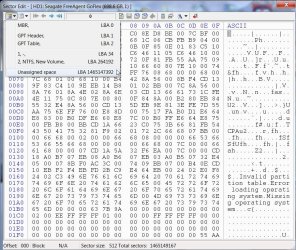
Bootice shows the partition table.

A28-12-2014 10-36-30.jpg

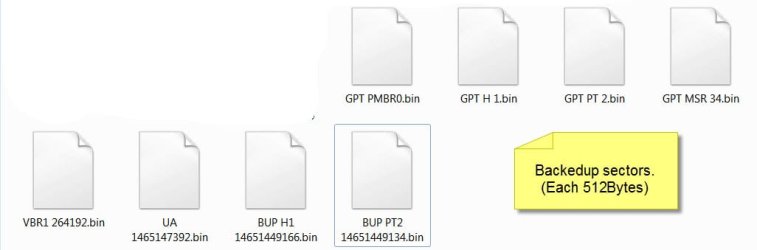
I save all these sectors shown, MBR, GPT Header, GPT Table, 1-, (this is actually the start of 128 MB MSR partition), New Volume (VBR at the start of the only partition), and the unassigned space ( I still do not know what it is.) ( Each sector is 512bytes)

I also save LBAn ( n is the last sector and in this HDD LBA 146514966). This is the backup of GPT Header LBA1.

I also save LBA n-32 ( here LBA 146514934)

I copy 11GB of data into the drive. All set for the start.

new.jpg

What happens when Sector 0 the Protective MBR is corrupted?

Wrote FF to Sector 0.

PMBR0FFjpg.jpg

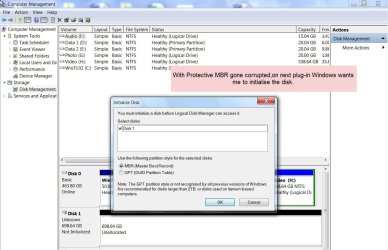
When the drive is plugged in, it is not seen in My computer. Windows Disk Management wants me to initialise the drive.

WDMinit.jpg

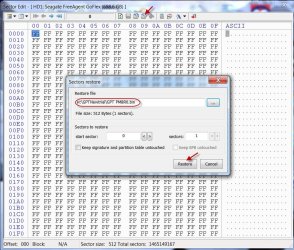
I shall now restore the Sector 0 from the backup.

Restore PMBR 0.jpg

When the drive is plugged out and plugged in, it is back in business.

Restored.jpg

28-12-2014 23-22-52.jpg

@alan10,

You seem to have done considerable research in coming to the conclusion that due to the spinup speeds and Windows not enumerating the disks in any standard way, it stole the unique id from the SSD and impinged it on the GPT drive. And you lost the drive due to it.

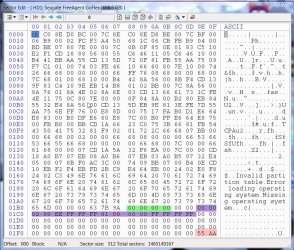
Now I am thinking aloud. Once you had your OS kicking in - in whatever way you managed to - you could have tried to change the Unique ID of your GPT drive to 00 00 00 00 (highlighted in green in the sector 0 screenshot above) and your GPT drive should have come alive after a reboot - provided that is the only change that had taken place as you aver.( With Diskpart Uniqueid command one can change the signature of any disk)

This may look like a post-mortem, but I think we are now in a better position to deal with this kind of problem in future.
 
Last edited:

My Computer My Computer

At a glance

Windows 7 Home Premium 32 bit
OS
Windows 7 Home Premium 32 bit
The disk signature is created when the MBR is created and it is stored on the diisk. It is then read from the disk each boot. Windows never rewrites a disk signature, it remains what was stored on the disk when the MBR was created.
I think that is the way it is. When you have a disk signature clash one will go offline and making it online will give it a different disk signature.
 

My Computer My Computer

At a glance

Windows 7x64 Home Premium SP1Intel i7 2600kG.Skill Ripjaws (DDR3-1600) 2x4GBNvidia GeForce GTS 450; Intel HD Graphics 300...
Computer type
PC/Desktop
Computer Manufacturer/Model Number
Own build
OS
Windows 7x64 Home Premium SP1
CPU
Intel i7 2600k
Motherboard
ASUS P8Z68 Deluxe
Memory
G.Skill Ripjaws (DDR3-1600) 2x4GB
Graphics Card(s)
Nvidia GeForce GTS 450; Intel HD Graphics 3000(GT2+)
Monitor(s) Displays
Dell Ultrasharp IPS panel U2311H, Samsung SyncMaster P2350
Screen Resolution
1920x1080
Hard Drives
Samsung 850 Pro SSD 256GB, Samsung SSD 840 120GB, Seagates 1TB Barracuda ST31000528AS x2
PSU
Seasonic M12II 520W
Case
Lian Li Lancool PC-K60
Cooling
Case: 1x120mm, 3x140mm CPU: Hyper 212+
Keyboard
Logitech MK520 (wireless)
Mouse
Logitech MK520
Internet Speed
6-7 Mbps
Antivirus
Norton Security Premium, Malwarebytes on 2 (MSE on 3rd PC)
Browser
FireFox
Other Info
Audio: Logitech Z523 2.1
You seem to have done considerable research in coming to the conclusion that due to the spinup speeds and Windows not enumerating the disks in any standard way, it stole the unique id from the SSD and impinged it on the GPT drive. And you lost the drive due to it.

I am quite confident windows won't do anything of the sort. It will not assign a signature to a disk (which it doesn't do in the normal course of things anyway) when there is one that already has this ID (which it has stored in the registry).

The OP, and apparently you, seem bent on believing this based on a misconceived view of how windows manages and identifies disks, and it appears nothing I can say is going to convince you otherwise as you don't seem to be listening so believe what you want., I'm out of here.
 

My Computer My Computer

At a glance

Windows 10 Pro. EFI boot partition, full EFI ...i7 4770k 4.4GHz (44-44-43-43 turbo) @ 1.248V16GB (8GBx2) @2200 MHz G.skill Sniper 10-11-1...MSI GTX 970 Gaming 4G
Computer type
PC/Desktop
Computer Manufacturer/Model Number
Home built (GeneO industries)/Model 4
OS
Windows 10 Pro. EFI boot partition, full EFI boot
CPU
i7 4770k 4.4GHz (44-44-43-43 turbo) @ 1.248V
Motherboard
ASUS Maximus VI Hero
Memory
16GB (8GBx2) @2200 MHz G.skill Sniper 10-11-10-30-1, 1.6V
Graphics Card(s)
MSI GTX 970 Gaming 4G
Sound Card
Onboard SupremeFX Audio
Monitor(s) Displays
NEC Spectraview 2490WUXi-SV
Screen Resolution
1920 x 1200
Hard Drives
Samsung 850 Pro 256GB (OS), Samsung 2x 128GB 840 Pro SSD in RAID0, 3x WD Blue 6Gb/s 1TB RAID0, WD 2TB Black external USB 3.0, 2TB WD20EARS Green external USB 3.0, 2x 500GB Seagate and 1 750 GB external USB, 1x 350GB external USB3
PSU
Seasonic X-850 (2012 KM3 model)
Case
Fractal Design Define R4
Cooling
NH-D14, NF-F12, NF-A15; NF-P14, NF-P12,NF-A14, S12A PWM
Keyboard
Cooler Master Storm Quickfire Rapid - Brown
Mouse
Logitech G602
Internet Speed
126.4 Mb/s down, 24.3 Mb/s up
Other Info
USB 3.0 x8 , SATA III x8, eSATA, USB 2.0 x6. Samsung DVD R/W drive.

WEI: CPU 7.8, Memory 7.9, Graphics 7.9, Disk 7.9
The disk signature is created when the MBR is created and it is stored on the diisk. It is then read from the disk each boot. Windows never rewrites a disk signature, it remains what was stored on the disk when the MBR was created.
I think that is the way it is. When you have a disk signature clash one will go offline and making it online will give it a different disk signature.

@mjf, your statement is confusing. Are you agreeing with Geneo's statement "Windows never rewrites a disk signature" or are you saying that Windows writes the new signature?

The fact is when you ask Windows to write a new unique id in place of an existing unique id, either by clicking on "online" to bring the offline HDD to recognition or use diskpart uniqueid command to change that unique id to a different unique id to bring it online, Windows will oblige and change the unique id.

Bypassing Windows, I can directly edit sector 0 and type a new unique id that is different from the existing id,save it and then Windows will accept that and bring the drive online.

If I deliberately present a drive with unique id 00 00 00 00, Windows will automatically write a non-zero unique id, if it perceives it as an MBR Disk.( I have confirmed this in an experiment I did yesterday.)And this is what seems to have happened in OP's case.GPT disks do not have a Unique ID. Those fields in Sector 0 are always 00 00 00 00. OP says Windows stole his SSD's Unique ID and wrote the same ID to the GPT drive and so his boot SSD went offline. I may think this is one in million occurrence, where Windows perceived his GPT drive as an MBR drive - for whatever reason/s - and assigned it a random Unique id as always seeing 00 00 00 00. And that unique ID unfortunately for the OP was the same as his SSD's Unique ID. A random unique id assigned just happened to be the same as his SSD's id.)

So the statement Windows never rewrites a disk signature does not seem to hold any water.
 
Last edited:

My Computer My Computer

At a glance

Windows 7 Home Premium 32 bit
OS
Windows 7 Home Premium 32 bit
...
Windows ... uses the disk's signature which is an ID written on the disk and read at boot time.
I understood that you were saying that Windows WRITES as well as READS the ID at boot time,
and only on the basis that WINDOWS IS SO STUPID THAT SUCH BEHAVIOR IS BELIEVABLE did I go along with you ! ! !

I know about GPT and MBR ID's because Macrium Reflect makes them visible to me.
I only tried to use DISKPART AFTER the ID was changed by something from a GPT style GUID to an extremely specific ID of the MBR style.

Against the odds of 4,294,967,296 to 1, something chose to apply the same 8 digit ID number of my Samsung MBR style partition C:\ on my Samsung HDD to what had been my GPT partition E:\ on a WDC HDD,
and when Windows came out of the BIOS it always enumerates the WDC first and so it saw the WDC as now holding C:\, and a bit later when the Samsung was enumerated it saw a Disk ID clash and put the Samsung off-line.
The was no Windows on the WDC, and the Windows HDD was off-line - what's a boy going to do ! ! !

Please note that I am no sys-linux guru.
My ONE-AND-ONLY Sys-Linux Boot tool is a Flash drive that is restricted to displaying a few Windows based type Boot Recovery tools, such as
Macrium Reflect PE Boot Recovery, and
Minitool Partition Wizard Partition Recovery, etc.

I was able to restore an old image of C:\ into unallocated space on the Samsung HDD,
and then change the ID signature of what had been my old C:\ to something that did NOT clash with the WDC drive.
A couple of reboots later and "Yesterday's" C:\ was back on-line and the WDC was placed completely OFF-LINE to await data recovery (which was successful.)

So far as I am aware, my Boot Recovery Flash Drive and its Linux style tool selection menu would NOT wantonly fix my WDC HDD with GPT style ID with an MBR style ID.
Windows is the only thing in town which I know of that obsesses about Disk ID's.

My WDC has always been GPT style and has NEVER been bootable,
so there should NEVER have been any attempt to automatically "repair".
I can only assume that Windows failed Big Style because it meddles with things it should leave alone.
(I always make adequate backups before I risk any "Windows Updates".)
 

My Computer My Computer

At a glance

Windows 7 Ultimate 64 bit SP1 x64AMD Phenom X4 95008 GBATI Radeon HD 4600 Series
Computer Manufacturer/Model Number
ASUSTeK Computer INC. M3A32-MVP DELUXE (CPU 1)
OS
Windows 7 Ultimate 64 bit SP1 x64
CPU
AMD Phenom X4 9500
Motherboard
ASUSTeK M3A32-MVP Deluxe (CPU 1)
Memory
8 GB
Graphics Card(s)
ATI Radeon HD 4600 Series
Sound Card
AMD High Definition Audio Device
Monitor(s) Displays
SyncMaster (1680x1050@60Hz)
Hard Drives
59GB OCZ-VERTEX2 ATA Device
+
977GB SAMSUNG HD103SJ ATA Device
+
625GB WDC WD6401AALS-00L3B2 ATA Device
for whatever reason/s - and assigned it a random Unique id as always seeing 00 00 00 00. And that unique ID unfortunately for the OP was the same as his SSD's Unique ID. A random unique id assigned just happened to be the same as his SSD's id.
Sure it does, and I had thought of that case. But I expect it generates a new unique 32 bit ID either from a random number or some combination of date and time. If it were just a 32 bit random number, the chance that you got the same ID is one in 4 billion. If it is a combo of the time and date, then the likelihood is even lower.

EDIT: and I am also confident that if Windows generates a new ID, it will not write it to the MBR if it clashes with another disk's ID, but would generate another, etc. The ppl that wrote this code are not stupid.

Also, for that to be plausible means that something prior to booting clobbered the GPT so that it appeared as a MBR. Just resetting the partition type of the protective MBR to be something other than 0xEE might be enough.
 

My Computer My Computer

At a glance

Windows 10 Pro. EFI boot partition, full EFI ...i7 4770k 4.4GHz (44-44-43-43 turbo) @ 1.248V16GB (8GBx2) @2200 MHz G.skill Sniper 10-11-1...MSI GTX 970 Gaming 4G
Computer type
PC/Desktop
Computer Manufacturer/Model Number
Home built (GeneO industries)/Model 4
OS
Windows 10 Pro. EFI boot partition, full EFI boot
CPU
i7 4770k 4.4GHz (44-44-43-43 turbo) @ 1.248V
Motherboard
ASUS Maximus VI Hero
Memory
16GB (8GBx2) @2200 MHz G.skill Sniper 10-11-10-30-1, 1.6V
Graphics Card(s)
MSI GTX 970 Gaming 4G
Sound Card
Onboard SupremeFX Audio
Monitor(s) Displays
NEC Spectraview 2490WUXi-SV
Screen Resolution
1920 x 1200
Hard Drives
Samsung 850 Pro 256GB (OS), Samsung 2x 128GB 840 Pro SSD in RAID0, 3x WD Blue 6Gb/s 1TB RAID0, WD 2TB Black external USB 3.0, 2TB WD20EARS Green external USB 3.0, 2x 500GB Seagate and 1 750 GB external USB, 1x 350GB external USB3
PSU
Seasonic X-850 (2012 KM3 model)
Case
Fractal Design Define R4
Cooling
NH-D14, NF-F12, NF-A15; NF-P14, NF-P12,NF-A14, S12A PWM
Keyboard
Cooler Master Storm Quickfire Rapid - Brown
Mouse
Logitech G602
Internet Speed
126.4 Mb/s down, 24.3 Mb/s up
Other Info
USB 3.0 x8 , SATA III x8, eSATA, USB 2.0 x6. Samsung DVD R/W drive.

WEI: CPU 7.8, Memory 7.9, Graphics 7.9, Disk 7.9
N.B.
On start-up the 'F8' and 'DEL' keys allow me access to the BIOS,
"Abandon all hope Ye who enter Here".

Once I have done whatever needs doing there,
I may chose to continue into Windows, or to restart or shut-down.

I found that letting all the disks run up to speed and wake-up properly and then continue into Windows,
allows me to experience new "orders of enumeration".

I consider it safer to fix and then shutdown and take a coffee break before my next start-up.

Regards
Alan
 

My Computer My Computer

At a glance

Windows 7 Ultimate 64 bit SP1 x64AMD Phenom X4 95008 GBATI Radeon HD 4600 Series
Computer Manufacturer/Model Number
ASUSTeK Computer INC. M3A32-MVP DELUXE (CPU 1)
OS
Windows 7 Ultimate 64 bit SP1 x64
CPU
AMD Phenom X4 9500
Motherboard
ASUSTeK M3A32-MVP Deluxe (CPU 1)
Memory
8 GB
Graphics Card(s)
ATI Radeon HD 4600 Series
Sound Card
AMD High Definition Audio Device
Monitor(s) Displays
SyncMaster (1680x1050@60Hz)
Hard Drives
59GB OCZ-VERTEX2 ATA Device
+
977GB SAMSUNG HD103SJ ATA Device
+
625GB WDC WD6401AALS-00L3B2 ATA Device
@mjf, your statement is confusing. Are you agreeing with Geneo's statement "Windows never rewrites a disk signature" or are you saying that Windows writes the new signature?
Sorry for any confusion.
Yes Windows will write a new disk signature when there is a clash and you need to reassign a new disk signature through an application like Windows Disk Management. I've had external WD drives with the same disk signature and they need to be changed if both are connected. In the MBR disk signatures identify a specific disk (HDD).
 

My Computer My Computer

At a glance

Windows 7x64 Home Premium SP1Intel i7 2600kG.Skill Ripjaws (DDR3-1600) 2x4GBNvidia GeForce GTS 450; Intel HD Graphics 300...
Computer type
PC/Desktop
Computer Manufacturer/Model Number
Own build
OS
Windows 7x64 Home Premium SP1
CPU
Intel i7 2600k
Motherboard
ASUS P8Z68 Deluxe
Memory
G.Skill Ripjaws (DDR3-1600) 2x4GB
Graphics Card(s)
Nvidia GeForce GTS 450; Intel HD Graphics 3000(GT2+)
Monitor(s) Displays
Dell Ultrasharp IPS panel U2311H, Samsung SyncMaster P2350
Screen Resolution
1920x1080
Hard Drives
Samsung 850 Pro SSD 256GB, Samsung SSD 840 120GB, Seagates 1TB Barracuda ST31000528AS x2
PSU
Seasonic M12II 520W
Case
Lian Li Lancool PC-K60
Cooling
Case: 1x120mm, 3x140mm CPU: Hyper 212+
Keyboard
Logitech MK520 (wireless)
Mouse
Logitech MK520
Internet Speed
6-7 Mbps
Antivirus
Norton Security Premium, Malwarebytes on 2 (MSE on 3rd PC)
Browser
FireFox
Other Info
Audio: Logitech Z523 2.1
@mjf, your statement is confusing. Are you agreeing with Geneo's statement "Windows never rewrites a disk signature" or are you saying that Windows writes the new signature?
Sorry for any confusion.
Yes Windows will write a new disk signature when there is a clash and you need to reassign a new disk signature through an application like Windows Disk Management. I've had external WD drives with the same disk signature and they need to be changed if both are connected. In the MBR disk signatures identify a specific disk (HDD).


But you manually have to resolve the clash by bringing one of the drives online (then windows creates a new signature for it).

I think the reason why WD external drives had such clashes is that they deliver pre-formatted disks ready to use out of the box. They don't format them in windows; they probably had a master that the cloned, including disk signature - so they all had the same signature. I expect that have since fixed that process (they could just use the epoch time- the number of seconds since Jan 1, 1970 for the signature for instance).
 

My Computer My Computer

At a glance

Windows 10 Pro. EFI boot partition, full EFI ...i7 4770k 4.4GHz (44-44-43-43 turbo) @ 1.248V16GB (8GBx2) @2200 MHz G.skill Sniper 10-11-1...MSI GTX 970 Gaming 4G
Computer type
PC/Desktop
Computer Manufacturer/Model Number
Home built (GeneO industries)/Model 4
OS
Windows 10 Pro. EFI boot partition, full EFI boot
CPU
i7 4770k 4.4GHz (44-44-43-43 turbo) @ 1.248V
Motherboard
ASUS Maximus VI Hero
Memory
16GB (8GBx2) @2200 MHz G.skill Sniper 10-11-10-30-1, 1.6V
Graphics Card(s)
MSI GTX 970 Gaming 4G
Sound Card
Onboard SupremeFX Audio
Monitor(s) Displays
NEC Spectraview 2490WUXi-SV
Screen Resolution
1920 x 1200
Hard Drives
Samsung 850 Pro 256GB (OS), Samsung 2x 128GB 840 Pro SSD in RAID0, 3x WD Blue 6Gb/s 1TB RAID0, WD 2TB Black external USB 3.0, 2TB WD20EARS Green external USB 3.0, 2x 500GB Seagate and 1 750 GB external USB, 1x 350GB external USB3
PSU
Seasonic X-850 (2012 KM3 model)
Case
Fractal Design Define R4
Cooling
NH-D14, NF-F12, NF-A15; NF-P14, NF-P12,NF-A14, S12A PWM
Keyboard
Cooler Master Storm Quickfire Rapid - Brown
Mouse
Logitech G602
Internet Speed
126.4 Mb/s down, 24.3 Mb/s up
Other Info
USB 3.0 x8 , SATA III x8, eSATA, USB 2.0 x6. Samsung DVD R/W drive.

WEI: CPU 7.8, Memory 7.9, Graphics 7.9, Disk 7.9
@alan10, I would still like to know:

Once you had your OS kicking in - in whatever way you managed to - you could have tried to change the Unique ID of your GPT drive to 00 00 00 00 and your GPT drive should have come alive after a reboot - provided that is the only change that had taken place as you aver.( With Diskpart Uniqueid command one can change the signature of any disk)

Why did you not try it and why did you straightaway go into data recovery mode with Lazesoft?

Since a GPT/MBR mix is being used on your system, atleast now I would advise you to save a copy of the GPT Protective MBR at LBA0 so that you can easily restore it in case of any mishap in future. I have already confirmed that it works in my post#44.

The GPT data redundancy (the backup of the GPT header and partition tables in the last 32 sectors of the GPT drive) do not come to one's rescue if the Protective MBR gets corrupted.
 

My Computer My Computer

At a glance

Windows 7 Home Premium 32 bit
OS
Windows 7 Home Premium 32 bit
Hi Jumanji,

I think he would have to have done more than that. If you read the link I posted he tried to reset the GUID for the GPT via diskpart. But diskpart thinks it is a MBR disk, so it did not work. If he would have set it to zero using DISKPART UNIQUEID, it would have just generated a new MBR signature, not GUID, and it still would appear as a MBR disk, though the conflict would have been gone. Setting the GUID to zero with a hex editor or whatever would still have left being interpreted as a MBR disk.

He would have had to change the MBR partition type to 0xEE though and the MBR signature to zero with an editor. Then who knows what else to make it appear as a GPT again.
 

My Computer My Computer

At a glance

Windows 10 Pro. EFI boot partition, full EFI ...i7 4770k 4.4GHz (44-44-43-43 turbo) @ 1.248V16GB (8GBx2) @2200 MHz G.skill Sniper 10-11-1...MSI GTX 970 Gaming 4G
Computer type
PC/Desktop
Computer Manufacturer/Model Number
Home built (GeneO industries)/Model 4
OS
Windows 10 Pro. EFI boot partition, full EFI boot
CPU
i7 4770k 4.4GHz (44-44-43-43 turbo) @ 1.248V
Motherboard
ASUS Maximus VI Hero
Memory
16GB (8GBx2) @2200 MHz G.skill Sniper 10-11-10-30-1, 1.6V
Graphics Card(s)
MSI GTX 970 Gaming 4G
Sound Card
Onboard SupremeFX Audio
Monitor(s) Displays
NEC Spectraview 2490WUXi-SV
Screen Resolution
1920 x 1200
Hard Drives
Samsung 850 Pro 256GB (OS), Samsung 2x 128GB 840 Pro SSD in RAID0, 3x WD Blue 6Gb/s 1TB RAID0, WD 2TB Black external USB 3.0, 2TB WD20EARS Green external USB 3.0, 2x 500GB Seagate and 1 750 GB external USB, 1x 350GB external USB3
PSU
Seasonic X-850 (2012 KM3 model)
Case
Fractal Design Define R4
Cooling
NH-D14, NF-F12, NF-A15; NF-P14, NF-P12,NF-A14, S12A PWM
Keyboard
Cooler Master Storm Quickfire Rapid - Brown
Mouse
Logitech G602
Internet Speed
126.4 Mb/s down, 24.3 Mb/s up
Other Info
USB 3.0 x8 , SATA III x8, eSATA, USB 2.0 x6. Samsung DVD R/W drive.

WEI: CPU 7.8, Memory 7.9, Graphics 7.9, Disk 7.9
  • Like
Reactions: mjf
Ok, that makes sense.

So in the final analysis, do you agree that had he saved the Protective MBR earlier and restored it once the problem cropped up, he would have saved the situation and would have been back in business without calling upon Lazesoft or any other data recovery software?

My little experiment does confirm so. I corrupted the Protective MBR and then restored it from the backup and the drive was back as before.(Also when Windows initialises a disk as an MBR disk, it does not write anything beyond Sector 0. It just writes the MBR Code and zeroes the Partition table area in sector 0, ready to take a new partition table.)
 

My Computer My Computer

At a glance

Windows 7 Home Premium 32 bit
OS
Windows 7 Home Premium 32 bit
I think the reason why WD external drives had such clashes is that they deliver pre-formatted disks ready to use out of the box.
Sorry but that is totally and completely wrong.
There was only one off WDC HDD plus one off Samsung HDD.

For some reason Windows 7 woke up stupid - more stupid than normal.
Something idiotic (e.g. Windows 7) decided that as a special action the very first drive to be enumerated would have its GPT style ID replaced with an MBR style ID,
and out of its own latent malicious hostility towards me it did NOT use a purely random 8 digit number,
BUT copied the 8 digit number that belonged to my Samsung HDD,
so that when the Samsung was eventually enumerated it got thrown off-line.

Until 15 hours ago I would not have known what I have been shown in post #44 above,
and so would not have known about the location of 4 bytes that could be set to zero.

Even if I had known I would not have dabbled because I was still very new to the unpredictable nature of Windows 7,
having spend some years adapting to and then taming Windows XP.

Whether editing those bytes would have helped me is too late to know.

The beautiful thing about Data Recovery with Lazesoft is that it does not risk altering the partition which has lost data.
There is NO WAY that I would trust :-
the reliability of any Windows utilities to safely write to a disk without causing accidenetal data loss ;
or my ability to use correctly deploy and employ unfamiliar disk editing tools.

Regards
Alan
 

My Computer My Computer

At a glance

Windows 7 Ultimate 64 bit SP1 x64AMD Phenom X4 95008 GBATI Radeon HD 4600 Series
Computer Manufacturer/Model Number
ASUSTeK Computer INC. M3A32-MVP DELUXE (CPU 1)
OS
Windows 7 Ultimate 64 bit SP1 x64
CPU
AMD Phenom X4 9500
Motherboard
ASUSTeK M3A32-MVP Deluxe (CPU 1)
Memory
8 GB
Graphics Card(s)
ATI Radeon HD 4600 Series
Sound Card
AMD High Definition Audio Device
Monitor(s) Displays
SyncMaster (1680x1050@60Hz)
Hard Drives
59GB OCZ-VERTEX2 ATA Device
+
977GB SAMSUNG HD103SJ ATA Device
+
625GB WDC WD6401AALS-00L3B2 ATA Device
I think the reason why WD external drives had such clashes is that they deliver pre-formatted disks ready to use out of the box.
Sorry but that is totally and completely wrong.
There was only one off WDC HDD plus one off Samsung HDD.

Alan, I wasn't talking about your issue with your WDC drive, but the one Michael and others have run across with two WDC having the same disk ID.

For some reason Windows 7 woke up stupid - more stupid than normal.
Something idiotic (e.g. Windows 7) decided that as a special action the very first drive to be enumerated would have its GPT style ID replaced with an MBR style ID, and out of its own latent malicious hostility towards me it did NOT use a purely random 8 digit number,
BUT copied the 8 digit number that belonged to my Samsung HDD,

As others have also pointed out, it is more likely something happened in your immediate previous boot or the Syslinux boot that failed immediately in between, since Syslinux was obviously having an issue. If you only use the SysLinux for recovery tools like partition magic and macrium, were you trying to boot to it to fix some problem?
 

My Computer My Computer

At a glance

Windows 10 Pro. EFI boot partition, full EFI ...i7 4770k 4.4GHz (44-44-43-43 turbo) @ 1.248V16GB (8GBx2) @2200 MHz G.skill Sniper 10-11-1...MSI GTX 970 Gaming 4G
Computer type
PC/Desktop
Computer Manufacturer/Model Number
Home built (GeneO industries)/Model 4
OS
Windows 10 Pro. EFI boot partition, full EFI boot
CPU
i7 4770k 4.4GHz (44-44-43-43 turbo) @ 1.248V
Motherboard
ASUS Maximus VI Hero
Memory
16GB (8GBx2) @2200 MHz G.skill Sniper 10-11-10-30-1, 1.6V
Graphics Card(s)
MSI GTX 970 Gaming 4G
Sound Card
Onboard SupremeFX Audio
Monitor(s) Displays
NEC Spectraview 2490WUXi-SV
Screen Resolution
1920 x 1200
Hard Drives
Samsung 850 Pro 256GB (OS), Samsung 2x 128GB 840 Pro SSD in RAID0, 3x WD Blue 6Gb/s 1TB RAID0, WD 2TB Black external USB 3.0, 2TB WD20EARS Green external USB 3.0, 2x 500GB Seagate and 1 750 GB external USB, 1x 350GB external USB3
PSU
Seasonic X-850 (2012 KM3 model)
Case
Fractal Design Define R4
Cooling
NH-D14, NF-F12, NF-A15; NF-P14, NF-P12,NF-A14, S12A PWM
Keyboard
Cooler Master Storm Quickfire Rapid - Brown
Mouse
Logitech G602
Internet Speed
126.4 Mb/s down, 24.3 Mb/s up
Other Info
USB 3.0 x8 , SATA III x8, eSATA, USB 2.0 x6. Samsung DVD R/W drive.

WEI: CPU 7.8, Memory 7.9, Graphics 7.9, Disk 7.9
I doubt that anyone here believes that Windows ignores disk identities.
If it finds an identity clash it fixes it somehow - typically by putting something off-line.

Does anyone here seriously believe that SysLinux on a Flash drive would go out of its way to fix a HDD problem that it was NOT supposed to address ?

I do not care what I was doing with what bit of SysLinux,
nothing should have "Fixed" my GPT drive which still holds all the original data in perfect condition.
The bulk of that data was Macrium Reflect image backups which are created with extensive hash-checksums too detect ANY CORRUPTION that may occur to the files,
and there is a total of about 300 GB data in such image files ranging in size from 50 MB up to 6000 MB each,
and Lazesoft recovered them all and they have all been checksum validated by Macrium.

Only Windows is so perverse that it sticks its nose in where it does no need to be,
and ONLY WINDOWS would have thought that an EXACT duplicate of the Samsung HDD MBR ID would enhance my WDC HDD GPT

The actual SysLinux components were Grub.exe at 282 kB and Idlinux.sys at 37 kB plus about 6 other sundry files to launch a Linux boot that then gives me a menu to choose from various recovery tools.
Code:
29/01/2013  16:40        44,812,288 PartitionWizard-Pro-7.iso
30/01/2013  12:49       181,530,624 Macrium-Rescue-5529.iso
29/01/2013  16:38        44,756,992 PartitionWizard-Pro-6.iso
19/01/2013  16:43       181,518,336 Macrium-Rescue-5496.iso
You seriously underestimate my capabilities by rashly assuming I was fixing something with SysLinux.
I was actually testing how to boot into my new Flash Drive with the YUMI Boot loader and ENSURE that both the latest and the previous Boot Rescue versions of PartitionWizard and Macrium-Rescue could be launched should I ever have need of them.

I WAS NOT FIXING ANYTHING,
I WAS SIMPLY TESTING TO BE SURE THAT IF / WHEN I NEEDED THE TOOL IT WOULD WORK FOR ME.

Anyone who creates partition image backups and does not test them until a moment of need is living in a fool's paradise.

THIS is the current site of the YUMI Boot Loader
YUMI
The current version is
YUMI-2.0.1.2.exe – December 12, 2014 – Changelog

‎The version which I was using was much simpler, and dated
02 ‎October ‎2012, ‏‎09:05:26

I think it is foolish for anyone to suggest that the Yumi boot loader would use its Linux capabilities to fix a problem that it was not asked to fix.
There really was no problem, until Windows chose to trash a Disk that had no problem and still holds all the files in good condition.

Geneo, you were very naive when you said
"The ppl that wrote this code are not stupid."
They are so stupid that in my first year of using Windows 7, it trashed itself with two separate "Windows Updates".
I NEVER allow an update until I have made a backup - but originally the differences from XP were so different that I had not completely blocked the updates and I lost work in progress as my PC was turned into dead metal, i.e. non-boot-able.
Fortunately my Boot Recovery tools were able to rescue all my "lost work-in-progress" before I restored my previous image backup.

Others MAY have suggested that SysLinux might have been implicated in my GPT disaster
But you are the only one who continues to drone on-and-on about this,
and you totally ignore the peculiar 4 billion to one "random" coincidence that resulted in the WDC drive being given the same ID as the Samsung Drive.
Please give up what seem to be needless repetitions of your beliefs that Windows is perfect and does no harm - that is not my experience.

Regards
Alan
 

My Computer My Computer

At a glance

Windows 7 Ultimate 64 bit SP1 x64AMD Phenom X4 95008 GBATI Radeon HD 4600 Series
Computer Manufacturer/Model Number
ASUSTeK Computer INC. M3A32-MVP DELUXE (CPU 1)
OS
Windows 7 Ultimate 64 bit SP1 x64
CPU
AMD Phenom X4 9500
Motherboard
ASUSTeK M3A32-MVP Deluxe (CPU 1)
Memory
8 GB
Graphics Card(s)
ATI Radeon HD 4600 Series
Sound Card
AMD High Definition Audio Device
Monitor(s) Displays
SyncMaster (1680x1050@60Hz)
Hard Drives
59GB OCZ-VERTEX2 ATA Device
+
977GB SAMSUNG HD103SJ ATA Device
+
625GB WDC WD6401AALS-00L3B2 ATA Device
Well I give up all right, but not for any of your reasons.
 
Last edited:

My Computer My Computer

At a glance

Windows 10 Pro. EFI boot partition, full EFI ...i7 4770k 4.4GHz (44-44-43-43 turbo) @ 1.248V16GB (8GBx2) @2200 MHz G.skill Sniper 10-11-1...MSI GTX 970 Gaming 4G
Computer type
PC/Desktop
Computer Manufacturer/Model Number
Home built (GeneO industries)/Model 4
OS
Windows 10 Pro. EFI boot partition, full EFI boot
CPU
i7 4770k 4.4GHz (44-44-43-43 turbo) @ 1.248V
Motherboard
ASUS Maximus VI Hero
Memory
16GB (8GBx2) @2200 MHz G.skill Sniper 10-11-10-30-1, 1.6V
Graphics Card(s)
MSI GTX 970 Gaming 4G
Sound Card
Onboard SupremeFX Audio
Monitor(s) Displays
NEC Spectraview 2490WUXi-SV
Screen Resolution
1920 x 1200
Hard Drives
Samsung 850 Pro 256GB (OS), Samsung 2x 128GB 840 Pro SSD in RAID0, 3x WD Blue 6Gb/s 1TB RAID0, WD 2TB Black external USB 3.0, 2TB WD20EARS Green external USB 3.0, 2x 500GB Seagate and 1 750 GB external USB, 1x 350GB external USB3
PSU
Seasonic X-850 (2012 KM3 model)
Case
Fractal Design Define R4
Cooling
NH-D14, NF-F12, NF-A15; NF-P14, NF-P12,NF-A14, S12A PWM
Keyboard
Cooler Master Storm Quickfire Rapid - Brown
Mouse
Logitech G602
Internet Speed
126.4 Mb/s down, 24.3 Mb/s up
Other Info
USB 3.0 x8 , SATA III x8, eSATA, USB 2.0 x6. Samsung DVD R/W drive.

WEI: CPU 7.8, Memory 7.9, Graphics 7.9, Disk 7.9
Back
Top