is "iassdo.dll.mui" the culprit?

Hi Sammy,

Sorry for the delay; I'm currently in university and have very little free time to come online here. I have a backlog of 25 threads which will range from 2-60 minutes to fix each one, so I've got so much to reply to at the moment.

Don't worry about how you ran SFCFix, that won't have caused any problems.

There are many others with the same problem as you but you can safely ignore it for now. Yes, there's still a problem but it won't cause any side effects from you. We're looking into the cause of it right now and I will get back to you if we find a solution but until then, you can ignore this with no problems!

Tom
 

My Computer My Computer

Computer type
PC/Desktop
Computer Manufacturer/Model Number
Build #1
OS
Windows 8.1 Pro x64
CPU
Intel i7 3770K @4.5GHz
Motherboard
ASUS P8Z77-V PRO
Memory
Corsair Vengeance 2x4GB DDR3 1600MHz Low Profile (White)
Graphics Card(s)
Gigabyte Radeon HD 7850 (2GB GDDR5)
Sound Card
Integrated on motherboard
Monitor(s) Displays
23" LG LCD/LED IPS
Screen Resolution
1920*1080
Hard Drives
Samsung EVO 128GB SSD
Seagate Barracuda 2GB 7200rpm
2x Seagate FreeAgent [500gb]
PSU
Corsair TX650W V2 (80+ Bronze)
Case
NZXT Phantom 410 White
Cooling
Corsair H100 Water Cooler
Keyboard
Microsoft Desktop 2000 Wireless Keyboard
Mouse
Microsoft Desktop 2000 Wireless Mouse
Internet Speed
95 Mb/s Download 70 Mb/s Upload
Antivirus
MSE + MBAM Pro
Browser
Firefox
hi tom

bill did warn me about your hectic schedule so no apologies needed here at all.

but thanks for staying intouch and good luck with your studies....i know how that goes trust me.

i'll ignore the problem for now as you suggest and patiently wait for the fix.

thanks tom

sammy
 

My Computer My Computer

Computer type
Laptop
Computer Manufacturer/Model Number
Acer Aspire 4741
OS
Microsoft Windows 7 Ultimate 64-bit 7601 Multiprocessor Free Service Pack 1
CPU
Intel(R) Core(TM) i3 CPU M 350 @ 2.27GHz
Motherboard
Acer JE40_CP
Memory
8.00 GB
Graphics Card(s)
Intel(R) HD Graphics
Sound Card
(1) Realtek High Definition Audio (2) Intel(R) Display Aud
Monitor(s) Displays
14.0" HD LED LCD (Generic PnP Monitor)
Screen Resolution
1366 x 768 x 32 bits (4294967296 colors) @ 59 Hz
Hard Drives
WDC WD2500BEVT-22A23T0
Keyboard
Standard PS/2 Keyboard
Mouse
HP 3D Optical Mouse
Antivirus
Microsoft Security Essentials
Browser
Internet Explorer 11
still waiting tom

sammy
 

My Computer My Computer

Computer type
Laptop
Computer Manufacturer/Model Number
Acer Aspire 4741
OS
Microsoft Windows 7 Ultimate 64-bit 7601 Multiprocessor Free Service Pack 1
CPU
Intel(R) Core(TM) i3 CPU M 350 @ 2.27GHz
Motherboard
Acer JE40_CP
Memory
8.00 GB
Graphics Card(s)
Intel(R) HD Graphics
Sound Card
(1) Realtek High Definition Audio (2) Intel(R) Display Aud
Monitor(s) Displays
14.0" HD LED LCD (Generic PnP Monitor)
Screen Resolution
1366 x 768 x 32 bits (4294967296 colors) @ 59 Hz
Hard Drives
WDC WD2500BEVT-22A23T0
Keyboard
Standard PS/2 Keyboard
Mouse
HP 3D Optical Mouse
Antivirus
Microsoft Security Essentials
Browser
Internet Explorer 11
Hi Sammy,

NoelDP has made a big breakthrough with this problem, but we're still not 100% sure on the fix. Can you run this please?

SFCFix Script

Warning: this fix is specific to the user in this thread. No one else should follow these instructions as it may cause more harm than good. If you are after assistance, please start a thread of your own.

  1. Download SFCFix.exe (by niemiro) and save this to your Desktop.
  2. Download the attached file, SFCFix.txt, and save this to your Desktop. Ensure that this file is named SFCFix.txt - do not rename it.
  3. Save any open documents and close all open windows.
  4. On your Desktop, you should see two files: SFCFix.exe and SFCFix.txt.
  5. Drag the file SFCFix.txt onto the file SFCFix.exe and release it.
  6. SFCFix will now process the script.
  7. Upon completion, a log should be created on your Desktop: SFCFix.txt.
  8. Copy (Ctrl+C) and Paste (Ctrl+V) the contents of this into your next post for me to analyse please - put [CODE][/CODE] tags around the log to break up the text.

https://dl.dropboxusercontent.com/u...c/FileScan/Hardlink Detection/SFCFix.txt?dl=1

Tom
 

My Computer My Computer

Computer type
PC/Desktop
Computer Manufacturer/Model Number
Build #1
OS
Windows 8.1 Pro x64
CPU
Intel i7 3770K @4.5GHz
Motherboard
ASUS P8Z77-V PRO
Memory
Corsair Vengeance 2x4GB DDR3 1600MHz Low Profile (White)
Graphics Card(s)
Gigabyte Radeon HD 7850 (2GB GDDR5)
Sound Card
Integrated on motherboard
Monitor(s) Displays
23" LG LCD/LED IPS
Screen Resolution
1920*1080
Hard Drives
Samsung EVO 128GB SSD
Seagate Barracuda 2GB 7200rpm
2x Seagate FreeAgent [500gb]
PSU
Corsair TX650W V2 (80+ Bronze)
Case
NZXT Phantom 410 White
Cooling
Corsair H100 Water Cooler
Keyboard
Microsoft Desktop 2000 Wireless Keyboard
Mouse
Microsoft Desktop 2000 Wireless Mouse
Internet Speed
95 Mb/s Download 70 Mb/s Upload
Antivirus
MSE + MBAM Pro
Browser
Firefox
Beat me to it, Tom - although I was going to do it old-style :)
 

My Computer My Computer

Computer type
Laptop
Computer Manufacturer/Model Number
Asus K52F or Lenovo B51-80
OS
Win 7 x64 Home Premium (and x86 VirtualBox VM)/Win10
CPU
i3 370M/i7 6500U
Motherboard
Asus/Lenovo
Memory
8GB - finally :)/8GB
Graphics Card(s)
it's an i3, dude!/dual Intel&nVidia
Sound Card
onboard
Monitor(s) Displays
15.6" built-in
Screen Resolution
1366x768/1920x1080
Hard Drives
750GB Seagate internal
Sundry external drives attached to other computers on the local network
1TB SSD on the Lenovo
PSU
n/a
Internet Speed
as much as I can get - usually on a dongle/phone, so <1MB/s
Antivirus
MSE/Defender
Browser
IE11/12/Edge/Chrome/FF(if I must)
hi guys, thanks for sticking with me.

I got on it right away and here is the report:


Code:
SFCFix version 2.1.3.0 by niemiro.
Start time: 2014-03-12 05:49:33.568
Using .txt script file at C:\Users\Sammi BorD\Desktop\SFCFix.txt
 

FileScan::
[0: 7] C:\Windows\winsxs\amd64_microsoft-windows-tabletpc-journal_31bf3856ad364e35_6.1.7600.16385_none_73a679f8be493c8c\Pretty_Peacock.jpg 
 Expected: tfmxBgEeHYSqU0nOhrdrRtqL98a1xYC32if7l90WiOg= Found: hLMYgoYEaSd6WHNAcMpQlj3ndwYSJanHCJ0EaEjgsTg=
 Expected: 6.1.7600.16385
Trace not available.
 [C:\Windows\winsxs\x86_microsoft-windows-n..ce_iassdo.resources_31bf3856ad364e35_6.1.7600.16385_en-us_e86c80b89a3f77b7\iassdo.dll.mui]
 [C:\Windows\SysWOW64\en-US\iassdo.dll.mui]
 [C:\Program Files\Common Files\Microsoft Shared\Stationery\Pretty_Peacock.jpg]
 [C:\Windows\winsxs\amd64_microsoft-windows-tabletpc-journal_31bf3856ad364e35_6.1.7601.17514_none_75d78dc0bb37c026\Pretty_Peacock.jpg]
 [C:\Windows\winsxs\amd64_microsoft-windows-tabletpc-journal_31bf3856ad364e35_6.1.7601.22296_none_760c8d5fd494972b\Pretty_Peacock.jpg]
 [C:\Windows\winsxs\amd64_microsoft-windows-tabletpc-journal_31bf3856ad364e35_6.1.7601.18126_none_75cea008bb3e33ca\Pretty_Peacock.jpg]

[1: 1] C:\Users\Sammi BorD\AppData\Local\Microsoft\Windows Mail\Stationery\Pretty_Peacock.jpg 
File is untraceable.
 Found: tfmxBgEeHYSqU0nOhrdrRtqL98a1xYC32if7l90WiOg=
 Version number not available.
Trace not available.
 
[2: 1] C:\SFCFix\Backups\C\Windows\winsxs\x86_microsoft-windows-n..ce_iassdo.resources_31bf3856ad364e35_6.1.7600.16385_en-us_e86c80b89a3f77b7\iassdo.dll.mui 
File is untraceable.
 Found: tfmxBgEeHYSqU0nOhrdrRtqL98a1xYC32if7l90WiOg=
 Version number not available.
Trace not available.
 
[3: 2] C:\Windows\winsxs\amd64_microsoft-windows-n..ce_iassdo.resources_31bf3856ad364e35_6.1.7600.16385_en-us_448b1c3c529ce8ed\iassdo.dll.mui 
 Expected: OP2PFNasfNNIWM0oyuajsI6jQ9pkJ7CbHj0zbJYzCpQ=
 Expected: 31bf3856ad364e35 Found: 6.1.7600.16385
Trace not available.
 [C:\Windows\System32\en-US\iassdo.dll.mui]
FileScan:: directive completed successfully.
 

Successfully processed all directives.
SFCFix version 2.1.3.0 by niemiro has completed.
Currently storing 1 datablocks.
Finish time: 2014-03-12 05:49:46.890
----------------------EOF-----------------------
 

My Computer My Computer

Computer type
Laptop
Computer Manufacturer/Model Number
Acer Aspire 4741
OS
Microsoft Windows 7 Ultimate 64-bit 7601 Multiprocessor Free Service Pack 1
CPU
Intel(R) Core(TM) i3 CPU M 350 @ 2.27GHz
Motherboard
Acer JE40_CP
Memory
8.00 GB
Graphics Card(s)
Intel(R) HD Graphics
Sound Card
(1) Realtek High Definition Audio (2) Intel(R) Display Aud
Monitor(s) Displays
14.0" HD LED LCD (Generic PnP Monitor)
Screen Resolution
1366 x 768 x 32 bits (4294967296 colors) @ 59 Hz
Hard Drives
WDC WD2500BEVT-22A23T0
Keyboard
Standard PS/2 Keyboard
Mouse
HP 3D Optical Mouse
Antivirus
Microsoft Security Essentials
Browser
Internet Explorer 11
Hi Sammy,

No problem - it's what we're here for! That's perfect, thanks for the log. Now can you find SFCFix.exe on your Desktop and double click on it please? It will run the AutoAnalysis that has recently been updated (3 hours ago) to target this problem. Post the log when it finishes please!

Tom
 

My Computer My Computer

Computer type
PC/Desktop
Computer Manufacturer/Model Number
Build #1
OS
Windows 8.1 Pro x64
CPU
Intel i7 3770K @4.5GHz
Motherboard
ASUS P8Z77-V PRO
Memory
Corsair Vengeance 2x4GB DDR3 1600MHz Low Profile (White)
Graphics Card(s)
Gigabyte Radeon HD 7850 (2GB GDDR5)
Sound Card
Integrated on motherboard
Monitor(s) Displays
23" LG LCD/LED IPS
Screen Resolution
1920*1080
Hard Drives
Samsung EVO 128GB SSD
Seagate Barracuda 2GB 7200rpm
2x Seagate FreeAgent [500gb]
PSU
Corsair TX650W V2 (80+ Bronze)
Case
NZXT Phantom 410 White
Cooling
Corsair H100 Water Cooler
Keyboard
Microsoft Desktop 2000 Wireless Keyboard
Mouse
Microsoft Desktop 2000 Wireless Mouse
Internet Speed
95 Mb/s Download 70 Mb/s Upload
Antivirus
MSE + MBAM Pro
Browser
Firefox
I'm right here with you buddy

here's the report

Code:
SFCFix version 2.1.3.0 by niemiro.
Start time: 2014-03-12 06:55:40.570
Not using a script file.
 

AutoAnalysis::
SUMMARY: Some corruptions could not be fixed automatically. Seek advice from helper or sysnative.com.
   CBS & SFC total detected corruption count:     5
   CBS & SFC total unimportant corruption count:  0
   CBS & SFC total fixed corruption count:        0
   SURT total detected corruption count:          0
   SURT total unimportant corruption count:       0
   SURT total fixed corruption count:             0
AutoAnalysis:: directive completed successfully.
 

Successfully processed all directives.
SFCFix version 2.1.3.0 by niemiro has completed.
Currently storing 1 datablocks.
Finish time: 2014-03-12 06:58:42.887
----------------------EOF-----------------------
 

My Computer My Computer

Computer type
Laptop
Computer Manufacturer/Model Number
Acer Aspire 4741
OS
Microsoft Windows 7 Ultimate 64-bit 7601 Multiprocessor Free Service Pack 1
CPU
Intel(R) Core(TM) i3 CPU M 350 @ 2.27GHz
Motherboard
Acer JE40_CP
Memory
8.00 GB
Graphics Card(s)
Intel(R) HD Graphics
Sound Card
(1) Realtek High Definition Audio (2) Intel(R) Display Aud
Monitor(s) Displays
14.0" HD LED LCD (Generic PnP Monitor)
Screen Resolution
1366 x 768 x 32 bits (4294967296 colors) @ 59 Hz
Hard Drives
WDC WD2500BEVT-22A23T0
Keyboard
Standard PS/2 Keyboard
Mouse
HP 3D Optical Mouse
Antivirus
Microsoft Security Essentials
Browser
Internet Explorer 11
Hi Sammy,

Can you try once more please? SFCFix has been updated once again (to 2.1.4.0) and I would like to see whether this can fix it before I go ahead with a manual fix.

Tom
 

My Computer My Computer

Computer type
PC/Desktop
Computer Manufacturer/Model Number
Build #1
OS
Windows 8.1 Pro x64
CPU
Intel i7 3770K @4.5GHz
Motherboard
ASUS P8Z77-V PRO
Memory
Corsair Vengeance 2x4GB DDR3 1600MHz Low Profile (White)
Graphics Card(s)
Gigabyte Radeon HD 7850 (2GB GDDR5)
Sound Card
Integrated on motherboard
Monitor(s) Displays
23" LG LCD/LED IPS
Screen Resolution
1920*1080
Hard Drives
Samsung EVO 128GB SSD
Seagate Barracuda 2GB 7200rpm
2x Seagate FreeAgent [500gb]
PSU
Corsair TX650W V2 (80+ Bronze)
Case
NZXT Phantom 410 White
Cooling
Corsair H100 Water Cooler
Keyboard
Microsoft Desktop 2000 Wireless Keyboard
Mouse
Microsoft Desktop 2000 Wireless Mouse
Internet Speed
95 Mb/s Download 70 Mb/s Upload
Antivirus
MSE + MBAM Pro
Browser
Firefox
hi tom

which of these two steps should i follow now:


1) repeat post #24---download the two files again and follow the instructions?


2) connect to the internet, double click on the sfcfix.exe file on my desktop to update itself and perform the action?

standing by

sammy
 

My Computer My Computer

Computer type
Laptop
Computer Manufacturer/Model Number
Acer Aspire 4741
OS
Microsoft Windows 7 Ultimate 64-bit 7601 Multiprocessor Free Service Pack 1
CPU
Intel(R) Core(TM) i3 CPU M 350 @ 2.27GHz
Motherboard
Acer JE40_CP
Memory
8.00 GB
Graphics Card(s)
Intel(R) HD Graphics
Sound Card
(1) Realtek High Definition Audio (2) Intel(R) Display Aud
Monitor(s) Displays
14.0" HD LED LCD (Generic PnP Monitor)
Screen Resolution
1366 x 768 x 32 bits (4294967296 colors) @ 59 Hz
Hard Drives
WDC WD2500BEVT-22A23T0
Keyboard
Standard PS/2 Keyboard
Mouse
HP 3D Optical Mouse
Antivirus
Microsoft Security Essentials
Browser
Internet Explorer 11
Sorry for the confusion, #2 please!
 

My Computer My Computer

Computer type
PC/Desktop
Computer Manufacturer/Model Number
Build #1
OS
Windows 8.1 Pro x64
CPU
Intel i7 3770K @4.5GHz
Motherboard
ASUS P8Z77-V PRO
Memory
Corsair Vengeance 2x4GB DDR3 1600MHz Low Profile (White)
Graphics Card(s)
Gigabyte Radeon HD 7850 (2GB GDDR5)
Sound Card
Integrated on motherboard
Monitor(s) Displays
23" LG LCD/LED IPS
Screen Resolution
1920*1080
Hard Drives
Samsung EVO 128GB SSD
Seagate Barracuda 2GB 7200rpm
2x Seagate FreeAgent [500gb]
PSU
Corsair TX650W V2 (80+ Bronze)
Case
NZXT Phantom 410 White
Cooling
Corsair H100 Water Cooler
Keyboard
Microsoft Desktop 2000 Wireless Keyboard
Mouse
Microsoft Desktop 2000 Wireless Mouse
Internet Speed
95 Mb/s Download 70 Mb/s Upload
Antivirus
MSE + MBAM Pro
Browser
Firefox
hi tom

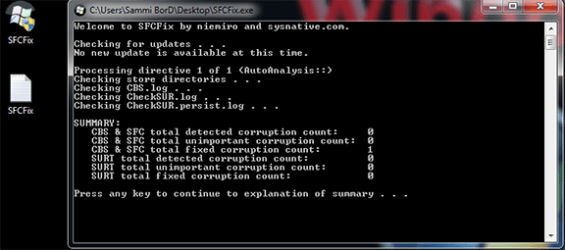
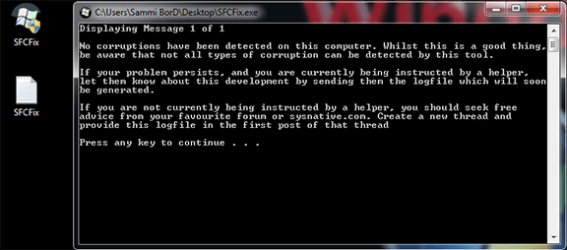
this is what transpired:

i took screen shots of two of the msgs that appeared in "command prompt" during the process.

screen shots below:

Capture.PNG
Capture2.PNG

this is the sfcfix.txt file that was produced

View attachment SFCFix.txt

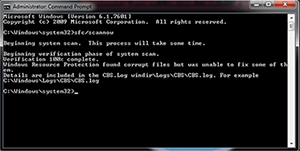
i then decided to run sfc/scannow to verify. did it in two steps. first in safe mode and normal windows startup.

screen shots below.

safe mode.PNG
normal.PNG

this is the cbs log file

View attachment 310240


thanks for taking the time to help.
 
Last edited:

My Computer My Computer

Computer type
Laptop
Computer Manufacturer/Model Number
Acer Aspire 4741
OS
Microsoft Windows 7 Ultimate 64-bit 7601 Multiprocessor Free Service Pack 1
CPU
Intel(R) Core(TM) i3 CPU M 350 @ 2.27GHz
Motherboard
Acer JE40_CP
Memory
8.00 GB
Graphics Card(s)
Intel(R) HD Graphics
Sound Card
(1) Realtek High Definition Audio (2) Intel(R) Display Aud
Monitor(s) Displays
14.0" HD LED LCD (Generic PnP Monitor)
Screen Resolution
1366 x 768 x 32 bits (4294967296 colors) @ 59 Hz
Hard Drives
WDC WD2500BEVT-22A23T0
Keyboard
Standard PS/2 Keyboard
Mouse
HP 3D Optical Mouse
Antivirus
Microsoft Security Essentials
Browser
Internet Explorer 11
(I have to admit I'm glad it's Tom dealing with this, and not me! <eg>)

I have a couple of vague ideas of how I want to deal with this on the machine I'm nursing - but the problem is access! I won't be able to get to it until sometime next week.
If Tom gives up, or hasn't managed to fix it by then, maybe I'll have some idea what to do (and perhaps even what works!)

<back in lurk mode>
 

My Computer My Computer

Computer type
Laptop
Computer Manufacturer/Model Number
Asus K52F or Lenovo B51-80
OS
Win 7 x64 Home Premium (and x86 VirtualBox VM)/Win10
CPU
i3 370M/i7 6500U
Motherboard
Asus/Lenovo
Memory
8GB - finally :)/8GB
Graphics Card(s)
it's an i3, dude!/dual Intel&nVidia
Sound Card
onboard
Monitor(s) Displays
15.6" built-in
Screen Resolution
1366x768/1920x1080
Hard Drives
750GB Seagate internal
Sundry external drives attached to other computers on the local network
1TB SSD on the Lenovo
PSU
n/a
Internet Speed
as much as I can get - usually on a dongle/phone, so <1MB/s
Antivirus
MSE/Defender
Browser
IE11/12/Edge/Chrome/FF(if I must)
hi noel, thanks for your input

it's really refreshing how the two of you (you and tom) work so well together. and i think i speak for all when i say we are lucky to have both of you here at the forum helping clowns like me out....but i'm slowly improving though haha.

could you guys tell me in short short what seems to be happening now based on the cbs log that i just posted.

i did creat a restore point before all this started. so if at any point you guys would like for me to revert back to that date please let me know. it will only mean having to do the 8 or so "march windows updates" again and that will be no problem.

thanks again for the help

sammy
 

My Computer My Computer

Computer type
Laptop
Computer Manufacturer/Model Number
Acer Aspire 4741
OS
Microsoft Windows 7 Ultimate 64-bit 7601 Multiprocessor Free Service Pack 1
CPU
Intel(R) Core(TM) i3 CPU M 350 @ 2.27GHz
Motherboard
Acer JE40_CP
Memory
8.00 GB
Graphics Card(s)
Intel(R) HD Graphics
Sound Card
(1) Realtek High Definition Audio (2) Intel(R) Display Aud
Monitor(s) Displays
14.0" HD LED LCD (Generic PnP Monitor)
Screen Resolution
1366 x 768 x 32 bits (4294967296 colors) @ 59 Hz
Hard Drives
WDC WD2500BEVT-22A23T0
Keyboard
Standard PS/2 Keyboard
Mouse
HP 3D Optical Mouse
Antivirus
Microsoft Security Essentials
Browser
Internet Explorer 11
It's likely that a restore point won't help here, the problem is with the NTFS file system itself, and the problem may well predate the update installation anyhow.

Essentially, the problem is that the system contains 'hardlinks' - which allow a number of virtual copies of a file to exist so reducing storage requirements. In this case, somehow, one relating to the iassdo file has gotten crossedlinked in to the Pretty_Peacock file, so the system ends up looking at the wrong file all the time. There is no easy way to delete hardlinks, so we're having to try some roundabout ways to get rid of it.
However, it may be that we are looking in the wrong place as yet, and need to focus more on the background of what creates and resets a hardlink, and whether it's this causing the problem, rather than a one-off file system error.
 

My Computer My Computer

Computer type
Laptop
Computer Manufacturer/Model Number
Asus K52F or Lenovo B51-80
OS
Win 7 x64 Home Premium (and x86 VirtualBox VM)/Win10
CPU
i3 370M/i7 6500U
Motherboard
Asus/Lenovo
Memory
8GB - finally :)/8GB
Graphics Card(s)
it's an i3, dude!/dual Intel&nVidia
Sound Card
onboard
Monitor(s) Displays
15.6" built-in
Screen Resolution
1366x768/1920x1080
Hard Drives
750GB Seagate internal
Sundry external drives attached to other computers on the local network
1TB SSD on the Lenovo
PSU
n/a
Internet Speed
as much as I can get - usually on a dongle/phone, so <1MB/s
Antivirus
MSE/Defender
Browser
IE11/12/Edge/Chrome/FF(if I must)
hi noel

thanks for the explanation.

i think i misled you when i said, i created a restore point befoare all this started.

i didn't mean that a restore point was created before the problem started....no.
this problem has been there for quite some time now. don't even know how or excatly when it started.

what i meant was, i created a restore point before i started carrying out your instructions to fix the problem.

so i was just simply suggesting that if at any point you guys will like to start "the fix" all over, to let me know so that i can do a system restore to that date....that is if the system hasn't deleted that restore point by then.

noel thanks very much again for that explanation and thanks guys for the help.

sammy
 

My Computer My Computer

Computer type
Laptop
Computer Manufacturer/Model Number
Acer Aspire 4741
OS
Microsoft Windows 7 Ultimate 64-bit 7601 Multiprocessor Free Service Pack 1
CPU
Intel(R) Core(TM) i3 CPU M 350 @ 2.27GHz
Motherboard
Acer JE40_CP
Memory
8.00 GB
Graphics Card(s)
Intel(R) HD Graphics
Sound Card
(1) Realtek High Definition Audio (2) Intel(R) Display Aud
Monitor(s) Displays
14.0" HD LED LCD (Generic PnP Monitor)
Screen Resolution
1366 x 768 x 32 bits (4294967296 colors) @ 59 Hz
Hard Drives
WDC WD2500BEVT-22A23T0
Keyboard
Standard PS/2 Keyboard
Mouse
HP 3D Optical Mouse
Antivirus
Microsoft Security Essentials
Browser
Internet Explorer 11
Same problem

is this issue resolved? I'm stuck with a similar situation. first iassdo.dll.mui was found to be corrupted, when i replaced it, sfc scan is now showing a corrupted pretty_peacock.jpg. And I'm unable to download any exe file from any browser since this error has occured. Help please!
 

My Computer My Computer

Computer type
Laptop
Computer Manufacturer/Model Number
HP
OS
Windows 7 Ultimate x64
CPU
intel i5 2.5 GHz
Memory
4.00 GB
Hard Drives
500 GB
Antivirus
Microsoft Security Essentials
Browser
Mozilla Firefox
Have you checked your system for malware?

As yet we really have no proper solution for this problem other than a repair install. :(
 

My Computer My Computer

Computer type
Laptop
Computer Manufacturer/Model Number
Asus K52F or Lenovo B51-80
OS
Win 7 x64 Home Premium (and x86 VirtualBox VM)/Win10
CPU
i3 370M/i7 6500U
Motherboard
Asus/Lenovo
Memory
8GB - finally :)/8GB
Graphics Card(s)
it's an i3, dude!/dual Intel&nVidia
Sound Card
onboard
Monitor(s) Displays
15.6" built-in
Screen Resolution
1366x768/1920x1080
Hard Drives
750GB Seagate internal
Sundry external drives attached to other computers on the local network
1TB SSD on the Lenovo
PSU
n/a
Internet Speed
as much as I can get - usually on a dongle/phone, so <1MB/s
Antivirus
MSE/Defender
Browser
IE11/12/Edge/Chrome/FF(if I must)
Back
Top