Solved Lost space on external drive - Lost 1TB of 2TB drive

soho1

New member
Power User
Local time
4:56 AM
Messages
458
Location
Earth, Mostly Chicago and London
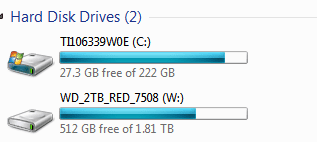
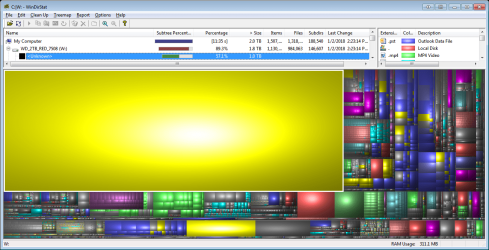
I have a WD Red 2.0 TB drive (1.8 TB formatted) and have been watching it fill up (%used) for some time now. I have lost 1 TB to "unknown" according to WinDirStat. VSS is NOT RUNNING, which I read about in the tutorial here: http://www.sevenforums.com/tutorials/330-system-protection-turn-off.html.

So, what could be eating this space and how do I recover it?

FYI - the usual litany - No viruses; Disk Cleanup was run; Drive diagnostics pass; Chkdsk, defrag, etc. all OK.
Also, the thing I use the drive for is to maintain program libraries. I perform a lot of temporary folder copies and delete old copies. The recycle bin is empty. Have no idea why this space is lost.
 

Attachments
  • OH_SHT.png
    OH_SHT.png
    164.9 KB · Views: 2

My Computer My Computer

Computer type
Laptop
Computer Manufacturer/Model Number
Dell Insprion 7559 next to a Toshiba Portege
OS
Win 7 Pro 64-bit
CPU
Intel Core i5
Motherboard
Intel
Memory
16 GB Dell, 6 GB Toshiba
Graphics Card(s)
Intel crap on both but Dell also has nVidia GeForce GTX960M
Sound Card
RealTek
Monitor(s) Displays
internal and external ACER KA270H 27"
Screen Resolution
1920x1080
Hard Drives
SSD 256 GB plus numerous WD Red or Purple on USB3 docks. Used to buy a lot of Seagate but tossed them the second time I got unrecoverable disc corruption in the midst of use.
Keyboard
Garage Mouse SW and some cheap Amazon China made USB device
Mouse
Garage Mouse and some cheap Amazon China made USB device
Internet Speed
50 Mbps (allegedly, depends on server)
Antivirus
Defender, Malwarebytes Premium and Kaspersky
Browser
IE 11, and Chrome something
I've always found WinDirStat results a bit cryptic.

Maybe you can get a more sensible result with a similar free application:

TreeSize Free - Quickly Scan Directory Sizes and Find Space Hogs

The usual suspects are hibernation file, System Restore points, page file, malware/virus, or some program doing something you don't expect it to do. For instance, we recently had a case here where someone was using a cloud backup program that was mis-configured and putting the backups on local drives, rather than in the cloud.
 

My Computer My Computer

Computer type
PC/Desktop
Computer Manufacturer/Model Number
Ignatz Special; 4 speed manual gearbox; factory air conditioning; one of one
OS
Windows 7 Home Premium SP1, 64-bit
CPU
Intel Skylake i5-6600K, not overclocked
Motherboard
AsRock Z170M Extreme 4, micro ATX
Memory
8 GB HyperX DDR4-2666 (2 x 4 GB)
Graphics Card(s)
none; graphics are integrated on CPU
Sound Card
onboard: Realtek ALC1150; external: USB Behringer UF0-202
Monitor(s) Displays
Dell S2340M 23 inch IPS
Screen Resolution
1600 x 900
Hard Drives
System: Crucial MX100 series SSD, 128 GB;
Data: Samsung Spinpoint 103SJ, 1 TB;
Backup: WD Caviar Green WD30EZRX-00D8PB0, 3 TB
PSU
Rosewill SilentNight 500 watt fanless, semi-modular
Case
Antec Solo II
Cooling
Noctua NH-U12S; Noctua F12 intake, Noctua S12A exhaust
Keyboard
Microsoft 200 6JH-00001 USB
Mouse
Dell or Microsoft optical wired; USB
Antivirus
Microsoft Security Essentials and Malwarebytes Premium
Browser
Pale Moon
Other Info
All fans PWM; speeds at idle: CPU circa 500 rpm; intake circa 600 rpm; exhaust circa 600 rpm; CPU temps 27 idle and 47 C load in a warm room (27 C/81 F) when running Intel Extreme Tuning Utility stress test.
Trying your TreeSize suggestion (just the free version at the moment). Now, first I'll say I have already checked disk AND filesystem integrity before commenting that TreeSize and WinDirStat produced the same counts on small folders (say 100k files or less) but when it came to larger counts, they don't match at all.

I would not have doubted WinDirStat, but the TreeSize is reporting just over 1 million extra (not quite twice as many) files in the same 1.8 TB. Not sure where it is getting such a number, I may have to download the pro trial and check again. I will also export all the subfolder and file counts to see which of these programs has an accounting error.

Perhaps along the way, I will find a clue, though nothing jumps out at me just yet.

BBL
 
Last edited:

My Computer My Computer

Computer type
Laptop
Computer Manufacturer/Model Number
Dell Insprion 7559 next to a Toshiba Portege
OS
Win 7 Pro 64-bit
CPU
Intel Core i5
Motherboard
Intel
Memory
16 GB Dell, 6 GB Toshiba
Graphics Card(s)
Intel crap on both but Dell also has nVidia GeForce GTX960M
Sound Card
RealTek
Monitor(s) Displays
internal and external ACER KA270H 27"
Screen Resolution
1920x1080
Hard Drives
SSD 256 GB plus numerous WD Red or Purple on USB3 docks. Used to buy a lot of Seagate but tossed them the second time I got unrecoverable disc corruption in the midst of use.
Keyboard
Garage Mouse SW and some cheap Amazon China made USB device
Mouse
Garage Mouse and some cheap Amazon China made USB device
Internet Speed
50 Mbps (allegedly, depends on server)
Antivirus
Defender, Malwarebytes Premium and Kaspersky
Browser
IE 11, and Chrome something
OK, I have a possible clue now, but going to get some sleep before picking up on this...

A snapshot of c:\users seems to have a recursion error.

c:\users was backed up to W:\drive_c\users\

The resulting w:\drive_c\users\<myaccount>\Local Settings contains a directory called Application Data which has another copy of Application Data inside itself and on and on a few times (recursively).

Now, the actual directory c:\users\<myaccount>\Local Settings is a protected directory for which I do not have access.

But before I poke further, I am going to get some sleep so as not to break anything.

Meanwhile, one of these disk utilities is wrong as WinDirStat suggests the USERS directory is about 79 GB (a likely number) on both C: and W: drives. However TreeSize reports the w: number as 811.2 GB which is not a likely number, but is a large percentage of the missing space on my W: drive.

Either way, sounds like trouble considering that both Microsoft and Western Digital diagnostics show the drives and filesystems to be in order.

FYI, my entire C: drive is only 222 GB. So how 1.0 TB on my W: backup drive can be "unknown" to WinDirStat and looking like 800+ GB in recursively stored files to TreeSize Pro, is a mystery I will have to sleep on before picking up again.
 

My Computer My Computer

Computer type
Laptop
Computer Manufacturer/Model Number
Dell Insprion 7559 next to a Toshiba Portege
OS
Win 7 Pro 64-bit
CPU
Intel Core i5
Motherboard
Intel
Memory
16 GB Dell, 6 GB Toshiba
Graphics Card(s)
Intel crap on both but Dell also has nVidia GeForce GTX960M
Sound Card
RealTek
Monitor(s) Displays
internal and external ACER KA270H 27"
Screen Resolution
1920x1080
Hard Drives
SSD 256 GB plus numerous WD Red or Purple on USB3 docks. Used to buy a lot of Seagate but tossed them the second time I got unrecoverable disc corruption in the midst of use.
Keyboard
Garage Mouse SW and some cheap Amazon China made USB device
Mouse
Garage Mouse and some cheap Amazon China made USB device
Internet Speed
50 Mbps (allegedly, depends on server)
Antivirus
Defender, Malwarebytes Premium and Kaspersky
Browser
IE 11, and Chrome something
OK, so this Application Data recursion has the problem that I cannot simply delete it. Windows says the file names are too long.

Can you recommend a file zapper that will handle the approaching infinite recursion?

Starting a list of things that don't work:
  • TreeSize (pro) seems to use Windows to do deletes, so doesn't work.
  • WinDirStat won't even recognized the highest Application Data folder in the recursion - as if not there
  • FileZilla won't even recognized the highest Application Data folder in the recursion - as if not there
  • BeyondCompare (v4) won't delete the long file names.


UPDATE: so my solution is, and seems to be working, to walk into each directory and rename "Application Data" to "xx" and then CD into xx and repeat.
now, the paths are shorter and Windows is able to delete files.

Marking this SOLVED for now unless I run into any further difficulties.

FYI also found an opensource project that is in Beta to backup Windows junctions, but HAVE NOT TESTED IT YET. For future readers, search for Junction Box (open source). Also thanks for the tip about TreeSize Pro, which seems to have been a useful tool for diagnosing the problem. The price tag is a little stiff compared to freeware, but I like to support tools that get the job done. Perhaps they will make single user licenses more affordable for masses in the future. Thanks all!

P.S. I have recovered 1/2 TB already and am not finished, but assume the rest will play out OK.
 

Attachments

  • recovery_in_progress.png
    recovery_in_progress.png
    4.2 KB · Views: 10
Last edited:

My Computer My Computer

Computer type
Laptop
Computer Manufacturer/Model Number
Dell Insprion 7559 next to a Toshiba Portege
OS
Win 7 Pro 64-bit
CPU
Intel Core i5
Motherboard
Intel
Memory
16 GB Dell, 6 GB Toshiba
Graphics Card(s)
Intel crap on both but Dell also has nVidia GeForce GTX960M
Sound Card
RealTek
Monitor(s) Displays
internal and external ACER KA270H 27"
Screen Resolution
1920x1080
Hard Drives
SSD 256 GB plus numerous WD Red or Purple on USB3 docks. Used to buy a lot of Seagate but tossed them the second time I got unrecoverable disc corruption in the midst of use.
Keyboard
Garage Mouse SW and some cheap Amazon China made USB device
Mouse
Garage Mouse and some cheap Amazon China made USB device
Internet Speed
50 Mbps (allegedly, depends on server)
Antivirus
Defender, Malwarebytes Premium and Kaspersky
Browser
IE 11, and Chrome something
Back
Top