Very high physical memory usage, no high usage programs running

DJN

New member
Local time
11:20 AM
Messages
31
Hello everyone, I've been having a very weird problem recently, in which I BELIEVE is involving high physical memory usage. Sometimes I will be doing things such as playing a game, or watching a stream, and my computer will run fine for a little while. But at random times, my computer will majorly slow down and sometimes even crash. If it doesn't crash, sometimes it will get so slow to the point where I have to hold down the power button and manually shut it down. Every time my computer slows down I notice it is using a TON of physical memory. It's actually happening right now. My computer is going very slow and it's using 6.22 GB memory out of 8. There are no big programs running right now, so I don't understand why it's being slow. I hope someone is able to help. Thank you for taking the time to read this!

Update: I just tried to open chrome, and the computer froze completely. It would not unfreeze. After leaving it frozen for a minute or two, the screen went black. This is becoming very frustrating.
 

My Computer

Computer type
Laptop
Computer Manufacturer/Model Number
Asus
OS
Microsoft Windows 7 Home Premium 64-bit 7601 Multiprocessor Free Service Pack 1
CPU
Intel(R) Core(TM) i7-3610QM CPU @ 2.30GHz
Motherboard
ASUSTeK COMPUTER INC. G75VW
Memory
8.00 GB
Graphics Card(s)
NVIDIA GeForce GTX 660M
Sound Card
(1) NVIDIA Virtual Audio Device (Wave Extensible) (WDM) (2
Keyboard
Built-In
Antivirus
Avast Free
Browser
Google Chrome
Post a screenshot of Task Manager - Performance tab when the problem occurs.
 

My Computer

Computer type
PC/Desktop
Computer Manufacturer/Model Number
HP
OS
Windows 7 Pro 64 bit
CPU
Xeon W3520
Memory
8 GB
Graphics Card(s)
Nvidia Geforce 210
I will add to what Miller has requested.

Open Resource Monitor and post a screenshot of Memory tab. (Sort by usage in the list).
 

My Computer

Computer type
PC/Desktop
Computer Manufacturer/Model Number
Custom Build
OS
Windows 7 Ultimate x64 SP1
CPU
AMD Phenom 2 1090T
Motherboard
Gigabyte GA-890FXA-UD5
Memory
2x8GB Kingston HyperX Fury Black 1600Mhz Unganged
Graphics Card(s)
MSI GTX 970 Gaming 4G
Sound Card
Realtek On-Board HD 7.1 Audio / Logitech G35
Monitor(s) Displays
3xAcer GD245HQ
Screen Resolution
1920x1080
Hard Drives
Samsung 850 Pro 512GB SSD - OS /
WD Caviar Black SATA 3 - 1 TBx2 - Dynamic RAID 0 /
WD Caviar Green SATA 2 - 640GBx2 - Dynamic RAID 0 /
WD Caviar Green SATA 2 - 640GB - Internal Backup /
Seagate Barracude SATA 3 - 3TB - External Backup/ Sync
PSU
HighPower 1000W
Case
Cooler Master HAF 932
Cooling
Noctua NH-D14
Keyboard
Logitech G19
Mouse
Logitech G500
Internet Speed
100/4 Mbit Cable (100GB quota)
Antivirus
ZoneAlarm Extreme Security / MBAM Pro / MBAE Free / SAS Free
Browser
IE 11 - Firefox - Chrome
Other Info
Logitech F710/ G27/ G940/ Z5500 // TrackIR 5 // Nvidia 3D Surround Vision
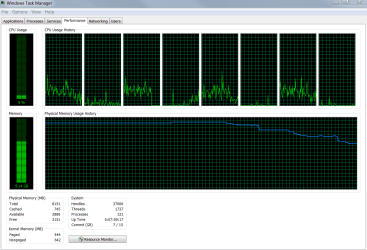
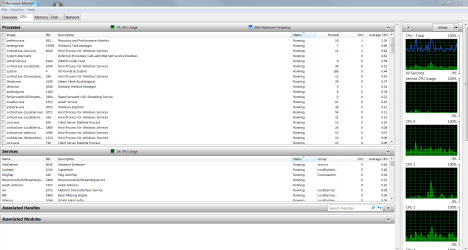
Its happening again, but not as bad as it was happening last night.
 

Attachments

  • Capture.PNG
    Capture.PNG
    70.5 KB · Views: 3
  • Capture2.PNG
    Capture2.PNG
    151 KB · Views: 7
  • Capture1.PNG
    Capture1.PNG
    138.5 KB · Views: 10
  • Capture3.PNG
    Capture3.PNG
    41.1 KB · Views: 2

My Computer

Computer type
Laptop
Computer Manufacturer/Model Number
Asus
OS
Microsoft Windows 7 Home Premium 64-bit 7601 Multiprocessor Free Service Pack 1
CPU
Intel(R) Core(TM) i7-3610QM CPU @ 2.30GHz
Motherboard
ASUSTeK COMPUTER INC. G75VW
Memory
8.00 GB
Graphics Card(s)
NVIDIA GeForce GTX 660M
Sound Card
(1) NVIDIA Virtual Audio Device (Wave Extensible) (WDM) (2
Keyboard
Built-In
Antivirus
Avast Free
Browser
Google Chrome
Update: The physical memory seems to be gradually increasing. It is now at 5.53 GB.
 

My Computer

Computer type
Laptop
Computer Manufacturer/Model Number
Asus
OS
Microsoft Windows 7 Home Premium 64-bit 7601 Multiprocessor Free Service Pack 1
CPU
Intel(R) Core(TM) i7-3610QM CPU @ 2.30GHz
Motherboard
ASUSTeK COMPUTER INC. G75VW
Memory
8.00 GB
Graphics Card(s)
NVIDIA GeForce GTX 660M
Sound Card
(1) NVIDIA Virtual Audio Device (Wave Extensible) (WDM) (2
Keyboard
Built-In
Antivirus
Avast Free
Browser
Google Chrome

My Computer

Computer type
PC/Desktop
Computer Manufacturer/Model Number
Custom Build
OS
Windows 7 Ultimate x64 SP1
CPU
AMD Phenom 2 1090T
Motherboard
Gigabyte GA-890FXA-UD5
Memory
2x8GB Kingston HyperX Fury Black 1600Mhz Unganged
Graphics Card(s)
MSI GTX 970 Gaming 4G
Sound Card
Realtek On-Board HD 7.1 Audio / Logitech G35
Monitor(s) Displays
3xAcer GD245HQ
Screen Resolution
1920x1080
Hard Drives
Samsung 850 Pro 512GB SSD - OS /
WD Caviar Black SATA 3 - 1 TBx2 - Dynamic RAID 0 /
WD Caviar Green SATA 2 - 640GBx2 - Dynamic RAID 0 /
WD Caviar Green SATA 2 - 640GB - Internal Backup /
Seagate Barracude SATA 3 - 3TB - External Backup/ Sync
PSU
HighPower 1000W
Case
Cooler Master HAF 932
Cooling
Noctua NH-D14
Keyboard
Logitech G19
Mouse
Logitech G500
Internet Speed
100/4 Mbit Cable (100GB quota)
Antivirus
ZoneAlarm Extreme Security / MBAM Pro / MBAE Free / SAS Free
Browser
IE 11 - Firefox - Chrome
Other Info
Logitech F710/ G27/ G940/ Z5500 // TrackIR 5 // Nvidia 3D Surround Vision
Yes, It still does seem to be gradually increasing

Update: it stopped at 1.55 GB. I've been sitting here watching it for a little while, it hasn't risen from that at all.
 

My Computer

Computer type
Laptop
Computer Manufacturer/Model Number
Asus
OS
Microsoft Windows 7 Home Premium 64-bit 7601 Multiprocessor Free Service Pack 1
CPU
Intel(R) Core(TM) i7-3610QM CPU @ 2.30GHz
Motherboard
ASUSTeK COMPUTER INC. G75VW
Memory
8.00 GB
Graphics Card(s)
NVIDIA GeForce GTX 660M
Sound Card
(1) NVIDIA Virtual Audio Device (Wave Extensible) (WDM) (2
Keyboard
Built-In
Antivirus
Avast Free
Browser
Google Chrome
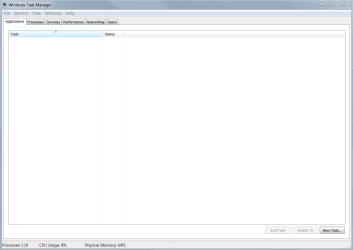
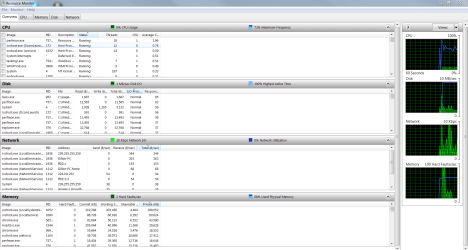
It happened again, this time, it was bad. The computer got very slow, then the screen went black. After a few minutes, the screen came back up, but very distorted. It happened when i was livestreaming a videogame. I managed to get 2 screenshots of the task manager when it started to slow up.

Someone please help. :(

I know my laptop is capable of doing everything i'm doing with it. This is getting so frustrating to where its getting depressing.
 

Attachments

  • Capture new 1.PNG
    Capture new 1.PNG
    48.3 KB · Views: 4
  • Capture new 2.PNG
    Capture new 2.PNG
    148.4 KB · Views: 8

My Computer

Computer type
Laptop
Computer Manufacturer/Model Number
Asus
OS
Microsoft Windows 7 Home Premium 64-bit 7601 Multiprocessor Free Service Pack 1
CPU
Intel(R) Core(TM) i7-3610QM CPU @ 2.30GHz
Motherboard
ASUSTeK COMPUTER INC. G75VW
Memory
8.00 GB
Graphics Card(s)
NVIDIA GeForce GTX 660M
Sound Card
(1) NVIDIA Virtual Audio Device (Wave Extensible) (WDM) (2
Keyboard
Built-In
Antivirus
Avast Free
Browser
Google Chrome
I have the same problem. Laptop seems to use more than 3GB of my RAM and the processes tab doesn't show such huge activity at all. Not even third
 

My Computer

Computer type
PC/Desktop
Computer Manufacturer/Model Number
Custom Build
OS
Windows 7 Ultimate x64 SP1
CPU
AMD Phenom 2 1090T
Motherboard
Gigabyte GA-890FXA-UD5
Memory
2x8GB Kingston HyperX Fury Black 1600Mhz Unganged
Graphics Card(s)
MSI GTX 970 Gaming 4G
Sound Card
Realtek On-Board HD 7.1 Audio / Logitech G35
Monitor(s) Displays
3xAcer GD245HQ
Screen Resolution
1920x1080
Hard Drives
Samsung 850 Pro 512GB SSD - OS /
WD Caviar Black SATA 3 - 1 TBx2 - Dynamic RAID 0 /
WD Caviar Green SATA 2 - 640GBx2 - Dynamic RAID 0 /
WD Caviar Green SATA 2 - 640GB - Internal Backup /
Seagate Barracude SATA 3 - 3TB - External Backup/ Sync
PSU
HighPower 1000W
Case
Cooler Master HAF 932
Cooling
Noctua NH-D14
Keyboard
Logitech G19
Mouse
Logitech G500
Internet Speed
100/4 Mbit Cable (100GB quota)
Antivirus
ZoneAlarm Extreme Security / MBAM Pro / MBAE Free / SAS Free
Browser
IE 11 - Firefox - Chrome
Other Info
Logitech F710/ G27/ G940/ Z5500 // TrackIR 5 // Nvidia 3D Surround Vision
Back
Top