Firefox using a lot of memory

debodun

Member
Member
VIP
Local time
10:06 PM
Messages
292
Location
upstate NY
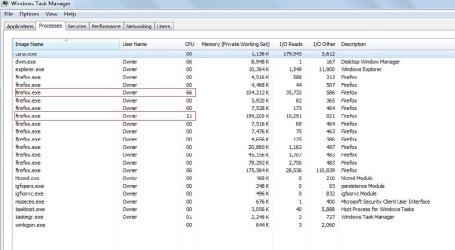
Firefox is getting logy. I checked it in Task Manager (see screenshot) and it's using what seems to me a lot of memory. Closing and restarting doesn't help. I have version 115.15.0esr (64-bit). Any solution to this memory usage - it's making web browsing slow.
 

Attachments

  • FF.jpg
    FF.jpg
    62.1 KB · Views: 2

My Computer My Computer

Computer type
PC/Desktop
Computer Manufacturer/Model Number
refurb in an HP/Compaq case
OS
Windows 7 Ultimate x64
CPU
1.86 GHz Intrel Core 2
Motherboard
HP 0A60h XU1
Memory
3 GB Dual Channel DDR2 @ 3.32 MHz
Graphics Card(s)
Intel Q965/Q963 Express chipset
Monitor(s) Displays
Dell CRT
Hard Drives
977GB Samsung HD 103 SI ATA
Case
HP Compaq DC5800
Mouse
wired optical
Antivirus
Microsoft Security Essentials, MalwareBytes, Spyware Blaster
Browser
Firefox 32-bit
Version 115.16.0 ESR has been out for a few days.
 

My Computer My Computer

Computer type
PC/Desktop
Computer Manufacturer/Model Number
Dell OptiPlex 9020
OS
Windows 7 Professional SP1 64-bit
CPU
Intel Core i7-4790 3.60 GHz
Memory
32 GB DDR3-1600 MHz
Graphics Card(s)
Integrated Intel HD Graphics 4600
Monitor(s) Displays
Viewsonic 32" LCD
Hard Drives
Kingston SATA 3 240 GB SSD
Internet Speed
Spectrum Internet 1000 Mbps
Yes, I do have Version 115.16.0 esr. I must have pressed the wrong key.
 

My Computer My Computer

Computer type
PC/Desktop
Computer Manufacturer/Model Number
refurb in an HP/Compaq case
OS
Windows 7 Ultimate x64
CPU
1.86 GHz Intrel Core 2
Motherboard
HP 0A60h XU1
Memory
3 GB Dual Channel DDR2 @ 3.32 MHz
Graphics Card(s)
Intel Q965/Q963 Express chipset
Monitor(s) Displays
Dell CRT
Hard Drives
977GB Samsung HD 103 SI ATA
Case
HP Compaq DC5800
Mouse
wired optical
Antivirus
Microsoft Security Essentials, MalwareBytes, Spyware Blaster
Browser
Firefox 32-bit
Memory usage looks good, around 600MB in all processes, so no real problem there.

What's disturbing is the CPU usage, nearly 90% on those two alone, leaving little for Windows itself. I would check with the Firefox process manager to check what are these two doing. It's likely to be a heavyweight (or buggy) plugin or a heavy tab opened at that time.
 

My Computer My Computer

Computer type
Laptop
Computer Manufacturer/Model Number
Toshiba Sattelite A665-S6092
OS
Windows 7 Ultimate x64
CPU
Intel Core i7-740QM
Memory
8 GB DDR3
Graphics Card(s)
NVIDIA GeForce 330GT
Screen Resolution
1366x768
Hard Drives
Samsung 840 SSD 500GB
1TB USB3 external HD
Cooling
Coolermaster Notepal U3 notebook cooling pad
Internet Speed
3mbps ASDL
Antivirus
ClamWin 0.98.7
Browser
Opera 12.17 x86 (main), Firefox 38 (sec), IE11 (last resort)
First clear cache. If that doesn't fix anything under help hit troubleshooting mode. That disables extensions. If that fixes it then you should look at the extensions. Make sure that they're updated or disable them one at a time until you determine which one is experiencing an issue. If you determine that an extension is causing an issue then remove it and reinstall it.
 

My Computers My Computers

System One System Two

dsw333.PNG

On average Firefox is a 2GB requirement browser and that is No tabs - to moderate amount of tabs open. You would want to sort descending and then calculate all process to see what the ram usage is, in the example that is roughly 1.6gb. There isn't much you can do other than minimize tabs open and some other basic logistics but overall you will never improve Firefox's ram usage drastically.

All modern Browser require like 2gb at least to run effectively. So if you want a lighter browser you need to use older style ones or barebones ones that are loading only basic HTML.

If you know how to block JS properly and how to manage that paradigm that can also shave some resource usage like ram but that will also be minimal.

I agree the CPU column is mainly what is concerning in your picture. But being a core 2 dual core on a slow platform it will be like that because those platforms are highly constrained with no hyper threading and many other areas on that platform are inefficient,
the CPU ends up taking all the brunt of the work and is a choke point well its not a choke point but it becomes one because everything else on 775 gets choked causing a round robin effect of choke points.

- Low ram
- Dual core CPU with no HT and no advanced instructions
- Several areas about the motherboard are slow like FSB,
- No memory controller on the CPU
- Northbridge / South Bridge choke point

All those areas choke and the CPU becomes overburden.

- - - Updated - - -

Code:
CPU: 1.86 GHz Intrel Core 2  
Motherboard: HP 0A60h XU1  
Memory: 3 GB Dual Channel DDR2 @ 3.32 MHz  
Graphics Card: Intel Q965/Q963 Express chipset
I would say with these specs you probably want to go for an alternate browser. I would use something like Kmeleon or Seamonkey on computer with only 3GB. You are only using roughly 600MB in the picture but i would assume that number to increase more towards 2gb over time when you are doing higher browsing with multi tasking.

with only 3GB you can hit potentially 2GB or higher on Firefox alone and it will leave you with 1GB. This is not enough headroom imo and Firefox or any other modern browser is not that viable on less than 6GB of ram in the system.

 

My Computers My Computers

System One System Two

  • OS
    10
  • Computer type
    PC/Desktop
It seems to happen when the Google has an animation. I use Google as a home page.
 

My Computer My Computer

Computer type
PC/Desktop
Computer Manufacturer/Model Number
refurb in an HP/Compaq case
OS
Windows 7 Ultimate x64
CPU
1.86 GHz Intrel Core 2
Motherboard
HP 0A60h XU1
Memory
3 GB Dual Channel DDR2 @ 3.32 MHz
Graphics Card(s)
Intel Q965/Q963 Express chipset
Monitor(s) Displays
Dell CRT
Hard Drives
977GB Samsung HD 103 SI ATA
Case
HP Compaq DC5800
Mouse
wired optical
Antivirus
Microsoft Security Essentials, MalwareBytes, Spyware Blaster
Browser
Firefox 32-bit
Back
Top