Svchost.exe Crazy High CPU Usage and Crazy High Memory Usage

passion4tech

Banned
Local time
1:41 AM
Messages
58
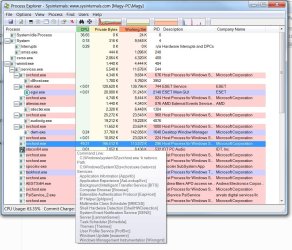
There is a serious issue with svchost.exe on my windows 7 computer. My HP Touchsmart 300-1025 has windows 7 64bit installed and svchost is slowing down the computer and using very high cpu and memory usage. It is not a virus or malware. I know the computer is not infected because one the computer has webroot and two if it was a virus or malware I would not be able to use the computer at all. So it has to be an issue with windows 7 64bit itself. Here is a screenshot of what I'm talking about and proof.

VdEVSajC.png
 

My Computer

Computer type
PC/Desktop
Computer Manufacturer/Model Number
Custom Gaming Computer
OS
Windows 7 Home Premium 64bit
CPU
i7 4790K
Motherboard
Asus Z97 Deluxe
Memory
16GB
Graphics Card(s)
Sapphire R9 290 Vapor X 4GB
Sound Card
Realtek High Definition Audio
Monitor(s) Displays
Acer H257HU
Screen Resolution
2560x1440
Hard Drives
WD10EZEX 00BN5A0 1 TB HDD and PNY CS1311 256 GB
PSU
EVGA 650 G2
Case
Enermax Ostrog GT ATX Mid Tower ECA3280A-BR
Cooling
Corsair H105
Keyboard
Logitech K520
Mouse
EasternTimes Tech wireless optical mouse mouse
Internet Speed
60 down and 30 up
Browser
Google Chrome
Anybody know how to fix this issue?
 

My Computer

Computer type
PC/Desktop
Computer Manufacturer/Model Number
Custom Gaming Computer
OS
Windows 7 Home Premium 64bit
CPU
i7 4790K
Motherboard
Asus Z97 Deluxe
Memory
16GB
Graphics Card(s)
Sapphire R9 290 Vapor X 4GB
Sound Card
Realtek High Definition Audio
Monitor(s) Displays
Acer H257HU
Screen Resolution
2560x1440
Hard Drives
WD10EZEX 00BN5A0 1 TB HDD and PNY CS1311 256 GB
PSU
EVGA 650 G2
Case
Enermax Ostrog GT ATX Mid Tower ECA3280A-BR
Cooling
Corsair H105
Keyboard
Logitech K520
Mouse
EasternTimes Tech wireless optical mouse mouse
Internet Speed
60 down and 30 up
Browser
Google Chrome
interesting date

Hi Passion,

Your comp appears to have the wrong date 16 12 2015.

Please reset it, its more than likely your updates are failing and it keeps RE-trying.

Roy
 

My Computer

Computer type
PC/Desktop
Computer Manufacturer/Model Number
medionl/Aspire 6930G/acer x55a
OS
W7 home premium 32bit/W7HP 64bit/w10 tp insider ring
CPU
E5300 dual core
Motherboard
medion MS7366
Memory
3gb
Graphics Card(s)
Nvidia Geforce 7100 Nforce 630i
Monitor(s) Displays
avixc
Internet Speed
n (isp resticted to 72)
Antivirus
mse/pands
Browser
palemoon
Other Info
Belkin Fd7050 n USB using Railink RT2870 drivers, more upto date
Hi Passion,

Your comp appears to have the wrong date 16 12 2015.

Please reset it, its more than likely your updates are failing and it keeps RE-trying.

Roy

That is an old screenshot, I took the screenshot on December 16 2015. svchost.exe still acts up today.
 

My Computer

Computer type
PC/Desktop
Computer Manufacturer/Model Number
Custom Gaming Computer
OS
Windows 7 Home Premium 64bit
CPU
i7 4790K
Motherboard
Asus Z97 Deluxe
Memory
16GB
Graphics Card(s)
Sapphire R9 290 Vapor X 4GB
Sound Card
Realtek High Definition Audio
Monitor(s) Displays
Acer H257HU
Screen Resolution
2560x1440
Hard Drives
WD10EZEX 00BN5A0 1 TB HDD and PNY CS1311 256 GB
PSU
EVGA 650 G2
Case
Enermax Ostrog GT ATX Mid Tower ECA3280A-BR
Cooling
Corsair H105
Keyboard
Logitech K520
Mouse
EasternTimes Tech wireless optical mouse mouse
Internet Speed
60 down and 30 up
Browser
Google Chrome
torchwood? Anybody?
 

My Computer

Computer type
PC/Desktop
Computer Manufacturer/Model Number
Custom Gaming Computer
OS
Windows 7 Home Premium 64bit
CPU
i7 4790K
Motherboard
Asus Z97 Deluxe
Memory
16GB
Graphics Card(s)
Sapphire R9 290 Vapor X 4GB
Sound Card
Realtek High Definition Audio
Monitor(s) Displays
Acer H257HU
Screen Resolution
2560x1440
Hard Drives
WD10EZEX 00BN5A0 1 TB HDD and PNY CS1311 256 GB
PSU
EVGA 650 G2
Case
Enermax Ostrog GT ATX Mid Tower ECA3280A-BR
Cooling
Corsair H105
Keyboard
Logitech K520
Mouse
EasternTimes Tech wireless optical mouse mouse
Internet Speed
60 down and 30 up
Browser
Google Chrome
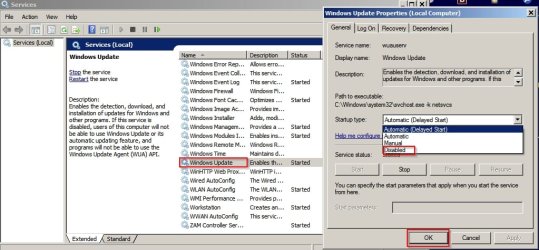
Disable Windows Update Service and reboot. If svchost RAM usage then remains normal for the next 24 hours, including ater an overnight shutdown - it means that you have a problem with Windows Updates.
 
Last edited:

My Computer

Computer type
Laptop
Computer Manufacturer/Model Number
ASUS
OS
Microsoft Windows 7 Home Premium 64-bit 7601 Multiprocessor Free Service Pack 1
CPU
AMD C-60 APU with Radeon(tm) HD Graphics
Motherboard
ASUSTeK COMPUTER INC. X501U
Memory
4.00 GB
Graphics Card(s)
AMD Radeon HD 6290 Graphics
Sound Card
(1) AMD High Definition Audio Device (2) Realtek High Defi
Screen Resolution
1366 x 768 x 32 bits (4294967296 colors) @ 60 Hz
Hard Drives
Hitachi HTS545050A7E380 SATA Disk Device
Antivirus
Comodo CIS & FW, SecureAplus App Whitelisting, Threatfire
Browser
Cyberfox 64bit, Opera 64bit, Airfox
Other Info
Spy-The-Spy, HitmanPro.Alert, Norton Connect Safe, MJRegWatcher, BitDefender TrafficLight, Voodoo Shield, Zemana AntiMalware
Disable Windows Update Service and reboot. If svchost RAM usage then remains normal for the next 24 hours, including ater an overnight shutdown - it means that you have a problem with Windows Updates.

Callender My HP touchsmart is acting funny and programs keep crashing ever since I disabled windows update. Amd Catlyst and Open hardware monitor crash a lot. But other than that the ram memory usage and cpu usage is back to normal after I disabled windows update. So what can I do to fix this issue so windows update won't do this again?
 

My Computer

Computer type
PC/Desktop
Computer Manufacturer/Model Number
Custom Gaming Computer
OS
Windows 7 Home Premium 64bit
CPU
i7 4790K
Motherboard
Asus Z97 Deluxe
Memory
16GB
Graphics Card(s)
Sapphire R9 290 Vapor X 4GB
Sound Card
Realtek High Definition Audio
Monitor(s) Displays
Acer H257HU
Screen Resolution
2560x1440
Hard Drives
WD10EZEX 00BN5A0 1 TB HDD and PNY CS1311 256 GB
PSU
EVGA 650 G2
Case
Enermax Ostrog GT ATX Mid Tower ECA3280A-BR
Cooling
Corsair H105
Keyboard
Logitech K520
Mouse
EasternTimes Tech wireless optical mouse mouse
Internet Speed
60 down and 30 up
Browser
Google Chrome
Disable Windows Update Service and reboot. If svchost RAM usage then remains normal for the next 24 hours, including ater an overnight shutdown - it means that you have a problem with Windows Updates.

Callender? I need your help please :)
 

My Computer

Computer type
PC/Desktop
Computer Manufacturer/Model Number
Custom Gaming Computer
OS
Windows 7 Home Premium 64bit
CPU
i7 4790K
Motherboard
Asus Z97 Deluxe
Memory
16GB
Graphics Card(s)
Sapphire R9 290 Vapor X 4GB
Sound Card
Realtek High Definition Audio
Monitor(s) Displays
Acer H257HU
Screen Resolution
2560x1440
Hard Drives
WD10EZEX 00BN5A0 1 TB HDD and PNY CS1311 256 GB
PSU
EVGA 650 G2
Case
Enermax Ostrog GT ATX Mid Tower ECA3280A-BR
Cooling
Corsair H105
Keyboard
Logitech K520
Mouse
EasternTimes Tech wireless optical mouse mouse
Internet Speed
60 down and 30 up
Browser
Google Chrome

My Computer

Computer type
PC/Desktop
Computer Manufacturer/Model Number
Custom assembled by me :}
OS
Win-7-Pro64bit 7-H-Prem-64bit
CPU
i7-5930K 2nd i9-9940x both water blocked VRM's too
Motherboard
ASUS SABERTOOTH X99 2nd ASUS x299 Apex
Memory
Trident-z 3200C14 2nd Trident-z 3600C16
Graphics Card(s)
EVGA 1080ti ftw3 2nd Titan Xp both water blocked
Sound Card
Built-in Realtek
Monitor(s) Displays
1-AOC G2460PG 24"G-Sync 144Hz/ 2nd 1-ASUS VG248QE 24" 144Hz
Screen Resolution
1920 x 1080 144Hz
Hard Drives
2-Samsung M.2 Evo & Evo Plus
2-Samsung 850 EVO 500GB SSD's/ 3-2.5 W.D. Black 1tb-&3-1tb/3-3.5 WD Black 1tb hdd's
PSU
EVGA SuperNOVA 1000-P2 2nd 1200-P2
Case
2-Corsair Obsidian Series 450D Black ATX Mid Tower
Cooling
Custom water loops
Keyboard
Logitech G710+/ 2nd Logitech G910
Mouse
2-RedDragon M901 Perdition 16400 dpi Gaming mouse = wired
Internet Speed
Comcast Ping 19ms 89.31mbps download speed 6.12mbps upload
Antivirus
Malwarebytes Pro/ Superantispyware Pro
Browser
FireFox & Pale moon
Other Info
2nd ASUS X299 Apex/Intel i9-9940x with Custom water loop/7H-Prem-x64/Corsair 450D case/Ram Trident-z 3600C16 4x8gb / Samsung970Evo plus 500gb SSD/Dual ssd EZ swap evo/PSU EVGA SuperNova 1200w-P2 80+Platinum/GPU Titan Xp /8-ML-140 on push-pull on 2-280GTX rads
Just for info - have a read through this:

Completely remove windows updates and reinstall

I've found that the batch file does not always succeed in deleting everything that it is supposed to delete and that manual/ force deletion may be required.

That's a very complicated fix and it might take several attempts over several days and a lot can go wrong.

For now:

Enable Copy/ Paste in Command Prompt

Then open an Elevated Command Prompt

Type powershell and hit enter. Wait for the powershell prompt to appear (PS)

Copy and paste the follwing text then press enter. Wait until checks have finished then take a screenshot of the updates that have been found.

Code:
get-hotfix -id kb2506928,kb2592687,kb2660075,kb2726535,kb2876229,kb2902907,kb2923545,kb2952664,kb2970228,kb2976978,kb2990214,kb2994023,kb3021917,kb3022345,kb3035583,kb3044374,kb3050265,kb3065987,kb3068708,kb3075249,kb3075851,kb3075853,kb3080149,kb3083324,kb3083325,kb3083710,kb3102810,kb3083325,kb3112343,kb3135445
 

My Computer

Computer type
Laptop
Computer Manufacturer/Model Number
ASUS
OS
Microsoft Windows 7 Home Premium 64-bit 7601 Multiprocessor Free Service Pack 1
CPU
AMD C-60 APU with Radeon(tm) HD Graphics
Motherboard
ASUSTeK COMPUTER INC. X501U
Memory
4.00 GB
Graphics Card(s)
AMD Radeon HD 6290 Graphics
Sound Card
(1) AMD High Definition Audio Device (2) Realtek High Defi
Screen Resolution
1366 x 768 x 32 bits (4294967296 colors) @ 60 Hz
Hard Drives
Hitachi HTS545050A7E380 SATA Disk Device
Antivirus
Comodo CIS & FW, SecureAplus App Whitelisting, Threatfire
Browser
Cyberfox 64bit, Opera 64bit, Airfox
Other Info
Spy-The-Spy, HitmanPro.Alert, Norton Connect Safe, MJRegWatcher, BitDefender TrafficLight, Voodoo Shield, Zemana AntiMalware
Try ThrashZone's suggested update first. After applying that update I'd personally suggest disabling Windows Update service for 24 hours before re-enabling it the next day then rebooting and running a check for updates.
 

My Computer

Computer type
Laptop
Computer Manufacturer/Model Number
ASUS
OS
Microsoft Windows 7 Home Premium 64-bit 7601 Multiprocessor Free Service Pack 1
CPU
AMD C-60 APU with Radeon(tm) HD Graphics
Motherboard
ASUSTeK COMPUTER INC. X501U
Memory
4.00 GB
Graphics Card(s)
AMD Radeon HD 6290 Graphics
Sound Card
(1) AMD High Definition Audio Device (2) Realtek High Defi
Screen Resolution
1366 x 768 x 32 bits (4294967296 colors) @ 60 Hz
Hard Drives
Hitachi HTS545050A7E380 SATA Disk Device
Antivirus
Comodo CIS & FW, SecureAplus App Whitelisting, Threatfire
Browser
Cyberfox 64bit, Opera 64bit, Airfox
Other Info
Spy-The-Spy, HitmanPro.Alert, Norton Connect Safe, MJRegWatcher, BitDefender TrafficLight, Voodoo Shield, Zemana AntiMalware
Callender My HP touchsmart is acting funny and programs keep crashing ever since I disabled windows update. Amd Catlyst and Open hardware monitor crash a lot. But other than that the ram memory usage and cpu usage is back to normal after I disabled windows update. So what can I do to fix this issue so windows update won't do this again?

How did you disable Windows Update Service? Like this?

Disable Windowsl Update.jpg

The correct way is stop the service then set it to disabled. Maybe you used msconfig to prevent it from starting?

Stopping or disabling Windows Update Service should not cause software crashes.
 

My Computer

Computer type
Laptop
Computer Manufacturer/Model Number
ASUS
OS
Microsoft Windows 7 Home Premium 64-bit 7601 Multiprocessor Free Service Pack 1
CPU
AMD C-60 APU with Radeon(tm) HD Graphics
Motherboard
ASUSTeK COMPUTER INC. X501U
Memory
4.00 GB
Graphics Card(s)
AMD Radeon HD 6290 Graphics
Sound Card
(1) AMD High Definition Audio Device (2) Realtek High Defi
Screen Resolution
1366 x 768 x 32 bits (4294967296 colors) @ 60 Hz
Hard Drives
Hitachi HTS545050A7E380 SATA Disk Device
Antivirus
Comodo CIS & FW, SecureAplus App Whitelisting, Threatfire
Browser
Cyberfox 64bit, Opera 64bit, Airfox
Other Info
Spy-The-Spy, HitmanPro.Alert, Norton Connect Safe, MJRegWatcher, BitDefender TrafficLight, Voodoo Shield, Zemana AntiMalware
Callender My HP touchsmart is acting funny and programs keep crashing ever since I disabled windows update. Amd Catlyst and Open hardware monitor crash a lot. But other than that the ram memory usage and cpu usage is back to normal after I disabled windows update. So what can I do to fix this issue so windows update won't do this again?

How did you disable Windows Update Service? Like this?


The correct way is stop the service then set it to disabled. Maybe you used msconfig to prevent it from starting?

Stopping or disabling Windows Update Service should not cause software crashes.

Yeah that is exactly what I did and programs are crashing, weird :p
 

My Computer

Computer type
PC/Desktop
Computer Manufacturer/Model Number
Custom Gaming Computer
OS
Windows 7 Home Premium 64bit
CPU
i7 4790K
Motherboard
Asus Z97 Deluxe
Memory
16GB
Graphics Card(s)
Sapphire R9 290 Vapor X 4GB
Sound Card
Realtek High Definition Audio
Monitor(s) Displays
Acer H257HU
Screen Resolution
2560x1440
Hard Drives
WD10EZEX 00BN5A0 1 TB HDD and PNY CS1311 256 GB
PSU
EVGA 650 G2
Case
Enermax Ostrog GT ATX Mid Tower ECA3280A-BR
Cooling
Corsair H105
Keyboard
Logitech K520
Mouse
EasternTimes Tech wireless optical mouse mouse
Internet Speed
60 down and 30 up
Browser
Google Chrome
Callender My HP touchsmart is acting funny and programs keep crashing ever since I disabled windows update. Amd Catlyst and Open hardware monitor crash a lot. But other than that the ram memory usage and cpu usage is back to normal after I disabled windows update. So what can I do to fix this issue so windows update won't do this again?

How did you disable Windows Update Service? Like this?


The correct way is stop the service then set it to disabled. Maybe you used msconfig to prevent it from starting?

Stopping or disabling Windows Update Service should not cause software crashes.

The programs crashing was not caused by disabling windows update, it was caused by a bios mod I recently installed and I got the infamous blue screen errors too :(
 

My Computer

Computer type
PC/Desktop
Computer Manufacturer/Model Number
Custom Gaming Computer
OS
Windows 7 Home Premium 64bit
CPU
i7 4790K
Motherboard
Asus Z97 Deluxe
Memory
16GB
Graphics Card(s)
Sapphire R9 290 Vapor X 4GB
Sound Card
Realtek High Definition Audio
Monitor(s) Displays
Acer H257HU
Screen Resolution
2560x1440
Hard Drives
WD10EZEX 00BN5A0 1 TB HDD and PNY CS1311 256 GB
PSU
EVGA 650 G2
Case
Enermax Ostrog GT ATX Mid Tower ECA3280A-BR
Cooling
Corsair H105
Keyboard
Logitech K520
Mouse
EasternTimes Tech wireless optical mouse mouse
Internet Speed
60 down and 30 up
Browser
Google Chrome
What "bios mod" did you use exactly :/
 

My Computer

Computer type
PC/Desktop
Computer Manufacturer/Model Number
Custom assembled by me :}
OS
Win-7-Pro64bit 7-H-Prem-64bit
CPU
i7-5930K 2nd i9-9940x both water blocked VRM's too
Motherboard
ASUS SABERTOOTH X99 2nd ASUS x299 Apex
Memory
Trident-z 3200C14 2nd Trident-z 3600C16
Graphics Card(s)
EVGA 1080ti ftw3 2nd Titan Xp both water blocked
Sound Card
Built-in Realtek
Monitor(s) Displays
1-AOC G2460PG 24"G-Sync 144Hz/ 2nd 1-ASUS VG248QE 24" 144Hz
Screen Resolution
1920 x 1080 144Hz
Hard Drives
2-Samsung M.2 Evo & Evo Plus
2-Samsung 850 EVO 500GB SSD's/ 3-2.5 W.D. Black 1tb-&3-1tb/3-3.5 WD Black 1tb hdd's
PSU
EVGA SuperNOVA 1000-P2 2nd 1200-P2
Case
2-Corsair Obsidian Series 450D Black ATX Mid Tower
Cooling
Custom water loops
Keyboard
Logitech G710+/ 2nd Logitech G910
Mouse
2-RedDragon M901 Perdition 16400 dpi Gaming mouse = wired
Internet Speed
Comcast Ping 19ms 89.31mbps download speed 6.12mbps upload
Antivirus
Malwarebytes Pro/ Superantispyware Pro
Browser
FireFox & Pale moon
Other Info
2nd ASUS X299 Apex/Intel i9-9940x with Custom water loop/7H-Prem-x64/Corsair 450D case/Ram Trident-z 3600C16 4x8gb / Samsung970Evo plus 500gb SSD/Dual ssd EZ swap evo/PSU EVGA SuperNova 1200w-P2 80+Platinum/GPU Titan Xp /8-ML-140 on push-pull on 2-280GTX rads

My Computer

Computer type
PC/Desktop
Computer Manufacturer/Model Number
Custom Gaming Computer
OS
Windows 7 Home Premium 64bit
CPU
i7 4790K
Motherboard
Asus Z97 Deluxe
Memory
16GB
Graphics Card(s)
Sapphire R9 290 Vapor X 4GB
Sound Card
Realtek High Definition Audio
Monitor(s) Displays
Acer H257HU
Screen Resolution
2560x1440
Hard Drives
WD10EZEX 00BN5A0 1 TB HDD and PNY CS1311 256 GB
PSU
EVGA 650 G2
Case
Enermax Ostrog GT ATX Mid Tower ECA3280A-BR
Cooling
Corsair H105
Keyboard
Logitech K520
Mouse
EasternTimes Tech wireless optical mouse mouse
Internet Speed
60 down and 30 up
Browser
Google Chrome
Sometimes I hear one of the PC’s fans running fast as if it’s working hard to cool the CPU. Sometimes this happens after visiting a single website. Other times I can use the PC for an hour or two & this does not happen.

When it happens the Windows Task Manager shows CPU usage at 25%. The Resource Monitor shows the same for svchost.exe (netsvcs), PID #336, Host Process for Windows Services, at 25%.

What would cause this to be so high, especially when it happens from just looking at a single website? And it typically stays at 25% while I’m using the PC. After a period of non-use the CPU usage will be back down to 1 or 2 percent.

One time I ended the svchost.exe (netsvcs) process & don’t recall any ill effects. But another time I had to re-boot the PC to get it working again.

In the Task Manager > Services window, PID 336 shows up 16 times with different names, and none of them with the name “svchost”. However the Group column has them all listed as “netsvcs”.

I had 3 instances of MSWorks open & Windows Explorer open & my CPU usage is 25% while composing this message.

I have Windows Updates set to download when I tell it to so I don't think this is the problem.

How do I know which one is the culprit & what to do about it?
 

My Computer

Computer type
PC/Desktop
Computer Manufacturer/Model Number
HP
OS
Windows 7 Ultimate x64
CPU
AMD Athlon x4
Motherboard
HP / Foxconn
Memory
8.00 GB
Graphics Card(s)
GTX 750Ti SC
Monitor(s) Displays
ACER
Hard Drives
1TB Seagate
PSU
380W
Cooling
Stock
Internet Speed
3 Mbps
Have the same issue. svchost starts randomly (and I mean it!), no matter what I'm doing or do nothing, then consume over 50% performance for tenths of minutes and suddenly kill itself and then nothing. Doesn't matter if I set low priority in task manager, and put higher priority for what I want to do, it slowing down whole computer and make lags of everything anyway. Not even single stupid video on u2b can be played smoothly. updates - turned off.
any idea?
except reinstall whole comp, I did it month ago and have installed minimum sw, but almost commit suicide until that heap of updates finally installed. and I let to install only those really important and just few optional. pls check attached picture.
 

Attachments

  • svchostbitch.jpg
    svchostbitch.jpg
    325.6 KB · Views: 1

My Computer

OS
Windows 7 Ultimate x64

My Computer

Computer type
PC/Desktop
Computer Manufacturer/Model Number
Custom assembled by me :}
OS
Win-7-Pro64bit 7-H-Prem-64bit
CPU
i7-5930K 2nd i9-9940x both water blocked VRM's too
Motherboard
ASUS SABERTOOTH X99 2nd ASUS x299 Apex
Memory
Trident-z 3200C14 2nd Trident-z 3600C16
Graphics Card(s)
EVGA 1080ti ftw3 2nd Titan Xp both water blocked
Sound Card
Built-in Realtek
Monitor(s) Displays
1-AOC G2460PG 24"G-Sync 144Hz/ 2nd 1-ASUS VG248QE 24" 144Hz
Screen Resolution
1920 x 1080 144Hz
Hard Drives
2-Samsung M.2 Evo & Evo Plus
2-Samsung 850 EVO 500GB SSD's/ 3-2.5 W.D. Black 1tb-&3-1tb/3-3.5 WD Black 1tb hdd's
PSU
EVGA SuperNOVA 1000-P2 2nd 1200-P2
Case
2-Corsair Obsidian Series 450D Black ATX Mid Tower
Cooling
Custom water loops
Keyboard
Logitech G710+/ 2nd Logitech G910
Mouse
2-RedDragon M901 Perdition 16400 dpi Gaming mouse = wired
Internet Speed
Comcast Ping 19ms 89.31mbps download speed 6.12mbps upload
Antivirus
Malwarebytes Pro/ Superantispyware Pro
Browser
FireFox & Pale moon
Other Info
2nd ASUS X299 Apex/Intel i9-9940x with Custom water loop/7H-Prem-x64/Corsair 450D case/Ram Trident-z 3600C16 4x8gb / Samsung970Evo plus 500gb SSD/Dual ssd EZ swap evo/PSU EVGA SuperNova 1200w-P2 80+Platinum/GPU Titan Xp /8-ML-140 on push-pull on 2-280GTX rads
I ran sfc /scannow three times in a row and restarted after each run. No problem was found so I'm still wondering what is going on.
 

My Computer

Computer type
PC/Desktop
Computer Manufacturer/Model Number
HP
OS
Windows 7 Ultimate x64
CPU
AMD Athlon x4
Motherboard
HP / Foxconn
Memory
8.00 GB
Graphics Card(s)
GTX 750Ti SC
Monitor(s) Displays
ACER
Hard Drives
1TB Seagate
PSU
380W
Cooling
Stock
Internet Speed
3 Mbps
Back
Top