Start Menu Freeze

LoVaC

New member
Local time
6:16 PM
Messages
13
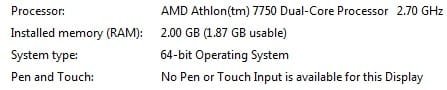
Hi, I was wondering if anyone else has my problem. When I click on the start menu and then all programs, the list freezes while trying to load, but in actuality one of my dual cores goes to 100%, then the second one maxes out after a few seconds. To get rid of it, I have to click somewhere on the desktop and try to open something else until it can somehow let the start menu minimize. I tried to search this problem in the forums, but I didn't come across anything. I also hope that this thread could be posted in this topic.

I am using the 7048 Build, downloading the 7057 one thinking it may solve my problem.

Thanks,
LoVaC
 

Attachments

  • CPU.jpg
    CPU.jpg
    68.4 KB · Views: 47
  • System.jpg
    System.jpg
    8.4 KB · Views: 20

My Computer

OS
Windows 7
No one has any idea what this problem could be, and how to resolve it? Please help me :cry:
 

My Computer

OS
Windows 7

My Computer

Computer Manufacturer/Model Number
Dell XPS420
OS
Vista Ult 64 bit Seven Ult RTM x64
CPU
Intel Core2 Quad Q6600 2.40 gigahertz
Memory
Crucial Ballistix 4x2GB PC2 6400
Graphics Card(s)
NVIDIA GeForce 8600 GTS 256 MB
Sound Card
Creative SB X-Fi audio
Monitor(s) Displays
HP w2207 + HPvs15
Screen Resolution
1680x1050 + 1024x768
Hard Drives
2-WD5000AAKS-500 GB
WD5000AAV-500 GB external
Keyboard
Microsoft Comfort Curve
Mouse
MX Revolution
Other Info
Wacom Intuos 2 Graphics Tablet
Experience Index=5.5
Hey Gary, I actually gave that a try and it didn't work. Better yet, I just installed 7057 and it works perfectly compared to the build I previously mentioned, it sloved the problem :D Thanks for helping, I guess this is case closed, lol.
 

My Computer

OS
Windows 7
Glad you got it sorted out.

Gary
 

My Computer

Computer Manufacturer/Model Number
Dell XPS420
OS
Vista Ult 64 bit Seven Ult RTM x64
CPU
Intel Core2 Quad Q6600 2.40 gigahertz
Memory
Crucial Ballistix 4x2GB PC2 6400
Graphics Card(s)
NVIDIA GeForce 8600 GTS 256 MB
Sound Card
Creative SB X-Fi audio
Monitor(s) Displays
HP w2207 + HPvs15
Screen Resolution
1680x1050 + 1024x768
Hard Drives
2-WD5000AAKS-500 GB
WD5000AAV-500 GB external
Keyboard
Microsoft Comfort Curve
Mouse
MX Revolution
Other Info
Wacom Intuos 2 Graphics Tablet
Experience Index=5.5
I'm having the same problem now with Build 7100. I didn't have this problem prior on the other builds. Is anyone else experiencing this??
 

My Computer

Computer Manufacturer/Model Number
Dell M1330 XPS - Laptop
OS
Windows 7 Build 7100
CPU
Core 2 Duo T7250
Motherboard
Dell Inc. 0U8042
Memory
2GB PC2-5300
Graphics Card(s)
NVIDIA 8400M GS
Sound Card
Standard HD Audio
Monitor(s) Displays
13" LCD Widescreen
Screen Resolution
1280x800
Hard Drives
160GB
Internet Speed
25 Mbit
I'm having this exact problem with my windows home premium, build 7600. The issue came completely out the blue when I got home from work earlier, booting up took way longer than usual aswell. I've no idea on how to troubleshoot an issue like this, all that comes to mind is virusvirusvirus, though my free AVG doesn't seem to find anything.

An additional note; Disconnect the dysfunctional HDD, problem still there and I'm no smarter. :-(
 

My Computer

OS
Windows 7, home premium build 7600
CPU
Intel Core Duo E8500 @ 3.16GHz
Motherboard
ASUS P5Q SE2, P45, Socket-775
Memory
Corsair TWIN2X PC6400 DDR2 4GB KIT CL5
Graphics Card(s)
Gainward GeForce 9800GT 1GB PhysX CUDA
Hard Drives
Western Digital Caviar SE16 500GB SATA2 x2
PSU
Corsair TX 650W PSU
Case
Cooler Master Gladiator 600 Midi Tower
Is this a PC or a Laptop? What HDD problem do you have? What are you specs? Maybe you got a lot of things loading up at start up?
 

My Computer

OS
Windows 7
Same thing here!!!

I put the comp to sleep before bed, and after a nighttime power-outage (possibly a small brown-out), Win7-64 would boot to the desktop, but everything froze as soon as I attempted to access the start button. Technically it wasn't "frozen", because the cursor was still spinning, as though it was thinking ...although there was no major HD activity.

Even after a reboot it would function for a few minutes before freezing, when accessing anything else. No taskman, no MSCONFIG, no virus scanning capability.

My solution turned out to be System Restore via SafeMode w/networking. I went back one restore point ...still freezing! Went back another one, and it appears to be back to normal so far.

This is the 3rd time I've had to use System Restore since I started using Win7 last fall. With WinXP & Win2000 I never had to use restore points, and usually found solutions for issues via driver/software updating, trojan fixes/patches, or a bootscan using free Avast. Even though my problem is solved, I don't even know what happened. It sucks always wondering if I'll turn on the computer when I get home from work, and wondering if I'll be troubleshooting an unknown issue until midnight!
 

My Computer

OS
Windows 7 64bit Ultimate
You are on the tail end of a very old thread. I would suggest starting your own new thread. Help would come much faster.
 

My Computer

Computer type
PC/Desktop
Computer Manufacturer/Model Number
Home made Desktop
OS
Windows 10 Pro. 64/ version 1709 Windows 7 Pro/64
CPU
Intel i7-6800K @ 4.3
Motherboard
ASUS X-99 Deluxe II
Memory
Corsair Platinum 16 gig @2400
Graphics Card(s)
EVGA GTX 1070 OC
Monitor(s) Displays
Asus 27" LED LCD/VE278Q
Screen Resolution
1920-1080 or 1280-720 HDMI
Hard Drives
INTEL SSD 730-240 Gb Sata 3.0/
PSU
EVGA Platium 1200W
Case
Phanteks Luxe Tempered Glass 8 fans/ one radiator
Cooling
XSPC/ Water Cooled CPU
Keyboard
Das 4 Professional
Mouse
Logitech M705/MX Anywhere 2-S
Internet Speed
100 mbits
Antivirus
Microsoft Security Essentials/ Malwarebytes Premium 3.0/ SAS
Browser
I.E. 11 default/Firefox/ ISP Time Warner Cable/Spectrum
Other Info
LG BluRay Burner/
Sound system-KLipsch-THX/
Icy Dock ssd Hot Swap bays.
@ Layback Bear: Thanks for the 'potential' assistance, but if you actually read the post, and read my full reply, you would see that I'm not looking for help. I'm just posting my solution to an ongoing issue. Since I found this post by Googling, I assume other people are as well. I'm hoping that my reply will assist those who find this thread, and are looking for their own solution. The original thread didn't seem to resolve anything, and I wasn't willing to search through the 'muck' for a good thread.
 

My Computer

OS
Windows 7 64bit Ultimate
Back
Top