Adobe Photoshop CS 4

Sorry 323Starz - but your post is absurd. I have installed PS CS4, Fireworks CS4, DW CS4 , Latest Acrobat and none of the things you complain about are true (for me - obviously).

The vast majority of problems reported here relate to re-installation after a good install - clearly that is a problem - but seems to have a good workaround.

The OpenGL problem might be something that Adobe needs to look at - but again, OpenGL works for me (and lots of others).

I have no problems with the Fonts issue you report and as I have not seen anyone else complain of this it just may be that your problem with this is unique or rare.

As for all your absolutes and capitalization and claims of "misleading" and "crap" - cool it. No software is perfect on every set-up despite our desire and hope that it should be. No-one here has been doing any misleading - we are trying to report and help based on our experiences.

Maybe you started with a bad attitude (sure sounds like it) and a bad disk.
 

My Computer

Computer Manufacturer/Model Number
AMD Athlon 64 3200+, Lenovo G560 i3
OS
Windows 7 Ultimate, Ubuntu
Motherboard
Gigabyte K8T8000
Memory
DDR 2Gb (!)
Graphics Card(s)
6600GT
Monitor(s) Displays
MultiMonitor (2) LCD
Hard Drives
Old Seagate 75
Big Western Digital
Samsung 500Gb pulled out of an external drive and installed
Ext: Maxtor (Firewire), 1Gb Lacie (Samsung)
Mouse
Logitech MX620 Cordless
this is precisely what I'm talking about!

A. I never mentioned that Open GL did not work
ATI OSD is what I mentioned pertaining to Win 7 itself

B. None of the things I complain about are true ha... well i have pictures of the "massive" diffence in the way win 7 uploads the files as opposed to vista view the pics please. with that bieng said who knows to what extent that win 7 has butcherd Adobe files no professional will want to install on win 7 and go through some "unknown" venture awaiting to find out what else is missing in the workplace

C. This was not a re-install issue nor was that ever mentioned in the post which seems to be a weak attempt to stray from the issue at hand well the photos can attest to that now.

D. Conclusion : obviously someone here trying to defend a "defective product"

E. The one who stated hes been using the win7 os for 6 months is even worse because you would have to be using the beta which has expired do yourself a favor and step up to the RC tard

F. "I installed it and it just runs" is totally inadequate for a professional who uses "all" of the features.

G. I really didnt have a bad attitude but I knew what was going to happen by posting here and the results are exactly the way I thought they would be "inadequate" "unprofessional" and "total lack of proof" this is a great os if youd like to just doodle around and in that case you could save some money and get gimp but dont get any version other than 2.0.4 because its unstable in Vista


Now if someone here works on the Win7 project they will readily see that Win7 has butcherd the Adobe install to unknown proportions and maybe that will help you to fix it but to say I was way off track is "absurd"

NO FONT FOLDER AND WHO KNOWS WHAT ELSE WILL BE MISSING FROM A $1,000.00 PROGRAM ! DO NOT MOVE OVER TO WIN7 IF YOU RELY ON ALL OF THE FEATURES IN THE CS4 CS3 CS2 SUITES "WIN7 IS INCOMPATIBLE

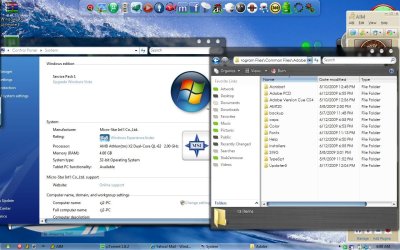
THE PHOTOS ARE OF WIN7 AND VIS IN THE SAME PLACE C/PROGRAMFILES/COMMONFILES/ADOBE
To give Win7 a thumbs up "amazingly the pref file is still in the same place"
The fonts file in the photo was added by me ok as an attempt to fix the problem but there is way too much out of wack here
 

Attachments

  • vis os.JPG
    vis os.JPG
    154.7 KB · Views: 719
  • win7 os.JPG
    win7 os.JPG
    195 KB · Views: 1,250
Last edited:

My Computer

OS
win7 vis xp
323starz:
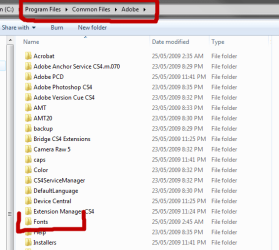
In my install the fonts folder is exactly where you say it should be (see attachment). Perhaps if you wish to use this facility you could simply create a font folder there. I'm sure you know how.

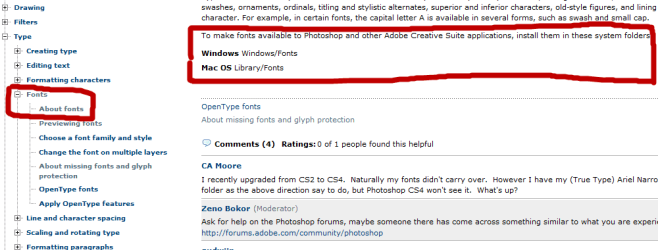
However simply installing a font in Windows (manually, thru Control panel or 3rd party program) will make it available to CS4. (see 2nd attachment)

Adobe has good user forums where your issues may already be addressed.

Hope you can resolve your Photoshop issues.
 

Attachments

  • fontfolder.png
    fontfolder.png
    12.9 KB · Views: 213
  • fonts help.png
    fonts help.png
    17 KB · Views: 379

My Computer

Computer Manufacturer/Model Number
AMD Athlon 64 3200+, Lenovo G560 i3
OS
Windows 7 Ultimate, Ubuntu
Motherboard
Gigabyte K8T8000
Memory
DDR 2Gb (!)
Graphics Card(s)
6600GT
Monitor(s) Displays
MultiMonitor (2) LCD
Hard Drives
Old Seagate 75
Big Western Digital
Samsung 500Gb pulled out of an external drive and installed
Ext: Maxtor (Firewire), 1Gb Lacie (Samsung)
Mouse
Logitech MX620 Cordless
E. The one who stated hes been using the win7 os for 6 months is even worse because you would have to be using the beta which has expired do yourself a favor and step up to the RC tard

your rudeness and name-calling is really not necessary. you have come into a community, shouting at people from the very beginning about things which are blatantly false. i don't know what you're trying to accomplish here, but i can assure you this is not the best way to go about it.

i've been running photoshop since 7000, and am now using 7229. as i said, i have had no problems with it. all system fonts show up fine, so i'm not sure what you're ranting about there.

exactly what sort of problems are you having? perhaps if you settle down and try to explain yourself, some of the fine people here will be willing/able to help you sort them out.
 

My Computer

OS
7600 x86
CPU
Core 2 Duo e7200, 2.53 ghz
Motherboard
Micro-Star MS-7529
Memory
2x DDR2 PC5300 1gb, 667 mhz
Graphics Card(s)
GeForce 9500gt, 512mb
Monitor(s) Displays
22" LG Flatron w2234s
Screen Resolution
1680x1050
Hard Drives
Excelstor SATA-II 250gb 7200rpm, 8mb cache
PSU
CoolerMaster M520
Internet Speed
30/20 mbits
Well maybe thats another issue that the Win7 team can fix instead of loading all of the fonts into Win7 and bogging down Office just let Adobe install its own fonts folder and take the load off of Office and its startup time. I have a countless amount of fonts and just by putting about 60 -70 of them in the generic Win7 folder it bogged Office to a very noticeable extent. I couldnt imagine the lag from a full fledged professional putting all of thier fonts into the Win7 fonts folder and expect to get some decent load time out of Office.
Well the good news is that just installing a fonts folder into c/programfiles/commonfiles/adobe isolates a massive font collection to adobe only. I wonder how extensive this damage is throughout the entire CS4 suite with Dreamweaver, Indesign, Illustrator and all. I dont see why they cant just let it install like it does in Vista. Even if you do install it with compatibility mode that so many rant about which cannot be done you then have the trailing "unguided" second disc which personally I think is where the problem exists. The only time I saw a wisp of compatibility mode is when I looked at Adobes site at the 10.99 trial version that just may be a download with an accessible exe file. What were they thinking to do all this compatiblity stuff for the practical user. I thought it was supposed to be better than Linux not more like it and in this instance even worse.

What in the world are "all" of those files doing in the Adobe folder and why such a dramatic difference between the install there and vista?
 
Last edited by a moderator:

My Computer

OS
win7 vis xp
Encore BluRay

Let me add something to the discussion here.

I tried CS4 Master Collection on different W7 builds (both x32 and x64).

Now I'm on 7229 x64.

Everything from CS4 MC worked well on all builds, except for one thing, that didn't work on all builds:

When in Encore you want to burn a BluRay project the whole system freezes and does not come to life anymore.

Can others confirm this behaviour? Any hints?

(I installed all the latest updates on system, drivers and CS4)
 

My Computer

OS
Windows 7
I've got mine installed fine, but almost every app seems to crash after using it for about 10 or 15 minutes. It's not memory related, I checked that first, it barely uses half of my available RAM. Any thoughts? It will always crash, I've never once been able to keep them open more than 15 minutes.

Hey renthor,
I remember a similar problem when i was using Adobe Photoshop CS3. Unbelievably, it seemed that Microsoft Intellipoint had a problem with Photoshop. After I uninstalled Microsoft Intellipoint, Photoshop ran just as it should without the crashes. I'm not sure if this is related with CS4, but the similarities are there. Good luck and hope I'm not too late!
 

My Computer

OS
Windows Vista, Windows 7
I have the Photoshop CS4 32-bit version running great on my build 7100 of Windows 7:thumbsup:
 

My Computer

Computer type
PC/Desktop
Computer Manufacturer/Model Number
Custom Build (multiple machines)
OS
Windows 7 Ultimate x86, Windows 7 Professional x64, Windows 8 Pro x64
CPU
AMD Athlon 7750 Dual-Core 2.70 GHz
Motherboard
ECS GF8200A
Memory
3GB
Graphics Card(s)
Nvidia
Monitor(s) Displays
Asus 24''
Screen Resolution
1680x1050
Antivirus
Microsoft Security Esentials
Browser
IE, Chrome, Firefox (Primary)
Other Info
Will update a full list soon...am planning on upgrading my system later this summer anyways.
I Use, Photoshop CS4, Flash CS4, And Fireworks CS4 :p they all run great on 7, No problems at all. (Except once, but that was because i had 3400 fonts installed :p)
 
I Use, Photoshop CS4, Flash CS4, And Fireworks CS4 :p they all run great on 7, No problems at all. (Except once, but that was because i had 3400 fonts installed :p)
That's a lot of fonts....
 

My Computer

Computer Manufacturer/Model Number
Compal JFT02 (Custom Build Laptop)
OS
Windows 7 Home Premium x64 - Mac OS X 10.6.4 x64
CPU
Intel Core 2 Duo T9300 2.5 GHz
Motherboard
JFT02
Memory
4GB Kingston DDR2-800
Graphics Card(s)
NVIDIA Geforce 8600M GT (512MB Model)
Sound Card
Realtek HD Audio
Monitor(s) Displays
WUXGA Standard Laptop Display
Screen Resolution
1680*1050
Hard Drives
Toshiba 320GB 5400RPM Laptop HD
PSU
Standard Laptop Power Supply
Case
Standard Laptop Case
Cooling
Standard Laptop Cooling
Keyboard
Standard Laptop 105 Key-Keyboard
Mouse
Synaptics Touchpad
Internet Speed
Verizion Online DSL 3360/864 kbs (dl/up)
Jaunelis

Whilst I know not eveyone buys software, I wouldnt be advertising it on a forum mate. I would have cropped the image to just the error message, to stop people seeing the crack folder in the background. :D
 

My Computer

Computer Manufacturer/Model Number
Me
OS
XP Pro waiting for Win 7 Home.
CPU
AMD Athlon 64 X2 Dual Core 6000+
Motherboard
Cant remember
Memory
4gb
Graphics Card(s)
Nvidia GeForce 7600 GS
Sound Card
Onboard
Monitor(s) Displays
2 x 19" crts
Hard Drives
1 x 300gb ide, 1 x 160gb sata, 1 x 250gb sata. 1tb sata to follow.
PSU
650w
Case
Cheap one.
Cooling
Hovercraft fans (sounds like it)
Adobe Photoshop CS 4 runs fine in Windows7 without using compatibility mode. Do you use registered version?
 

My Computer

OS
Vista, and Windows 7
I'm having an issue when saving photos using the "Save For Web" option. Windows tells me I don't have enough permission to save to this folder on this network. If I cancel and try again it works fine.

Windows 7 Home Premium 64-bit
 

My Computer

Computer Manufacturer/Model Number
Custom Built
OS
Windows 7 Home Premium 64-Bit
CPU
2600K @ 3.4Ghz
Motherboard
Gigabyte Z68 D3H-B3
Memory
G.Skill 2x4GB DDR3 1600 Sniper
Graphics Card(s)
nVidia GTX 560Ti
Sound Card
Realtek Onboard
Monitor(s) Displays
HP w2207h
Screen Resolution
1680x1050
Hard Drives
Western Digital AAKS6400
PSU
Antec 620
Case
Cooler Master Centurion 5
Cooling
Cooler Master 212+
Keyboard
Microsoft Wireless 3000
Mouse
Microsoft Wireless 3000
Internet Speed
Cable
Adobe CS4 Clean

:cool: The Adobe CS4 Clean Script will help resolve installation problems experienced by users of Adobe Creative Suite 4 software.

Hope this link Helps
Run the CS4 Clean Script
 

My Computer

OS
windows 7
guys help me, i just install photoshop cs 4 in win 7.
and the warning appear like this:
43642992.jpg

it's same if i reinstall it... :cry:
 

My Computer

OS
windows 7 ultimate x32
CPU
intel pentium dual core
Memory
3GB
Screen Resolution
1280x800
Mouse
logitech
Internet Speed
3.1mbps
Other Info
i used laptop toshiba satelite l310
guys help me, i just install photoshop cs 4 in win 7.
and the warning appear like this:
43642992.jpg

it's same if i reinstall it... :cry:

Have you had any adobe products installed before? If yes which and what version? And where is your download from?

And are you running x64 or x86?

- SG
 
yes i have, adobe reader 9.1 and flash player just it...
i have installed win 7 just a few menute ago..
before that, i used win vista but it work...
 

My Computer

OS
windows 7 ultimate x32
CPU
intel pentium dual core
Memory
3GB
Screen Resolution
1280x800
Mouse
logitech
Internet Speed
3.1mbps
Other Info
i used laptop toshiba satelite l310
yes i have, adobe reader 9.1 and flash player just it...
i have installed win 7 just a few menute ago..
before that, i used win vista but it work...

Ok, if you use x64 i can provide you the missing file, if you want to try it that way. It might work.
 
Back
Top