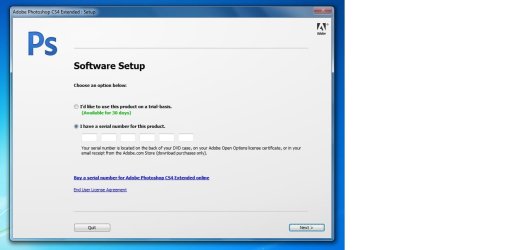
Adobe Photoshop CS 4

I've got mine installed fine, but almost every app seems to crash after using it for about 10 or 15 minutes. It's not memory related, I checked that first, it barely uses half of my available RAM. Any thoughts? It will always crash, I've never once been able to keep them open more than 15 minutes.

I have had this exact same problem? did you manage to find a fix for it? i have tried using both the 64bit and the 32bit installs, still getting the same problem of the machine freezing up. Very frustrating
 

My Computer My Computer

OS
windows 7 ultimate 64bit
CPU
amd phenom 2 x2550 q3.10ghz
Memory
4gb ddr3
Graphics Card(s)
geforce gtx 260
Monitor(s) Displays
viewsonic 1080p 22"
Brush Lagging

I had no problems installing photoshop CS4 on Windows 7, but does anyone else get brush lag while they are using it, even with OpenGL switched off?
 

My Computer My Computer

Computer Manufacturer/Model Number
Acer M3802
OS
Windows 7 64 bit
CPU
Intel Core 2 Quad
Memory
6GB DDR2
Graphics Card(s)
512MB ATI Radeon HD 4350
Monitor(s) Displays
LG Flatron W2243S
win 7 compatablility to adobe creative suite 4 design

greetings,
in response to compatability of windows 7, adobe themselves specifically states their creative suite 4 design it is not compatable with 64 bit operating system. while they do say you can run these great programs on windows 7 they specify it was tested on windows 7 ultimate. unfortunately adobe only tested their product on ultimate, ultimate allows you to choose to operate on 32bit or 64bit if you have an intel p 8700 processor or better. so adobe never says it is compatabile it says read on, when you read on you find this info. to confirm this windows 7 compatability site specifically says when you ask regarding photoshop, illlustrator, dreamweaver, they are currently only 32bit compatable. sorry for the bad news. perhaps some of you are figuring out ways of making it operate, however I and others make a living doing graphic design work, building websites, etc. software either loads or it doesn't, i make money doing design work, not attempting to work out glitches in software for behemoth software companies, it needs to be bullet proof or I can't meet deadlines. if someone out their is loading these software programs without hitches i would love to know about it. but currently all info from all companies involved says: NO GO!

lonestar
 

My Computer My Computer

OS
vista
Photoshop CS compatibility

I don't have CS4, I have CS. All the posts I'm seeing are for 3 or 4. Can anyone tell me if there are compatibility issues with Photoshop CS? In other words, do I need to install in compatibility mode, or can I just install?

Thanks!
 

My Computer My Computer

OS
Windows 7
I installed CS on Windows 7 64-bit, and it seemed to work fine until I tried to create a .ico graphic (which wasn't even listed as a possibility in the "save as..." options), and now I have a very unstable program. I uninstalled it and reinstalled it, but it's still balking at doing a simple paint brush. I'm afraid I need to upgrade to CS4.
 

My Computer My Computer

OS
Windows 7 64 bit
Help with photoshop cs3

Hi there, I'm new in the forum, I bought a Dell XPS and I have installed the CS4 Master but I have a problem with windows 7, the adobe Photoshop can not run, crash when I try to run it, everything run fine (Ai, Dw, FLash, iD, after effects and premier) but Photoshop impossible, I've try installing the CS3 but the same problem, so I don't know why everything run but Photoshop doesn't, Hope you can help me


msg:
Adobe Photoshop CS4 has stopped working
windows is checking for a solution to the problem...
A problem caused the program to stop working correctly
windows will close the program and notify you if a solution is available


thank you guys

Dave
 

My Computer My Computer

OS
windows 7
Adobe CS4 problems in Windows 7

Hi,

I installed Adobe CS4 and last week I disinstalled Adobe...now I can't install it again.
I tried to delete information in the registry and tried adobe cs4 registry cleaner, but it did not work. Can anybody tell me why this doesn't work, is it because of Windows 7
(32 and 64 bit)

Thanx.

Smurf2
 

My Computer My Computer

OS
Windows 7
Hi there, I'm new in the forum, I bought a Dell XPS and I have installed the CS4 Master but I have a problem with windows 7, the adobe Photoshop can not run, crash when I try to run it, everything run fine (Ai, Dw, FLash, iD, after effects and premier) but Photoshop impossible, I've try installing the CS3 but the same problem, so I don't know why everything run but Photoshop doesn't, Hope you can help me


msg:
Adobe Photoshop CS4 has stopped working
windows is checking for a solution to the problem...
A problem caused the program to stop working correctly
windows will close the program and notify you if a solution is available


thank you guys

Dave
Hi Dave
Can you tell us where you got your Photoshop Installation from?
 
Hello

Hey sergio porqe quiere saber de donde lo consegui?

Sergio why is so important where I get the CS4? I'm trying removing the CS4 with the Revo Uninstaller and I'll try to install it again, let see how it goes, thank you guys.

Dave
 

My Computer My Computer

OS
windows 7
Hi DaveBarillary,
I have the same problem when installing Adobe photoshop CS4 on window 7. If you or others else found solution then sent me by email ([email protected]).
Thanks
 

My Computer My Computer

OS
window 7
CPU
Core I3
Motherboard
GIGEBYTE
Memory
4G
Graphics Card(s)
navida 9400
Hello, Friends,
I seem to have an unusual challenge.
I am using Window 7.
When I attempt to install CS4, I only am given the option to do it in French.
I wish to do it in English.
After I install it in French,
I then attempt to reinstall it, whereupon it allows me to select English, but then disallows my serial number.
When it is installed in French, it disables my Internet Explorer.
When I uninstall it, my Internet Explorer works again.
If I could install it in English to begin, I think all could be well.
But that option is grayed out.
Suggestions?
Thanks.
 

My Computer My Computer

OS
Windows 7
I solved my own problem.
By adding the patch mentioned in the earlier posts re the Manifest folder etc. added to the Windows Folder, I was able to load in English.
However, the serial number could not be used.
In the pdf file that came with the program, I read that each serial number is not only program specific, but also language specific.
Consequently I phoned the Adobe help line, and received prompt and courteus assistance. Adobe is replacing the product (which turned out to be a French Canadian Serial number) with an English one.
 

My Computer My Computer

OS
Windows 7
Brush lagging?

I seem to be getting a lot of brush lag with both Photoshop CS4 and CS5. My graphics card is an ATI Radeon HD 4350 (512mb) - anyone know if there are any known issues with this type of card? Thanks.
 

My Computer My Computer

Computer Manufacturer/Model Number
Acer M3802
OS
Windows 7 64 bit
CPU
Intel Core 2 Quad
Memory
6GB DDR2
Graphics Card(s)
512MB ATI Radeon HD 4350
Monitor(s) Displays
LG Flatron W2243S
ADOBE CS Suite

Hello all, don't know if anybody can help me with this one, but it's driving me absolutely nuts.
I am trying to install the full Adobe Creative Suite CS4 on Windows 7, but I keep getting the following message:
"The version of this file is not compatible with the version of Windows you're running. Check your computer's system information to see whether you need an x86 (32-bit) or x64 (64-bit) version of the program, and then contact the software publisher"
I am trying to install this on a brand-new computer, which has 4gig ram etc, and meets all specs required.
I installed this perfectly on another computer which runs Windows Vista Ultimate, and also on a computer running XP, although both are using 32-bit versions of Windows, however Adobe recommends running this program on a 64-bit version (which my version of Windows 7 is running).
At this stage I am getting ready to throw the whole lot out.:mad:
Any ideas on this one????
 

My Computer My Computer

OS
Windows 7
PS CS4 registration problem

Hi, i've read through all the posts and this seems to be a new problem.

I bought CD/DVD version of PS CS4 and went to install it, installed fine, used it once, then i got the "Sorry to interrupt you message" and it says about the serial number not matching up or something. Then the next start up says "System set up" and asks me if i want to use the 30-day trial or enter a serial number, i then re-enter the number, and the dreaded red cross comes up next to it. Dud/illeagal copy you may think, but it isn't, i installed it on a Vista Laptop and that worked fine, installed it on my slow old PC (which, as with all the computers has internet connection), and it worked, and still does to this very day. One of my mates thought it was some form of registry block that had come on it or something, so he re-formatted my hard drive, and it worked, i ran the program a few times that evening (not connected to the internet), then ran it the following morning (again whilst NOT connected to the internet) and it worked again. However, when i got back to my house, i went to run PS (now connected to the internet) and it didn't work, back to what it said before with the same old boring serial number problem. I even did a system restore back to the date when it was working, turned off wireless, disabled the 60 windows updates and it still didn't work! It's quite annoying as Illustrator works fine.

Sorry for the length of the post, it's just i've done quite a few things (even found the file that brings up the error message and deleted it, but that just brought up an error message.)

I hope that someone can help me! (Error pic attached)

Thanks
 

Attachments

  • error.jpg
    error.jpg
    41.6 KB · Views: 36

My Computer My Computer

OS
Windows 7 Home Premium 64bit
Hello SevenForums members! I recently just started using Windows 7 Beta 1 and I like the experience with it so far.

I really need Adobe Photoshop CS 4 but unfortunately an error comes up in the Setup file that I downloaded from Adobe's server. This is because it's not compatible with Windows 7.

Edit: Nevermind it's working now! I just had to choose Windows Vista in compatibility mode for the setup to continue.

Try Photoshop CS5 64 Bit - Just Great !!!! (Needs Lots of Ram) :D:D:D
 

My Computer My Computer

Computer Manufacturer/Model Number
Alienware Aurora
OS
Win 7 Ultimate x64
CPU
Core I7 980X O.C. to 4.0 Ghz
Motherboard
Custom Intel mATX (Bios ver A10)
Memory
12GB 1600 mhz triple channel DDR3 - Kingston
Graphics Card(s)
ATI Radeon HD 5970 2GB Video Card
Sound Card
Creative Labs Titanium sound blaster
Monitor(s) Displays
30" Dell LCD
Screen Resolution
2560 x 1600
Hard Drives
240 GB OCZ Vertex 2 SSD
256 GB Samsung V2 SSD
2TB WD Black Caviar 7200 rpm SATA3
600GB WD Velociraptor 10,000 rpm SATA3
3TB WD MyBook Essential USB 3.0 7200 rpm External
PSU
850 Watt
Case
Alienware Aurora
Cooling
Water
Keyboard
Logitech G15 (original version)
Mouse
Logitech MX1000 Laser - Wireless
Internet Speed
Cable 22 Mb/sec download
Other Info
USB 3.0,
Blue Ray DVD Read/Writer
Bose Companion 3 Speakers
WRT54G Wireless Router
Back
Top