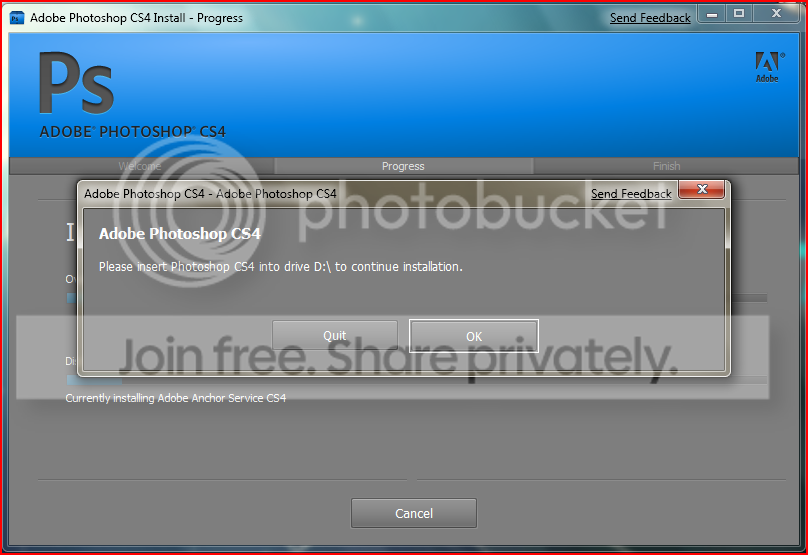
Adobe Photoshop CS 4

Windows 7

New member
Local time
2:00 PM
Messages
3
Hello SevenForums members! I recently just started using Windows 7 Beta 1 and I like the experience with it so far.

I really need Adobe Photoshop CS 4 but unfortunately an error comes up in the Setup file that I downloaded from Adobe's server. This is because it's not compatible with Windows 7.

Edit: Nevermind it's working now! I just had to choose Windows Vista in compatibility mode for the setup to continue.
 
Last edited:

My Computer My Computer

Computer Manufacturer/Model Number
HP Pavilion Slimline S3023W
OS
Windows 7 Beta 1
CPU
AMD Athlon 64 Processor 3800+ 2.4 GHz
Memory
1 GB RAM (2 x 512)
Graphics Card(s)
NVIDIA GeForce 6150 LE
Sound Card
Realtek HD Audio
Monitor(s) Displays
HP vp17
Screen Resolution
1152 x 864
Hard Drives
Seagate - Barracuda 7200.10 SATA 3.0Gb/s 250-GB Hard Drive
CS4 Master Collection installed perfectly fine for me in Windows7 without using compatibility mode.
 
Photoshop extended cs4 (downloaded from adobe) works flawless in windows 7 for me, too.

if you're having issues, try running it in a compatiblity mode for XP or Vista. (right click > properties > compatibility)
 

My Computer My Computer

Computer Manufacturer/Model Number
Made by moi :)
OS
Windows 7 x64 & Ubuntu 9.04 x64
CPU
AMD64x2 6000+ 3.0Ghz
Motherboard
Gigabyte... something.
Memory
4GB 2x2GB @ 667Mhz
Graphics Card(s)
GeForce 8500GT
Sound Card
Onboard bebbe!
Monitor(s) Displays
19" LCD and 17" LCD
Screen Resolution
1440x900 & 1280x1024
Hard Drives
160GB Maxtor 7600RPM, 80GB 7600RPM
External: 500GB Maxtor OneTouch
PSU
750W
Case
Mac Pro Style Brushed Aliminum
Cooling
Zalman
Keyboard
Saitek Blue LED
Internet Speed
10MB
Other Info
Built by me for less than £300 last February. Really want a Phenom II already!
I can second that CS4 works great for me on Win7. I have Adobe Photoshop Version: 11.0 running. BTW do you have OpenGL installed? CS4 uses some neweffects that require it.
 

My Computer My Computer

Computer Manufacturer/Model Number
Zanza Computer
OS
Windows 7 (7127)
CPU
i7 920 (4.1Ghz)
Motherboard
nForce X58
Memory
2x 2gb 1066 (4gb total)
Graphics Card(s)
GTX 295,
Sound Card
Creative X-Fi Platinum (Fata1ty)
Monitor(s) Displays
Viewsonic VX924 (2x - 19"), Viewsoic VX2835wm (1x - 28")
Screen Resolution
4480x1200 Total, 1920x1200 max single
Hard Drives
Raptor (main)
250 (local storage)
320 (Multi OS)
+Server Storage
PSU
1100W
Case
P182 Moded
Cooling
Air, mod cooling
Keyboard
Microsoft Desktop 8000
Mouse
Microsoft Desktop 8000
Internet Speed
Cable (24mbps)
Other Info
CPU OC'd to 3.2 stable (barely any temp change)
GPU (OC in progress) + additional GPU for side monitors
I have Windows 7 build 7000 and Adobe Product all WORK FINE. I have installed CS4 with 6-7 additional filters and ALL WORKS FINE.
 

My Computer My Computer

OS
WINDOWS Se7en build 7000
Works fine for me as well maybe you have a bad download?
 

My Computer My Computer

OS
Windows 7
DX

I'm running x64 Windows 7.

I'm having problems installing too.

I had it installed once, but while cleaning some bloat unattentively, I accidentally uninstalled it. I know, I'm an idiot...

Now, everytime I try installing, I get this error message "Suite Shared Configuration CS4
Error:
Error 1603. Error 1310.Error writing to file: C:\Windows\winsxs\Manifests\x86_Microsoft.VC80.CRT_1fc8b3b9a1e18e3b_8.0.50727.762_x-ww_6b128700.manifest. Verify that you have access to that directory."

I've tried going into the directory and looking for said file, and it's not even there.

I tried running as an admin, I've tried compatability mode, and neither worked.

I'm starting to wonder if when I uninstalled, it possibly took said .manifest with it...

Does anyone know what to do? Could someone possibly check if they have said .manifest, and if so, copy it and upload it to someplace like mediafire.com? Would that work? I'm a noob to this... Sorry for stupid questions...


I'm sorry, I'm kinda desperate to get this thing reinstalled. ^-^;;;
 

My Computer My Computer

OS
Windows 7
I've got mine installed fine, but almost every app seems to crash after using it for about 10 or 15 minutes. It's not memory related, I checked that first, it barely uses half of my available RAM. Any thoughts? It will always crash, I've never once been able to keep them open more than 15 minutes.
 

My Computer My Computer

Computer Manufacturer/Model Number
Dell 8400
OS
Windows 7 Beta 1 b7000
CPU
Intel Pentium 4
Memory
4GB
Graphics Card(s)
ATI Radeon HD3450
Sound Card
Creative SoundBlaster Audigy 2
Monitor(s) Displays
Acer AL2016W
Screen Resolution
1680x1050
Hard Drives
1x500GB
1x100GB
Case
Dell 8400
Cooling
Standard
Keyboard
Dell Multimedia Keyboard
Mouse
Logitech MediaPlay
Internet Speed
Comcastic!
trouble starts if u (have to) install the application twice. this maifestfiles are system owned an as i see it u have to reconfigure them one by one. runing the installer in admin mode doesnt solve the problem.
 

My Computer My Computer

OS
windows 7
I am trying to install cs4 and I keep getting that windows installer error coming up, i tried changing the compatibility but same error. Can someone help me?
 

My Computer My Computer

Computer Manufacturer/Model Number
Self-built
OS
Windows 7 Ultimate
CPU
Intel® Core™2 Duo E6550 2.33ghz
Motherboard
Gigabyte GA-P35-DS3L
Memory
2x1GB PC2-800
Graphics Card(s)
Nvidia Geforce 9800GT 512MB
Sound Card
Onboard HD 7.1
Monitor(s) Displays
HannsG 19" Widescreen
Screen Resolution
1440x900
Hard Drives
80GB
WD 250GB
Samsung Spinpoint F1 1TB
PSU
SeaSonic S12 Energy Plus SS-550HT 550W
Case
RAIDMAX SMILODON
Cooling
Zalman 9500AT
Keyboard
Logitech Office white
Mouse
Logitech MX™ Revolution
Internet Speed
Verizon DSL 3360 Kbps / 864 Kbps

My Computer My Computer

Computer Manufacturer/Model Number
Me.
OS
7 Pro X64
CPU
Core 2 Duo E8400 @ 4.3GHz
Motherboard
Gigabyte P35-DS3L
Memory
4GB OCZ Fatal1ty DDR2-800mhz
Graphics Card(s)
XFX Core Edition GTX260 c216
Monitor(s) Displays
Samsung 2233SW
Screen Resolution
1080p
Hard Drives
500GB WD AAKS (Windows)
250GB WD KS (Sometimes Linux, sometimes OSX, and sometimes Windows
PSU
Corsair HX520
Case
Cooler Master CM690
Cooling
TRUE120
Keyboard
Logitech G15 rev 2.0
Mouse
Logitech G9
Internet Speed
5MB/S

My Computer My Computer

Computer Manufacturer/Model Number
Self-built
OS
Windows 7 Ultimate
CPU
Intel® Core™2 Duo E6550 2.33ghz
Motherboard
Gigabyte GA-P35-DS3L
Memory
2x1GB PC2-800
Graphics Card(s)
Nvidia Geforce 9800GT 512MB
Sound Card
Onboard HD 7.1
Monitor(s) Displays
HannsG 19" Widescreen
Screen Resolution
1440x900
Hard Drives
80GB
WD 250GB
Samsung Spinpoint F1 1TB
PSU
SeaSonic S12 Energy Plus SS-550HT 550W
Case
RAIDMAX SMILODON
Cooling
Zalman 9500AT
Keyboard
Logitech Office white
Mouse
Logitech MX™ Revolution
Internet Speed
Verizon DSL 3360 Kbps / 864 Kbps
i tried to install ps cs4but got this error:

cs4.png


any suggestions guys?
 

My Computer My Computer

OS
windows 7
Not to necro, but I still can't reinstall it... Has anybody found a solution?
 

My Computer My Computer

OS
Windows 7
No Go for me. I had Adobe Premiere Pro installed and then uninstalled it. When I try to install it now I get this nasty error:

Suite Shared Configuration CS4
Error:
Error 1603. Error 1310.Error writing to file: C:\Windows\winsxs\Manifests\x86_Microsoft.VC80.CRT_1fc8b3b9a1e18e3b_8.0.50727.762_x-ww_6b128700.manifest. Verify that you have access to that directory.

I tried the suggested and navigated to HKLM\Software\Microsoft\SQMClient\Windows\DisabledSessions

There was no MachineThrottling to rename to _MachineThrottling

So I treid deleting the key as suggested in post
http://www.sevenforums.com/general-...cant-install-any-msi-package-4.html#post23050

Still nothing. Any other ideas?
 

My Computer My Computer

Computer Manufacturer/Model Number
HomeBuild
OS
Windows 7
CPU
Prescott Pentium 4 3.0 GHz
Motherboard
Intel D945GNT
Monitor(s) Displays
ViewSonic 22" LCD 5ms response 1000:1 contrast ratio
Keyboard
yep
Mouse
yep
Internet Speed
RR Cable
No go for me either, I tried all of the above as well, I'm in the same boat!
 

My Computer My Computer

OS
Windows 7
Just tried cc cleaner on my registry, it found and "fixed" 164 errors, but still doesn't install...

"Adobe Photoshop CS4 (64 Bit)
Error:
Error 1603. Error 1334.The file 'manifest.8.0.50727.762.844EFBA7_1C24_93B2_FF1F_C8B3B9A1E18E' cannot be installed because the file cannot be found in cabinet file 'Microsoft_VC80_CRT_x86_x64'. This could indicate a network error, an error reading from the CD-ROM, or a problem with this package.
Adobe Drive CS4
Error:
Error 1603. Error 1310.Error writing to file: C:\Windows\winsxs\Manifests\x86_Microsoft.VC80.CRT_1fc8b3b9a1e18e3b_8.0.50727.762_x-ww_6b128700.manifest. Verify that you have access to that directory."
 

My Computer My Computer

OS
Windows 7
I just downloaded and installed the 32 bit version. It was a recent download, so maybe they changed the installer to account for folks using W7.

The installer hesitated with a message about needing WinXP or later, but gave me an option to continue anyway. It then installed without problems.

The install started from a desktop folder (Adobe CS4) which is installed by the downloaded .exe file. Message says use the Setup.exe in the folder to install, which I ran as administrator.

One note, the next day when I booted up, I got a boot error message which I had not seen up until this time. Whether it was related to CS4 or not, I don't know.

I would assume everyone into CS4 knows they are running a beta for it to fix some issues and are asking for volunteers.
 

My Computer My Computer

Computer Manufacturer/Model Number
Homebuilt
OS
Windows 7 x64
CPU
i7-2600K
Motherboard
Asus P8Z77-v Pro
Memory
8 G
Graphics Card(s)
GTX 480
Sound Card
Onboard
Monitor(s) Displays
LG W2753V
Screen Resolution
1920x1080
Hard Drives
Crucial M4 128 G SSD
Fixed the winsxs Manifest Error

Hi guys,

I errored out while installing CS4, and in attempts to uninstall it and reinstall it I ran into the error you guys have posted:

Error 1603. Error 1310.Error writing to file: C:\Windows\winsxs\Manifests\x86_Microsoft.VC80.CRT_1fc8b3b9a1e18e3b_8.0.50727.762_x-ww_6b128700.manifest. Verify that you have access to that directory."

To resolve the problem I downloaded the manifest files and folders (now attached to this post) and put them into the C:\Windows\winsxs\ directory. You need to take ownership of the directory and give the Administrator full access. You do that by viewing the properties of winsxs, then go to the Security tab and click Advanced.

Hope this helps, sheesh that was annoying.
 

Attachments

My Computer My Computer

OS
Windows 7
Back
Top