

I know I hate Bonjour service, and it has a nasty tendency to mess up Windows 7 for all of us that use iTunes. I personally find it a PITA to remove post install, so I thought that a tutorial for installation without it (or mobile device support as well) would be nice.
The first step is to get ahold of winrar or 7zip
7-Zip
With this, you can now download the iTunes setup from Apple.
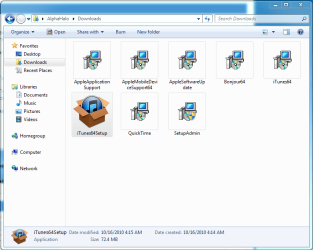
After you download "iTunesSetup" or "iTunes64Setup", whichever your machine requires, right click on the .exe file and extract the files using either program mentioned above.
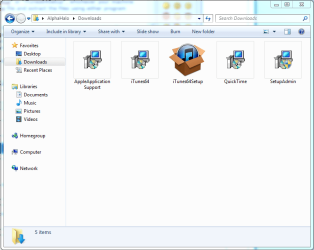
Delete Bonjour and or Mobile Device Support. I also deleted the update file to ensure that iTunes does not get updated without my express consent (download and install) as bonjour will get installed with all updates, since Apple is a bunch of butt-heads who think we want extra ports and all that crapola.
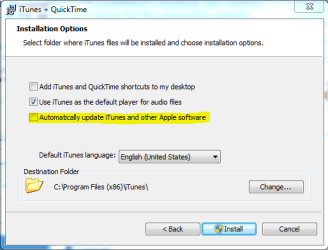
Also, disable automatic updates in the installer.
Run "iTunes.msi" or "iTunes64.msi"
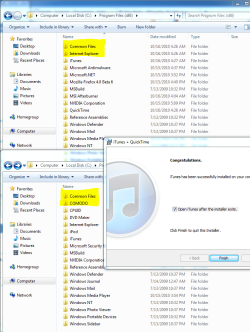
As you can see, the installation was totally Bonjour free. Enjoy.
The first step is to get ahold of winrar or 7zip
7-Zip
With this, you can now download the iTunes setup from Apple.
After you download "iTunesSetup" or "iTunes64Setup", whichever your machine requires, right click on the .exe file and extract the files using either program mentioned above.
Delete Bonjour and or Mobile Device Support. I also deleted the update file to ensure that iTunes does not get updated without my express consent (download and install) as bonjour will get installed with all updates, since Apple is a bunch of butt-heads who think we want extra ports and all that crapola.
Also, disable automatic updates in the installer.
Run "iTunes.msi" or "iTunes64.msi"
As you can see, the installation was totally Bonjour free. Enjoy.
Attachments
My Computer
- Computer Manufacturer/Model Number
- Pugh Technologies
- OS
- W7 Professional x64
- CPU
- AMD Athlon II X3 445 Rana 3.10 GHz
- Motherboard
- MSI 870A-G54
- Memory
- PNY XLR DDR3 1600 4x2GB
- Graphics Card(s)
- NVIDIA GeForce GTS 450 (fermi) 1GB GDDR5
- Sound Card
- Realtek ALC892 onboard
- Monitor(s) Displays
- ASUS VE205t, Viewsonic VX2035WM
- Screen Resolution
- 1600x900, 1600x1050
- Hard Drives
- 977GB Hitachi Hitachi HDS721010CLA332
244GB Western Digital WDC WD2500AAJS-65B4A0
488GB Western Digital WDC WD5000AAJS-00A8B0
488GB Western Digital WDC WD5000AAKS-00UU3A0
- PSU
- Antec EarthWatts EA650 650W
- Case
- ThermalTake Armor A90 Mid Tower
- Cooling
- 3x 120mm in, 1x 120mm & 200mm out, self built hydro-cooler
- Keyboard
- Logitec 55
- Mouse
- Razer Deathadder
- Internet Speed
- 20 Mbps D/L, 9 Mbps U/L


