

- Local time
- 3:08 AM
- Messages
- 5,915
PhotoRec can recover lost files including video, documents and archives from hard disks, CD-ROMs, and lost pictures (thus the Photo Recovery name) from digital camera memory.
PhotoRec ignores the file system and goes after the underlying data, so it will still work even if your media's file system has been severely damaged or reformatted.
So says the author and PhotoRec gets installed alongwith Test Disk. PhotoRec - CGSecurity
As tried by me, this guide should help others in need of a free recovery software to recover the lost media files.
Preparation:
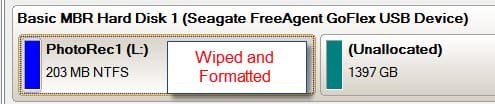
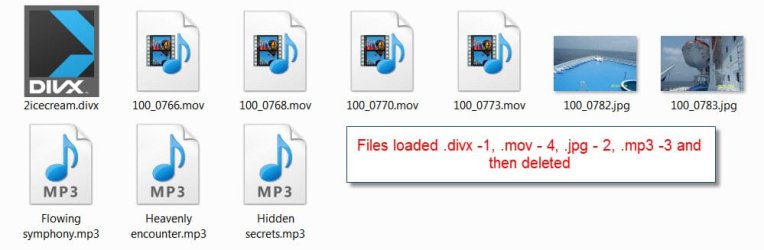

After deleting the media files and reformatting the 200MB partition, the recovery begins
Recovery:
1.Right click on photorec_win.exe and Run as Administrator.
2. First Window:

EDIT: Select the Disk and not the drive, Proceed, and press ENTER.
3. Second Window:

Select partition table type INTEL – Intel/PC partition, ENTER.
4. Third Window:
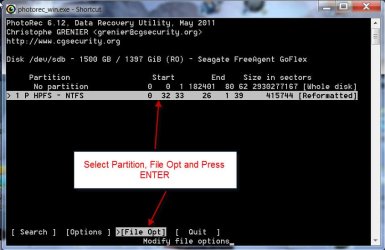
Select the partition, File Opt, ENTER.
5. Fourth Window:
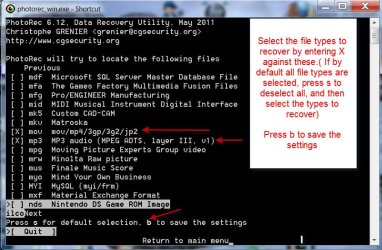
Select the file types to recover by entering X against the type. ( If all are selected by default, press s to deselect and then select the types to recover.) Press b to save the settings.
6. Fifth Window:
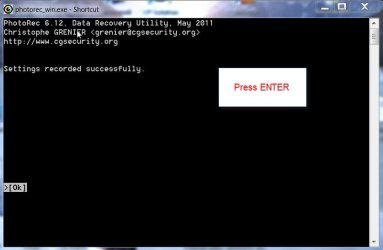
Just gives you the info that your settings have been saved.Press ENTER.
7. Sixth Window:

Press ENTER to return to the Main Menu.
8. Seventh Window:
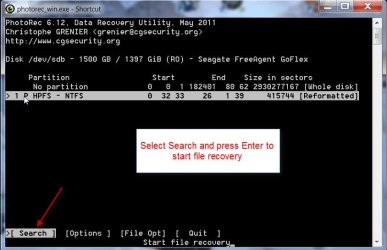
Select Search and Press ENTER to start file recovery.
9. Eighth Window:
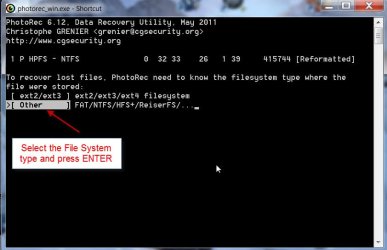
Select the file system type and press ENTER.
10. Ninth Window:
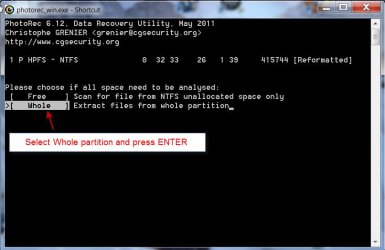
Select Whole partition and press ENTER.
11. Tenth Window:
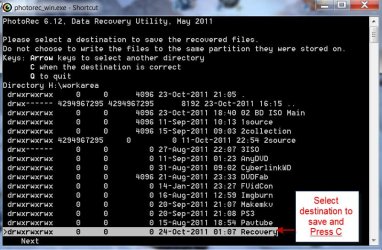
Select destination to save and press C
12. Eleventh Window :
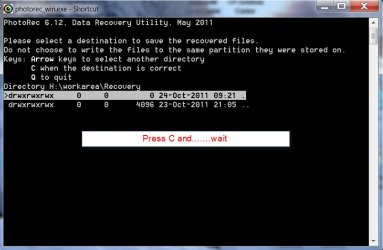
If you had pressed ENTER and a Window like this appears , just press C
again and Wait.
13. Twelfth Window:
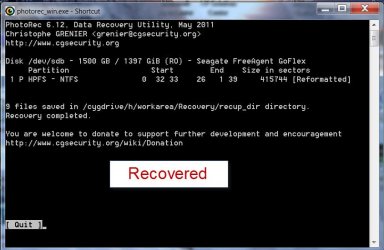
Files recovered.
Close the PhotoRec Window or press q repeatedly till it closes.
Here are the recovered files.
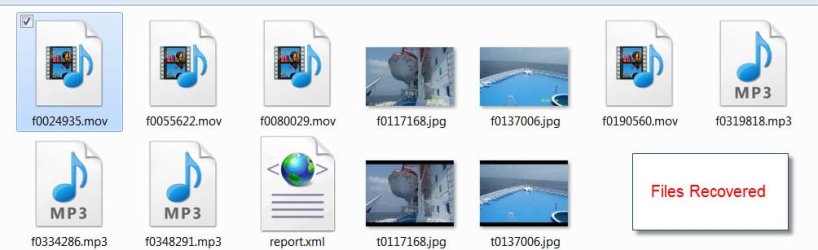
All files played.
There was no .divx file type to be selected. So it could not be recovered. Don’t know why.
The jpg files were recovered and appear twice. Again don’t know why.
EDIT: Mystery resolved. Two of the images are thumbnails, while the other two are original resolution pictures.
The other point I would like to mention here is that this program is absolutely safe to use even by novices. It operates in "read only" mode and does not write anything. So there is absolutely no possibility of any wrong commands writing to the disk,whereas Test Disk is more advanced and can write the partition table, MBR etc., into the disk if a wrong command is given by mistake.
The file types that can be recovered is quite exhaustive and is not necessarily limited to media files. You can run it and check what all file types are covered. (fourth window above)
PhotoRec ignores the file system and goes after the underlying data, so it will still work even if your media's file system has been severely damaged or reformatted.
So says the author and PhotoRec gets installed alongwith Test Disk. PhotoRec - CGSecurity
As tried by me, this guide should help others in need of a free recovery software to recover the lost media files.
Preparation:
After deleting the media files and reformatting the 200MB partition, the recovery begins
Recovery:
1.Right click on photorec_win.exe and Run as Administrator.
2. First Window:
EDIT: Select the Disk and not the drive, Proceed, and press ENTER.
3. Second Window:
Select partition table type INTEL – Intel/PC partition, ENTER.
4. Third Window:
Select the partition, File Opt, ENTER.
5. Fourth Window:
Select the file types to recover by entering X against the type. ( If all are selected by default, press s to deselect and then select the types to recover.) Press b to save the settings.
6. Fifth Window:
Just gives you the info that your settings have been saved.Press ENTER.
7. Sixth Window:
Press ENTER to return to the Main Menu.
8. Seventh Window:
Select Search and Press ENTER to start file recovery.
9. Eighth Window:
Select the file system type and press ENTER.
10. Ninth Window:
Select Whole partition and press ENTER.
11. Tenth Window:
Select destination to save and press C
12. Eleventh Window :
If you had pressed ENTER and a Window like this appears , just press C
again and Wait.
13. Twelfth Window:
Files recovered.
Close the PhotoRec Window or press q repeatedly till it closes.
Here are the recovered files.
All files played.
There was no .divx file type to be selected. So it could not be recovered. Don’t know why.
The jpg files were recovered and appear twice. Again don’t know why.
EDIT: Mystery resolved. Two of the images are thumbnails, while the other two are original resolution pictures.
The other point I would like to mention here is that this program is absolutely safe to use even by novices. It operates in "read only" mode and does not write anything. So there is absolutely no possibility of any wrong commands writing to the disk,whereas Test Disk is more advanced and can write the partition table, MBR etc., into the disk if a wrong command is given by mistake.
The file types that can be recovered is quite exhaustive and is not necessarily limited to media files. You can run it and check what all file types are covered. (fourth window above)
Last edited:
My Computer
- OS
- Windows 7 Home Premium 32 bit


