

- Local time
- 6:20 AM
- Messages
- 5,915
ImgBurn is quite a popular burning software. No doubt it has many plus points, but today using it only for the second time, I ran into rough weather that spoilt my Sunday and my trial.
Having made an ISO of a BD movie for my trial using IsoBuster, I invoked ImgBurn to burn that ISO to a virgin Verbatim BD-RE DL. As the info box ran the script of actions taken by ImgBurner, one little read took me my surprise.
Since it was a virgin BD-RE, ImgBurn started a full format and formatting without Spare Sectors. Is ImgBurn trying to do something unwarranted - just to regain some more space? This was the thought that ran in my mind but it was a little late to stop it and so I let it go. 1.5 hours to format and another 1.5 hours to write the image and my BD-RE was ready to be tried.
But alas, neither Power DVD, nor TMT5 nor Nero's Bluray player will play the BD when mounted on the Virtual Clone Drive - unsupported format.
I quickly ran through the ImgBurn forum and found support that many people indeed had problems in playing BDs formatted by ImgBurn. In some cases the BD-REs will play on the PC, but not on the hardware players. ( In my case it did not even play on my PC)
Lightning UK - the venerable creator of DVD Decrypter - blames it on the players that do not tolerate the absence of spare sectors. Hmmm... these look for compliance with standards.
Come to think of it, the blu-ray standards specify the spare sectors. Bad sectors will be mapped out and new sectors from the spare will be allocated.
To retrieve my BD-RE, I had to run a full erase with Nero 11. Otherwise the disc was not usable with a quick erase. And all these took my Sunday and dropped a spanner on my trials.
So be warned. Do not ever put a new BD-RE into ImgBurn and allow it to be formatted by it. Full erase the new BD-RE with some other burning software, before putting it into ImgBurn.
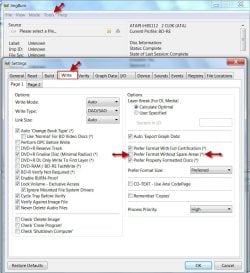
If you are intent on using ImgBurn only, then go to Tools > Settings > Write and uncheck "Prefer Format Without Spare Areas" > OK and be safe (hopefully. )
)
I wish I had seen this or known this earlier.
Having made an ISO of a BD movie for my trial using IsoBuster, I invoked ImgBurn to burn that ISO to a virgin Verbatim BD-RE DL. As the info box ran the script of actions taken by ImgBurner, one little read took me my surprise.
Since it was a virgin BD-RE, ImgBurn started a full format and formatting without Spare Sectors. Is ImgBurn trying to do something unwarranted - just to regain some more space? This was the thought that ran in my mind but it was a little late to stop it and so I let it go. 1.5 hours to format and another 1.5 hours to write the image and my BD-RE was ready to be tried.
But alas, neither Power DVD, nor TMT5 nor Nero's Bluray player will play the BD when mounted on the Virtual Clone Drive - unsupported format.
I quickly ran through the ImgBurn forum and found support that many people indeed had problems in playing BDs formatted by ImgBurn. In some cases the BD-REs will play on the PC, but not on the hardware players. ( In my case it did not even play on my PC)
Lightning UK - the venerable creator of DVD Decrypter - blames it on the players that do not tolerate the absence of spare sectors. Hmmm... these look for compliance with standards.
Come to think of it, the blu-ray standards specify the spare sectors. Bad sectors will be mapped out and new sectors from the spare will be allocated.
To retrieve my BD-RE, I had to run a full erase with Nero 11. Otherwise the disc was not usable with a quick erase. And all these took my Sunday and dropped a spanner on my trials.
So be warned. Do not ever put a new BD-RE into ImgBurn and allow it to be formatted by it. Full erase the new BD-RE with some other burning software, before putting it into ImgBurn.
If you are intent on using ImgBurn only, then go to Tools > Settings > Write and uncheck "Prefer Format Without Spare Areas" > OK and be safe (hopefully.
)I wish I had seen this or known this earlier.
My Computer
- OS
- Windows 7 Home Premium 32 bit
