Calculator - is there a way to add "Always on top"?

Paultx

New member
Member
Local time
6:37 PM
Messages
74
Location
Brazil
This is certainly one of the oldest and most annoying missing option ever in the Windows history!

I wonder if there is some way in Windows itself (I mean via Registry) to add that option to good old Calc?

If not, will some third-party app, like Resource Hacker, do it?

TIA.
 

My Computer My Computer

OS
Windows 7
The code below should do what you want:

Code:
;AutoIt Version: 3.3.8.1
Run(@SystemDir & "\calc.exe")
WinWait("Calculator")
WinSetOnTop("Calculator", '', 1)

You can leave it as a text file, create a shortcut to that text file and assign that shortcut an OS shortcut key - I use ctrl-alt-c.

See the bottom of this post for info on AutoIt:
http://www.sevenforums.com/general-...ear-after-explorer-restart-2.html#post1841812
 

My Computer My Computer

Computer type
Laptop
Computer Manufacturer/Model Number
Employer provided Dell Latitude
OS
W7 Pro SP1 64bit
CPU
i7
Memory
8GB
Graphics Card(s)
Intel HD Graphics
Hard Drives
crappy SSD
Antivirus
Employer mandated Symantec Endpoint Protection
Browser
Pale Moon 64bit, IE11 64bit & Chrome 64bit
I assume you have a keyboard with a calculator button.

The previous answer assumes you're using a program called Auto Hot Key, I believe. If you do not want to use another program to gain control, I suggest you look at the control panel for help. The logitech brand keyboard I use is programmable through the CONTROL PANEL > KEYBOARD screen in Windows 7. A tab titled SETPOINT SETTINGS is from where I can select what the calculator key does on my keyboard. I think SETPOINT is some sort of brandname for logitech. Yours may be different.

I had the same problem you did.

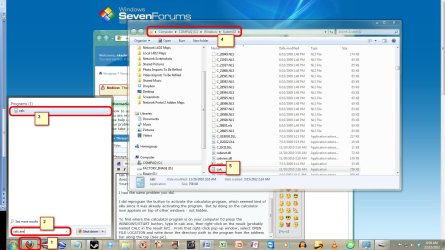
I did reprogram the button to activate the calculator program, which seemed kind of silly since it was already activating the program. But by doing so the calculator now appears on top of other windows - not hidden.

To find where the calculator program is on your computer I'd


  1. press the WINDOWS/START button,
  2. type in calc.exe,
  3. right-click on the result (probably named CALC in the result list). From that right-click pop-up window, select OPEN FILE LOCATION
  4. Windows Explorer will pop up, and you can then write down the directory path to the program from the address bar
  5. to where calc.exe is located on your computer.
At the very least you'll now have a written-down reference of where the program is, if nothing else. But hopefully you can find what you need from the control panel. I did.
 

Attachments

  • calc.jpg
    calc.jpg
    197.4 KB · Views: 39

My Computer My Computer

Computer Manufacturer/Model Number
Compaq
OS
Win 7 Home Premium, 64-bit, 32-bit
CPU
Athlon
Motherboard
Green
Memory
RAM
Graphics Card(s)
Yes
Sound Card
No
Monitor(s) Displays
2
Hard Drives
Very hard
PSU
What's a PSU
Case
Yes
Cooling
Very Cool
Welcome to the Seven Forums.

Thanks for the additional info and the screenshot.

Question, if you click on another window, does the calculator window go behind it?
 

My Computer My Computer

Computer type
Laptop
Computer Manufacturer/Model Number
Employer provided Dell Latitude
OS
W7 Pro SP1 64bit
CPU
i7
Memory
8GB
Graphics Card(s)
Intel HD Graphics
Hard Drives
crappy SSD
Antivirus
Employer mandated Symantec Endpoint Protection
Browser
Pale Moon 64bit, IE11 64bit & Chrome 64bit
Dear akedm, I thank you for your help, but I think I didn't make myself clear enough about the problem I want to fix. Reading your answer it seems I can't find the Windows Calculator, which is not the case.

What I want is to add an "Always on top" option in good ol' Calc, a feature it has been missing forever...
 

My Computer My Computer

OS
Windows 7
Paultx, have you tried the AutoIt solution? While it is a shame to have to use a 3rd party tool to get the feature you want, it should work for you. The script is only used to start calculator app and set it to stay on top... then the script exits RAM.

Let me know if you have any questions/fears/problems with using AutoIt.
 

My Computer My Computer

Computer type
Laptop
Computer Manufacturer/Model Number
Employer provided Dell Latitude
OS
W7 Pro SP1 64bit
CPU
i7
Memory
8GB
Graphics Card(s)
Intel HD Graphics
Hard Drives
crappy SSD
Antivirus
Employer mandated Symantec Endpoint Protection
Browser
Pale Moon 64bit, IE11 64bit & Chrome 64bit
Back
Top