Solved How to convert from .RAR to .ISO file? (For Lenovo OKR7.0 Engineering)

cheesum

New member
Member
Local time
7:35 PM
Messages
61
Hi all;
Just downloaded the OKR 7.0 Engineering edition from FileFactory.
Source: Lenovo OneKey Recovery 7 Engineering DVD - Software Chat - nsane.forums

However, the file format is in .rar
How can i convert it to .iso format? This is because i want to burn the file to a DVD.

One side question. Have anyone owned a Lenovo Y580 that comes pre-installed with Windows 8 but then downgrade it to Windows 7 using UEFI and managed to use Lenovo OKR 7.0 Engineering edition?

Please help.....
 

My Computer My Computer

At a glance

Windows 7 Home Premium 64Bit
Computer type
Laptop
Computer Manufacturer/Model Number
Lenovo Ideapad Y580
OS
Windows 7 Home Premium 64Bit
Have you tried extracting it with WinRAR or 7zip?

I'm sure the ISO is inside the compressed container.
 

My Computer My Computer

At a glance

Win 10 Pro x64Intel I5-2500K @3.3GHz16GB G.Skill Ripjaws X (4x4GB)EVGA GeForce 750 Ti SC 2GB
Computer type
PC/Desktop
Computer Manufacturer/Model Number
Self Built
OS
Win 10 Pro x64
CPU
Intel I5-2500K @3.3GHz
Motherboard
Asrock P67 Extreme4
Memory
16GB G.Skill Ripjaws X (4x4GB)
Graphics Card(s)
EVGA GeForce 750 Ti SC 2GB
Sound Card
ASUS Xonar DG 5.1 Channels 24-bit 96KHz PCI Interface Sound
Monitor(s) Displays
auria eq2367
Screen Resolution
1920 x 1080
Hard Drives
250GB Samsung 850 EVO SSD
1TB WD Blue
1TB Hitachi
PSU
SeaSonic X 650W 80 Plus Gold
Case
Corsair Obsidian 750D
Cooling
Corsair H60, Three 140mm case fans
Keyboard
Logitech Wireless Keyboard K520
Mouse
Logitech Wireless Mouse M310
Internet Speed
Wave Broadband ~ 100 dn 5 up
Antivirus
Windows Defender, Malwarebytes Premium
Browser
Edge, IE11, Chrome
Other Info
Laptop specs: HP g7-1365dx /
CPU: AMD A6-3420M APU with Radeon(tm) HD Graphics /
RAM: Crucial 8Gb (2x4Gb) /
SSD: Crucial M4-CT128M4SSD2 ATA Device/ FW 000F /
GFX: AMD Radeon HD 6520G /
OS: Windows 10 Pro x64
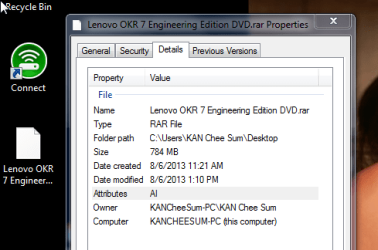
Hi - unfortunately, the entire file is .RAR The file is not being zipped or something like that.
Please refer to the printscreen of the file. Hence, how can i convert this file to .iso ? The instruction per the website below states that we need to burn the file into DVD and boot from the DVD itself. Hence, i do not know whether we can burn into the DVD using .RAR format? From what i read, only .ISO format can be burn into DVD. Please help.

http://www.nsaneforums.com/topic/166177-lenovo-onekey-recovery-7-engineering-dvd/
 

Attachments

  • Program Manager_2013-06-08_13-47-55.png
    Program Manager_2013-06-08_13-47-55.png
    16.5 KB · Views: 10

My Computer My Computer

At a glance

Windows 7 Home Premium 64Bit
Computer type
Laptop
Computer Manufacturer/Model Number
Lenovo Ideapad Y580
OS
Windows 7 Home Premium 64Bit
A rar file is also a compressed or "zipped" file exactly like a zip file. WinRAR, WinZIP, 7Zip and other compression apps can open the rar packets. The ISO file is in the packet and needs to be extracted.
 

My Computer My Computer

At a glance

Windows 10 Pro x64 EN-GB1.6 GHz Intel Core i7-720QM Processor6 GBATI Mobility Radeon HD 5850 Graphics
Computer type
Laptop
Computer Manufacturer/Model Number
HP ENVY 17-1150eg
OS
Windows 10 Pro x64 EN-GB
CPU
1.6 GHz Intel Core i7-720QM Processor
Memory
6 GB
Graphics Card(s)
ATI Mobility Radeon HD 5850 Graphics
Sound Card
Beats sound system with integrated subwoofer
Monitor(s) Displays
17" laptop display, 22" LED and 32" Full HD TV through HDMI
Screen Resolution
1600*900 (1), 1920*1080 (2&3)
Hard Drives
Internal: 2 x 500 GB SATA Hard Disk Drive 7200 rpm
External: 2TB for backups, 3TB USB3 network drive for media
Cooling
As Envy runs a bit warm, I have it on a Cooler Master pad
Keyboard
Logitech diNovo Media Desktop Laser (bluetooth)
Mouse
Logitech Performance Mouse MX
Internet Speed
50/10 Mbps VDSL
Antivirus
Windows Defender 4.3.9431.0
Browser
Maxthon 3.5.2., IE11
Back in the win 7 forums again, hello. Short note, if you download a zip, rar, exe, interpret this as a 'file' download - you can pop open the rar with a tool like winrar (usually uninstall after - just to keep things simple) to iso, this is your 'image' file, and so you need software to take a 'snapshot' of the cd contents. Google gizmo tools - this will also you to create an your iso file of your cd, once you have loaded it with content, and also virtualize your cd drive to load up your images.
 

My Computer My Computer

At a glance

Window 7 ult x64
OS
Window 7 ult x64
OK. Please correct me if i am wrong here. All i need to do is to download WinRAR. Then, unzip the .RAR file using WinRAR and look for the ISO image file. Thereafter, i just need to burn the ISO imahe file straight to the DVD.
Is this correct? Thanks for your help.
 

My Computer My Computer

At a glance

Windows 7 Home Premium 64Bit
Computer type
Laptop
Computer Manufacturer/Model Number
Lenovo Ideapad Y580
OS
Windows 7 Home Premium 64Bit
Yes.
 

My Computer My Computer

At a glance

Windows 10 Pro x64 EN-GB1.6 GHz Intel Core i7-720QM Processor6 GBATI Mobility Radeon HD 5850 Graphics
Computer type
Laptop
Computer Manufacturer/Model Number
HP ENVY 17-1150eg
OS
Windows 10 Pro x64 EN-GB
CPU
1.6 GHz Intel Core i7-720QM Processor
Memory
6 GB
Graphics Card(s)
ATI Mobility Radeon HD 5850 Graphics
Sound Card
Beats sound system with integrated subwoofer
Monitor(s) Displays
17" laptop display, 22" LED and 32" Full HD TV through HDMI
Screen Resolution
1600*900 (1), 1920*1080 (2&3)
Hard Drives
Internal: 2 x 500 GB SATA Hard Disk Drive 7200 rpm
External: 2TB for backups, 3TB USB3 network drive for media
Cooling
As Envy runs a bit warm, I have it on a Cooler Master pad
Keyboard
Logitech diNovo Media Desktop Laser (bluetooth)
Mouse
Logitech Performance Mouse MX
Internet Speed
50/10 Mbps VDSL
Antivirus
Windows Defender 4.3.9431.0
Browser
Maxthon 3.5.2., IE11
Thanks....have a nice day. :)
 

My Computer My Computer

At a glance

Windows 7 Home Premium 64Bit
Computer type
Laptop
Computer Manufacturer/Model Number
Lenovo Ideapad Y580
OS
Windows 7 Home Premium 64Bit
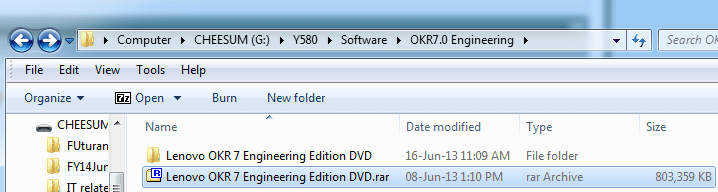
Hi all; It appears i am stuck in the mud...:o Need some simple step by step instruction on how to burn .RAR file into DVD.
Please refer to the printscreen below. I have extracted this Lenovo OKR7 Engineering Edition DVD.rar into the following folder using .winrar.
2013-06-16 11_49_02-G__Y580_Software_OKR7.0 Engineering.png

Now, i need to burn this to a DVD to create a bootable DVD.

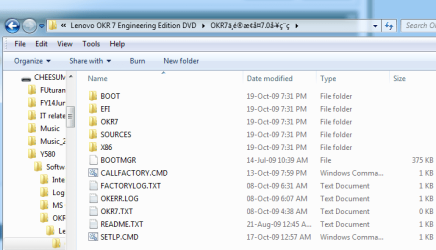
So, using Winrar, i actually extracted everything as shown in the folder below.
2013-06-16 11_50_38-G__Y580_Software_OKR7.0 Engineering_Lenovo OKR 7 Engineering Edition DVD_OKR.png

But then, do i burn all these files into the DVD? Seeking high and low, i tried looking for the iso file but cannot find any.

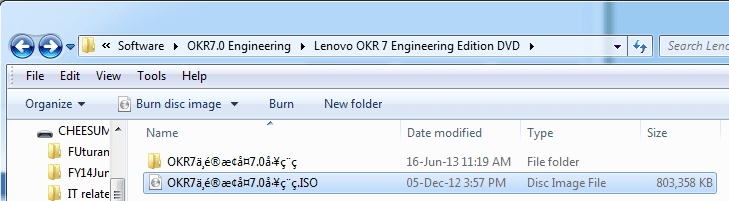
I try looking for the .iso format but the only one that i can find is this.
2013-06-16 11_52_45-G__Y580_Software_OKR7.0 Engineering_Lenovo OKR 7 Engineering Edition DVD.png

I burned the above file .iso into DVD and then try to boot from it. But nothing happens. Can anyone please help? After checking the DVD, it shows what i burn is winrar archive....
 

My Computer My Computer

At a glance

Windows 7 Home Premium 64Bit
Computer type
Laptop
Computer Manufacturer/Model Number
Lenovo Ideapad Y580
OS
Windows 7 Home Premium 64Bit
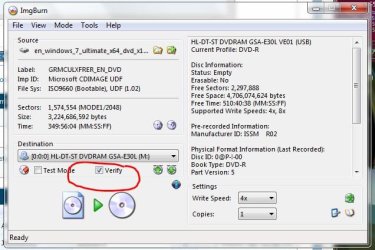
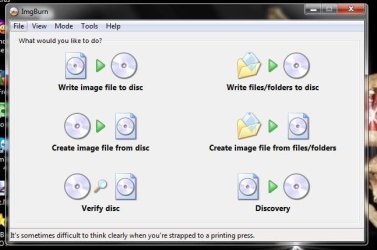
Did you try burning with ImgBurn ?
 

Attachments

  • ImgBurn_Verify.JPG
    ImgBurn_Verify.JPG
    54.5 KB · Views: 8
  • ImgBurn.JPG
    ImgBurn.JPG
    40.3 KB · Views: 6

My Computer My Computer

At a glance

Win7 Enterprise, Win7 x86 (Ult 7600), Win7 x6...AMD fx8350 4ghz, AMD-32 2400mhz, AMD-64 3200m...2gb, 4gb on the Ult 7600, 4gb on Technet RTM,...Draw my own Graphics, several nVidia cards
Computer type
PC/Desktop
Computer Manufacturer/Model Number
Built them myself, Science Experiments !
OS
Win7 Enterprise, Win7 x86 (Ult 7600), Win7 x64 Ult 7600, TechNet RTM on AMD x64 (2.8Ghz)
CPU
AMD fx8350 4ghz, AMD-32 2400mhz, AMD-64 3200mhz, AMDx64 2.8G
Motherboard
SIS 755, ECS-K8M890M-M (Ult 7600), GigaByte & others
Memory
2gb, 4gb on the Ult 7600, 4gb on Technet RTM, 32gb on FX8350
Graphics Card(s)
Draw my own Graphics, several nVidia cards
Sound Card
on motherboard
Monitor(s) Displays
19" flat scr, 28" I-Inc widescr,22" Emprex Widescr, 23" Acer
Screen Resolution
1280 x 1024, 1440 x 900, 1920 x 1080
Hard Drives
6 pata Ide HD's & 2 Sata HD's
added 80gb external on Ult 7600 computer,
numerous extra 1tb, 2TB, 3Tb SATA HD's
A collection of ext HD Docks w/ HDs
PSU
430w, 550w, 600w, 700, 800, etc
Case
All Generic Full Towers
Cooling
Open Air & a few fans, some w/ colored LEDs
Keyboard
Compaq & Dell recycled from GoodWill
Mouse
Made in China Optical Wired Mouse
Internet Speed
Fast Cable InterNet
Antivirus
AVG Free on 24 different Desktops, NO Problems!
Browser
IE 8 is preferred, but use FireFox sometimes
Other Info
Linksys Routers, switches, & Hubs
Too Many USB Flash Drives to count, Biggest is 64GB !
Eight computers in my home network.
Sixteen computers at my business network.
Linked via TeamViewer !
Lots of old used spare computer parts everywhere!
Hi ...nope. BUt where to get ImgBurn? Also, which files do i need to burn now? Do i burn all the files being extracted by WinRar into the DVD? Then, i can boot straight from the DVD itself?
 

My Computer My Computer

At a glance

Windows 7 Home Premium 64Bit
Computer type
Laptop
Computer Manufacturer/Model Number
Lenovo Ideapad Y580
OS
Windows 7 Home Premium 64Bit

My Computer My Computer

At a glance

Win7 Enterprise, Win7 x86 (Ult 7600), Win7 x6...AMD fx8350 4ghz, AMD-32 2400mhz, AMD-64 3200m...2gb, 4gb on the Ult 7600, 4gb on Technet RTM,...Draw my own Graphics, several nVidia cards
Computer type
PC/Desktop
Computer Manufacturer/Model Number
Built them myself, Science Experiments !
OS
Win7 Enterprise, Win7 x86 (Ult 7600), Win7 x64 Ult 7600, TechNet RTM on AMD x64 (2.8Ghz)
CPU
AMD fx8350 4ghz, AMD-32 2400mhz, AMD-64 3200mhz, AMDx64 2.8G
Motherboard
SIS 755, ECS-K8M890M-M (Ult 7600), GigaByte & others
Memory
2gb, 4gb on the Ult 7600, 4gb on Technet RTM, 32gb on FX8350
Graphics Card(s)
Draw my own Graphics, several nVidia cards
Sound Card
on motherboard
Monitor(s) Displays
19" flat scr, 28" I-Inc widescr,22" Emprex Widescr, 23" Acer
Screen Resolution
1280 x 1024, 1440 x 900, 1920 x 1080
Hard Drives
6 pata Ide HD's & 2 Sata HD's
added 80gb external on Ult 7600 computer,
numerous extra 1tb, 2TB, 3Tb SATA HD's
A collection of ext HD Docks w/ HDs
PSU
430w, 550w, 600w, 700, 800, etc
Case
All Generic Full Towers
Cooling
Open Air & a few fans, some w/ colored LEDs
Keyboard
Compaq & Dell recycled from GoodWill
Mouse
Made in China Optical Wired Mouse
Internet Speed
Fast Cable InterNet
Antivirus
AVG Free on 24 different Desktops, NO Problems!
Browser
IE 8 is preferred, but use FireFox sometimes
Other Info
Linksys Routers, switches, & Hubs
Too Many USB Flash Drives to count, Biggest is 64GB !
Eight computers in my home network.
Sixteen computers at my business network.
Linked via TeamViewer !
Lots of old used spare computer parts everywhere!
Nope...it is full of bloatware. I tried burning all the files being extracted from .winrar to the DVD and try to boot from the DVD but nothing happens. Think i have missed something here. Any other suggestions?
 

My Computer My Computer

At a glance

Windows 7 Home Premium 64Bit
Computer type
Laptop
Computer Manufacturer/Model Number
Lenovo Ideapad Y580
OS
Windows 7 Home Premium 64Bit
Did you download ImgBurn & install it ? Then right click on the .iso file and choose Open with ImgBurn. Burn at 4x speed with Verify ON.
 

My Computer My Computer

At a glance

Win7 Enterprise, Win7 x86 (Ult 7600), Win7 x6...AMD fx8350 4ghz, AMD-32 2400mhz, AMD-64 3200m...2gb, 4gb on the Ult 7600, 4gb on Technet RTM,...Draw my own Graphics, several nVidia cards
Computer type
PC/Desktop
Computer Manufacturer/Model Number
Built them myself, Science Experiments !
OS
Win7 Enterprise, Win7 x86 (Ult 7600), Win7 x64 Ult 7600, TechNet RTM on AMD x64 (2.8Ghz)
CPU
AMD fx8350 4ghz, AMD-32 2400mhz, AMD-64 3200mhz, AMDx64 2.8G
Motherboard
SIS 755, ECS-K8M890M-M (Ult 7600), GigaByte & others
Memory
2gb, 4gb on the Ult 7600, 4gb on Technet RTM, 32gb on FX8350
Graphics Card(s)
Draw my own Graphics, several nVidia cards
Sound Card
on motherboard
Monitor(s) Displays
19" flat scr, 28" I-Inc widescr,22" Emprex Widescr, 23" Acer
Screen Resolution
1280 x 1024, 1440 x 900, 1920 x 1080
Hard Drives
6 pata Ide HD's & 2 Sata HD's
added 80gb external on Ult 7600 computer,
numerous extra 1tb, 2TB, 3Tb SATA HD's
A collection of ext HD Docks w/ HDs
PSU
430w, 550w, 600w, 700, 800, etc
Case
All Generic Full Towers
Cooling
Open Air & a few fans, some w/ colored LEDs
Keyboard
Compaq & Dell recycled from GoodWill
Mouse
Made in China Optical Wired Mouse
Internet Speed
Fast Cable InterNet
Antivirus
AVG Free on 24 different Desktops, NO Problems!
Browser
IE 8 is preferred, but use FireFox sometimes
Other Info
Linksys Routers, switches, & Hubs
Too Many USB Flash Drives to count, Biggest is 64GB !
Eight computers in my home network.
Sixteen computers at my business network.
Linked via TeamViewer !
Lots of old used spare computer parts everywhere!
I just installed ImgBurn from Major Geeks, there was an option to install the Ask Tool bar, which I UNchecked, no bloatware.
Here is the developers' site.
The Official ImgBurn Website

If you extract all the files from the downloaded .rar files, you don't need an iso file. From your snip it has the Boot folder in the file list. You should burn those files, all of them, to a DVD. Don't burn the folder they are in. Open said folder and select all of them, then Send To> your blank DVD drive with a writable DVD in it.

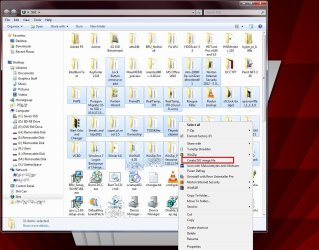
If you are bent on an iso, select all the un-rarred files and right click one of them, then click Create ISO Image File, as shown below. Then use ImgBurn (assume you already installed it for this to work) to make a bootable disk.
create iso1.jpg
 

My Computer My Computer

At a glance

Windows 7 Ultimate X64 SP1Intel i5-2550K, Differing ~4.4-4.8GHz No buil...16GB G.Skill Sniper 1866MHz @ 2133MHz 2x8GBASUS GTX650TIB-DC2OC-2GD5, (650TI Boost)
Computer type
PC/Desktop
Computer Manufacturer/Model Number
Home Built Desktop By DataTech
OS
Windows 7 Ultimate X64 SP1
CPU
Intel i5-2550K, Differing ~4.4-4.8GHz No built in GPU
Motherboard
ASUS P8Z68-V PRO/GEN3
Memory
16GB G.Skill Sniper 1866MHz @ 2133MHz 2x8GB
Graphics Card(s)
ASUS GTX650TIB-DC2OC-2GD5, (650TI Boost)
Sound Card
Onboard Realtek 5-1
Monitor(s) Displays
Samsung P2570HD
Screen Resolution
1920x1080
Hard Drives
Samsung 840 Pro 256GB SSD for OS, 500GB Seagate Constellation (Enterprise drive) for Data
PSU
Corsair HX650W
Case
Inwin Dragon Rider
Cooling
Hyper 212 EVO w/two Noctua fans, push-pull, @1300 RPM
Keyboard
E-Z Eyes, bright yellow keys with large characters
Mouse
steelseries SENSEI Laser Pro Gaming
Internet Speed
48-51Mbs Mbs down, 11 Mbs up Xfinity Cable
Antivirus
Norton Internet Security 2013
Browser
IE 10, Opera, Pale Moon if needed
Other Info
4 case fans, LG BluRay-RE, ASUS DVD-RW, Mr. Fusion power supply, 1.21 gigawatts.
an .iso file contains more than just files, if you want a functional DVD you can must burn it with a iso-burning program. Any self-respecting DVD burning program can do it, not just ImgBurn.
 

My Computer My Computer

At a glance

Win 7 Pro 64-bit 7601AMD Phenom 9650 QuadCore, revision DR-B35 GB yes I run 2x 2GB and 1x 1GB, different b...NVIDIA GeForce 9800 GT 512 Mb, unknown manufa...
Computer type
PC/Desktop
Computer Manufacturer/Model Number
custom built
OS
Win 7 Pro 64-bit 7601
CPU
AMD Phenom 9650 QuadCore, revision DR-B3
Motherboard
ASUS M4A78
Memory
5 GB yes I run 2x 2GB and 1x 1GB, different brand, spank me.
Graphics Card(s)
NVIDIA GeForce 9800 GT 512 Mb, unknown manufacturer.
Sound Card
Crappy Realtek Integrated Audio
Monitor(s) Displays
Fujitsu Siemens P19-3P
Screen Resolution
1280 x 1024 x 32 bits @ 60 Hz Oh yeah, 4:3 rocks!
Hard Drives
(1) MAXTOR S TM3320613AS SATA Disk Device (2) STM35004 18AS SATA Disk Device (3) TOSHIBA USB 2.5"-HDD
PSU
whatever, around 450w
Case
Scavenged from old company PC, 10+ years old
Cooling
CPU fan, GPU fan, case fan, nothing fancy
Keyboard
Microsoft, PS/2, white.
Mouse
Optical, logitec.
Internet Speed
effective max speeds: 70-ish kB/s down 30-ish kB/s up
Antivirus
Avira, free edition.
Browser
Firefox with FXChrome to make it look like Google Chrome :P
Other Info
Was discarded by previous owner due to "horrible performance".
Was running Win Xp from a IDE drive. Yeah. Was a pain.
SATA II drive and Win7 and it zips away! Yay!
Hi all;
Just downloaded the OKR 7.0 Engineering edition from FileFactory.
Source: Lenovo OneKey Recovery 7 Engineering DVD - Software Chat - nsane.forums

However, the file format is in .rar
How can i convert it to .iso format? This is because i want to burn the file to a DVD.

One side question. Have anyone owned a Lenovo Y580 that comes pre-installed with Windows 8 but then downgrade it to Windows 7 using UEFI and managed to use Lenovo OKR 7.0 Engineering edition?

Please help.....

What exactly are you trying to do? Are you trying to do a recovery?

I'm curious why you are downloading a file from File Factory to do that.

There is a one key recovery on the Lenovo site for the Y580,

Drivers and software - IdeaPad Y580 Notebook#

If you explain what it is you're trying to do, we can walk you through it.
 

My Computer My Computer

At a glance

Win 10 Pro x64Intel I5-2500K @3.3GHz16GB G.Skill Ripjaws X (4x4GB)EVGA GeForce 750 Ti SC 2GB
Computer type
PC/Desktop
Computer Manufacturer/Model Number
Self Built
OS
Win 10 Pro x64
CPU
Intel I5-2500K @3.3GHz
Motherboard
Asrock P67 Extreme4
Memory
16GB G.Skill Ripjaws X (4x4GB)
Graphics Card(s)
EVGA GeForce 750 Ti SC 2GB
Sound Card
ASUS Xonar DG 5.1 Channels 24-bit 96KHz PCI Interface Sound
Monitor(s) Displays
auria eq2367
Screen Resolution
1920 x 1080
Hard Drives
250GB Samsung 850 EVO SSD
1TB WD Blue
1TB Hitachi
PSU
SeaSonic X 650W 80 Plus Gold
Case
Corsair Obsidian 750D
Cooling
Corsair H60, Three 140mm case fans
Keyboard
Logitech Wireless Keyboard K520
Mouse
Logitech Wireless Mouse M310
Internet Speed
Wave Broadband ~ 100 dn 5 up
Antivirus
Windows Defender, Malwarebytes Premium
Browser
Edge, IE11, Chrome
Other Info
Laptop specs: HP g7-1365dx /
CPU: AMD A6-3420M APU with Radeon(tm) HD Graphics /
RAM: Crucial 8Gb (2x4Gb) /
SSD: Crucial M4-CT128M4SSD2 ATA Device/ FW 000F /
GFX: AMD Radeon HD 6520G /
OS: Windows 10 Pro x64
Windows 8 - Downgrade Instructions

Lenovo said:
Performing the recovery process for Windows 7


Notes:
•You must have an internal or external DVD drive to use the recovery discs.
•During the recovery process, all data on the hard disk drive will be deleted. Copy any important data or personal files that you want to keep onto removable media or a network drive before you start the recovery process.

To restore your computer to the original factory configuration using the recovery disc set, do the following:
1.Make the CD/DVD drive the first startup device in the startup sequence using the following procedure:
?Repeatedly press and release the F1 key when turning on the computer. When you hear multiple beeps or see a logo screen, release the F1 key. The Setup Utility program opens.
?Use the arrow keys to select Startup. Depending on your computer model, select Primary Boot Sequence, Boot, or Startup Sequence.
?Select the CD/DVD drive as the first boot device by following the instructions and the help messages on the screen.


LENOVO said:
6.Read the messages on the screen and then select GPT partition style or MBR partition style as you desire. Click Next. ¦Note: GPT partition style is selected by default.


cheesum said:
One side question. Have anyone owned a Lenovo Y580 that comes pre-installed with Windows 8 but then downgrade it to Windows 7 using UEFI and managed to use Lenovo OKR 7.0 Engineering edition ?
 

My Computer My Computer

At a glance

ME/XP/Vista/Win7
OS
ME/XP/Vista/Win7
Hi all;
Just downloaded the OKR 7.0 Engineering edition from FileFactory.
Source: Lenovo OneKey Recovery 7 Engineering DVD - Software Chat - nsane.forums

However, the file format is in .rar
How can i convert it to .iso format? This is because i want to burn the file to a DVD.

One side question. Have anyone owned a Lenovo Y580 that comes pre-installed with Windows 8 but then downgrade it to Windows 7 using UEFI and managed to use Lenovo OKR 7.0 Engineering edition?

Please help.....

What exactly are you trying to do? Are you trying to do a recovery?

I'm curious why you are downloading a file from File Factory to do that.

There is a one key recovery on the Lenovo site for the Y580,

Drivers and software - IdeaPad Y580 Notebook#

If you explain what it is you're trying to do, we can walk you through it.

Hi all - this is what i am trying to achieve. :) Please bear with me. It is abit long.
The Lenovo Ideapad Y580 comes pre-installed with Win8. Now, i am downgrading it to Win7 (home premium) 64 bits using BIOS mode. There is no need to perform a recovery because the laptop is spanking new, with NO personal data in it. I am doing a clean installation ~ wiping clean of everything ~ and then proceed to download the drivers one by one. The show stopper is detailed below.

The One Key Recovery 7 (OKR 7) driver at Lenovo website will NOT create a recovery partition (called Lenovo_Part) in the SSD. There is a button (called the Novo button) on the Ideapad whereby when we press on it, it will automatically create a recovery of everything in C Drive into this recovery partition. The OKR driver found at the Lenovo website is not able to create this recovery partition. We need to use the OKR 7 Engineering edition found at this link to create this recovery partition.
Lenovo OneKey Recovery 7 Engineering DVD - Software Chat - nsane.forums

We need to burn this OKR7 Engineering edition into a DVD and then boot from the DVD itself. Then, this will create a recovery partition in the SSD. Further instruction on how to use the OKR7.0 engineering edition can be found here.
Disk Partitioning and OneKey Recovery Feature - Page 37 - Lenovo Community

Hence, I managed to download the entire file (OKR7.0 Engineering edition) which is in (.RAR format) from FileFactory. To date, i have already extracted all the contents and burn all the contents into a DVD. The contents are shown in this picture.
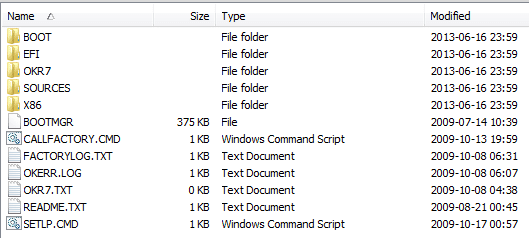
Contents Lenovo OKR7.0 Engineering Edition.png

Unfortunately, i cannot boot from this DVD and find it very frustrating. The instruction in the link above states we need to boot from this DVD to create a recovery partition in the SSD.

Hence, i need to know how to:
(1): Correctly burn all the contents in the .RAR file into the DVD, and more importantly,
(2): create a bootable disk so that i can boot from that disk and follow the instructions listed in this link:

Disk Partitioning and OneKey Recovery Feature - Page 37 - Lenovo Community

Thanks for the help and reading to the end of this post.

 

My Computer My Computer

At a glance

Windows 7 Home Premium 64Bit
Computer type
Laptop
Computer Manufacturer/Model Number
Lenovo Ideapad Y580
OS
Windows 7 Home Premium 64Bit
Hi all;
Just to follow up on the above. Have done everything that DocBrown requested and it worked....:-)
Thanks....hahaha...on reflection - silly me...i need to enter into BIOS and set the boot priority -----> being to boot from Optical Disk Drive....typical beginner's mistake.
:)

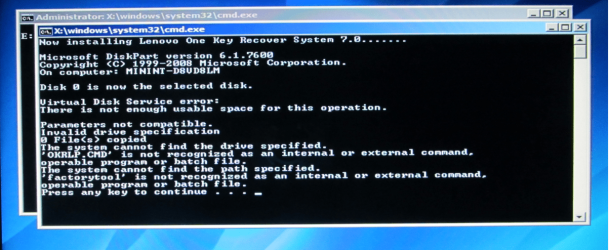
Anyway, this leads on to another problem. Apparently, OKR 7.0 Engineering edition does not allow me to part disk...i.e.; create a separate partition being LENOVO_PART where the recovery file will be kept in this partition ~!

Disk part failure.png

What can i do now???? ANy ideas???? Is this because my laptop Lenovo Y580 is not an original Windows 7 laptop but was a Windows 8 laptop? As being pointed out by this dude? That is why i cannot create the recovery partition?
Nsane forum.png

My current disk is still not showing the Lenovo_Part as shown below.
Disk partition.png

Please help. What can i do now? It is frustrating getting so far but being "shown the door".
 

My Computer My Computer

At a glance

Windows 7 Home Premium 64Bit
Computer type
Laptop
Computer Manufacturer/Model Number
Lenovo Ideapad Y580
OS
Windows 7 Home Premium 64Bit
Back
Top