How to convert from dual boot to single boot 2 HDDs - Win 7 & Vista64
Hello,
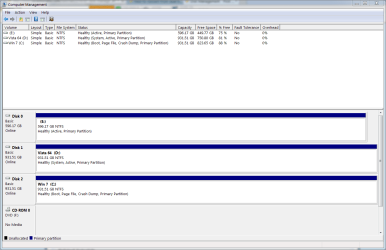
I'm trying to convert back to using just Win 7 after having a successful dual boot setup for a few years now. However, the multiple runs of the Win 7 startup repair have not moved the system files to my Win 7 HDD. Here is the data from the BCDEDIT command:
Microsoft Windows [Version 6.1.7601]
Copyright (c) 2009 Microsoft Corporation. All rights reserved.
C:\Windows\system32>bcdedit
Windows Boot Manager
--------------------
identifier {bootmgr}
device partition=D:
path \bootmgr
description Windows Boot Manager
locale en-US
inherit {globalsettings}
default {current}
resumeobject {470dc358-369b-11e2-8f7f-fc31c5b7de69}
displayorder {current}
{8ee6a7a6-4e60-11dd-8165-ce8fc0eea296}
{470dc35c-369b-11e2-8f7f-fc31c5b7de69}
toolsdisplayorder {memdiag}
timeout 30
Windows Boot Loader
-------------------
identifier {current}
device partition=C:
path \Windows\system32\winload.exe
description Windows 7
locale en-US
inherit {bootloadersettings}
recoverysequence {470dc35a-369b-11e2-8f7f-fc31c5b7de69}
recoveryenabled Yes
osdevice partition=C:
systemroot \Windows
resumeobject {470dc358-369b-11e2-8f7f-fc31c5b7de69}
nx OptIn
Windows Boot Loader
-------------------
identifier {8ee6a7a6-4e60-11dd-8165-ce8fc0eea296}
device partition=D:
path \Windows\system32\winload.exe
description Microsoft Windows Vista
locale en-US
inherit {bootloadersettings}
osdevice partition=D:
systemroot \Windows
resumeobject {8ee6a7a7-4e60-11dd-8165-ce8fc0eea296}
nx OptIn
Windows Boot Loader
-------------------
identifier {470dc35c-369b-11e2-8f7f-fc31c5b7de69}
device partition=E:
path \Windows\system32\winload.exe
description Windows Vista (TM) Home Premium (recovered)
locale en-US
osdevice partition=E:
systemroot \Windows
C:\Windows\system32>
I also would like to remove the bootup menu so the system boots straight into Win 7 instead of waiting on a selection. I suspect this will be remedied once I get the system files moved to the Win 7 drive, but wanted to note that request as well.
Thanks in advance for your help!
Hello,
I'm trying to convert back to using just Win 7 after having a successful dual boot setup for a few years now. However, the multiple runs of the Win 7 startup repair have not moved the system files to my Win 7 HDD. Here is the data from the BCDEDIT command:
Microsoft Windows [Version 6.1.7601]
Copyright (c) 2009 Microsoft Corporation. All rights reserved.
C:\Windows\system32>bcdedit
Windows Boot Manager
--------------------
identifier {bootmgr}
device partition=D:
path \bootmgr
description Windows Boot Manager
locale en-US
inherit {globalsettings}
default {current}
resumeobject {470dc358-369b-11e2-8f7f-fc31c5b7de69}
displayorder {current}
{8ee6a7a6-4e60-11dd-8165-ce8fc0eea296}
{470dc35c-369b-11e2-8f7f-fc31c5b7de69}
toolsdisplayorder {memdiag}
timeout 30
Windows Boot Loader
-------------------
identifier {current}
device partition=C:
path \Windows\system32\winload.exe
description Windows 7
locale en-US
inherit {bootloadersettings}
recoverysequence {470dc35a-369b-11e2-8f7f-fc31c5b7de69}
recoveryenabled Yes
osdevice partition=C:
systemroot \Windows
resumeobject {470dc358-369b-11e2-8f7f-fc31c5b7de69}
nx OptIn
Windows Boot Loader
-------------------
identifier {8ee6a7a6-4e60-11dd-8165-ce8fc0eea296}
device partition=D:
path \Windows\system32\winload.exe
description Microsoft Windows Vista
locale en-US
inherit {bootloadersettings}
osdevice partition=D:
systemroot \Windows
resumeobject {8ee6a7a7-4e60-11dd-8165-ce8fc0eea296}
nx OptIn
Windows Boot Loader
-------------------
identifier {470dc35c-369b-11e2-8f7f-fc31c5b7de69}
device partition=E:
path \Windows\system32\winload.exe
description Windows Vista (TM) Home Premium (recovered)
locale en-US
osdevice partition=E:
systemroot \Windows
C:\Windows\system32>
I also would like to remove the bootup menu so the system boots straight into Win 7 instead of waiting on a selection. I suspect this will be remedied once I get the system files moved to the Win 7 drive, but wanted to note that request as well.
Thanks in advance for your help!
My Computer
At a glance
Windows 7 Premium 64bitIntel Core 2 Duo e84008gb (4x2gb) OCZ PlatinumGeForce GTX 460 SE
- Computer type
- PC/Desktop
- Computer Manufacturer/Model Number
- Custom build
- OS
- Windows 7 Premium 64bit
- CPU
- Intel Core 2 Duo e8400
- Motherboard
- ASUS P5Q Deluxe
- Memory
- 8gb (4x2gb) OCZ Platinum
- Graphics Card(s)
- GeForce GTX 460 SE
- Hard Drives
- WD 1TB (2)
WD 640gb (1)
- Antivirus
- Norton
- Browser
- IE 10, Firefox