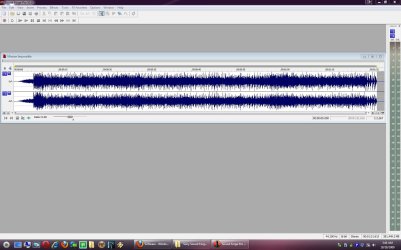
Sony Sound Forge 9.0e

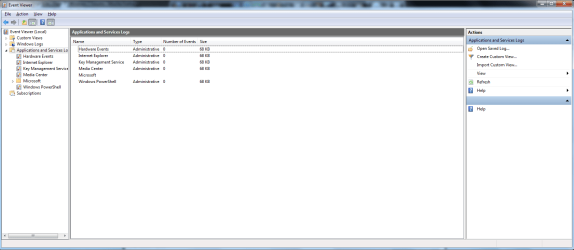
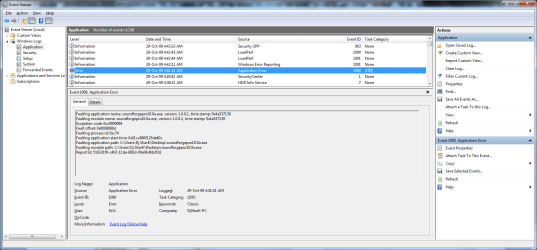
Could you go into event viewer (type event viewer in search) and see what errors are in the app tab that relate to this problem

Ken

Which one am i to look at? Sorry but i'm not all that familiar with this part. :o

Untitled.png
 

My Computer My Computer

Computer Manufacturer/Model Number
DIY
OS
Windows 7 Ultimate x86 7600
CPU
Intel Pentium Dual CPU E2180 @ 2.00 GHz
Motherboard
Gigabyte G41M Combo (rev 1.3)
Memory
1 x 2GB | 1 x 1GB Kingston 667
Graphics Card(s)
512MB Nvidia GeForce EN8500GT Silent Magic
Sound Card
Onboard HD 7.1 Audio
Monitor(s) Displays
22" LG W2242T
Screen Resolution
1680 X 1050
Hard Drives
1 x 500GB SATA Hitachi ( Internal )
1 x 1TB SATA Hitachi ( Internal )
1 x 320GB Western Digital ( External )
PSU
500W
Case
Coolermaster
Cooling
Coolermaster
Keyboard
Logitech Media Wireless Keyboard
Mouse
A4Tech G6 Wireless Mouse
Internet Speed
DL : 12MB/s | UL : 1.2MB/s
Other Info
I'm not a gamer. I don't overclock. I use my PC for web browsing, listening to music and watching HD movies.
Somebody? Anybody?

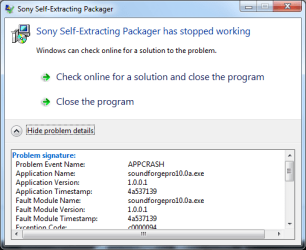
I tried installing Sony Vegas Movie Studio and it gave me the same error ( APPCRASH ) as my previous post as well.

Basically anything from Sony cannot work. :mad:

I guess there's no real fix for this till Sony does some updates. :rolleyes:
 

My Computer My Computer

Computer Manufacturer/Model Number
DIY
OS
Windows 7 Ultimate x86 7600
CPU
Intel Pentium Dual CPU E2180 @ 2.00 GHz
Motherboard
Gigabyte G41M Combo (rev 1.3)
Memory
1 x 2GB | 1 x 1GB Kingston 667
Graphics Card(s)
512MB Nvidia GeForce EN8500GT Silent Magic
Sound Card
Onboard HD 7.1 Audio
Monitor(s) Displays
22" LG W2242T
Screen Resolution
1680 X 1050
Hard Drives
1 x 500GB SATA Hitachi ( Internal )
1 x 1TB SATA Hitachi ( Internal )
1 x 320GB Western Digital ( External )
PSU
500W
Case
Coolermaster
Cooling
Coolermaster
Keyboard
Logitech Media Wireless Keyboard
Mouse
A4Tech G6 Wireless Mouse
Internet Speed
DL : 12MB/s | UL : 1.2MB/s
Other Info
I'm not a gamer. I don't overclock. I use my PC for web browsing, listening to music and watching HD movies.
Somebody? Anybody?

I tried installing Sony Vegas Movie Studio and it gave me the same error ( APPCRASH ) as my previous post as well.

Basically anything from Sony cannot work. :mad:

I guess there's no real fix for this till Sony does some updates. :rolleyes:

IM sorry DJ

You need to look here for the sony errors

Ken
 
Last edited:

My Computer My Computer

Computer Manufacturer/Model Number
HP Pavillion dv-7 1005 Tx
OS
Win 8 Release candidate 8400
CPU
[email protected]
Memory
4 gigs
Graphics Card(s)
Nvidia 9600M
Sound Card
HD built-in
Monitor(s) Displays
17" Wxga
Screen Resolution
1440x900
Cooling
none
Internet Speed
45Mb down 5Mb up
My turn to apologize. Sorry, i did not get any email notification this time. :confused:

Anyways, here's the error i got ( thanks for explaining in the pic ;) )

Code:
Faulting application name: soundforge90e-trial_enu.exe, version: 1.0.0.1, time stamp: 0x47a23419
Faulting module name: soundforge90e-trial_enu.exe, version: 1.0.0.1, time stamp: 0x47a23419
Exception code: 0xc0000094
Fault offset: 0x000613bd
Faulting process id: 0x1230
Faulting application start time: 0x01ca264eaa047497
Faulting application path: C:\Users\Dj SharK\Documents\Downloads\Programs\soundforge90e-trial_enu.exe
Faulting module path: C:\Users\Dj SharK\Documents\Downloads\Programs\soundforge90e-trial_enu.exe
Report Id: e8a496d7-9241-11de-b415-00e04d6b3fd2
 

My Computer My Computer

Computer Manufacturer/Model Number
DIY
OS
Windows 7 Ultimate x86 7600
CPU
Intel Pentium Dual CPU E2180 @ 2.00 GHz
Motherboard
Gigabyte G41M Combo (rev 1.3)
Memory
1 x 2GB | 1 x 1GB Kingston 667
Graphics Card(s)
512MB Nvidia GeForce EN8500GT Silent Magic
Sound Card
Onboard HD 7.1 Audio
Monitor(s) Displays
22" LG W2242T
Screen Resolution
1680 X 1050
Hard Drives
1 x 500GB SATA Hitachi ( Internal )
1 x 1TB SATA Hitachi ( Internal )
1 x 320GB Western Digital ( External )
PSU
500W
Case
Coolermaster
Cooling
Coolermaster
Keyboard
Logitech Media Wireless Keyboard
Mouse
A4Tech G6 Wireless Mouse
Internet Speed
DL : 12MB/s | UL : 1.2MB/s
Other Info
I'm not a gamer. I don't overclock. I use my PC for web browsing, listening to music and watching HD movies.
I just purchased a laptop with Vista. I also just purchased a new copy of Sound Forge 9. The free upgrade to Windows 7 is coming soon.

Should I install Sound Forge 9 on Vista, and then upgrade to Windows 7?

Or should I upgrade Vista to Windows 7 and THEN install Sound Forge 9?
 

My Computer My Computer

OS
Vista / Windows 7
hi dawgfan, and welcome to sevenforums,

install it now, so you can start using it right away!
 

My Computer My Computer

Computer Manufacturer/Model Number
mickey megabyte 1234
OS
ultimate 64 sp1
CPU
i5 2500K [email protected]
Motherboard
MSI P67A-GD53
Memory
8 gigs GSkill Ripjaws 1600
Graphics Card(s)
amd hd6950
Sound Card
creative x-fi gamer
Monitor(s) Displays
samsung 24"
Screen Resolution
1920x1080
Hard Drives
ocz vertex 2e 60 gig, samsung f3 1tb, buffalo 2tb ext
PSU
antec 550
Case
antec three hundred
Cooling
i'm a cooling fan
Keyboard
saitek eclipse ii
Mouse
logitech g3
Internet Speed
about 4 Mbps
Other Info
i love win7
Thanks, Mickey. Will there be a compatibility issue if I go ahead and install Sound Forge 9 now...then upgrade the OS to Windows 7? Will Sound Forge 9 operate on Windows 7 if I install it under Vista?
 

My Computer My Computer

OS
Vista / Windows 7
Yeah, it will. It runs great on Win 7 and it will if you install it to Vista and then do upgrade.
 

My Computer My Computer

Computer Manufacturer/Model Number
self built
OS
7600.20510 x86
CPU
P4 550 3.4 GHz HT running at 3.5 GHz
Motherboard
MSI PM8M3-V (MS-7211 v1.x) Micro-ATX mainboard
Memory
OCZ 2 GB(2x1GB) DDR400mHz running @ 414 mHz
Graphics Card(s)
HIS Radeon HD 3850 IceQ 3 Turbo HDMI Dual DL-DVI AGP
Sound Card
MOTU Traveler firewire studio interface 192 kHz 24 bit
Monitor(s) Displays
22" widescreen Acer X223W LCD, 17" Compaq P75 CRT
Screen Resolution
1680x1050 and 1280x1024
Hard Drives
SATA I x2 WD, 400 GB and 120 GB, SATA 2 WD Caviar Black 1 TB
PSU
350W generic
Case
Cybertronpc, it glows blue
Cooling
stock cpu fan, Ice-Q 3 gpu and system, many case fans
Keyboard
Logitch Classical Keyboard 200
Mouse
Logitech Mediaplay cordless
Internet Speed
1792/448 kbits/sec
Other Info
SATA II PCI fake RAID adapter, 1 GB Readyboost, original ATI Remote Wonder (even works with WMC perfectly), Logitech Rumblepad 2 game controller x2
I just checked Sony Sound Forge site. Their latest version supports Win7.

Sound Forge Pro 10 System Requirements

Microsoft® Windows® XP (SP2 or later), Windows Vista® (SP2 or later), or Windows 7

So i tried to install and *bam*, same old APPCRASH message. Something is wrong somewhere and i have no idea where to start.
 

My Computer My Computer

Computer Manufacturer/Model Number
DIY
OS
Windows 7 Ultimate x86 7600
CPU
Intel Pentium Dual CPU E2180 @ 2.00 GHz
Motherboard
Gigabyte G41M Combo (rev 1.3)
Memory
1 x 2GB | 1 x 1GB Kingston 667
Graphics Card(s)
512MB Nvidia GeForce EN8500GT Silent Magic
Sound Card
Onboard HD 7.1 Audio
Monitor(s) Displays
22" LG W2242T
Screen Resolution
1680 X 1050
Hard Drives
1 x 500GB SATA Hitachi ( Internal )
1 x 1TB SATA Hitachi ( Internal )
1 x 320GB Western Digital ( External )
PSU
500W
Case
Coolermaster
Cooling
Coolermaster
Keyboard
Logitech Media Wireless Keyboard
Mouse
A4Tech G6 Wireless Mouse
Internet Speed
DL : 12MB/s | UL : 1.2MB/s
Other Info
I'm not a gamer. I don't overclock. I use my PC for web browsing, listening to music and watching HD movies.
I'm getting version 10 right now. Awesome! Haven't had an update to this app in years!

I'll report back after I install and test.
 

My Computer My Computer

Computer Manufacturer/Model Number
self built
OS
7600.20510 x86
CPU
P4 550 3.4 GHz HT running at 3.5 GHz
Motherboard
MSI PM8M3-V (MS-7211 v1.x) Micro-ATX mainboard
Memory
OCZ 2 GB(2x1GB) DDR400mHz running @ 414 mHz
Graphics Card(s)
HIS Radeon HD 3850 IceQ 3 Turbo HDMI Dual DL-DVI AGP
Sound Card
MOTU Traveler firewire studio interface 192 kHz 24 bit
Monitor(s) Displays
22" widescreen Acer X223W LCD, 17" Compaq P75 CRT
Screen Resolution
1680x1050 and 1280x1024
Hard Drives
SATA I x2 WD, 400 GB and 120 GB, SATA 2 WD Caviar Black 1 TB
PSU
350W generic
Case
Cybertronpc, it glows blue
Cooling
stock cpu fan, Ice-Q 3 gpu and system, many case fans
Keyboard
Logitch Classical Keyboard 200
Mouse
Logitech Mediaplay cordless
Internet Speed
1792/448 kbits/sec
Other Info
SATA II PCI fake RAID adapter, 1 GB Readyboost, original ATI Remote Wonder (even works with WMC perfectly), Logitech Rumblepad 2 game controller x2
Installed. Very surprised to see that it opens DVD MPEG-2 videos now with .ac3 audio. Sucky part is that it can not open an .ac3 audio file on its own. Maybe I'll figure something out.

DJ Shark, try updating your directx, remove all codec packs you installed. That may help you install.
 

Attachments

  • Capture.JPG
    Capture.JPG
    152.4 KB · Views: 62

My Computer My Computer

Computer Manufacturer/Model Number
self built
OS
7600.20510 x86
CPU
P4 550 3.4 GHz HT running at 3.5 GHz
Motherboard
MSI PM8M3-V (MS-7211 v1.x) Micro-ATX mainboard
Memory
OCZ 2 GB(2x1GB) DDR400mHz running @ 414 mHz
Graphics Card(s)
HIS Radeon HD 3850 IceQ 3 Turbo HDMI Dual DL-DVI AGP
Sound Card
MOTU Traveler firewire studio interface 192 kHz 24 bit
Monitor(s) Displays
22" widescreen Acer X223W LCD, 17" Compaq P75 CRT
Screen Resolution
1680x1050 and 1280x1024
Hard Drives
SATA I x2 WD, 400 GB and 120 GB, SATA 2 WD Caviar Black 1 TB
PSU
350W generic
Case
Cybertronpc, it glows blue
Cooling
stock cpu fan, Ice-Q 3 gpu and system, many case fans
Keyboard
Logitch Classical Keyboard 200
Mouse
Logitech Mediaplay cordless
Internet Speed
1792/448 kbits/sec
Other Info
SATA II PCI fake RAID adapter, 1 GB Readyboost, original ATI Remote Wonder (even works with WMC perfectly), Logitech Rumblepad 2 game controller x2
Hi torrentg.

Thanks for your response.

Anyways, i did everything you suggested and even updated my graphic card ( nVidia ) and still getting APPCRASH. I'm on DirectX 11. No idea what's wrong.

1.png


Event Viewer

Untitled1.png
 

My Computer My Computer

Computer Manufacturer/Model Number
DIY
OS
Windows 7 Ultimate x86 7600
CPU
Intel Pentium Dual CPU E2180 @ 2.00 GHz
Motherboard
Gigabyte G41M Combo (rev 1.3)
Memory
1 x 2GB | 1 x 1GB Kingston 667
Graphics Card(s)
512MB Nvidia GeForce EN8500GT Silent Magic
Sound Card
Onboard HD 7.1 Audio
Monitor(s) Displays
22" LG W2242T
Screen Resolution
1680 X 1050
Hard Drives
1 x 500GB SATA Hitachi ( Internal )
1 x 1TB SATA Hitachi ( Internal )
1 x 320GB Western Digital ( External )
PSU
500W
Case
Coolermaster
Cooling
Coolermaster
Keyboard
Logitech Media Wireless Keyboard
Mouse
A4Tech G6 Wireless Mouse
Internet Speed
DL : 12MB/s | UL : 1.2MB/s
Other Info
I'm not a gamer. I don't overclock. I use my PC for web browsing, listening to music and watching HD movies.
I briefly researched for you. Seems problem can be caused by external hard drive or installing a really old application or driver to your system previously.
Maybe an old digital camera driver on your system....something like that.

Does any of that remind you of your system at all?
 

My Computer My Computer

Computer Manufacturer/Model Number
self built
OS
7600.20510 x86
CPU
P4 550 3.4 GHz HT running at 3.5 GHz
Motherboard
MSI PM8M3-V (MS-7211 v1.x) Micro-ATX mainboard
Memory
OCZ 2 GB(2x1GB) DDR400mHz running @ 414 mHz
Graphics Card(s)
HIS Radeon HD 3850 IceQ 3 Turbo HDMI Dual DL-DVI AGP
Sound Card
MOTU Traveler firewire studio interface 192 kHz 24 bit
Monitor(s) Displays
22" widescreen Acer X223W LCD, 17" Compaq P75 CRT
Screen Resolution
1680x1050 and 1280x1024
Hard Drives
SATA I x2 WD, 400 GB and 120 GB, SATA 2 WD Caviar Black 1 TB
PSU
350W generic
Case
Cybertronpc, it glows blue
Cooling
stock cpu fan, Ice-Q 3 gpu and system, many case fans
Keyboard
Logitch Classical Keyboard 200
Mouse
Logitech Mediaplay cordless
Internet Speed
1792/448 kbits/sec
Other Info
SATA II PCI fake RAID adapter, 1 GB Readyboost, original ATI Remote Wonder (even works with WMC perfectly), Logitech Rumblepad 2 game controller x2
I do have an external hard drive but it's not hooked up at the point of installation.

Really old application or driver? Hmm.. I'm very sure there are a couple programs on my PC that is not Windows 7 compatible but it did install anyways. Driver wise, i always get them on the official sites.

Anywho, i sent a message to Sonys' Technical Support dept last night and here's the response. It did not work for me but maybe it might work for somebody else that's having this problem.

Hi Danny,

Thank you for contacting Sony Creative Software. Please disable Startup applications and Background Services. To disable these items from starting, you can go to the Start menu and select Run. Then type msconfig into the field provided and press Enter or OK. In Windows Vista, there is a field at the bottom of the Start menu that you can type directly into.

Open the Startup tab, press the “Disable All” button and then Apply. Then go into the Services Tab, check the box next to “Hide All Microsoft Services” at the bottom of the window and choose Disable All. Then press Apply and OK and reboot the computer.

** Note: This measure is for testing purposes. If you are disabling these services, none of these services are critical for your computer to start or function. We recommend this troubleshooting step to remove as many variables from the problem as possible; though you may also be disabling desired services like anti-virus or portable device recognition services like iPod Service, etc. If this solves your issue, you may want to repeat the steps above to open the MSCONFIG dialog so that you can re-enable most of these services. You may want to spend some time re-enabling these one at a time until you find the culprit. Most likely there are just one or two services that are causing the conflict. To re-enable these services, just reverse the instructions.

Try to install with these services disabled. Please respond back with your findings. If you still have a follow-up question on this particular incident, please feel free to update it. If you have a completely different question, please create a new incident.

Sincerely,

Kevin K.
 

My Computer My Computer

Computer Manufacturer/Model Number
DIY
OS
Windows 7 Ultimate x86 7600
CPU
Intel Pentium Dual CPU E2180 @ 2.00 GHz
Motherboard
Gigabyte G41M Combo (rev 1.3)
Memory
1 x 2GB | 1 x 1GB Kingston 667
Graphics Card(s)
512MB Nvidia GeForce EN8500GT Silent Magic
Sound Card
Onboard HD 7.1 Audio
Monitor(s) Displays
22" LG W2242T
Screen Resolution
1680 X 1050
Hard Drives
1 x 500GB SATA Hitachi ( Internal )
1 x 1TB SATA Hitachi ( Internal )
1 x 320GB Western Digital ( External )
PSU
500W
Case
Coolermaster
Cooling
Coolermaster
Keyboard
Logitech Media Wireless Keyboard
Mouse
A4Tech G6 Wireless Mouse
Internet Speed
DL : 12MB/s | UL : 1.2MB/s
Other Info
I'm not a gamer. I don't overclock. I use my PC for web browsing, listening to music and watching HD movies.
You have to set the recording level at 1 on the sliding scale of 1 to 100 forWin 7 . Default setting works fine with Vista and XP.
 

My Computer My Computer

OS
win 7
Back
Top