Want to double-click to add to list in WMP 12

sugardaddy11

New member
Local time
4:29 PM
Messages
5
I've read that Library options to configure what action to take when double clicking files (Add to List, Play All, Play Selected Items) have been removed. Is this true?

I habitually double-click songs inteding for them to go to the end of my currently-playing list of music. I may have compiled a pretty long list and double-click a song and it completely clears the entire list, stops the currently playing song, and plays the song I double-clicked.
 

My Computer My Computer

At a glance

Windows 7 Home Premium 32bit
OS
Windows 7 Home Premium 32bit
Does no one else find this to be a problem? It is a dealbreaker for me. I want to use Windows Media Player, but I will not use it if everytime anyone double clicks a song, it erases my whole currently playing list. Is there a way to set double-clicking a song to add the song to the end of the currently playing list like you can in Winamp?
 

My Computer My Computer

At a glance

Windows 7 Home Premium 32bit
OS
Windows 7 Home Premium 32bit
can you retrain your fingers to right click and select add to... that way?
 

My Computer My Computer

At a glance

Windows 7 Ultimate x641.80 GHz Intel Core 2 Duo processor T71003 gig ddr2NVIDIA GeForce 8400M GS
Computer Manufacturer/Model Number
HP dv6519tx
OS
Windows 7 Ultimate x64
CPU
1.80 GHz Intel Core 2 Duo processor T7100
Memory
3 gig ddr2
Graphics Card(s)
NVIDIA GeForce 8400M GS
Sound Card
Realtek High Definition Audio
Monitor(s) Displays
15.4” WXGA High Definition BrightView Widescreen
Screen Resolution
1280 x 800
Hard Drives
Hitachi 320 GB (5400 rpm)
PSU
90 W AC Power Adapter
Cooling
Kitchen plate under the lappy
Keyboard
101 key compatible
Mouse
Touch Pad with On/Off button and dedicated vertical Scroll
Internet Speed
Three Wireless internet prepaid using E160G USB dongle
In XP there was a file type tab in the file properties. It was removed in Vista since the Microsoft team assumed that too many noobs messed up their file type associations that way. So now you need 3rd party software.

get the File type manager from nirsoft, scroll down to MP3 (or whatever filetype you use) rightclick and change the default action.
make sure you set a restore point first (in case things get messed up).

-DG
 

My Computer My Computer

At a glance

Windows 7 Ultimate x86DualCore AMD Athlon 64 X2, 2600 MHz 5200+Samsung 2GB DDR2Onboard NVIDIA GeForce 6150SE nForce 430
Computer Manufacturer/Model Number
HP m8000n
OS
Windows 7 Ultimate x86
CPU
DualCore AMD Athlon 64 X2, 2600 MHz 5200+
Motherboard
Asus M2N68-LA (Narra)
Memory
Samsung 2GB DDR2
Graphics Card(s)
Onboard NVIDIA GeForce 6150SE nForce 430
Sound Card
Onboard nVIDIA nForce 6100-430 (MCP61P)
Monitor(s) Displays
Westinghouse 19" LED
Screen Resolution
1280x1024
Hard Drives
SATA II Seagate Barracuda 500GB
USB II WD Elements 500GB
USB II WD My Book 1TB
USB II WD My Book 2TB
PSU
Stock (HP)
Case
Stock (HP)
Cooling
Stock
Keyboard
Logitech Classic KB 200
Mouse
Standard HP opticle USB mouse
can you retrain your fingers to right click and select add to... that way?

I probably could retrain my fingers, but when I get other people over here, they're going to be messing with it and I can almost gaurantee you they'll intuitively double click a song and erase and entire playlist.
 

My Computer My Computer

At a glance

Windows 7 Home Premium 32bit
OS
Windows 7 Home Premium 32bit
In XP there was a file type tab in the file properties. It was removed in Vista since the Microsoft team assumed that too many noobs messed up their file type associations that way. So now you need 3rd party software.

get the File type manager from nirsoft, scroll down to MP3 (or whatever filetype you use) rightclick and change the default action.
make sure you set a restore point first (in case things get messed up).

-DG
I'm o.k. with the file types. Is downloading this File Type Manager going to allow me to set songs to go to the end of the currently playing list without interupting the currently playing song in that playlist?
 

My Computer My Computer

At a glance

Windows 7 Home Premium 32bit
OS
Windows 7 Home Premium 32bit
OK, I got it. first of all sorry for putting out the wrong link The filemanager you need is found HERE
After running the filemanager you need to wait a couple seconds until the list is populated.
Next you scroll down to the .mp3 entry.
Now right click in the Bottom portion and chose NEW Action
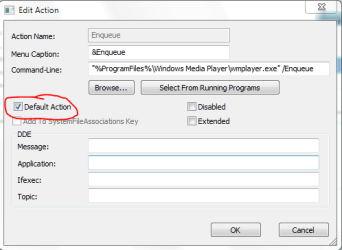
There you enter the following
Capture.PNG
(This is the Edit Box because I already created that entry, but it's identical...most important: mind that checkbox)

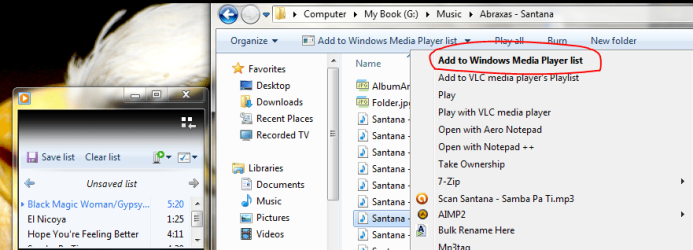
Then you end up with a context menu similar to this one and a the 1st double click enqueues and plays
all subsequent double clicks just enqueue without interrupting the actually played song.
Capture2.PNG

Another "Quirk" since Vista: If you don't get the "Add to Windows Media Player list" you need to set the Folder in question to Music or Video Via Properties/Customize

Enjoy
-DG
 

My Computer My Computer

At a glance

Windows 7 Ultimate x86DualCore AMD Athlon 64 X2, 2600 MHz 5200+Samsung 2GB DDR2Onboard NVIDIA GeForce 6150SE nForce 430
Computer Manufacturer/Model Number
HP m8000n
OS
Windows 7 Ultimate x86
CPU
DualCore AMD Athlon 64 X2, 2600 MHz 5200+
Motherboard
Asus M2N68-LA (Narra)
Memory
Samsung 2GB DDR2
Graphics Card(s)
Onboard NVIDIA GeForce 6150SE nForce 430
Sound Card
Onboard nVIDIA nForce 6100-430 (MCP61P)
Monitor(s) Displays
Westinghouse 19" LED
Screen Resolution
1280x1024
Hard Drives
SATA II Seagate Barracuda 500GB
USB II WD Elements 500GB
USB II WD My Book 1TB
USB II WD My Book 2TB
PSU
Stock (HP)
Case
Stock (HP)
Cooling
Stock
Keyboard
Logitech Classic KB 200
Mouse
Standard HP opticle USB mouse
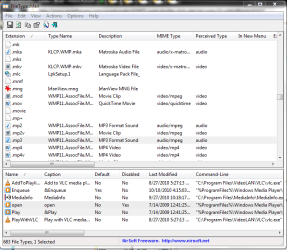
This is how the filemanager looks in the bottom part you see all possible (already created) actions for the selected file type. The Action set as DEFAULT is what is executed on double click (and always shown in BOLD in the context menu )
Capture3.PNG

-DG
 

My Computer My Computer

At a glance

Windows 7 Ultimate x86DualCore AMD Athlon 64 X2, 2600 MHz 5200+Samsung 2GB DDR2Onboard NVIDIA GeForce 6150SE nForce 430
Computer Manufacturer/Model Number
HP m8000n
OS
Windows 7 Ultimate x86
CPU
DualCore AMD Athlon 64 X2, 2600 MHz 5200+
Motherboard
Asus M2N68-LA (Narra)
Memory
Samsung 2GB DDR2
Graphics Card(s)
Onboard NVIDIA GeForce 6150SE nForce 430
Sound Card
Onboard nVIDIA nForce 6100-430 (MCP61P)
Monitor(s) Displays
Westinghouse 19" LED
Screen Resolution
1280x1024
Hard Drives
SATA II Seagate Barracuda 500GB
USB II WD Elements 500GB
USB II WD My Book 1TB
USB II WD My Book 2TB
PSU
Stock (HP)
Case
Stock (HP)
Cooling
Stock
Keyboard
Logitech Classic KB 200
Mouse
Standard HP opticle USB mouse
This is how the filemanager looks in the bottom part you see all possible (already created) actions for the selected file type. The Action set as DEFAULT is what is executed on double click (and always shown in BOLD in the context menu )
View attachment 103642

-DG
Thanks.
Well this works from a folder, but what about while in the Library in Window Media Player? It still cancels the playing song when I double click on a song in the Library.
 

My Computer My Computer

At a glance

Windows 7 Home Premium 32bit
OS
Windows 7 Home Premium 32bit
Sorry...I don't use WMP as Audio player so I can't tell you where to look to make Play Next in the Library function the default action. For all I know it could be hard coded .
Looks like you need to get used to right clicks (or only double click on a pre-created/saved set of playlists.
-DG
 

My Computer My Computer

At a glance

Windows 7 Ultimate x86DualCore AMD Athlon 64 X2, 2600 MHz 5200+Samsung 2GB DDR2Onboard NVIDIA GeForce 6150SE nForce 430
Computer Manufacturer/Model Number
HP m8000n
OS
Windows 7 Ultimate x86
CPU
DualCore AMD Athlon 64 X2, 2600 MHz 5200+
Motherboard
Asus M2N68-LA (Narra)
Memory
Samsung 2GB DDR2
Graphics Card(s)
Onboard NVIDIA GeForce 6150SE nForce 430
Sound Card
Onboard nVIDIA nForce 6100-430 (MCP61P)
Monitor(s) Displays
Westinghouse 19" LED
Screen Resolution
1280x1024
Hard Drives
SATA II Seagate Barracuda 500GB
USB II WD Elements 500GB
USB II WD My Book 1TB
USB II WD My Book 2TB
PSU
Stock (HP)
Case
Stock (HP)
Cooling
Stock
Keyboard
Logitech Classic KB 200
Mouse
Standard HP opticle USB mouse
Back
Top