No sound via HDMI to ASUS Monitor

tnguyen9175

New member
Local time
7:51 PM
Messages
1
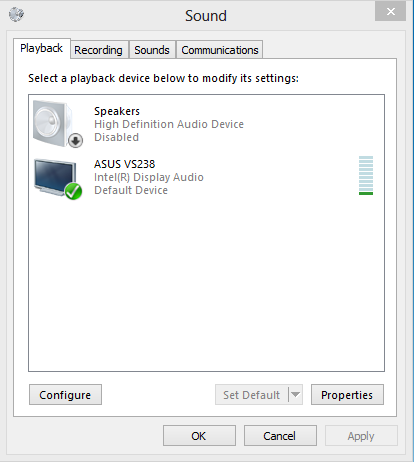
Despite going through the basic steps in disabling any other playback device but my monitor, I am still having trouble getting any sound on my monitor. I have an Asus VS238H-P and it is plugged from my laptop by a HDMI cable. Here is what I currently have:

d92ee9f9c34a2ce4d596d566e177b05e.png


Any idea what is wrong? If any additional information is needed, I'd be glad to provide it to you.
 

My Computer My Computer

At a glance

Windows 8 64 bit
Computer type
PC/Desktop
OS
Windows 8 64 bit
tnguyen9175 welcome to the Seven Forums.

Is this the monitor?

http://www.asus.com/Monitors_Projectors/VS238H/

If so it doesn't have any speakers in it. What it has is a headphone jack on the back, which would require self powered speakers of headphones to get sound from it.

P.S. You also don't have the driver for the built in audio, as it is showing as "high definition audio device". It would show the proper name of whatever the built in audio is (Realtek, IDT, etc) with the proper driver installed.
 

My Computer My Computer

At a glance

Win 7 Ultimate x64FX-8350 @ 4.6 GHz so farADATA XPG V1 Series Black 8GB DDR3 1600Sapphire R9 270x Dual-X

Computer type
PC/Desktop
Computer Manufacturer/Model Number
Me
OS
Win 7 Ultimate x64
CPU
FX-8350 @ 4.6 GHz so far
Motherboard
Asus M5A97 EVO
Memory
ADATA XPG V1 Series Black 8GB DDR3 1600
Graphics Card(s)
Sapphire R9 270x Dual-X
Sound Card
Xonar DGX w/ Corsair Vengence 1300
Monitor(s) Displays
Acer S232HL Abid
Screen Resolution
1920x1080
Hard Drives
120 GB OCZ Vertex 3
500 GB Seagate 7200.12
PSU
Antec Earthwatts 650W Green
Case
Antec Three Hundred
Cooling
Cooler Master 212 EVO
Keyboard
Logitech G510
Mouse
Logitech G500s
Internet Speed
35000/3000
Back
Top