- Local time
- 7:06 PM
- Messages
- 657
I have 2 monitors that are 24'. One is an asus
Amazon.com: ASUS VS24AH-P 24.1" WUXGA 1920x1200 HDMI DVI VGA Eye Care Monitor: Computers & Accessories
I used it for a few years before one day... there was a short power outage and i notice everything turned off and then when everything turned back on, my monitor did not turn on. I brought my monitor to a few repair shops and they both said it no longer works. I also use windows 10... but i assume this isn't a big deal compared to windows 7 as this is a monitor issue.
I then got another monitor... it was a used one bought from a computer store.. reason because i needed 1920x1200 resolution and its impossible to find it here where im located.
Its a samsung syncmaster t240hd.
I only used one monitor connected to my dell xps 15 9550 via hdmi to hdmi cable. However not that long ago, i decided to take my old asus monitor and tried to connect it to the power... strangely enough it turned on. I was shocked at this because i basically had it in closet for over 1.5 years... i never threw it away. So then i connected it to laptop via hdmi to hdmi and it worked. I then bought a usb c to hdmi cable and connected my laptop to that asus monitor... while connecting same hdmi to hdmi from laptop to samsung monitor. Thus i was using 2 monitors and it was great.
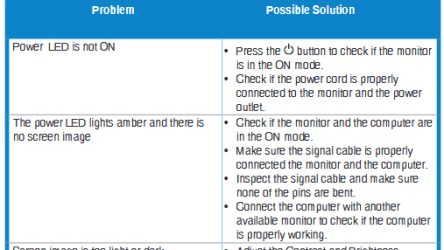
The thing though is just recently when my laptop and monitors are turned on... both monitors suddenly turned off. I thought it was a light power outage but it wasn't as the fan still works etc. Then i notice only the samsung monitor turned on and not the asus. I then unconnected the usb-c to hdmi cable and plug it back in. However when i did this, nothing shows up on the asus. I unplugged everything from asus monitor and connect it back to laptop, nothing. I then decide to unplug my hdmi to hdmi cable from laptop to samsung and connect that to my asus monitor. Nothing shows up on my asus monitor... however, you do see like the wallpaper on my dell laptop screen... but nothing shows up on asus monitor.
1. Does this mean my asus monitor no longer works? This worried me because i basically kept it in the apartment for 1.5 years... i put it like in the top of some storage space i have in my apartment. It wasn't in a closet though. However, my apartment is pretty humid because where im located, its pretty hot. I do have fans on always and sometimes air conditioner. Is there a way to try to make this asus monitor work again? The big thing is i cannot get this monitor here where im located 1920x1200.
2. I heard this is very common with humidity right? Like if its too hot, then it could damage monitor? However, i have fan on and its not that bad. Both monitors just suddenly turned off and now the asus can't turn back on.
3. Every night when i turned off my computer since that asus monitor worked, i always powered off my samsung monitor. The asus one... i would just unplug the usb-c part from laptop from it and keep the hdmi part on the other end. I never powered it off. The thing was i wasn't sure where the power on/off was at the time but just recognized now its right under the monitor. But could this have caused this? There were few nights where i did not disconnect usb-c to hdmi cable and just let it like that... but had turned off my computer. Could that have caused some damage to it? Or was the damage already done about 1.5 years ago. Because what worried me was when the monitor started to work again... it would only work temporary. I heard lot of cases where monitors are like this due to the weather of where im located with other ppl with monitors. Thus that rarely happens in the us.
Is there any tips/advice you have for me? Thing is i really need both monitors to work and i cant get this resolution where im located. But is the both monitor thing turning off meant something? The thing is i dont think its the usb-c to hdmi cable because connecting hdmi to hdmi with that asus monitor didn't seem to work. But even if it doesn't, you should have that wallpaper on your laptop screen right? So im not sure what to do here because i can't get a monitor like this here.
The thing is when this happened, both my monitors went dark for a bit... until a few seconds and then only the samsung one turned on. Is there any way to test if the asus still works? If it doesn't work, wouldn't that mean connecting an hdmi to hdmi cable from laptop to monitor... mean my laptop would still have same icons on screen though? Because they do not.
Thanks.
Amazon.com: ASUS VS24AH-P 24.1" WUXGA 1920x1200 HDMI DVI VGA Eye Care Monitor: Computers & Accessories
I used it for a few years before one day... there was a short power outage and i notice everything turned off and then when everything turned back on, my monitor did not turn on. I brought my monitor to a few repair shops and they both said it no longer works. I also use windows 10... but i assume this isn't a big deal compared to windows 7 as this is a monitor issue.
I then got another monitor... it was a used one bought from a computer store.. reason because i needed 1920x1200 resolution and its impossible to find it here where im located.
Its a samsung syncmaster t240hd.
I only used one monitor connected to my dell xps 15 9550 via hdmi to hdmi cable. However not that long ago, i decided to take my old asus monitor and tried to connect it to the power... strangely enough it turned on. I was shocked at this because i basically had it in closet for over 1.5 years... i never threw it away. So then i connected it to laptop via hdmi to hdmi and it worked. I then bought a usb c to hdmi cable and connected my laptop to that asus monitor... while connecting same hdmi to hdmi from laptop to samsung monitor. Thus i was using 2 monitors and it was great.
The thing though is just recently when my laptop and monitors are turned on... both monitors suddenly turned off. I thought it was a light power outage but it wasn't as the fan still works etc. Then i notice only the samsung monitor turned on and not the asus. I then unconnected the usb-c to hdmi cable and plug it back in. However when i did this, nothing shows up on the asus. I unplugged everything from asus monitor and connect it back to laptop, nothing. I then decide to unplug my hdmi to hdmi cable from laptop to samsung and connect that to my asus monitor. Nothing shows up on my asus monitor... however, you do see like the wallpaper on my dell laptop screen... but nothing shows up on asus monitor.
1. Does this mean my asus monitor no longer works? This worried me because i basically kept it in the apartment for 1.5 years... i put it like in the top of some storage space i have in my apartment. It wasn't in a closet though. However, my apartment is pretty humid because where im located, its pretty hot. I do have fans on always and sometimes air conditioner. Is there a way to try to make this asus monitor work again? The big thing is i cannot get this monitor here where im located 1920x1200.
2. I heard this is very common with humidity right? Like if its too hot, then it could damage monitor? However, i have fan on and its not that bad. Both monitors just suddenly turned off and now the asus can't turn back on.
3. Every night when i turned off my computer since that asus monitor worked, i always powered off my samsung monitor. The asus one... i would just unplug the usb-c part from laptop from it and keep the hdmi part on the other end. I never powered it off. The thing was i wasn't sure where the power on/off was at the time but just recognized now its right under the monitor. But could this have caused this? There were few nights where i did not disconnect usb-c to hdmi cable and just let it like that... but had turned off my computer. Could that have caused some damage to it? Or was the damage already done about 1.5 years ago. Because what worried me was when the monitor started to work again... it would only work temporary. I heard lot of cases where monitors are like this due to the weather of where im located with other ppl with monitors. Thus that rarely happens in the us.
Is there any tips/advice you have for me? Thing is i really need both monitors to work and i cant get this resolution where im located. But is the both monitor thing turning off meant something? The thing is i dont think its the usb-c to hdmi cable because connecting hdmi to hdmi with that asus monitor didn't seem to work. But even if it doesn't, you should have that wallpaper on your laptop screen right? So im not sure what to do here because i can't get a monitor like this here.
The thing is when this happened, both my monitors went dark for a bit... until a few seconds and then only the samsung one turned on. Is there any way to test if the asus still works? If it doesn't work, wouldn't that mean connecting an hdmi to hdmi cable from laptop to monitor... mean my laptop would still have same icons on screen though? Because they do not.
Thanks.
My Computer
At a glance
Windows 10 Pro
- Computer type
- Laptop
- OS
- Windows 10 Pro