Can Bitlocker be used to encrypt mirrored disks in a RAID 1 volume?

motch6

New member
Local time
5:12 PM
Messages
4
Can Bitlocker be used to encrypt mirrored disks in a RAID 1 volume?

If so, What happens when one drive fails?
Will I be able to read the other drive?

On another note, would I be able to take that 2nd drive from this computer and put it into another computer and get the files? (assuming I have the password)

Thanks for any help on this issue.
 

My Computer My Computer

At a glance

Win 7 Ult x64Intel Q6600 2.4GhzCorsair XMS Dominator 4GBEVGA nVidia GTX 260
Computer Manufacturer/Model Number
my own
OS
Win 7 Ult x64
CPU
Intel Q6600 2.4Ghz
Motherboard
ASUS P5B Deluxe
Memory
Corsair XMS Dominator 4GB
Graphics Card(s)
EVGA nVidia GTX 260
Sound Card
Integrated
Monitor(s) Displays
Dell 20" 2005 digital
Screen Resolution
1680 x 1050
Hard Drives
2x1TB Western Digital RE, Mirrored RAID
PSU
Thermaltake 750
Case
Thermaltake Xaser VI
Cooling
Thermaltake MaxOrb
Keyboard
Logitech Cordless WavePro
Mouse
Logitech WavePro Combo
Internet Speed
20MB down 4MB up
Bitlocker and RAID

Joules, Unfortunately that thread is what I've been posting at since July and unfortunately no one has come up with a good answer.

Was hoping someone here would.

Thanks.
 

My Computer My Computer

At a glance

Win 7 Ult x64Intel Q6600 2.4GhzCorsair XMS Dominator 4GBEVGA nVidia GTX 260
Computer Manufacturer/Model Number
my own
OS
Win 7 Ult x64
CPU
Intel Q6600 2.4Ghz
Motherboard
ASUS P5B Deluxe
Memory
Corsair XMS Dominator 4GB
Graphics Card(s)
EVGA nVidia GTX 260
Sound Card
Integrated
Monitor(s) Displays
Dell 20" 2005 digital
Screen Resolution
1680 x 1050
Hard Drives
2x1TB Western Digital RE, Mirrored RAID
PSU
Thermaltake 750
Case
Thermaltake Xaser VI
Cooling
Thermaltake MaxOrb
Keyboard
Logitech Cordless WavePro
Mouse
Logitech WavePro Combo
Internet Speed
20MB down 4MB up
Hello motch6. welcome to the forums.

According to TechNet library (http://technet.microsoft.com/en-us/library/ee449438(WS.10).aspx):

What type of disk configurations are supported by BitLocker?
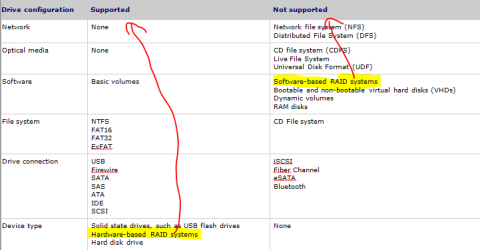
In Windows Server 2008 R2, Windows Server 2008, and Windows 7, any number of internal, fixed data drives can be protected with BitLocker. ATA and SATA-based, direct-attached storage devices are also supported. The following table details which disk configurations are supported and not supported by BitLocker.
Capture.PNG

So as you can see from the picture.
It says That Hardware-based RAID systems are Supported

However Software-based RAID systems are Not Supported.

One can also notice in the Microsoft KB Description of the BitLocker Drive Preparation Tool
Under system requirements for BitLocker Drive Preparation Tool it mentions
The partition is not using software spanning, software mirroring, or software RAID.

Which basically shows again that it can not work under software RAID


I hope it answers your question.
 

My Computer My Computer

At a glance

Windows 7 Ultimate x86 SP1
OS
Windows 7 Ultimate x86 SP1
That helps, but I need to know what happens if a drive fails?

Is it Bit-locking both drives?
Is it simple to just supply a new drive to RAID configuration?

On another note:
If I need to pull one of those drives because of computer hardware failure will I be able to plug it into another computer and access the data?

Thanks.
 

My Computer My Computer

At a glance

Win 7 Ult x64Intel Q6600 2.4GhzCorsair XMS Dominator 4GBEVGA nVidia GTX 260
Computer Manufacturer/Model Number
my own
OS
Win 7 Ult x64
CPU
Intel Q6600 2.4Ghz
Motherboard
ASUS P5B Deluxe
Memory
Corsair XMS Dominator 4GB
Graphics Card(s)
EVGA nVidia GTX 260
Sound Card
Integrated
Monitor(s) Displays
Dell 20" 2005 digital
Screen Resolution
1680 x 1050
Hard Drives
2x1TB Western Digital RE, Mirrored RAID
PSU
Thermaltake 750
Case
Thermaltake Xaser VI
Cooling
Thermaltake MaxOrb
Keyboard
Logitech Cordless WavePro
Mouse
Logitech WavePro Combo
Internet Speed
20MB down 4MB up
I know this is an old post but did you ever find an answer to the what happens if a drive fails? I'm currently in the middle of a raid encryption and never thought of that. I guess I just assumed it would encrypt both. But if one does die that does bring the question of replacing the dead.. Would you have to decrypt the old? or will the encryption copy itself to the new drive? Also I know if you transfer a USB stick with Bitlocker installed you can access it on a different PC even if that PC doesn't have Bitlocker.. I tested it on windows 7 anyway. It is still encrypted but will ask you for the password just like it does on your own PC. But im not sure about internal drives.
 

My Computer My Computer

At a glance

Windows 7 Ultimate
OS
Windows 7 Ultimate
It shouldn't make a difference if a drive fails, RAID 1 is suppose to be a near carbon copy meaning as far as bitlocker is concern is the same data.
 

My Computer My Computer

At a glance

Windows 10 Pro (x64)Intel Core i7-3930K (3.2GHz - 4.5GHz)4x Samsung 4GB PC3-12800 DDR3 (16GB 1600MHz)Nvidia Geforce GTX 690
Computer type
PC/Desktop
Computer Manufacturer/Model Number
Alienware Aurora ALX R4
OS
Windows 10 Pro (x64)
CPU
Intel Core i7-3930K (3.2GHz - 4.5GHz)
Motherboard
Alienware Aurora-R4 x79
Memory
4x Samsung 4GB PC3-12800 DDR3 (16GB 1600MHz)
Graphics Card(s)
Nvidia Geforce GTX 690
Sound Card
SteelSeries Siberia Elite
Monitor(s) Displays
Dell UltraSharp U3011
Screen Resolution
2560x1600
Hard Drives
Samsung 850 Pro 256 GB, Seagate 1TB Desktop Hybrid HDD, 2x Western Digital 4TB Green HDD
PSU
875W Some Dell PSU <.<
Case
Alienware Aurora ALX
Cooling
Custom Liquid Cooling (EK CPU & GPU blocks) dual EK 480RAD
Keyboard
Logitech G710+ Mechanical
Mouse
Logitech G700s
Internet Speed
Verizon Fios (50 mbps average)
Other Info
Server: Intel NUC D54250WYK: i5-4250U, 16GB, 256 GB mSATA, Windows Server 2012 R2
I'll chime in as well. Yes, if a Drive fails the RAID will rebuild it regardless of encryption. I was my concerned if the whole computer failed and you had to take the drives to a new computer that they might not work, but I have also learned that it should be possible just as you mentioned. It should ask for an ecryption key. ALTHOUGH, I have not tested this so I'm not 100% sure it would work.
 

My Computer My Computer

At a glance

Win 7 Ult x64Intel Q6600 2.4GhzCorsair XMS Dominator 4GBEVGA nVidia GTX 260
Computer Manufacturer/Model Number
my own
OS
Win 7 Ult x64
CPU
Intel Q6600 2.4Ghz
Motherboard
ASUS P5B Deluxe
Memory
Corsair XMS Dominator 4GB
Graphics Card(s)
EVGA nVidia GTX 260
Sound Card
Integrated
Monitor(s) Displays
Dell 20" 2005 digital
Screen Resolution
1680 x 1050
Hard Drives
2x1TB Western Digital RE, Mirrored RAID
PSU
Thermaltake 750
Case
Thermaltake Xaser VI
Cooling
Thermaltake MaxOrb
Keyboard
Logitech Cordless WavePro
Mouse
Logitech WavePro Combo
Internet Speed
20MB down 4MB up
Ahh ok. I guess my concern was, as I thought yours was, if one fails and you go to mirror the data to rebuild the raid would the encryption copy over quickly like the data would (well not quickly but faster than an encryption process) Or would the copying take another 12hrs (thats how long it took me to encrypt). I just dont understand how encryption works all that well is why Im asking. Like when I encrypted Raid setup.. Did it encrypt both drives, or just one?
 

My Computer My Computer

At a glance

Windows 7 Ultimate
OS
Windows 7 Ultimate
Back
Top