Can the "HDDRestore" data in 7 be used to transfer 7 to another system

T38

New member
Local time
3:45 PM
Messages
17
Can the "HDDRestore" data in 7 be used to transfer 7 to another system

I'm guessing a few users have seen the image or partition titled "HDDRecovery (hidden)" on W7. SO...can this be used to move the OS to another computer? If so, how do you extract the data?

I'm using Macrium Reflect free, and can see how to get it to a new drive, but not sure if the system will offer the option to boot to the new OS. Anyone dabbled with that? Thx.
 

My Computers My Computers

  • At a glance

    W7 home premium 64-bitAMD A-6 3420M6 GBunknown
    Computer type
    Laptop
    Computer Manufacturer/Model Number
    Toshiba L755
    OS
    W7 home premium 64-bit
    CPU
    AMD A-6 3420M
    Motherboard
    unknown
    Memory
    6 GB
    Graphics Card(s)
    unknown
    Hard Drives
    Hitachi 500 GB
    Antivirus
    AVG
    Browser
    Firefox
  • Computer type
    PC/Desktop
I'm guessing a few users have seen the image or partition titled "HDDRecovery (hidden)" on W7. SO...can this be used to move the OS to another computer? If so, how do you extract the data?

No, not really. The HDDRecovery partition contains the Factory Reset system image for the PC. This is the OEM supplied Windows 7 tailored for the particular model, with all the OEM software, drivers and customisations.

Toshiba/Dynabook said:
Most Toshiba laptops with come with the factory software recovery image stored in a special hidden partition on the hard drive of the laptop. The factory software recovery image allows the user to recover the laptop to its factory fresh condition as when it was new.
How To: Perform system recovery - Windows 7

I'm using Macrium Reflect free, and can see how to get it to a new drive, but not sure if the system will offer the option to boot to the new OS. Anyone dabbled with that? Thx.
Generally you should be able to make a system image of the partition(s) required to backup and restore one PC, then restore that to another PC. Windows contains drivers for most common hardware and should be able sort out which to use on the new machine.

If the OS you want to move is the one on the Toshiba L755 in your specs, then this is a Legacy Bios/MBR machine. If the PC you are moving the OS to is a UEFI machine then you'd need to make sure its bios is set up to support CSM/Legacy boot.

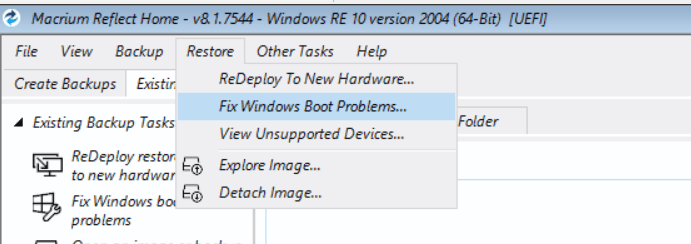
Before you start make a system image of the destination machine so you can put it back as it was should the migration not work. Restore the system image of the first machine to it. If Windows does not boot at first, then boot from the Macrium recovery usb and use its 'Fix Windows Boot Problems' tool.
image.png
 

My Computers My Computers

  • At a glance

    Windows 7 Home Premium x64AMD V1204GB
    Computer type
    Laptop
    Computer Manufacturer/Model Number
    Toshiba satellite C650D
    OS
    Windows 7 Home Premium x64
    CPU
    AMD V120
    Memory
    4GB
    Internet Speed
    150 Mbps
    Antivirus
    MSE
    Browser
    IE11, Edge, Firefox
    Other Info
    I also have W7 Pro on my System Two, and several W7 Hyper-V VMs. My other machines run Windows 10/11. Their specs are in my Ten Forums & Eleven Forum profiles.
  • At a glance

    Windows 7 Pro x64Intel i5-3320M8 GB
    Computer type
    Laptop
    System Manufacturer/Model Number
    Lenovo Thinkpad T430
    OS
    Windows 7 Pro x64
    CPU
    Intel i5-3320M
    Memory
    8 GB
    Hard Drives
    250GB Samsung SSD 860 EVO
    Antivirus
    MSE
  • Like
Reactions: T38
Thanks, Bree. So...plan is to make an "image" of both the MBR and C: on my old 7, load it onto the D: drive I created on the new 10. And as I understand it, there will be a problem because the 7 uses MBR while the 10 uses UEFI. I'll try using "fix boot problems" in Macrium and see if that does the trick.

Have I missed anything?
 

My Computers My Computers

  • At a glance

    W7 home premium 64-bitAMD A-6 3420M6 GBunknown
    Computer type
    Laptop
    Computer Manufacturer/Model Number
    Toshiba L755
    OS
    W7 home premium 64-bit
    CPU
    AMD A-6 3420M
    Motherboard
    unknown
    Memory
    6 GB
    Graphics Card(s)
    unknown
    Hard Drives
    Hitachi 500 GB
    Antivirus
    AVG
    Browser
    Firefox
  • Computer type
    PC/Desktop
If you are moving from mbr partition style ( and bios boot mode ) to gpt style partitioning ( and efi boot mode ), there are several ways to do it.

For example:

One way is to convert the source to gpt before transferring to new system. Conversion can be done in theory with Microsoft's mbr2gpt.exe, but it is a bit picky. Any decent 3rd party partition manager can do it.

***************************************************************

Another way is to apply a copy/image of the mbr source to the target, then convert the target to gpt before attempting to boot into it.

***************************************************************

Another way is to initialize and partition the target disk gpt style with an esp partition, then apply only the windows partition from the source and create efi boot files and adjust the osletter using commands.

The latter is the best way for enthusiasts because it is quick and does not cause unnecessary writes to the the target disk.

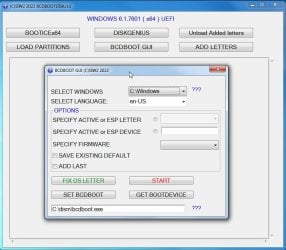
I made a little thing to do the adjustments so they can be done in a few clicks and a few seconds.

bcdbootdiskv11.jpg

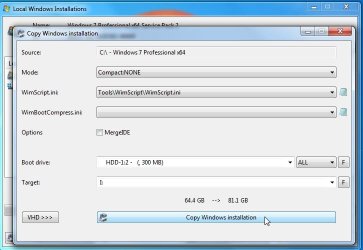
However, an easy way is to first partition the target disk gpt style with an esp partition, then use JFX Wincopy function which copies the source windows partition to the target and does the adjustments for you.

wincopy3.jpg
 
Last edited:

My Computers My Computers

  • At a glance

    7 X64i5 84002x8gb 3200mhz
    Computer type
    PC/Desktop
    OS
    7 X64
    CPU
    i5 8400
    Motherboard
    gigabyte b365m ds3h
    Memory
    2x8gb 3200mhz
    Hard Drives
    various
    PSU
    pure power 11 400w cm
    Case
    Coolermaster
    Cooling
    cryorig m9i
  • At a glance

    7x64g54008gb ddr4 2400
    Computer type
    PC/Desktop
    OS
    7x64
    CPU
    g5400
    Motherboard
    ga b365m ds3h
    Memory
    8gb ddr4 2400
    PSU
    xfx pro 450w
SIW: thanks. I feel like I'm back in pilot training trying to land my first jet! I've moved my entire C drive and "system" to the W10 laptop. I'm guessing contains the MBR?
Curiously, Macrium says the W7's "system" file is NTFS, while the "system" on the 10 says it's FAT32.
SO...following your suggestion I need to change the MBR to UEFI/GPT.

You wrote,
Another way is to initialize and partition the target disk gpt style with an esp partition, then apply only the windows partition from the source and create efi boot files and adjust the osletter using commands.
The latter is the best way for enthusiasts because it is quick and does not cause unnecessary writes to the the target disk.

I've created D: on the new laptop, but don't know how to "Partition the target disk GPT style." Can I do that *after* it's already got the data loaded, or do I have to do that beforehand?

BTW, my 256GB usb3 drive started showing 32 GB, which seems a fairly common problem. Tried every tool in W7 and Macrium to re-format but no go. Finally found a free tool you might find useful, called "EaseUS Partition Manager" that did the trick.

Finally, how do you get the texts you quote to format in the boxes here?
 

My Computers My Computers

  • At a glance

    W7 home premium 64-bitAMD A-6 3420M6 GBunknown
    Computer type
    Laptop
    Computer Manufacturer/Model Number
    Toshiba L755
    OS
    W7 home premium 64-bit
    CPU
    AMD A-6 3420M
    Motherboard
    unknown
    Memory
    6 GB
    Graphics Card(s)
    unknown
    Hard Drives
    Hitachi 500 GB
    Antivirus
    AVG
    Browser
    Firefox
  • Computer type
    PC/Desktop
the mbr is at the beginning of the disk. it is not inside a partition.

1. intialize disk to gpt partition style
2. create partition(s)
3. format partitions

if the disk has already been initialized to mbr patition style, it can be converted
 

My Computers My Computers

  • At a glance

    7 X64i5 84002x8gb 3200mhz
    Computer type
    PC/Desktop
    OS
    7 X64
    CPU
    i5 8400
    Motherboard
    gigabyte b365m ds3h
    Memory
    2x8gb 3200mhz
    Hard Drives
    various
    PSU
    pure power 11 400w cm
    Case
    Coolermaster
    Cooling
    cryorig m9i
  • At a glance

    7x64g54008gb ddr4 2400
    Computer type
    PC/Desktop
    OS
    7x64
    CPU
    g5400
    Motherboard
    ga b365m ds3h
    Memory
    8gb ddr4 2400
    PSU
    xfx pro 450w
SIW: Thanks for the reply. You wrote,
"if the disk has already been initialized to mbr patition style, it can be converted."​

The drive on my 7 machine is definitely MBR, but I haven't found the way to convert it to GPT. (I understand W7 will still work fine if GPT, although I'm guessing you have to change the boot to UEFI/GPT.)

Problem is the 7 laptop doesn't have mbr2gpt, and the one on my 10 laptop seems to want to deal with the entire drive, not just my one data file that's the entire C drive from my 7 laptop in MBR format.

Because several folks write about converting MBR to GPT as if it's easy, apparently I just haven't found the right command. Any suggestions?

Thanks!
 

My Computers My Computers

  • At a glance

    W7 home premium 64-bitAMD A-6 3420M6 GBunknown
    Computer type
    Laptop
    Computer Manufacturer/Model Number
    Toshiba L755
    OS
    W7 home premium 64-bit
    CPU
    AMD A-6 3420M
    Motherboard
    unknown
    Memory
    6 GB
    Graphics Card(s)
    unknown
    Hard Drives
    Hitachi 500 GB
    Antivirus
    AVG
    Browser
    Firefox
  • Computer type
    PC/Desktop
(I understand W7 will still work fine if GPT, although I'm guessing you have to change the boot to UEFI/GPT.)

Does your win7 machine support efi boot ?

Problem is the 7 laptop doesn't have mbr2gpt, and the one on my 10 laptop seems to want to deal with the entire drive, not just my one data file that's the entire C drive from my 7 laptop in MBR format.

mbr and gpt are disk partition styles. The partition style applies to the whole disk, not just a single partition.

mbr2gpt.exe is a command line program that comes with win10 and win11.

One way is to run the command from booted win10 installation media.

MBR2GPT - Windows Deployment | Microsoft Learn

There are 3rd party partition programs that can convert non destructively and don't require use of the command line.

I use diskgenius or aomei partition manager. There are others - pretty sure easeus, paragon, minitool etc could also do the job.
 

My Computers My Computers

  • At a glance

    7 X64i5 84002x8gb 3200mhz
    Computer type
    PC/Desktop
    OS
    7 X64
    CPU
    i5 8400
    Motherboard
    gigabyte b365m ds3h
    Memory
    2x8gb 3200mhz
    Hard Drives
    various
    PSU
    pure power 11 400w cm
    Case
    Coolermaster
    Cooling
    cryorig m9i
  • At a glance

    7x64g54008gb ddr4 2400
    Computer type
    PC/Desktop
    OS
    7x64
    CPU
    g5400
    Motherboard
    ga b365m ds3h
    Memory
    8gb ddr4 2400
    PSU
    xfx pro 450w
  • Like
Reactions: T38
Back
Top